

Resend Nextjs Prisma Email - Working Setup (2026)
Skilldham
Engineering deep-dives for developers who want real understanding.
Last updated: July 2026
You add Resend to your Next.js app. You test it locally. The email arrives.
You deploy to Vercel. Nothing arrives.
No error in the logs. The API returns 200. But the user gets nothing.
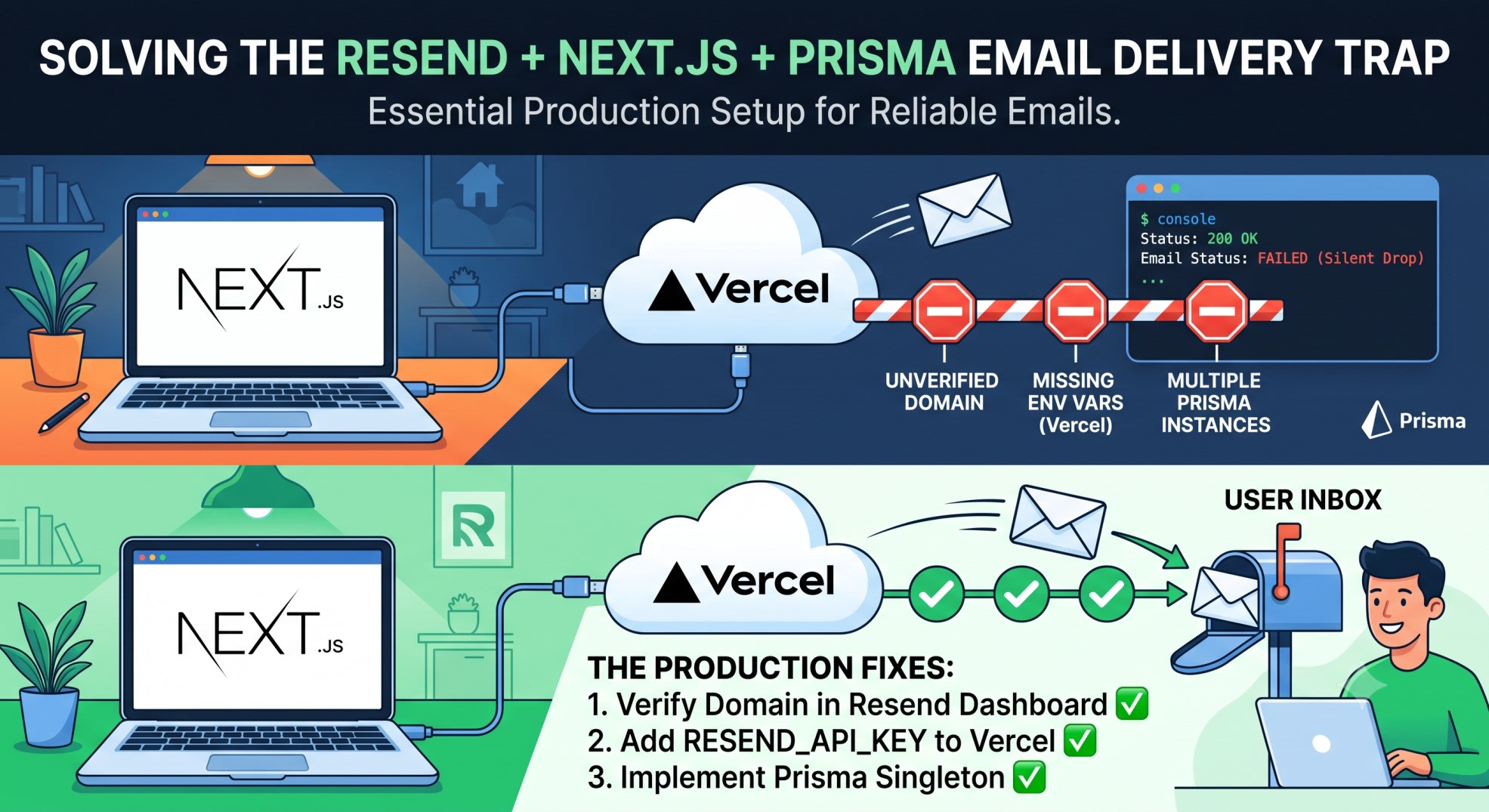
This is the resend nextjs prisma email trap that wastes hours. The fix is not in the Resend docs. It is in three things most tutorials skip.
I hit all three building Munshi - a React Native finance app with email OTP auth and SkillDham's newsletter system. Here is the exact setup that works.
Quick Answer
Resend Nextjs Prisma Email breaks in production for three reasons: unverified domain blocks sends silently, RESEND_API_KEY missing from Vercel env vars, and duplicate Prisma client instances crash on cold starts. Fix all three before you deploy. The setup below covers each one.
Why SMTP Fails and Resend Does Not
Old email setup meant SMTP credentials, port config, and emails landing in spam.
Resend is an API. One call. Done.
But serverless changes things. Next.js on Vercel runs in isolated functions. Each function invocation can be a cold start. Traditional SMTP keeps a persistent connection - serverless kills it.
Resend works per-request. No persistent connection needed. That is why it fits Next.js on Vercel.
The Three Things That Break in Production
Problem 1 - Unverified domain. Resend blocks sends from unverified domains silently. The API returns 200 but the email never sends. This only shows in the Resend dashboard logs.
Problem 2 - Missing env var on Vercel. .env.local does not deploy to Vercel. You must add RESEND_API_KEY manually in Vercel project settings. Most tutorials skip this.
Problem 3 - Multiple Prisma instances. Next.js hot reload creates new Prisma instances on every file save in development. Without a global singleton, you hit connection pool errors.
Step 1 - Install Packages
bash
npm install resend @prisma/client prisma
npm install -D @types/node
Do not install react-email unless you need React-based templates. For simple HTML emails it adds unnecessary weight.
Step 2 - Configure Prisma Schema
Wrong: Missing uniqueness constraint
prisma
// Wrong: no unique constraint on email - allows duplicate subscribers
model Subscriber {
  id        String   @id @default(auto()) @map("_id") @db.ObjectId
  email     String
  createdAt DateTime @default(now())
}
Correct: Unique email with verified flag
prisma
// Correct: unique email, verified flag, NeonDB-compatible
generator client {
  provider = "prisma-client-js"
}

datasource db {
  provider  = "postgresql"
  url       = env("DATABASE_URL")
}

model Subscriber {
  id        String   @id @default(cuid())
  email     String   @unique
  verified  Boolean  @default(false)
  createdAt DateTime @default(now())
}
If you use MongoDB, change provider to "mongodb" and update the id field to use @db.ObjectId. The rest stays the same.
Generate the client:
bash
npx prisma generate
npx prisma db push
Step 3 - Prisma Singleton (Critical for Next.js)
Wrong: New instance on every import
typescript
// Wrong: creates a new PrismaClient on every hot reload
import { PrismaClient } from "@prisma/client";
export const prisma = new PrismaClient();
In development, Next.js hot reloads modules. Each reload creates a new Prisma instance. You hit connection pool limits fast.
Correct: Global singleton
typescript
// lib/prisma.ts - Correct: reuses instance across hot reloads
import { PrismaClient } from "@prisma/client";

const globalForPrisma = globalThis as unknown as {
  prisma: PrismaClient | undefined;
};

export const prisma =
  globalForPrisma.prisma ??
  new PrismaClient({
    log: process.env.NODE_ENV === "development" ? ["error"] : [],
  });

if (process.env.NODE_ENV !== "production") {
  globalForPrisma.prisma = prisma;
}
globalThis persists across hot reloads in development. In production each function is isolated so a new instance is fine.
Step 4 - Resend Setup
typescript
// lib/resend.ts
import { Resend } from "resend";

if (!process.env.RESEND_API_KEY) {
  throw new Error("RESEND_API_KEY is not set");
}

export const resend = new Resend(process.env.RESEND_API_KEY);
The guard at the top catches the Vercel env var mistake at startup - not silently at runtime.
Step 5 - The Subscribe API Route
Wrong: No duplicate check, no proper error handling
typescript
// Wrong: duplicate emails crash with Prisma unique constraint error
export async function POST(req: Request) {
  const { email } = await req.json();
  await prisma.subscriber.create({ data: { email } });
  await resend.emails.send({ ... });
  return NextResponse.json({ success: true });
}
If the email already exists, Prisma throws P2002. No handling means a 500 error to the user.
Correct: Full production-ready route
typescript
// app/api/subscribe/route.ts - Correct
import { prisma } from "@/lib/prisma";
import { resend } from "@/lib/resend";
import { NextResponse } from "next/server";

export async function POST(req: Request) {
  try {
    const body = await req.json();
    const email = body?.email?.trim()?.toLowerCase();

    if (!email || !email.includes("@")) {
      return NextResponse.json(
        { error: "Valid email required" },
        { status: 400 }
      );
    }

    // Check for existing subscriber first
    const existing = await prisma.subscriber.findUnique({
      where: { email },
    });

    if (existing) {
      return NextResponse.json(
        { error: "Already subscribed" },
        { status: 409 }
      );
    }

    // Save to DB before sending email
    // If email send fails, subscriber is still saved
    const subscriber = await prisma.subscriber.create({
      data: { email },
    });

    const { error: emailError } = await resend.emails.send({
      from: "SkillDham <hello@skilldham.com>",
      to: email,
      subject: "Welcome to SkillDham",
      html: `
        <div style="font-family: sans-serif; max-width: 600px; margin: 0 auto;">
          <h2>You're in.</h2>
          <p>Every week, one real engineering breakdown. No fluff.</p>
          <p>Reply to this email anytime - I read every reply.</p>
          <p>- SkillDham</p>
        </div>
      `,
    });

    if (emailError) {
      console.error("Resend error:", emailError);
      // Subscriber saved but email failed - still return success
      // Log this for monitoring
    }

    return NextResponse.json({ success: true });
  } catch (error) {
    console.error("Subscribe error:", error);
    return NextResponse.json(
      { error: "Something went wrong" },
      { status: 500 }
    );
  }
}
Note the order: save to DB first, then send email. If the email send fails, the subscriber is not lost. You can retry the email send from your dashboard.
Step 6 - Frontend Form
typescript
// app/page.tsx
"use client";

import { useState } from "react";

export default function Home() {
  const [email, setEmail] = useState("");
  const [status, setStatus] = useState<"idle" | "loading" | "success" | "error">("idle");
  const [message, setMessage] = useState("");

  async function handleSubmit(e: React.FormEvent) {
    e.preventDefault();
    setStatus("loading");

    try {
      const res = await fetch("/api/subscribe", {
        method: "POST",
        headers: { "Content-Type": "application/json" },
        body: JSON.stringify({ email }),
      });

      const data = await res.json();

      if (!res.ok) {
        setStatus("error");
        setMessage(data.error || "Something went wrong");
        return;
      }

      setStatus("success");
      setMessage("Check your inbox.");
      setEmail("");
    } catch {
      setStatus("error");
      setMessage("Network error. Try again.");
    }
  }

  return (
    <main style={{ maxWidth: 480, margin: "80px auto", padding: "0 20px" }}>
      <h1>SkillDham Newsletter</h1>
      <p>Real engineering breakdowns. Weekly.</p>

      <form onSubmit={handleSubmit}>
        <input
          type="email"
          value={email}
          onChange={(e) => setEmail(e.target.value)}
          placeholder="your@email.com"
          required
          disabled={status === "loading"}
          style={{ width: "100%", padding: "10px", marginBottom: "10px" }}
        />
        <button
          type="submit"
          disabled={status === "loading" || status === "success"}
          style={{ padding: "10px 20px" }}
        >
          {status === "loading" ? "Subscribing..." : "Subscribe"}
        </button>
      </form>

      {message && (
        <p style={{ color: status === "error" ? "red" : "green", marginTop: "10px" }}>
          {message}
        </p>
      )}
    </main>
  );
}
Step 7 - Domain Verification (The Silent Killer)
This is the step most tutorials skip. Without it, Resend silently drops your emails in production.
Go to the Resend dashboard. Click Domains. Add your domain.
Resend gives you three DNS records:
Type: TXT   Name: @           Value: v=spf1 include:amazonses.com ~all
Type: CNAME Name: em.yourdomain Value: feedback-smtp.us-east-1.amazonses.com
Type: TXT   Name: resend._domainkey  Value: p=MIGfMA0GC...
Add these to your DNS provider (Cloudflare, Namecheap, Vercel Domains). Wait 5-10 minutes.
Once verified, change your from address:
typescript
// Wrong: unverified domain - emails silently blocked
from: "hello@gmail.com"

// Correct: your verified domain
from: "SkillDham <hello@yourdomain.com>"
The from email must use a verified domain. Resend returns 200 even if the domain is unverified - but the email never sends. Check Resend dashboard logs if emails stop arriving.
Step 8 - Vercel Deployment
Push to GitHub. Connect to Vercel.
Before deploying, add env vars in Vercel project settings:
RESEND_API_KEY = re_xxxxxxxxx
DATABASE_URL   = postgresql://...
.env.local does not deploy. This is the most common reason resend nextjs prisma email fails silently on Vercel.
After adding env vars, redeploy. Do not just push a new commit - trigger a fresh deploy so Vercel picks up the new variables.
Why This Stack Works
Next.js handles both the API and the frontend. No separate backend needed.
Prisma gives you type-safe database access. The unique constraint on email prevents duplicates at the database level.
Resend handles deliverability. SPF, DKIM, and DMARC are set up through their dashboard. You do not configure any of this manually.
This is the same stack I use in SkillDham's newsletter system. It has been running in production since March 2026 with zero email delivery issues.
For caching your Prisma queries to reduce database load, the Cache Prisma Queries in Next.js guide covers the use cache pattern that works without Redis.
If your Next.js build fails on Vercel after adding these files, the Next.js Build Fails on Vercel guide covers the most common causes including TypeScript errors and missing env vars.
Key Takeaways
Resend Nextjs Prisma Email breaks silently when your domain is not verified in the Resend dashboard - always verify before going to production
Save to the database before sending the email - if the email send fails, the subscriber data is not lost
Use a Prisma singleton with globalThis to avoid connection pool errors during Next.js hot reload in development
.env.local does not deploy to Vercel - add RESEND_API_KEY manually in project settings and trigger a fresh deploy
The from field must use a verified domain - using Gmail or any unverified domain causes Resend to silently drop the email
Check the Resend dashboard logs first when emails stop arriving - the API always returns 200 regardless of delivery status
The resend nextjs prisma email stack is production-ready for apps sending under 3,000 emails per month on Resend's free tier
FAQ
Why is my resend nextjs prisma email not sending on Vercel but working locally?
Two reasons. First, RESEND_API_KEY is missing from Vercel environment variables - .env.local does not deploy automatically. Add it in Vercel project settings and redeploy. Second, your from domain is not verified in the Resend dashboard. Resend returns 200 but silently drops the email.
Does Resend work in Next.js App Router API routes?
Yes. Resend is a simple HTTP API. It works in any server-side context - App Router route handlers, Server Actions, and Pages Router API routes. Use it only server-side. Never import lib/resend.ts in a client component.
How do I prevent duplicate subscribers in Prisma?
Add @unique to the email field in your Prisma schema. This creates a database-level constraint. In your API route, use findUnique to check before creating, and return a 409 status if the subscriber exists. This prevents duplicate emails from being sent.
Can I use MongoDB instead of PostgreSQL with this setup?
Yes. Change provider to "mongodb" in schema.prisma and update the id field to use @db.ObjectId with @map("_id"). The Resend and API route code stays the same.
Why does my Prisma client throw connection errors in development?
Next.js hot reload creates a new module instance on every file save. Without a globalThis singleton, each reload creates a new PrismaClient and exhausts your connection pool. The singleton pattern in Step 3 fixes this.
Is Resend free for a newsletter?
Resend's free tier allows 3,000 emails per month and 100 emails per day. For a newsletter with under a few hundred subscribers, the free tier covers it. Paid plans start at 50,000 emails per month.
What happens if Resend fails to send the email?
With the setup above, the subscriber is already saved to Prisma before the email send is attempted. If Resend fails, the subscriber record exists in your database. You can retry the email from the Resend dashboard or build a retry queue later.
Can I use React Email templates with this setup?
Yes. Install @react-email/components and react-email. Create a .tsx file in an emails/ folder. Pass it to the react field instead of html in resend.emails.send. The rest of the setup stays identical.
Conclusion
SMTP was the old way. Resend + Next.js + Prisma is the current standard for transactional email in modern apps.
The setup is simple. The traps are in production - unverified domain, missing env vars, and Prisma connection issues. This guide covers all three.
If your emails are still not arriving after following this guide, check the Resend dashboard logs first. The answer is always there.