

Cache Prisma Queries Next.js - Skip Redis
Skilldham
Engineering deep-dives for developers who want real understanding.
You add Prisma to your Next.js app. Queries work. The app ships.
Then someone opens the dashboard on a real server.
Every page load fires a fresh DB query. The database is doing work it already did 200ms ago. Response times creep up. You start reading about Redis. You look at connection pooling. You add a caching layer package.
Three hours later you are debugging a cache invalidation bug you introduced yourself.
Here is the thing - Next.js 15 ships use cache as a native directive. It works directly in your data-fetching functions. No Redis. No extra package. No connection string to manage.
This post shows you the exact pattern to cache Prisma queries Next.js now ships natively - using the use cache directive, with revalidation and the mutation bug nobody warns you about.
Quick Answer
Add "use cache" at the top of any async function that runs a Prisma query. Next.js caches the return value automatically. Call revalidateTag() after any mutation to bust that cache entry.
This only works in Next.js 15+ with the experimental dynamicIO flag enabled. The cache is server-side only - not the browser. Three things break it if you miss them: forgetting the tag, calling revalidateTag in the wrong scope, and mutating inside a cached function.
Why use cache Exists - and What It Actually Does
The Problem With Prisma Queries in Server Components
Prisma queries run on every request by default.
That is fine in development. In production, with real traffic, the same query fires 500 times in 60 seconds for data that has not changed.
The old fix was unstable_cache from next/cache. It worked, but the API was awkward - you had to wrap your function, pass cache keys manually, and the tag-based invalidation was easy to wire up wrong.
use cache is the replacement. It is a React directive - same idea as "use client" or "use server". You add it at the top of a function, and Next.js handles the rest.
What Next.js Does Under the Hood
When you mark a function with "use cache", Next.js:
Computes a cache key from the function name and its arguments
Checks the server-side cache for that key
Returns the cached value on hit
Runs the function (and your Prisma query) only on cache miss
Stores the result for the next request
The result - your Prisma data - is serialized and stored. The database does not run again until the cache is invalidated.
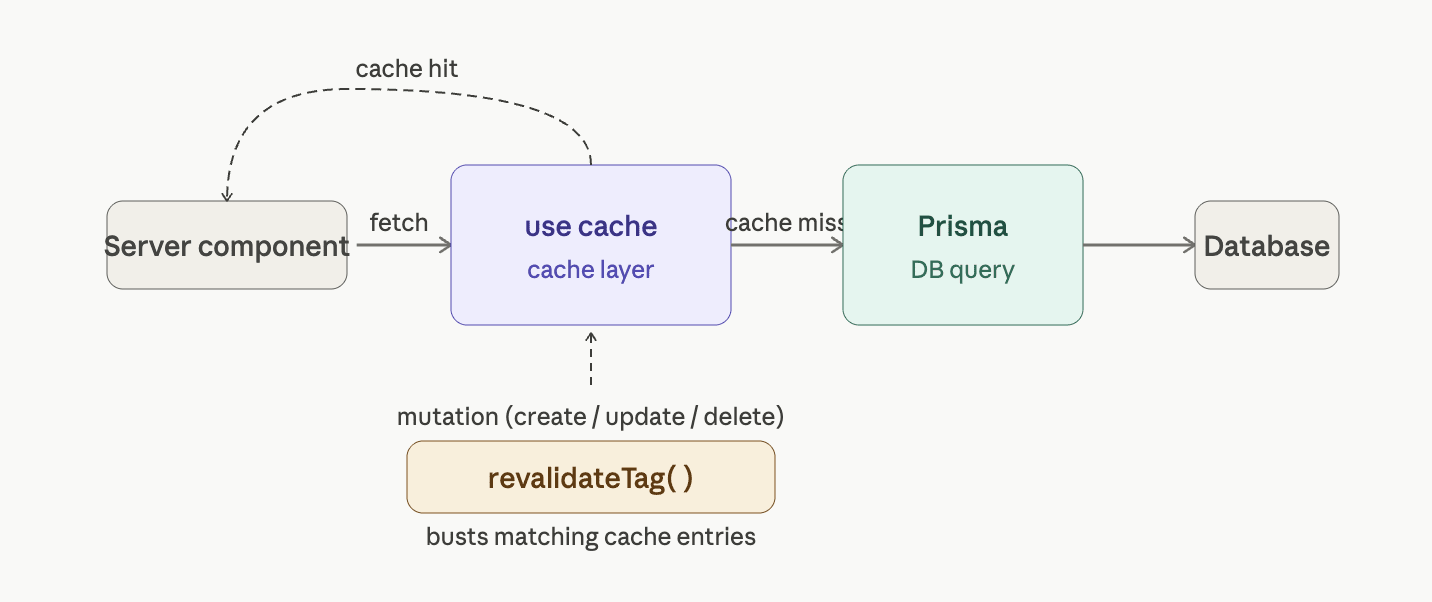
Setup - Enabling use cache in Next.js 15
The Config Flag You Must Add
use cache requires dynamicIO to be enabled. Without it, the directive is silently ignored.
javascript
// next.config.js

// Wrong: use cache is silently ignored without this flag
module.exports = {
  experimental: {},
};

// Correct: dynamicIO enables use cache
module.exports = {
  experimental: {
    dynamicIO: true,
  },
};
If you are on Next.js 15.1 or below, also check if ppr is required in your version. As of Next.js 15.2, dynamicIO alone is enough.
Prisma Client Setup
Use a singleton Prisma client. This is not specific to caching, but it matters here - a new PrismaClient() on every import defeats connection pooling.
typescript
// lib/prisma.ts

// Correct: singleton pattern prevents multiple client instances in dev
import { PrismaClient } from "@prisma/client";

const globalForPrisma = globalThis as unknown as { prisma: PrismaClient };

export const prisma =
  globalForPrisma.prisma ||
  new PrismaClient({
    log: process.env.NODE_ENV === "development" ? ["query"] : [],
  });

if (process.env.NODE_ENV !== "production") globalForPrisma.prisma = prisma;
How to Cache Prisma Queries Next.js Style - With `use cache`
The Basic Pattern
typescript
// lib/data/posts.ts

// Correct: use cache at the top of the function caches its return value
import { prisma } from "@/lib/prisma";
import { unstable_cacheTag as cacheTag } from "next/cache";

export async function getAllPosts() {
  "use cache";
  cacheTag("posts");

  const posts = await prisma.post.findMany({
    orderBy: { createdAt: "desc" },
    select: {
      id: true,
      title: true,
      slug: true,
      createdAt: true,
    },
  });

  return posts;
}
Two things are happening here.
First, "use cache" marks the function. Next.js intercepts calls to this function and checks the cache before running the body.
Second, cacheTag("posts") attaches a string tag to this cache entry. This is the handle you use to bust the cache later. Without a tag, you cannot invalidate selectively.
Using the Cached Function in a Server Component
typescript
// app/blog/page.tsx

// Correct: call the cached function directly - no special wrapper needed
import { getAllPosts } from "@/lib/data/posts";

export default async function BlogPage() {
  const posts = await getAllPosts();

  return (
    <ul>
      {posts.map((post) => (
        <li key={post.id}>{post.title}</li>
      ))}
    </ul>
  );
}
The first request runs the Prisma query. Every request after that returns the cached value. The database is not touched again until you call revalidateTag("posts").

Cache Invalidation - Busting the Cache After a Mutation
This is where most developers get it wrong.
The Pattern That Fails
typescript
// app/actions/createPost.ts

// Wrong: mutations must NOT be inside a cached function
import { prisma } from "@/lib/prisma";
import { unstable_cacheTag as cacheTag } from "next/cache";
import { revalidateTag } from "next/cache";

export async function createPost(data: { title: string; content: string }) {
  "use cache"; // Wrong: this caches the mutation itself - it stops running after first call
  cacheTag("posts");

  await prisma.post.create({ data });
  revalidateTag("posts"); // This never runs correctly here
}
A cached function caches its return value. Mutations inside a cached function run once and then stop running on cache hits. Never put a prisma.create, prisma.update, or prisma.delete inside a "use cache" function.
If you have hit this exact bug - your post was created once but the cache never updated after that - the Next.js Cache Not Updating After Server Action post covers this failure mode in full detail.
The Pattern That Works
typescript
// app/actions/createPost.ts

// Correct: mutation in a Server Action, revalidateTag called after the write
"use server";

import { prisma } from "@/lib/prisma";
import { revalidateTag } from "next/cache";

export async function createPost(data: { title: string; content: string }) {
  // No "use cache" here - this is a write operation
  await prisma.post.create({ data });

  // Bust the cache tag defined in getAllPosts()
  revalidateTag("posts");
}
The rule is simple:
"use cache" goes on read functions
revalidateTag() goes in write functions (Server Actions)
They are linked by the tag string - here "posts"
Tag-Based Invalidation for Per-User or Per-Record Caching
When One Tag Is Not Enough
A "posts" tag busts the cache for all posts. That is fine for a public blog list.
But if you are caching per-user data - a user's own posts, their profile, their settings - you need per-record tags.
typescript
// lib/data/user.ts

// Correct: tag scoped to a specific user ID
import { prisma } from "@/lib/prisma";
import { unstable_cacheTag as cacheTag } from "next/cache";

export async function getUserPosts(userId: string) {
  "use cache";
  cacheTag(`user-posts-${userId}`);

  const posts = await prisma.post.findMany({
    where: { authorId: userId },
    orderBy: { createdAt: "desc" },
  });

  return posts;
}
When this user updates their post, bust only their cache entry:
typescript
// app/actions/updatePost.ts

"use server";

import { prisma } from "@/lib/prisma";
import { revalidateTag } from "next/cache";

export async function updatePost(
  postId: string,
  authorId: string,
  data: { title?: string; content?: string }
) {
  await prisma.post.update({
    where: { id: postId },
    data,
  });

  // Only this user's cache is invalidated - other users are not affected
  revalidateTag(`user-posts-${authorId}`);
}
This is one of the most powerful parts of tag-based caching. You invalidate exactly what changed, nothing more.
If you are choosing between Prisma and Drizzle for your Next.js project, read Prisma vs Drizzle in Next.js - it covers how each ORM's query structure affects patterns like this one.
Setting a Cache Lifetime With cacheLife
When You Want Automatic Expiry
By default, "use cache" caches indefinitely until you call revalidateTag. For data that should refresh on a schedule - a price feed, a leaderboard, public stats - use cacheLife alongside cacheTag.
typescript
// lib/data/stats.ts

// Correct: cacheLife sets a time-to-live; data refreshes automatically
import { prisma } from "@/lib/prisma";
import {
  unstable_cacheTag as cacheTag,
  unstable_cacheLife as cacheLife,
} from "next/cache";

export async function getSiteStats() {
  "use cache";
  cacheTag("site-stats");
  cacheLife("hours"); // Built-in profiles: "seconds", "minutes", "hours", "days", "weeks"

  const postCount = await prisma.post.count();
  const userCount = await prisma.user.count();

  return { postCount, userCount };
}
Next.js ships with built-in cache profiles. "hours" sets a stale-while-revalidate window appropriate for data that changes across hours, not seconds. You can define custom profiles in next.config.js if the defaults do not fit.
For a deeper look at how the App Router handles data fetching and why cache behavior differs between layouts and pages, the Next.js App Router Not Working guide covers the full mental model you need before caching gets complex.
Key Takeaways
use cache in Next.js 15+ is a native directive that caches the return value of any async server function - no Redis, no extra package
Add cacheTag("your-tag") inside every cached function so you can bust it later with revalidateTag()
Mutations (prisma.create, prisma.update, prisma.delete) must never go inside a "use cache" function - they belong in Server Actions
Call revalidateTag() immediately after every write operation to keep the UI consistent
Use dynamic tags like cacheTag(`user-posts-${userId}`) to invalidate only the affected user's data, not everyone's
cacheLife("hours") adds automatic expiry on top of tag-based invalidation - use both when data has a natural freshness window
The dynamicIO: true flag in next.config.js is required - without it, use cache is silently ignored
FAQs
What is the use cache directive in Next.js?
use cache is a React directive introduced in Next.js 15 that caches the return value of an async server function. It works like "use client" or "use server" - you add it as a string at the top of your function. Next.js intercepts calls to that function and returns a cached result instead of running the function body again.
Does use cache work with Prisma specifically?
Yes. Prisma queries return plain JavaScript objects, which Next.js can serialize and store. Any async function that runs a Prisma query and returns the result can be marked with "use cache". The Prisma client call is skipped on subsequent requests until you invalidate the cache.
How do I invalidate the cache after a Prisma mutation?
Call revalidateTag("your-tag") from a Server Action after the write. The tag string must match the one you passed to cacheTag() inside the cached read function. When revalidateTag runs, Next.js marks that cache entry as stale and the next request will re-run the Prisma query.
Can I cache per-user data with use cache?
Yes. Pass a dynamic tag like cacheTag(`user-${userId}`). When that user's data changes, call revalidateTag(`user-${userId}`) to invalidate only their entry. Other users' cached data is not affected.
What is the difference between use cache and unstable_cache?
unstable_cache is the older API from Next.js 13-14. It required wrapping your function in a unstable_cache() call, passing explicit cache keys as an array, and managing the API shape manually. "use cache" is the modern replacement - it is a directive, not a wrapper function. It handles key generation automatically and is the direction Next.js is heading. Prefer "use cache" on Next.js 15+.
Does use cache replace Redis for all use cases?
For standard server-side caching of Prisma queries in a single Next.js app, yes. If you need shared caching across multiple Next.js deployments, a distributed cache like Redis is still the right tool. For most apps, use cache is sufficient.
What happens if I forget to call revalidateTag after a mutation?
Users see stale data until the cache expires naturally or you redeploy. This is the most common production bug with this pattern. Always pair every write operation with a revalidateTag call. A missing revalidation is much harder to debug than a slow query.
Do I need Redis at all with use cache?
Not for a standard Next.js deployment. use cache stores data in the built-in Next.js server cache. You only need Redis if you are running multiple isolated Next.js instances that need to share cache state across separate servers without a shared file system.
Conclusion
use cache removes the need for a separate caching layer in most Next.js apps.
Put the directive on your Prisma read functions, attach tags, and call revalidateTag after every write. That is the whole pattern.
The developers who struggle with this are the ones who either skip the dynamicIO flag or put mutations inside cached functions. Now you know both traps before you hit them.