
JavaScript Web Workers - How They Actually Work
Skilldham
Engineering deep-dives for developers who want real understanding.
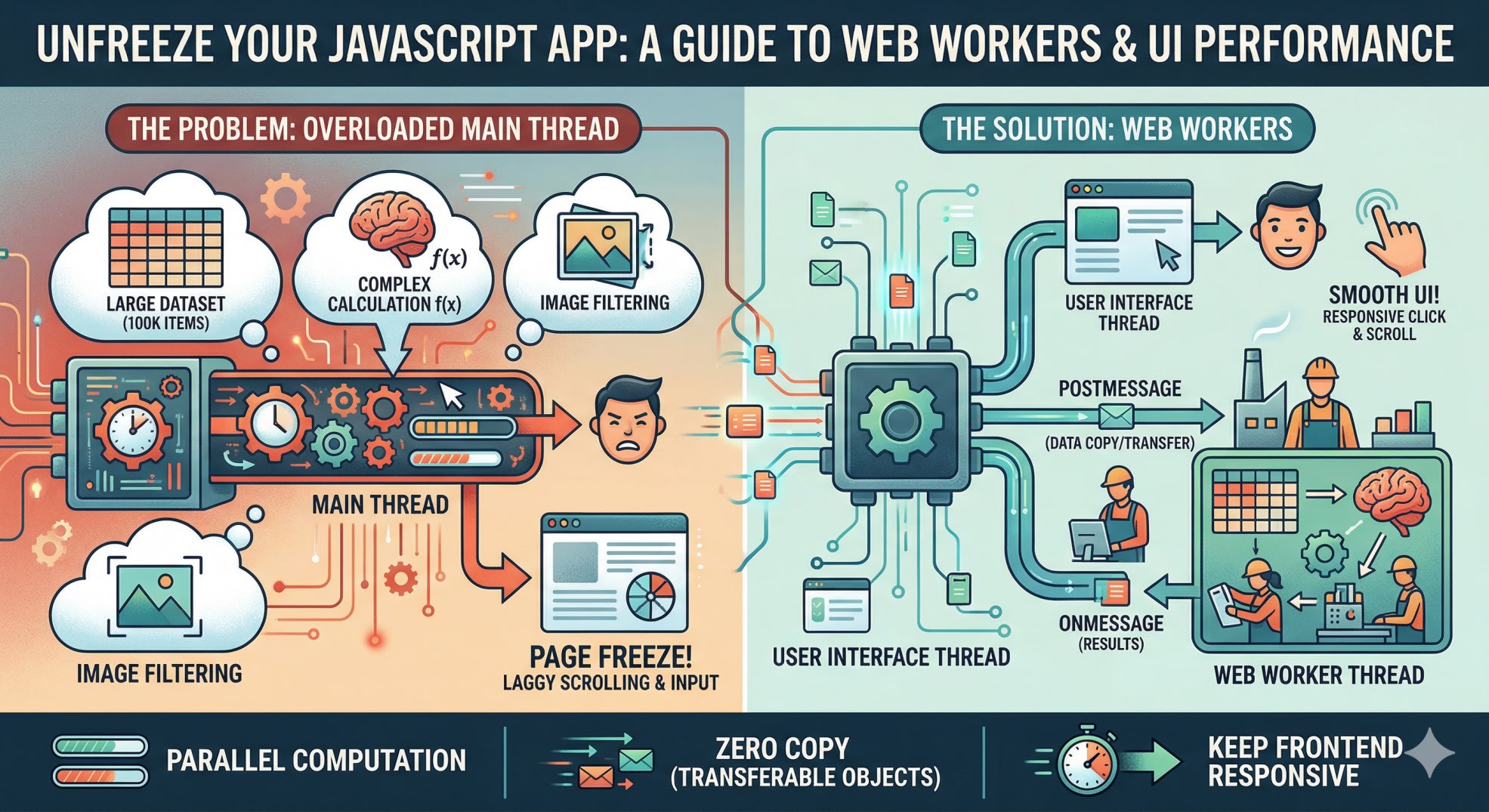
Your JavaScript app is doing too much at once. A user clicks a button, a heavy calculation starts running, and suddenly the whole page freezes. The scroll stops. The animations stutter. The input field stops responding. The user thinks something broke.
Nothing broke. Your main thread is just busy.
This is the fundamental problem that javascript web workers solve - and once you understand how they work, you will never approach heavy frontend computation the same way again.
What the Main Thread Actually Is
Before web workers make sense, you need to understand what you are trying to escape from.
Every browser tab runs on a single main thread. That one thread is responsible for everything: parsing HTML, running JavaScript, calculating CSS styles, painting pixels to the screen, and responding to user input. All of it happens in sequence, on the same thread, in the same event loop.
This works fine for most things. A fetch call, a state update, a DOM manipulation - these are fast operations that complete quickly and hand control back to the thread before anyone notices.
The problem starts when you give the main thread something genuinely expensive. Sorting a large dataset, parsing a huge JSON file, running image processing, doing cryptographic operations - these take real time. And while the main thread is busy with that work, everything else stops. No scroll. No input. No animation. Just a frozen page.
js
// This runs on the main thread - freezes everything
function processLargeDataset(data) {
  return data
    .filter(item => item.value > 100)
    .map(item => ({ ...item, processed: expensiveTransform(item) }))
    .sort((a, b) => b.score - a.score);
}

// If data has 100,000 items, your UI is frozen for the duration
const result = processLargeDataset(hugeArray);
Web workers give you a way to run that expensive work on a separate thread, completely off the main thread, so the UI stays responsive the entire time.
How JavaScript Web Workers Actually Work
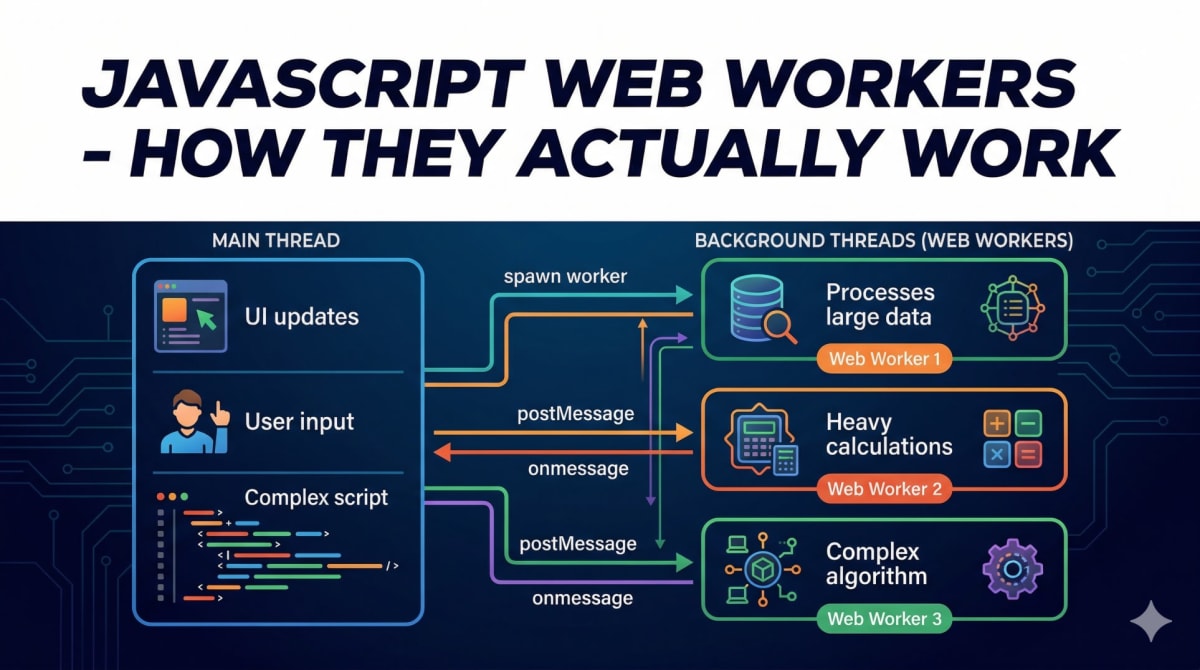
A web worker is a JavaScript file that runs in its own thread, separate from your main thread. It has no access to the DOM, no access to window, no access to document. It is completely isolated.
The only way a worker communicates with the main thread is through messages. You send a message to the worker, the worker does its work, and sends a message back. That is the entire API.
js
// main.js - create the worker
const worker = new Worker('/workers/data-processor.js');

// Send data to the worker
worker.postMessage({ type: 'PROCESS', data: hugeArray });

// Listen for the result
worker.onmessage = (event) => {
  const { result } = event.data;
  updateUI(result); // Now update the UI with processed data
};

worker.onerror = (error) => {
  console.error('Worker error:', error);
};
js
// workers/data-processor.js - this runs in the worker thread
self.onmessage = (event) => {
  const { type, data } = event.data;

  if (type === 'PROCESS') {
    // This runs off the main thread - UI stays smooth
    const result = data
      .filter(item => item.value > 100)
      .map(item => ({ ...item, processed: expensiveTransform(item) }))
      .sort((a, b) => b.score - a.score);

    self.postMessage({ result });
  }
};
The main thread sends the data, goes back to doing normal things - responding to clicks, running animations, keeping the UI alive - and when the worker finishes, it sends the result back. The main thread picks up the result and updates the UI.
The key thing to understand is that postMessage copies the data by default. When you send an object from the main thread to a worker, the object is serialized and a copy is sent. This is safe but slow for very large data - we will get to how to fix that later.
For a deeper look at how JavaScript handles async operations in general, our guide on JavaScript Promise Not Working - 5 Common Mistakes covers the patterns that complement worker-based architectures well.
When to Use Web Workers and When Not To
Web workers are not always the right tool. Understanding when they help versus when they add unnecessary complexity is what separates good usage from cargo-culting.
Use web workers when:
The work is CPU-intensive and takes more than a few milliseconds. Image processing, video frame analysis, large dataset sorting, compression, encryption, parsing huge files - these are the right use cases.
js
// Good worker use case - image processing
// workers/image-processor.js
self.onmessage = async (event) => {
  const { imageData, filter } = event.data;

  // Apply complex filter pixel by pixel
  const processed = applyFilter(imageData, filter);

  // Transfer back (not copy) for performance
  self.postMessage({ processed }, [processed.buffer]);
};
Do not use web workers when:
The work is async I/O - fetch calls, database queries, timers. These are already non-blocking. Wrapping a fetch call in a worker adds overhead without benefit. Workers also cannot access the DOM, so any work that needs to read or write the DOM has to happen on the main thread anyway.
js
// Bad worker use case - fetch is already async
// Don't do this - unnecessary complexity
self.onmessage = async (event) => {
  const data = await fetch('/api/data'); // fetch works in workers but adds no value
  self.postMessage(data);
};

// Just do this on the main thread instead
const data = await fetch('/api/data'); // already non-blocking
Transferable Objects - Solving the Copy Problem
When you postMessage a large ArrayBuffer or ImageData, JavaScript copies it by default. For a 10MB dataset, that copy takes time and uses double the memory.
Transferable objects solve this. Instead of copying the data, you transfer ownership from one thread to the other. The original thread loses access to it, and the receiving thread gets it instantly - zero copy, zero memory overhead.
js
// Without transfer - copies the data (slow for large buffers)
worker.postMessage({ buffer: largeArrayBuffer });

// With transfer - moves ownership (fast, zero copy)
worker.postMessage(
  { buffer: largeArrayBuffer },
  [largeArrayBuffer] // ← transferable list
);

// After this line, largeArrayBuffer is empty on the main thread
// The worker now owns it
js
// Worker sends result back with transfer
self.onmessage = (event) => {
  const { buffer } = event.data;
  const view = new Float32Array(buffer);

  // Process the data
  for (let i = 0; i < view.length; i++) {
    view[i] = Math.sqrt(view[i]);
  }

  // Transfer back - not copy
  self.postMessage({ buffer }, [buffer]);
};
This pattern is essential for image processing and audio processing where you are moving megabytes of data between threads repeatedly.
The MDN documentation on Web Workers covers the full API including SharedArrayBuffer for cases where you need both threads to access the same memory simultaneously.
Using Web Workers in React
React does not have built-in worker support, but integrating workers is straightforward. The main pattern is to create the worker once when the component mounts and clean it up when it unmounts.
jsx
import { useEffect, useRef, useState } from 'react';

function DataProcessor({ rawData }) {
  const workerRef = useRef(null);
  const [result, setResult]   = useState(null);
  const [loading, setLoading] = useState(false);

  useEffect(() => {
    // Create worker on mount
    workerRef.current = new Worker(
      new URL('../workers/data-processor.js', import.meta.url)
    );

    workerRef.current.onmessage = (event) => {
      setResult(event.data.result);
      setLoading(false);
    };

    // Clean up on unmount
    return () => {
      workerRef.current?.terminate();
    };
  }, []);

  function handleProcess() {
    setLoading(true);
    workerRef.current.postMessage({
      type: 'PROCESS',
      data: rawData,
    });
  }

  return (
    <div>
      <button onClick={handleProcess} disabled={loading}>
        {loading ? 'Processing...' : 'Process Data'}
      </button>
      {result && <ResultDisplay data={result} />}
    </div>
  );
}
The new URL('../workers/data-processor.js', import.meta.url) pattern works with Next.js and Vite - they both understand this syntax and bundle the worker file correctly.
If you are using Next.js specifically, you need one additional config change. Web worker files need to be bundled differently from regular modules.
js
// next.config.js
/** @type {import('next').NextConfig} */
const nextConfig = {
  webpack: (config) => {
    config.output.workerChunkLoading = false;
    return config;
  },
};

module.exports = nextConfig;
Our post on React performance in real apps covers other patterns that work well alongside web workers for keeping React applications responsive under load.
A Real Use Case - Search Index in a Worker
Here is a complete, practical example: running a client-side search index in a worker so that searching through thousands of items never blocks the UI.
js
// workers/search.js
let searchIndex = null;

self.onmessage = (event) => {
  const { type, payload } = event.data;

  switch (type) {
    case 'BUILD_INDEX':
      // Build index off main thread - could take 200-500ms for large datasets
      searchIndex = payload.items.map(item => ({
        id:       item.id,
        title:    item.title.toLowerCase(),
        content:  item.content.toLowerCase(),
        original: item,
      }));
      self.postMessage({ type: 'INDEX_READY', count: searchIndex.length });
      break;

    case 'SEARCH':
      if (!searchIndex) {
        self.postMessage({ type: 'SEARCH_RESULT', results: [] });
        return;
      }

      const query = payload.query.toLowerCase().trim();
      const results = searchIndex
        .filter(item =>
          item.title.includes(query) ||
          item.content.includes(query)
        )
        .map(item => item.original)
        .slice(0, 20);

      self.postMessage({ type: 'SEARCH_RESULT', results });
      break;
  }
};
jsx
// SearchComponent.jsx
function SearchComponent({ items }) {
  const workerRef  = useRef(null);
  const [query, setQuery]     = useState('');
  const [results, setResults] = useState([]);
  const [ready, setReady]     = useState(false);

  useEffect(() => {
    workerRef.current = new Worker(
      new URL('../workers/search.js', import.meta.url)
    );

    workerRef.current.onmessage = (event) => {
      const { type, results, count } = event.data;
      if (type === 'INDEX_READY') setReady(true);
      if (type === 'SEARCH_RESULT') setResults(results);
    };

    // Build index immediately - runs off main thread
    workerRef.current.postMessage({
      type: 'BUILD_INDEX',
      payload: { items },
    });

    return () => workerRef.current?.terminate();
  }, [items]);

  function handleSearch(e) {
    const q = e.target.value;
    setQuery(q);
    if (q.length > 1 && ready) {
      workerRef.current.postMessage({
        type: 'SEARCH',
        payload: { query: q },
      });
    } else {
      setResults([]);
    }
  }

  return (
    <div>
      <input
        value={query}
        onChange={handleSearch}
        placeholder={ready ? 'Search...' : 'Building index...'}
        disabled={!ready}
      />
      {results.map(item => (
        <SearchResult key={item.id} item={item} />
      ))}
    </div>
  );
}
The index builds in the background. Every keystroke search runs in the worker. The input field never freezes, no matter how large the dataset.
Key Takeaway
JavaScript web workers move expensive computation off the main thread so your UI stays responsive. The core concepts are straightforward: create a worker with a file path, communicate through postMessage, use transferable objects for large data, and terminate the worker when you are done with it.
The right use cases for web workers are CPU-intensive operations that take real time - data processing, image manipulation, search indexing, encryption. The wrong use cases are async I/O operations like fetch, which are already non-blocking and do not need worker overhead.
Web workers are not complicated once you see the pattern. The message-passing API feels verbose at first but becomes natural quickly, and the performance benefit for the right use cases is significant and immediately measurable.
FAQs
What is a JavaScript web worker and why would I use one? A web worker is a script that runs in a background thread separate from the main browser thread. You use one when you have CPU-intensive work - large data processing, image manipulation, encryption - that would freeze the UI if it ran on the main thread. Workers let that work happen in parallel while the UI stays responsive.
Can web workers access the DOM? No - web workers have no access to the DOM, window, or document objects. They run in complete isolation from the page. All communication happens through the postMessage API. If you need to update the DOM based on worker results, the worker sends a message back to the main thread and the main thread handles the DOM update.
How do I use web workers in Next.js or React? Use new Worker(new URL('./worker.js', import.meta.url)) - both Next.js and Vite understand this syntax and bundle the worker file correctly. Create the worker in a useEffect hook, set up the onmessage handler, and terminate it in the cleanup function. For Next.js you may need a small webpack config change to handle worker chunk loading.
What is the difference between postMessage copy and transfer? By default, postMessage serializes and copies the data you send - both threads have their own copy. With transferable objects like ArrayBuffer, you transfer ownership instead of copying. The sending thread loses access to the data and the receiving thread gets it instantly with zero copy overhead. Use transfer when moving large binary data like image buffers or audio data between threads.
Are web workers supported in all browsers? Web workers have been supported in all major browsers for years - Chrome, Firefox, Safari, Edge all support them fully. The newer features like SharedArrayBuffer require HTTPS and specific security headers, but basic worker functionality works everywhere without any special setup.