
libreact featureflagsjni crash? The Real Fix for RN 0.82
Skilldham
Engineering deep-dives for developers who want real understanding.
Last updated: August 2026
TL;DR
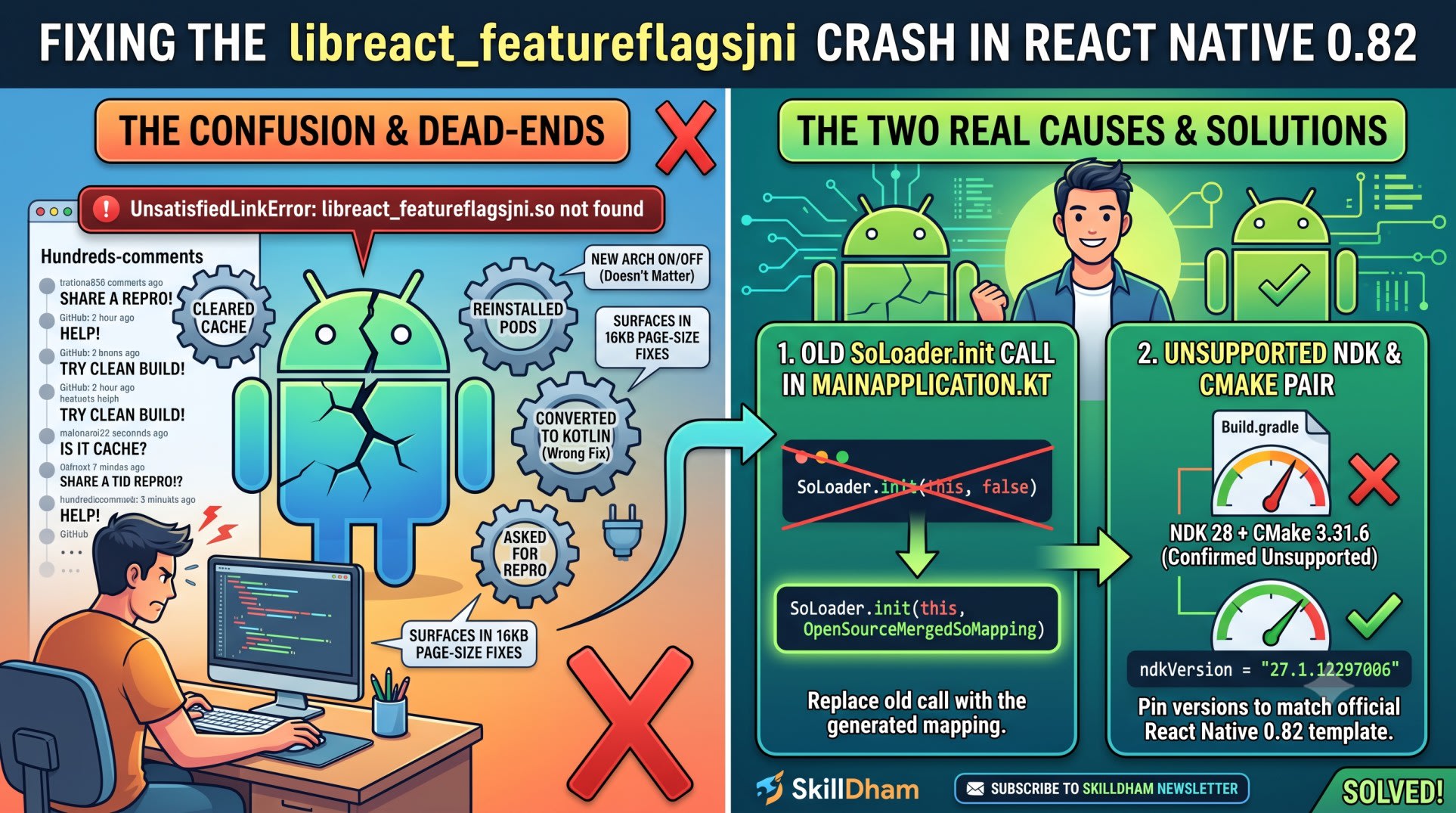
The libreact featureflagsjni crash hits React Native 0.82 apps on Android. It has two real causes. First: an old SoLoader.init(this, false) call. Use SoLoader.init(this, OpenSourceMergedSoMapping) instead. Second: an NDK and CMake pair your build tools reject.
It happens with New Architecture on or off
It often shows up during 16KB page-size fixes
Update both settings to stop the crash for good
You upgrade to React Native 0.82. You run the app on Android.
It crashes before the first screen loads.
The logcat shows one line. UnsatisfiedLinkError: library "libreact_featureflagsjni.so" not found. This is the libreact featureflagsjni crash. It is not a caching problem.
You clear the Metro cache. You delete node_modules. You reinstall pods, just in case.
Nothing changes.
You open the GitHub thread. Over a hundred comments sit there. Half say "clear cache." The other half say "share a repro." Neither helps.
Here is what is actually happening. Two things break this. Neither is cache-related. One is a bad SoLoader call. The other is a broken NDK and CMake pair.
What Causes the libreact featureflagsjni Crash
The libreact featureflagsjni crash has two real causes. Both come from GitHub issue #50144. A React Native maintainer confirmed them there.
Most guides guess. They say "clear cache." They say "reinstall pods." Neither is a real fix. Both are just steps. Sometimes they touch the real fix by accident.
Older React Native versions show this as UnsatisfiedLinkError. Newer versions show it as SoLoaderDSONotFoundError. Both point to the same two causes.
The two real causes are:
An outdated SoLoader.init() call in MainApplication
An NDK and CMake version pair your React Native version does not support
Fix both. The crash goes away for good.
Root Cause 1: The Wrong SoLoader.init Call
The Broken Call in MainApplication
Most crash reports share one setup. Their MainApplication.kt calls SoLoader.init(this, false). That call was correct years ago. It is not correct now.
kotlin
// Wrong: this is the older SoLoader init call
package com.yourapp

import com.facebook.soloader.SoLoader

class MainApplication : Application(), ReactApplication {
  override fun onCreate() {
    super.onCreate()
    SoLoader.init(this, false)
  }
}
The Fix That Actually Works
Replace that call. Point SoLoader at the merged mapping instead.
kotlin
// Correct: use the generated OpenSourceMergedSoMapping
package com.yourapp

import com.facebook.react.soloader.OpenSourceMergedSoMapping
import com.facebook.soloader.SoLoader

class MainApplication : Application(), ReactApplication {
  override fun onCreate() {
    super.onCreate()
    SoLoader.init(this, OpenSourceMergedSoMapping)
  }
}
This one change fixed the crash for most people in the thread. It is the most common fix reported.
Why OpenSourceMergedSoMapping Fixes It
New Architecture builds ship one merged .so file. They do not ship many small files.
SoLoader.init(this, false) does not know about that merged file. It looks for libreact_featureflagsjni.so on its own. That file was never packaged alone. So the load fails.
OpenSourceMergedSoMapping fixes this. It tells SoLoader where the feature-flags code lives inside the merged file. The lookup stops failing.
Root Cause 2: An Unsupported NDK and CMake Pairing
The Version Pair That Fails
Some developers fix the SoLoader call. They still crash. Their real problem sits in the build tools.
React Native maintainer cortinico confirmed this in the thread. NDK 28 with CMake 3.31.6 is not supported. The build compiles fine. The library still breaks at runtime.
Match the Official Template Instead
Do not pick the newest NDK or CMake version on your machine. Use the exact pair pinned in the official React Native template.
gradle
// android/build.gradle - pin these to match the RN 0.82 template
buildscript {
    ext {
        ndkVersion = "27.1.12297006"
        // CMake version is set by the Android Gradle Plugin.
        // Do not override it unless the template does.
    }
}
Check the template for your exact React Native version. NDK and CMake pairs change between releases.
It Happens With New Architecture On or Off
Why Disabling New Architecture Does Not Help
One reporter hit this crash with newArchEnabled=false. They also used Expo SDK 53. Disabling New Architecture should have skipped this path. It did not.
Recent React Native versions run a feature-flags check on startup. This check runs either way. It does not matter if New Architecture is on or off. A bad SoLoader.init() call still crashes your app.
This is not the only Android quirk that ignores your config. The Android 15 edge-to-edge keyboard fix covers a similar case. A platform default there overrides a flag you already set.
The 16KB Page-Size Connection
Why This Surfaces Now, in 2026
The original report is GitHub issue #53926. It surfaced during a 16KB page-size fix.
Google Play has a 2026 deadline for this. The deadline covers 16KB memory page-size support. Developers bump their NDK version to meet it.
That NDK bump breaks the SoLoader mapping. It only breaks if MainApplication still uses the old call.
Touching your NDK version for 16KB support? Check your SoLoader.init() call too. Fix both at the same time. Fixing only one leaves the crash in place.
The React Native 0.82 release notes list every breaking change for this version. Check them if you want the full picture.
Dead-End Fixes to Stop Wasting Time On
Converting to Kotlin Is Not the Real Fix
Some developers converted MainApplication.java to MainApplication.kt. The crash went away. They assumed Kotlin fixed it.
It did not. The conversion forced a rewrite of the SoLoader call. That rewrite used OpenSourceMergedSoMapping by chance. The language change was not the fix. The SoLoader call was the fix.
"Share a Repro" Threads That Never Resolve
Many comments ask for a minimal repro. Many reporters never give one. Their issues close unresolved.
Does your crash point to one native module, not the feature-flags check? The React Native iOS 26 TurboModule crash fix covers a similar native mismatch on iOS.
Can you not reproduce this in a clean project? Do not wait on that thread. Check your SoLoader.init() call first. Check your NDK and CMake versions too. Most people fix it before a repro is ever needed.
Key Takeaways
The libreact featureflagsjni crash has two real causes, not one
Use SoLoader.init(this, OpenSourceMergedSoMapping) in MainApplication, not the old call
Pin your NDK and CMake versions to the official React Native template
NDK 28 with CMake 3.31.6 is confirmed unsupported by a maintainer
The crash fires with New Architecture on or off
It often shows up during 16KB page-size fixes
Converting MainApplication to Kotlin only helps if you fix the SoLoader call too
Fix both causes together. Fixing only one can leave the crash in place
FAQ
What does the libreact featureflagsjni crash mean?
Android could not find libreact_featureflagsjni.so at startup. SoLoader tried to load it. The load failed. This is almost always a SoLoader or NDK issue, not a missing package.
Does this still happen in React Native 0.82?
Yes. The same two causes still apply in React Native 0.82. Update your SoLoader.init() call. Match your NDK and CMake pair to the official template.
Can I fix this by clearing the Metro cache or reinstalling pods?
No. Cache clears and pod reinstalls do not touch SoLoader or your native build tools. A full clean rebuild can look like it helped. The crash returns on the next real build.
Does disabling New Architecture avoid this crash?
Not reliably. Recent React Native versions run the feature-flags check either way. One reporter hit this crash with New Architecture off, on Expo SDK 53.
Why did converting MainApplication to Kotlin fix it for some people?
It did not fix it directly. The conversion forced a new SoLoader call. That new call used OpenSourceMergedSoMapping. The language was not the fix. The SoLoader call was.
Is NDK 28 with CMake 3.31.6 supported for this crash?
No. A React Native maintainer confirmed this pair is not supported. Match the NDK and CMake versions in the official template instead.
Is this crash related to Android's 16KB page-size rule?
Often, yes. The original report surfaced during a 16KB compliance update. The developer was updating their NDK version at the time. That update exposed the broken SoLoader mapping.
What should I do if I cannot reproduce the crash in a clean project?
Check your SoLoader.init() call first. Check your NDK and CMake versions too. Do this before you try to build a repro. Most people never need one.
Conclusion
The libreact featureflagsjni crash is not one problem. It is two.
One is an old SoLoader call. The other is a bad NDK and CMake pair. Fix both. They hide behind each other.
A SoLoader fix alone can still crash on a bad NDK pair. A good NDK pair alone will not save a broken SoLoader call.
Check MainApplication first. Then check android/build.gradle. Mid-migration to New Architecture? This is where most mismatches start.
Want fixes like this before they hit a hundred-comment GitHub thread? Subscribe to the SkillDham newsletter.