
Fix React Native Android 15 Edge-to-Edge Keyboard Bugs
Skilldham
Engineering deep-dives for developers who want real understanding.
Last updated: June 2026
TL;DR - Quick Fix
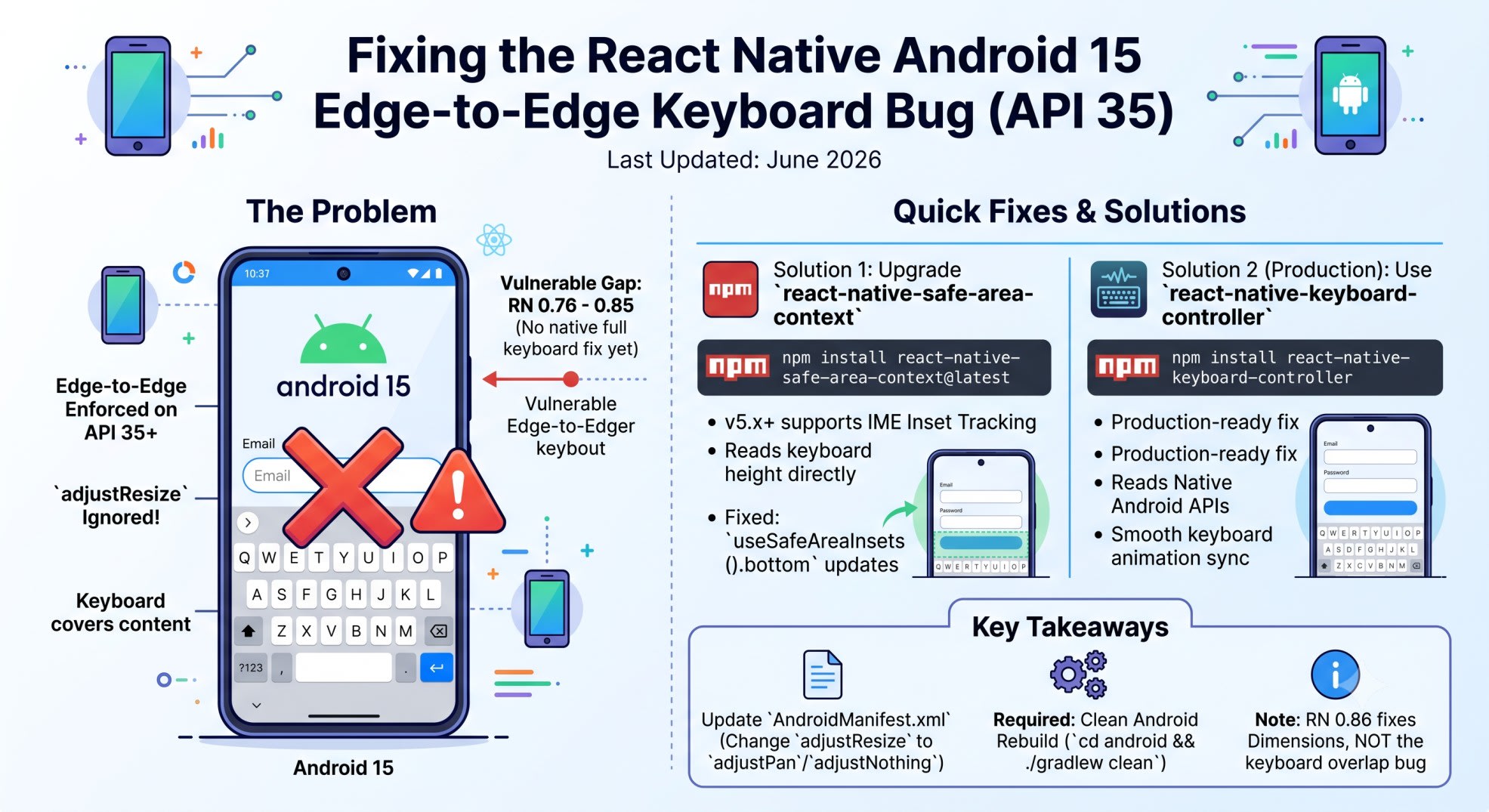
react native android 15 edge-to-edge breaks keyboard on API 35 in two ways at once.
Error: Keyboard covers inputs. No crash. No warning. adjustResize silently stops working.
Root causes:
adjustResize is dead on Android 15 edge-to-edge
react-native-safe-area-context below v5.x returns 0 for keyboard height
Fix in 3 steps:
Step 1 - Upgrade safe-area-context:
bash
npm install react-native-safe-area-context@latest
cd android && ./gradlew clean && cd ..
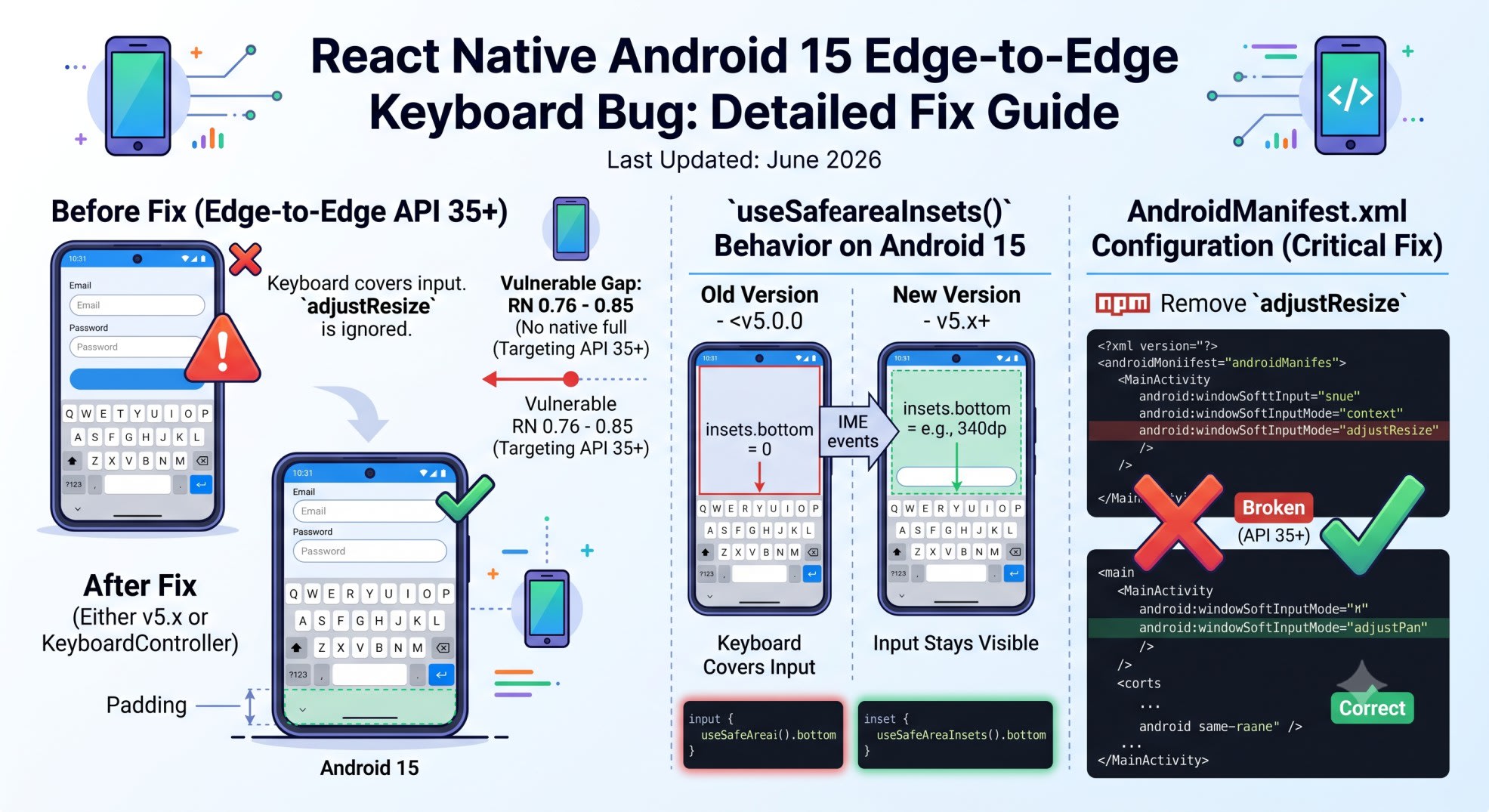
Step 2 - Update AndroidManifest.xml:
xml
android:windowSoftInputMode="adjustPan"Step 3 - Use IME insets:
javascript
const insets = useSafeAreaInsets();
<View style={{ paddingBottom: insets.bottom }}>
For production: use react-native-keyboard-controller instead.
Tested on: RN 0.76-0.86 - Android 15 - API 35 - Play Store
You tap a text input.
The keyboard appears.
It covers the input.
You check your manifest. adjustResize is set. KeyboardAvoidingView is there. Everything looks right.
Still broken.
This is the react native android 15 edge-to-edge keyboard bug. It hits every app targeting SDK 35. It breaks silently. The usual fix does not work.
Here is what is happening - and how to fix it.
Quick Answer
Android 15 enforces edge-to-edge for all apps targeting API 35. This breaks adjustResize - it no longer shrinks your layout when the keyboard opens. Also, react-native-safe-area-context below v5.x returns 0 for the bottom inset on Android 15. The fix: upgrade to safe-area-context v5.x for IME inset tracking, or use react-native-keyboard-controller as the production fix.
Why adjustResize Breaks on Android 15
adjustResize is a windowSoftInputMode setting.
It tells Android to shrink the layout when the keyboard appears.
Edge-to-edge changes this. Your layout now spans the full screen - including behind the status bar and nav bar.
Android cannot shrink a full-screen window. So adjustResize stops working.
No crash. No warning. The keyboard just covers your content.
What Android 15 Changed
Google enforced edge-to-edge for all apps targeting API 35. It was not optional.
Play Store required API 35 for all app updates by August 2025.
RN 0.76 and above include edge-to-edge support. But the keyboard fix was not complete until RN 0.86 (June 11, 2026).
If you are on RN 0.76 to 0.85 - you are in the gap. Edge-to-edge is on. adjustResize is dead.
The Broken Pattern Everyone Uses
xml
<!-- AndroidManifest.xml - Wrong for Android 15 -->
<activity
  android:name=".MainActivity"
  android:windowSoftInputMode="adjustResize"
  android:exported="true">
javascript
// Wrong: worked before Android 15, breaks now
import { KeyboardAvoidingView, Platform } from 'react-native';

export function LoginScreen() {
  return (
    <KeyboardAvoidingView
      behavior={Platform.OS === 'ios' ? 'padding' : 'height'}
      style={{ flex: 1 }}
    >
      <TextInput placeholder="Email" />
      <TextInput placeholder="Password" secureTextEntry />
    </KeyboardAvoidingView>
  );
}
On Android 15, adjustResize is ignored. KeyboardAvoidingView gets no keyboard signal. It does nothing. The keyboard covers your inputs.
The Safe Area Context Version Problem
This is the part no post covers clearly.
react-native-safe-area-context below v5.x does not track IME insets.
IME insets = the keyboard height value on Android.
Before Android 15, adjustResize handled this at the system level. It shrunk the window. Safe-area-context did not need to know about the keyboard.
On Android 15 edge-to-edge, adjustResize is gone. Your code must read IME insets directly. But v4.x cannot do this. It returns 0 for bottom inset when the keyboard is open.
I hit this building Munshi - the React Native finance app I have live on the Play Store. After targeting API 35, every input screen broke. I spent 3 hours on it. useSafeAreaInsets().bottom was returning 0 with the keyboard open. Version 4.x did not know the keyboard existed.
Check Your Version First
bash
# Check your current version
cat node_modules/react-native-safe-area-context/package.json | grep '"version"'

# You need 5.x or above
# If you see 4.x.x - this is your problem
Upgrade to v5.x
bash
# Correct: upgrade for IME inset support
npm install react-native-safe-area-context@latest

# Clean rebuild required
cd android && ./gradlew clean && cd ..
npx react-native run-android
With v5.x, useSafeAreaInsets().bottom returns the correct keyboard height on Android 15.
Fix 1 - Safe Area Context v5.x With IME Insets
This is the minimal fix. Good for small screen counts.
Remove adjustResize First
xml
<!-- AndroidManifest.xml - Correct for Android 15 -->
<activity
  android:name=".MainActivity"
  android:windowSoftInputMode="adjustPan"
  android:exported="true">
Switch to adjustPan. Or use adjustNothing if you want full JS control.
Use IME Insets in Your Component
javascript
// Correct: safe-area-context v5.x tracks keyboard height via IME insets
import { useSafeAreaInsets } from 'react-native-safe-area-context';
import { View, TextInput } from 'react-native';

export function LoginScreen() {
  const insets = useSafeAreaInsets();

  return (
    <View style={{ flex: 1, paddingBottom: insets.bottom }}>
      <View style={{ flex: 1, justifyContent: 'flex-end', padding: 24 }}>
        <TextInput
          placeholder="Email"
          style={{
            height: 48,
            borderWidth: 1,
            borderRadius: 8,
            paddingHorizontal: 12,
            marginBottom: 12,
          }}
        />
        <TextInput
          placeholder="Password"
          secureTextEntry
          style={{
            height: 48,
            borderWidth: 1,
            borderRadius: 8,
            paddingHorizontal: 12,
          }}
        />
      </View>
    </View>
  );
}
When the keyboard opens, insets.bottom updates to the keyboard height. The padding grows. Your inputs stay visible.
Why This Works
Android 15 exposes keyboard height as a live event stream.
Safe-area-context v5.x subscribes to that stream. It updates inset values as the keyboard changes.
Version 4.x only read insets at mount time. It never subscribed to keyboard events. That is why it returned 0.
Fix 2 - react-native-keyboard-controller
This is the production fix. Use it when you have many input screens or need keyboard animation.
This library reads keyboard height from native Android APIs. It does not rely on adjustResize at all.
Install and Set Up
bash
npm install react-native-keyboard-controller

# Clean rebuild required
cd android && ./gradlew clean && cd ..
npx react-native run-android
Wrap your app root with the provider:
javascript
// Correct: wrap app root with KeyboardProvider
import { KeyboardProvider } from 'react-native-keyboard-controller';
import { SafeAreaProvider } from 'react-native-safe-area-context';

export default function App() {
  return (
    <SafeAreaProvider>
      <KeyboardProvider>
        <RootNavigator />
      </KeyboardProvider>
    </SafeAreaProvider>
  );
}
Use KeyboardAvoidingView From the Library
Do not use React Native's built-in KeyboardAvoidingView here. Use the one this library exports.
javascript
// Correct: import from react-native-keyboard-controller, not react-native
import { KeyboardAvoidingView } from 'react-native-keyboard-controller';
import { View, TextInput, Platform } from 'react-native';

export function LoginScreen() {
  return (
    <KeyboardAvoidingView
      behavior={Platform.OS === 'ios' ? 'padding' : 'height'}
      style={{ flex: 1 }}
    >
      <View style={{ flex: 1, justifyContent: 'flex-end', padding: 24 }}>
        <TextInput
          placeholder="Email"
          style={{
            height: 48,
            borderWidth: 1,
            borderRadius: 8,
            paddingHorizontal: 12,
            marginBottom: 12,
          }}
        />
        <TextInput
          placeholder="Password"
          secureTextEntry
          style={{
            height: 48,
            borderWidth: 1,
            borderRadius: 8,
            paddingHorizontal: 12,
          }}
        />
      </View>
    </KeyboardAvoidingView>
  );
}
Why the Built-in KeyboardAvoidingView Breaks
React Native's built-in component reads keyboard height from keyboardDidShow.
That event fires once - after the keyboard is fully open.
On Android 15 edge-to-edge, the event payload has wrong height values. adjustResize no longer shrinks the window. The height math is based on window size changes that do not happen anymore.
react-native-keyboard-controller bypasses all of this. It reads keyboard height from native Android APIs. The height is correct at every frame of the animation.
What RN 0.86 Fixed (and Did Not Fix)
React Native 0.86 shipped June 11, 2026.
It fixed Dimensions.get('window') returning wrong values on edge-to-edge Android.
It did not fix the keyboard overlap bug.
adjustResize still does not work on Android 15 in RN 0.86. You still need the safe-area-context upgrade and keyboard-controller.
Which Fix Should You Use?
Use Fix 1 when:
You have a small number of input screens
You do not need keyboard animation sync
You want the smallest code change
Use Fix 2 when:
You have many screens with forms
You need smooth keyboard animation
You are building a chat screen
You want the most future-proof setup
I used Fix 2 in Munshi. The built-in KeyboardAvoidingView had been fragile across Android versions for a long time. This was the right time to switch.
For the full Android config setup - including FCM and notification changes that also came with Android 15 - the React Native Firebase notifications post covers the AndroidManifest patterns in detail.
Key Takeaways
react native android 15 edge-to-edge enforcement makes adjustResize stop working silently on API 35
react-native-safe-area-context below v5.x returns 0 for bottom inset when the keyboard is open - upgrade this first
Remove adjustResize from AndroidManifest.xml - replace with adjustPan or adjustNothing
With safe-area-context v5.x, useSafeAreaInsets().bottom tracks keyboard height via IME insets
React Native's built-in KeyboardAvoidingView cannot read correct keyboard height on Android 15 edge-to-edge
react-native-keyboard-controller reads keyboard height from native Android APIs - no reliance on adjustResize
RN 0.86 fixed Dimensions values on edge-to-edge - it did not fix the keyboard overlap bug
Both fixes need a clean Android rebuild after changes
FAQ
Why does adjustResize stop working on Android 15?
adjustResize shrinks your app window when the keyboard appears. Android 15 enforces edge-to-edge for apps targeting API 35. Edge-to-edge means your app window spans the full screen. Android cannot shrink a full-screen window. So adjustResize is ignored. No error is thrown. The keyboard covers your content.
Does react-native-safe-area-context v4.x work on Android 15?
No. Version 4.x does not track IME insets. When the keyboard opens, useSafeAreaInsets().bottom returns 0. Your layout does not move. Upgrade to v5.x for correct IME inset tracking on Android 15.
Is this bug fixed in React Native 0.86?
Partially. RN 0.86 fixed Dimensions.get('window') values on edge-to-edge Android. It did not fix the keyboard overlap bug from adjustResize breaking. You still need safe-area-context v5.x or react-native-keyboard-controller.
What should I set windowSoftInputMode to on Android 15?
Remove adjustResize. Set it to adjustPan or adjustNothing. With adjustPan, Android pans the view up when the keyboard opens. With adjustNothing, you handle keyboard height fully in JavaScript.
Does react-native-keyboard-controller work with Expo?
It does not work in Expo Go. It works with bare React Native and Expo development builds using expo prebuild. On Expo managed workflow, create a development build first.
Do I need to rebuild after upgrading safe-area-context to v5.x?
Yes. Safe-area-context v5.x has native Android code changes. Run cd android && ./gradlew clean before npx react-native run-android. Without a clean rebuild, you may still see v4.x behavior.
Does this affect iOS too?
No. This is Android-specific. On iOS, KeyboardAvoidingView with behavior="padding" still works. You only need these fixes for Android 15 and above.
Does this affect all Android 15 devices?
It affects all apps targeting API 35 on Android 15. If your app targets API 34 or below, you are not affected yet. Play Store required API 35 for all app updates by August 2025. Any app updated after that date hits this bug on Android 15 devices.
The react native android 15 edge-to-edge keyboard bug looks random at first. But two things broke at the same time. adjustResize stopped working at the system level. Safe-area-context stopped returning correct values at the library level. Both need fixing.
Upgrade safe-area-context to v5.x. Add react-native-keyboard-controller for production use. Remove adjustResize from your manifest.
Your inputs will stay above the keyboard.
Want to see how Munshi handles auth, AI chat, and production setups like this? The Munshi React Native expense tracker post walks through the full architecture.
Subscribe to SkillDham for more production React Native fixes.