

Nextjs CVE 94485 - Fix DynamicParams Leak in Next.js 16
Skilldham
Engineering deep-dives for developers who want real understanding.
Last updated: October 2026
Quick Answer
CVE-2026-94485 affects Next.js 16.0.0 through 16.3.7 when an App Router app uses webpack and metadata image routes on dynamic segments.
The bug makes opengraph-image and similar metadata image routes ignore dynamicParams.
Upgrade to Next.js 16.3.8 or later. Next.js 15.5.27 also contains the backported fix. Check your metadata image routes before deciding if the CVE affects your app.
You Have a Dynamic Route. Then You Add an OG Image.
You have a route like app/blog/[slug].
You only want known blog slugs to render.
So you add generateStaticParams().
Then you add dynamicParams = false.
That looks right.
Your normal page returns a 404 for an unknown slug.
Then you add an opengraph-image.tsx file.
This is where CVE-2026-94485 matters.
In affected Next.js versions, the metadata image route could ignore that dynamicParams rule.
An attacker could request an image URL for a dynamic value that you intentionally excluded.
The result is an information disclosure issue.
The tricky part is that your normal page can look completely safe.
Your route test can return 404.
Your metadata image route can still behave differently.
This article shows exactly what to check.
What CVE-2026-94485 Actually Breaks
The issue is not simply "dynamic routes are unsafe."
The vulnerable path has several pieces.
First, the application uses the App Router.
Second, the build uses webpack.
Third, a metadata image route exists below a dynamic segment.
Fourth, the application uses generateStaticParams() to define allowed values.
Finally, dynamicParams is set to false.
The GitHub advisory describes this exact class of issue. Metadata image routes such as opengraph-image and twitter-image could ignore the route segment setting.
dynamicParams controls unknown values
Normally, dynamicParams decides what happens outside generateStaticParams().
With true, Next.js can render unknown values.
With false, unknown values should return a 404.
The Next.js documentation describes this behavior for App Router dynamic segments.
// Correct: block params not returned by generateStaticParams

export const dynamicParams = false;

export async function generateStaticParams() {
  return [
    { slug: "hello-world" },
    { slug: "nextjs-security" },
  ];
}
The important part is the relationship between these two settings.
generateStaticParams() defines the known values.
dynamicParams = false blocks values outside that list.
CVE-2026-94485 breaks that expectation for affected metadata image routes.
The metadata image route is the tricky part
Next.js supports file-based metadata.
For example, you can create opengraph-image.tsx inside a dynamic route.
That image can use route parameters.
// Correct: dynamic metadata image inside the route

import { ImageResponse } from "next/og";

export default async function Image({
  params,
}: {
  params: Promise<{ slug: string }>;
}) {
  const { slug } = await params;

  return new ImageResponse(

      {slug}

  );
}
Next.js documents generated Open Graph images as a supported App Router feature.
The vulnerability appears when this metadata route sits behind the dynamic parameter restriction.
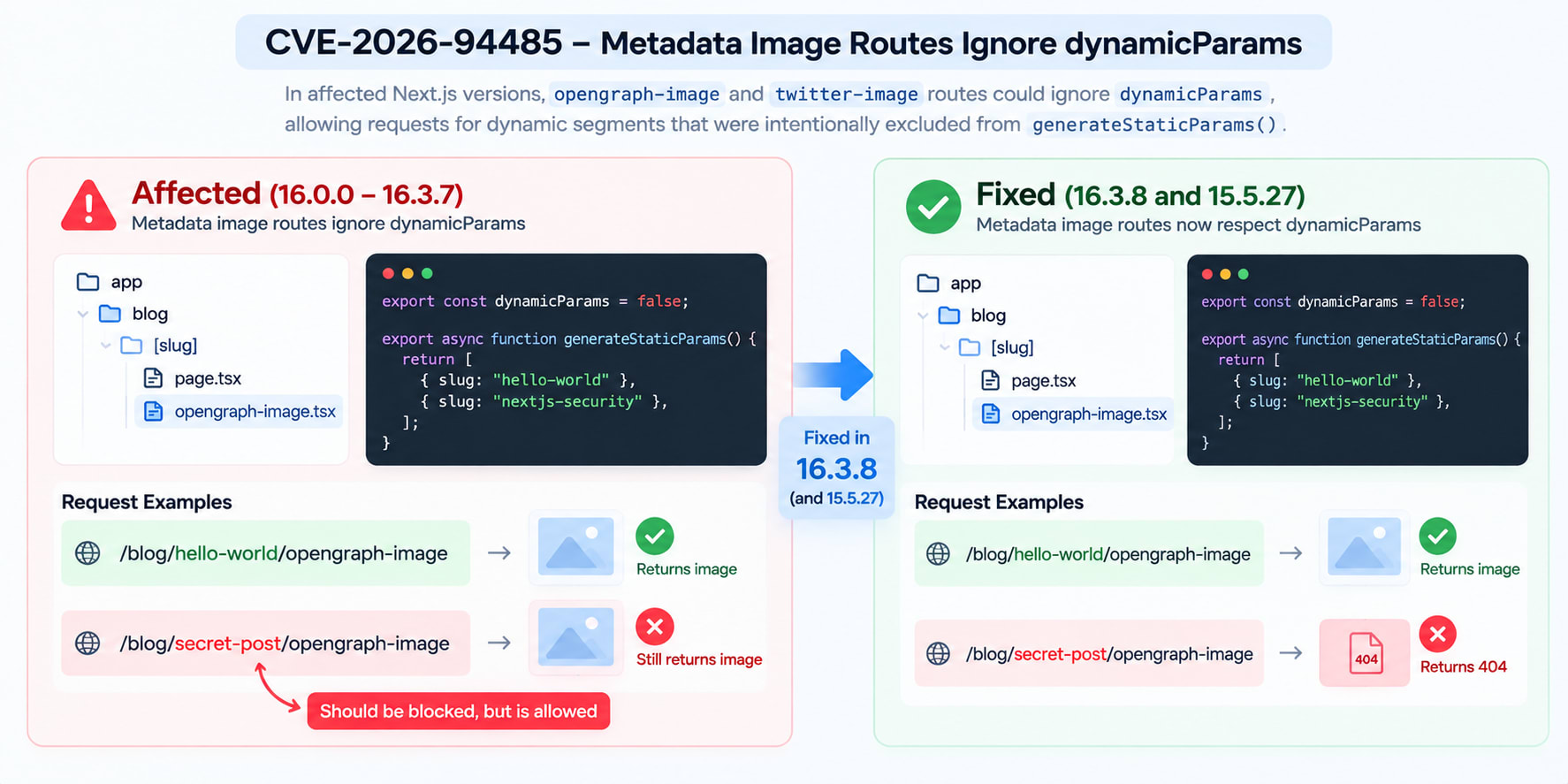
A Minimal Vulnerable Route
Now let's build the smallest useful example.
Imagine this route tree:
app/
  blog/
    [slug]/
      page.tsx
      opengraph-image.tsx
The page only allows two slugs.
// Wrong: the page is restricted, but the metadata route can bypass it
export const dynamicParams = false;
export async function generateStaticParams() {
return [
{ slug: "hello-world" },
{ slug: "nextjs-security" },
];
}
export default async function Page({
params,
}: {
params: Promise<{ slug: string }>;
}) {
const { slug } = await params;
return {slug}
;
}The intended behavior is simple.
/blog/hello-world is valid.
/blog/nextjs-security is valid.
/blog/secret-post should not be generated.
The route segment setting should block that unknown value.
Now add the image route
// Wrong: metadata image route depends on the restricted dynamic segment

import { ImageResponse } from "next/og";

export default async function Image({
  params,
}: {
  params: Promise<{ slug: string }>;
}) {
  const { slug } = await params;

  return new ImageResponse(

      {slug}

  );
}
The important detail is not the JSX.
The important detail is the route combination.
The metadata image uses the same dynamic segment.
The page says unknown values are not allowed.
The affected framework code did not apply that restriction consistently to the metadata image route.
That is the bug.
Why Normal Dynamic Pages Are Not Automatically Vulnerable
This is the part most security summaries skip.
Having a dynamic route does not automatically mean you have CVE-2026-94485.
A route like this is not enough:
app/
  products/
    [id]/
      page.tsx
The CVE targets a more specific path.
You need to look for metadata image routes too.
A normal dynamic page
A normal dynamic page can use:
// Correct: normal dynamic route
export default async function Page({
params,
}: {
params: Promise<{ id: string }>;
}) {
const { id } = await params;
return Product {id}
;
}There is no metadata image route here.
The CVE is not a generic warning against every dynamic segment.
A dynamic page with an image route
Now compare it with:
app/
  products/
    [id]/
      page.tsx
      opengraph-image.tsx
This deserves an audit.
The next question is your build system.
If the affected route uses webpack, the CVE applies to the vulnerable Next.js versions.
If your relevant build uses Turbopack, the advisory says the vulnerable condition does not apply.
That distinction matters.
Do not label every Next.js App Router project as vulnerable.
How to Check Your Next.js Version
Start with the package version.
Do not guess from your package.json range.
Check the installed version.
Check with npm
# Correct: check the installed Next.js version

npm ls next
You can also inspect the package directly.
# Correct: print the installed Next.js version

node -p "require('next/package.json').version"
You are looking for a version below 16.3.8.
The vulnerable CVE range is:
16.0.0 <= next < 16.3.8The fixed version is:
16.3.8The official Next.js 16.3.8 release lists CVE-2026-94485 among its security fixes.
What about Next.js 15?
The official 15.5.27 release also lists the metadata image dynamicParams issue among its security fixes.
So if your application is on the maintained 15.5 line, use:
# Correct: apply the Next.js 15 security backport

npm install next@15.5.27
For Next.js 16:
# Correct: apply the Next.js 16 security fix

npm install next@16.3.8
If you are moving to a newer supported release, use the current supported release instead.
Next.js 16 is the Active LTS line.
Next.js 15 is the Maintenance LTS line.
Audit Your Codebase Before You Upgrade
The version check is only the first step.
You should also search your project.
Look for these strings:
dynamicParams
generateStaticParams
opengraph-image
twitter-image
A simple repository search can find most relevant files.
Search for dynamicParams
# Correct: find route restrictions

rg "dynamicParams" app
Then search for metadata image files.
# Correct: find metadata image routes

find app -name "opengraph-image.*" -o -name "twitter-image.*"
Your goal is to find combinations.
You want to know whether an affected dynamic segment contains a metadata image route.
Build a quick affected-route list
For each match, record:
CheckWhat to look forNext.js16.0.0 through 16.3.7RouterApp RouterBuildwebpackDynamic route[slug], [id], or similarStatic paramsgenerateStaticParams()RestrictiondynamicParams = falseMetadataopengraph-image or twitter-image
If all of those line up, treat the route as affected.
Do not stop after checking page.tsx.
The metadata image file is the important part.
The Fix Is an Upgrade, Not a Route Hack
There is no good reason to patch this with application-level route tricks.
The framework behavior itself is the issue.
Upgrade to a fixed release.
For Next.js 16:
# Correct: upgrade to the fixed Next.js 16 release

npm install next@16.3.8
For Next.js 15:
# Correct: upgrade to the fixed Next.js 15 maintenance release

npm install next@15.5.27
Then reinstall your lockfile dependencies if your package manager requires it.
Build the application again.
# Correct: rebuild the production application

npm run build
Then verify the deployed route behavior.
Do not remove dynamicParams
Removing the setting is not the right security fix.
You may see advice like this:
// Wrong: removing the restriction hides the real issue

// export const dynamicParams = false;
That changes application behavior.
Unknown values may become renderable again.
It does not patch the framework vulnerability.
Upgrade first.
Keep your intended route rules.
Do not delete your OG images
You also do not need to remove opengraph-image.tsx.
These files are useful.
They generate route-specific social images.
The correct fix is to run a patched Next.js version.
If you recently handled another Next.js security issue, the same upgrade discipline applies. SkillDham's guide to the Next.js July 2026 security release is useful for comparing affected-version checks.
How to Verify the Fix
After upgrading, do not assume the work is finished.
Test a valid generated value.
Then test an excluded value.
For example:
/blog/hello-world
/blog/secret-post
Your application should preserve the intended behavior.
You should also test the metadata route.
/blog/hello-world/opengraph-image
/blog/secret-post/opengraph-image
Do the same for twitter-image if your application uses it.
The goal is simple.
Known values should work.
Excluded values should remain excluded.
The framework should enforce the route rule consistently.
Check the production build
Your local development server is not enough for this CVE.
The advisory is about App Router applications built with webpack.
So test the production build path that your deployment actually uses.
A useful sequence is:
# Correct: verify the production path

npm run build
npm run start
Then test the metadata image URLs.
This is especially useful if your CI build differs from local development.
Check your build configuration
If you explicitly use webpack, pay attention.
For example:
# Correct: search for an explicit webpack build flag

rg --glob "package.json" "webpack"
You should also inspect your CI scripts.
Do not assume that the command used on your laptop matches production.
Next.js 16 has Turbopack support as a major part of the current toolchain. The CVE advisory specifically identifies webpack-built applications as the affected case.
Are You Actually Affected?
Use this checklist before opening a security ticket.
You probably need the fix urgently if:
You use Next.js 16.0.0 through 16.3.7.
Your application uses the App Router.
The relevant production build uses webpack.
You have a dynamic route segment.
That route uses generateStaticParams().
The route sets dynamicParams = false.
The route contains a metadata image route.
That image route can read the dynamic parameter.
If those conditions match, upgrade.
You are not in the same risk path if:
You run Next.js 16.3.8 or later.
You do not use metadata image routes on dynamic segments.
Your relevant build uses Turbopack.
You are not using the App Router route pattern described above.
Still keep your Next.js version patched.
Security fixes should not wait for an exploit.
One More Next.js Security Check
CVE-2026-94485 is part of a broader September security release.
Next.js 16.3.8 fixed several security issues.
Next.js 15.5.27 also received multiple backported fixes.
So do not upgrade only because one CVE appears in your scanner.
Check the full release.
If you maintain a production Next.js application, your security checklist should include:
Installed Next.js version.
Supported Next.js release line.
App Router usage.
Build system.
Dynamic route configuration.
Metadata image routes.
Recent security advisories.
For another Next.js security example, see the Next.js middleware and proxy bypass CVE-2026-64642 breakdown. It shows why checking the exact route and deployment conditions matters.
Key Takeaways
nextjs cve 94485 affects a specific App Router metadata image route pattern.
The vulnerable range is Next.js 16.0.0 through 16.3.7.
The fixed Next.js 16 release is 16.3.8.
Next.js 15.5.27 also carries the backported fix.
The issue involves webpack-built applications.
dynamicParams = false is important to the affected route pattern.
Search for generateStaticParams, opengraph-image, and twitter-image.
nextjs cve 94485 is not a reason to remove dynamic routes or metadata images.
Upgrade Next.js instead of adding a route-level workaround.
FAQ
What is CVE-2026-94485 in Next.js?
CVE-2026-94485 is a medium-severity information disclosure issue in Next.js App Router metadata image routes. Affected webpack builds can ignore dynamicParams for metadata image routes.
Which Next.js versions are affected by CVE-2026-94485?
The CVE affects Next.js versions from 16.0.0 through 16.3.7. The fixed Next.js 16 release is 16.3.8. Next.js 15.5.27 also contains the backported fix.
Is Next.js 15 affected by CVE-2026-94485?
The official 15.5.27 release includes the fix for this metadata image issue. If you use the maintained Next.js 15 line, upgrade to 15.5.27 rather than relying on an older release.
Does CVE-2026-94485 affect normal dynamic pages?
No. A normal dynamic page alone does not match the reported vulnerability. The important combination includes metadata image routes, dynamic segments, dynamicParams, generateStaticParams, and the affected build path.
Does Turbopack avoid CVE-2026-94485?
The GitHub advisory specifically describes the vulnerability in App Router applications built with webpack. Turbopack builds are not in that affected condition.
Do I need to remove dynamicParams = false?
No. Do not remove it just to work around the CVE. That can change your application's route behavior. Upgrade Next.js to a fixed release instead.
How do I check if my app uses the affected pattern?
Search your App Router code for dynamicParams, generateStaticParams, opengraph-image, and twitter-image. Then check whether those files exist under the same dynamic route.
Is upgrading Next.js enough?
For the CVE itself, the framework upgrade is the main fix. After upgrading, rebuild the application and test both valid and excluded metadata image URLs.
Conclusion
CVE-2026-94485 is easy to misunderstand because your normal dynamic page can behave correctly while its metadata image route does not.
The real question is not "Do I use dynamic routes?"
Check the full combination instead.
Look for generateStaticParams(), dynamicParams = false, metadata image routes, and webpack builds.
If your app runs an affected Next.js version, upgrade it.
Use 16.3.8 or later for the Next.js 16 line. Use 15.5.27 for the maintained Next.js 15 line.
Security bugs like this are easiest to fix when you know the exact route that matters.
For more practical Next.js fixes, browse the SkillDham Next.js blog collection.