
Nextjs dev server leak - Patch 16.3.8
Skilldham
Engineering deep-dives for developers who want real understanding.
Last updated: October 2026
TL;DR
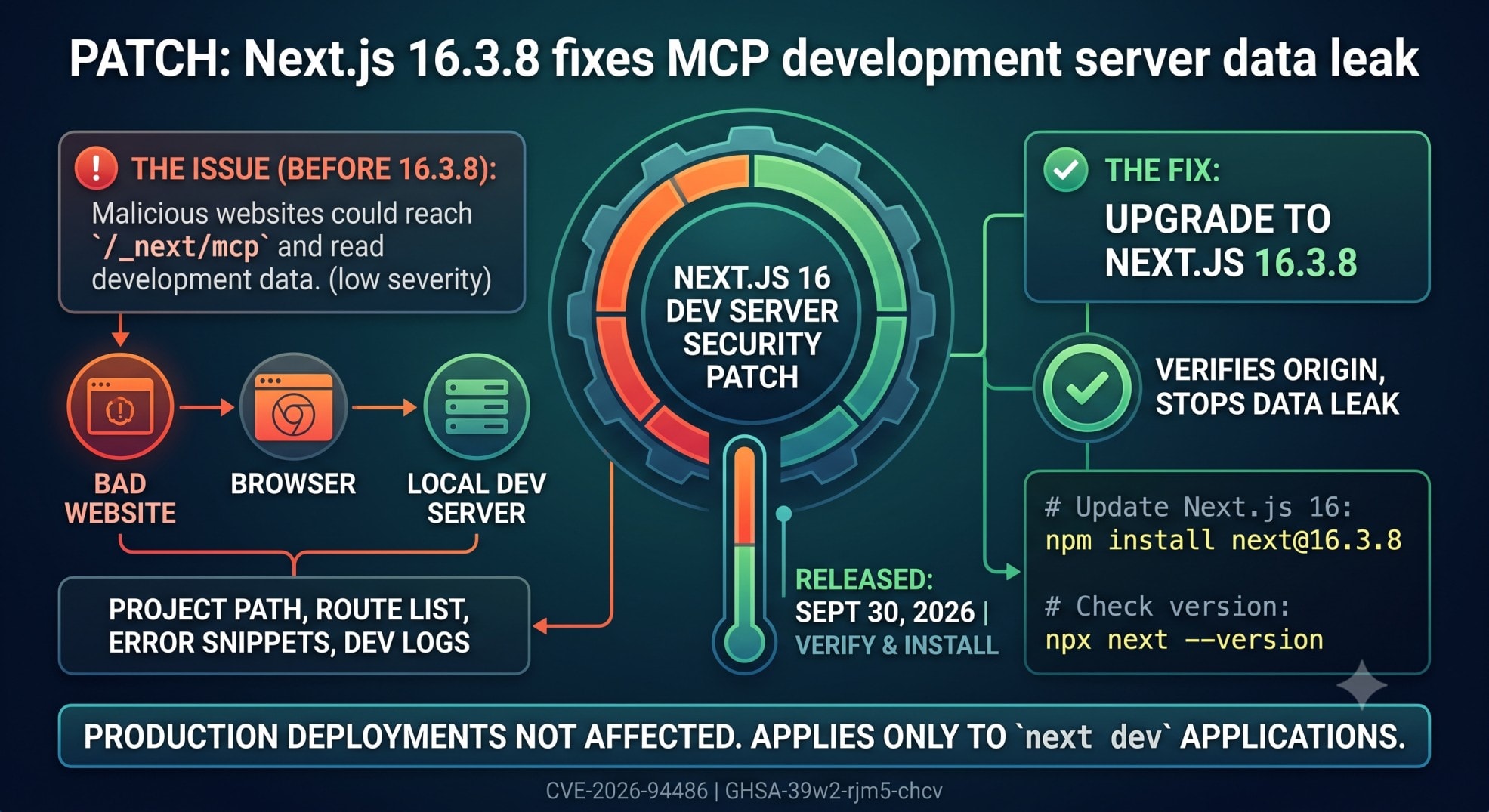
If you run Next.js 16 with next dev, upgrade to 16.3.8. The September 30, 2026 release fixes a low-severity information disclosure in the dev server MCP endpoint. A malicious website opened in the same browser can reach that endpoint and read development data. That can include your project path, route list, error source snippets, and dev logs. Production deployments do not serve this endpoint.
The Next.js dev server leak
You start your Next.js app with npm run dev.
The app works. Your terminal looks normal. Your browser is open with the project running on localhost.
Then you visit another website.
That sounds harmless.
The problem is that Next.js 16 added an MCP endpoint to the development server.
The nextjs dev server is now more than a local page renderer.
MCP stands for Model Context Protocol. It gives coding agents a standard way to inspect a running app.
The endpoint lives at /_next/mcp.
Before Next.js 16.3.8, the endpoint did not verify which website sent the request. A malicious page could use the browser to talk to your local dev server.
This is the part that makes the issue easy to miss.
Your production site can be fine. Your local development server can still expose data.
The official September 2026 security release calls this a low-severity information disclosure. It affects apps running with next dev. It does not affect production deployments.
If you use Next.js 16.3.7, check it now.
nextjs dev server: What the MCP endpoint does
The MCP endpoint is not a random debug route.
Next.js 16 added MCP support for coding agents. MCP stands for Model Context Protocol. It gives tools a standard way to inspect application state.
The endpoint is part of that design.
The endpoint path
A Next.js 16 dev server exposes the MCP endpoint here:
http://localhost:3000/_next/mcpThe port can differ in your project.
Next.js documents /_next/mcp as a built-in development endpoint. The next-devtools-mcp package can discover and connect to it automatically.
That means the endpoint has a real purpose.
It can expose runtime information to an AI coding agent. That includes things like errors, routes, and development logs.
What could be exposed?
The official advisory lists four types of development data.
The project's location on disk
Source code snippets from error reports
The route inventory
Development logs
This is information disclosure.
It is not the same as remote code execution.
It is also not a production API leak.
The risk exists because a website you visit can make browser requests to your local development server.
That distinction matters when you check your own project.
Am I affected by this Next.js 16 issue?
Start with one question.
Do you run next dev on Next.js 16?
If yes, treat the project as affected until you patch it.
The September 30 release lists CVE-2026-94486 and GHSA-39w2-rjm5-chcv for this issue. The fixed Next.js 16 release is 16.3.8. The affected surface is the development server. You can verify the affected versions and security fixes in the official Next.js September 2026 security release.
Check your installed version
Run this inside your project:
# Check: print the installed Next.js version
npx next --version
You can also inspect the dependency tree:
# Check: show the installed Next.js package
npm ls next
For Next.js 16, you want 16.3.8 or later.
If you see 16.3.7, do not assume you are protected.
Next.js 16.3.7 was released before this security patch. The security fixes landed in 16.3.8.
Check whether you run the dev server
Look at your package.json:
{
  "scripts": {
    "dev": "next dev"
  }
}
Then check your normal workflow.
If you only run next build and next start, this specific dev-server endpoint is not served.
If you run npm run dev, it is.
That difference is the key to the exposure model.
Fix the Next.js dev server leak
The fix is simple.
Upgrade Next.js to 16.3.8.
For npm:
# Correct: install the patched Next.js 16 release
npm install next@16.3.8
Then restart your development server.
# Correct: restart the patched dev server
npm run dev
Check the version again:
# Verify: confirm the installed version
npx next --version
You should now see 16.3.8.
What if you use Next.js 15?
The maintenance LTS fix is 15.5.27.
Use:
# Correct: install the patched Next.js 15 release
npm install next@15.5.27
Do not jump from Next.js 15 to 16 just for this patch.
A security patch and a major upgrade are different jobs.
If you are already on Next.js 16, use 16.3.8.
What if the lockfile keeps the old version?
This can happen when your package range and lockfile disagree with what you expect.
Check the actual installed package:
# Verify: inspect the resolved Next.js version
npm ls next
Do not rely only on package.json.
The installed tree is what your running application uses.
If your lockfile still resolves an old version, update the dependency and reinstall.
Then run the version check again.
How to verify the patch
Do not stop after npm install.
Verification should take a few minutes.
Step 1: Confirm the version
Run:
# Verify: confirm Next.js 16.3.8 is installed
npx next --version
For a 16.x project, the target is 16.3.8 or later.
Step 2: Start next dev
Run:
# Verify: start the local development server
npm run dev
Next.js should start your normal development server.
The MCP endpoint is part of the Next.js 16 development tooling. The official docs describe it as a built-in endpoint at /_next/mcp.
Step 3: Test the endpoint locally
You can check the route locally:
# Verify: request the local MCP endpoint
curl -i http://localhost:3000/_next/mcp
Do not treat a successful local response as a vulnerability test.
The issue was about cross-site access to the endpoint.
Your goal is to confirm that you are running the patched framework.
Step 4: Check the browser workflow
Think about how you use your machine.
Do you keep next dev running all day?
Do you browse the web in the same browser?
Do you use AI coding tools with your Next.js project?
Do you expose your dev server to another device?
These questions help you understand the real exposure.
The patch is still required.
The checks simply tell you how much attention your setup needs.
Do not confuse localhost with production
This is where many security posts lose developers.
A local server is not automatically a production server.
But local does not always mean private.
Your browser can talk to services on your machine.
A development server can also be exposed through a LAN address or a tunnel.
For example, a mobile testing workflow might use a tunnel:
Browser
   |
   v
Tunnel
   |
   v
next dev
   |
   v
/_next/mcp
That setup creates a larger attack surface.
The official Next.js advisory still scopes this specific issue to next dev. Production deployments do not serve the endpoint.
So do not panic about your deployed app because of this one advisory.
Patch the development environment instead.
For earlier patches, see SkillDham's Next.js August 2026 security release guide. The Next.js July 2026 security release guide covers the previous cycle.
What should you do with tunnels and LAN access?
The safest setup is simple.
Keep your development server local when you do not need remote access.
If you need LAN access, understand which interface and port you expose.
You can inspect listening ports on macOS or Linux with:
# Check: inspect common Next.js development ports
lsof -nP -iTCP:3000 -sTCP:LISTEN
On a different port, replace 3000.
You should also check whether a tunnel points at the same port.
Common examples include tools such as cloudflared and ngrok.
The exact tunnel does not change the patch requirement.
Upgrade first.
Then reduce unnecessary exposure.
For related development issues, see the Next.js App Router troubleshooting guide.
Why Next.js has an MCP endpoint at all
This part is easy to misunderstand.
MCP is not the vulnerability.
Next.js 16 was designed with AI-assisted development in mind.
The framework can expose runtime information so coding agents can inspect a running application.
That can help an agent answer questions about errors, routes, and runtime state.
Next.js documents this MCP workflow as part of its developer tooling.
The endpoint exists because the tooling needs a way to talk to the running app.
That creates a new security boundary.
Once a browser endpoint can expose development state, origin validation matters.
This is the real lesson from the patch.
AI tooling is becoming part of the local development stack.
Local development servers now need the same careful security thinking we use for APIs.
Why the severity is low but the fix still matters
The official release rates CVE-2026-94486 as low severity.
That rating makes sense in the scope of the advisory.
The issue affects next dev.
It does not affect next start production deployments.
The exposed data is development data.
But low severity does not mean ignore it.
Your development machine can contain valuable information.
Error output can include source snippets.
Logs can include internal URLs.
Route lists can reveal application structure.
The project path can reveal local filesystem details.
The exact impact depends on what your development environment contains.
That is why patching is the right response.
It is a small version change that removes the affected behavior.
One important detail about 16.3.8
There is another detail worth knowing.
The September 30 release fixed seven vulnerabilities.
It included one high-severity issue, five medium-severity issues, and this low-severity MCP issue.
Two previously announced fixes were postponed because of upstream dependency delays.
So 16.3.8 does not close every known Next.js security issue.
It is the patched release for this September 30 security batch.
That distinction matters for teams tracking security releases.
Tie your security ticket to the seven issues fixed in this release.
Do not treat 16.3.8 as a permanent security guarantee.
For another version-specific case, see the Next.js middleware to proxy bypass CVE guide.
A practical patch checklist
Use this checklist for every Next.js 16 project.
Version check
Run npx next --version.
Confirm the 16.x line is 16.3.8 or later.
Run npm ls next if the version is unclear.
Dev server check
Check whether the project uses next dev.
Check which port the server uses.
Check whether a tunnel points to that port.
Check whether the server is reachable from another device.
MCP check
Know that Next.js 16 includes the /_next/mcp development endpoint.
Know that coding-agent tooling can connect to it.
Do not expose an old dev server unnecessarily.
Patch check
Install Next.js 16.3.8.
Restart the dev server.
Verify the installed version again.
Commit the updated lockfile.
Team check
Tell other developers to update their local projects.
Update shared development images if you use them.
Update CI images that run next dev for tests.
Check long-running remote development machines.
That last point is easy to miss.
A developer laptop is not the only place where next dev can run.
Remote workspaces and shared development hosts can run the same command.
Key Takeaways
The nextjs dev server issue affects the Next.js 16 development server, not normal production deployments.
Next.js 16 exposes an MCP endpoint at /_next/mcp.
The September 2026 patch fixes CVE-2026-94486 in Next.js 16.3.8.
A malicious website could read development data through the affected endpoint.
Run npx next --version to check your installed version.
Upgrade with npm install next@16.3.8 for Next.js 16.
Check tunnels and LAN access if your development server is not strictly local.
Treat AI development tooling as a real security boundary.
FAQ
Does this Next.js issue affect production?
No. The official advisory says only applications run with next dev are affected. Production deployments do not serve this MCP endpoint.
Does Next.js 16.3.7 contain the fix?
No. The September 30 security fixes landed in 16.3.8. Check the installed version. Do not assume your previous 16.x update is patched.
What data can the MCP endpoint expose?
The advisory lists the project path and error source snippets. It also lists routes and development logs. The exact information depends on the running project.
Is the /_next/mcp endpoint itself dangerous?
The endpoint is a normal part of Next.js 16 developer tooling. The patched issue was the missing origin verification. Next.js 16.3.8 fixes the affected security behavior.
Do I need to remove MCP from Next.js?
No. The fix is to upgrade Next.js. MCP is a supported development feature in Next.js 16.
Does this affect Next.js 15?
The September release also ships a patched 15.5.27 release. The MCP issue discussed here is listed against the Next.js 16 development server.
What if I expose next dev through ngrok or another tunnel?
Upgrade first. A tunnel can make your development server reachable beyond your local machine. Keep the server private when remote access is not needed.
How do I check my Next.js version?
Run npx next --version. You can also run npm ls next to inspect the installed dependency tree.
Conclusion
Your development server is now part of your security boundary. This is the key lesson from this patch.
The next dev MCP endpoint supports AI-assisted tooling. The patch shows why these new surfaces need origin checks.
If your project runs Next.js 16, install 16.3.8. Then verify the installed version.
Browse the SkillDham Next.js guides for more practical fixes. You can also subscribe to the newsletter for security updates.