

Next.js Middleware Cookie - Why First Render Misses It
Skilldham
Engineering deep-dives for developers who want real understanding.
Last updated: October 2026
Quick Answer
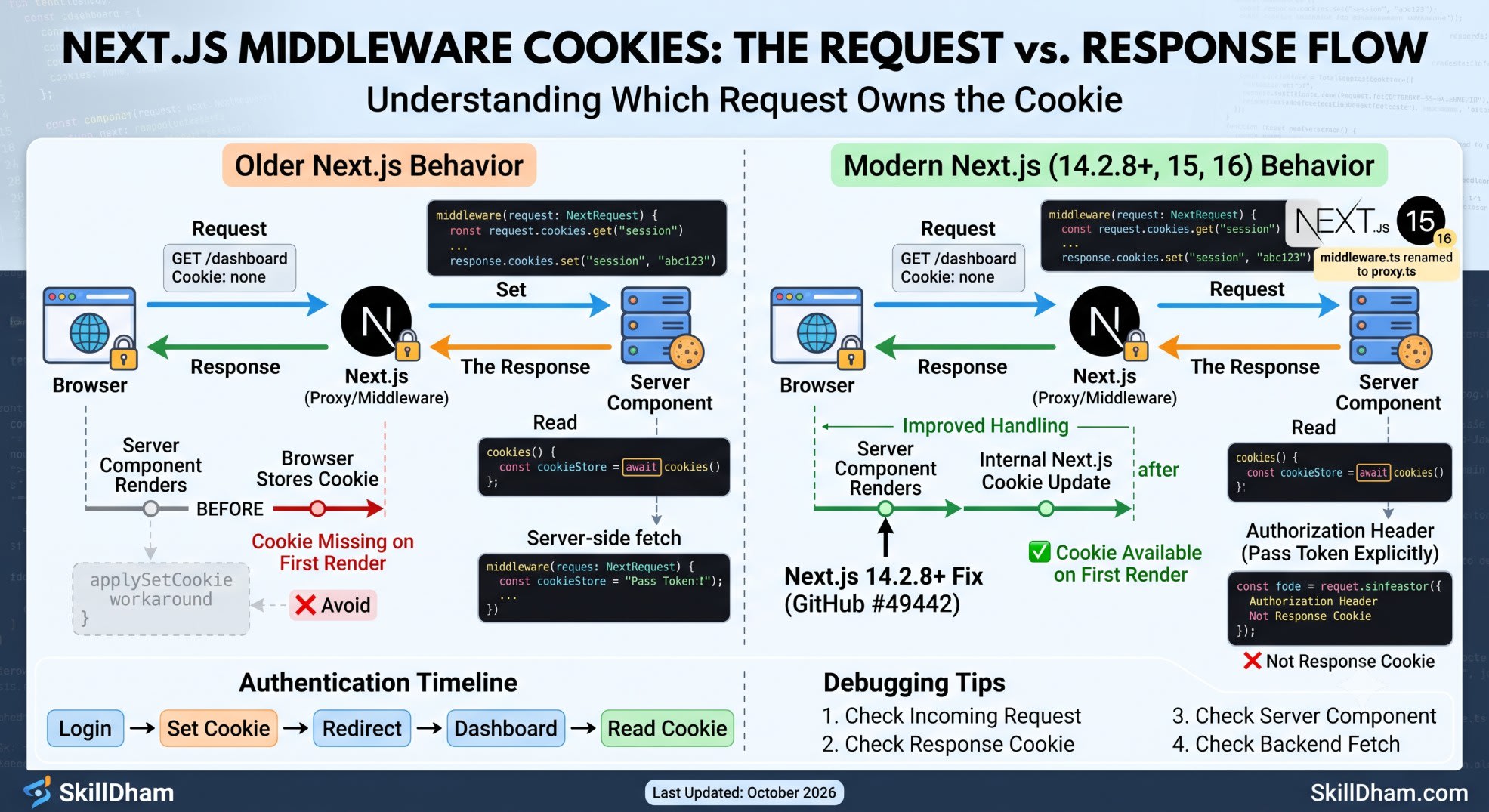
A Next.js middleware cookie is set on the response, not magically added to the current request. Modern Next.js 14.2.8+ improved this behavior for Server Components. Next.js 15 and 16 follow the newer model. The key is knowing which request owns the cookie. This matters most during login, token refresh, redirects, and Server Component rendering.
Why Does the Cookie Look Missing?
You add a cookie in middleware.
The browser receives it.
Then your Server Component still cannot see it.
You refresh the page.
Suddenly, the cookie appears.
At first, this looks like a Next.js bug.
It is easy to blame caching too. You may even start adding no-store everywhere.
The real issue is simpler.
You are looking at two different HTTP messages.
One message is the request coming into Next.js.
The other message is the response going back to the browser.
That difference explains most Next.js middleware cookie problems.
This article shows that flow with real code.
It also covers Next.js 15 and Next.js 16.
The Request and Response Are Different
The first thing to understand is the HTTP flow.
A browser sends a request to Next.js.
Middleware or Proxy can inspect that request.
It can also create a response.
The response can contain a Set-Cookie header.
The browser stores that cookie.
The important part is timing.
The cookie does not travel backward into the request.
What the browser sends
Suppose the browser already has this cookie:
Cookie: session=abc123
Next.js receives it.
You can read it from the incoming request.
// Read a cookie from the incoming request

import { NextRequest, NextResponse } from "next/server";

export function middleware(request: NextRequest) {
  const session = request.cookies.get("session");

  console.log("Incoming session:", session?.value);

  return NextResponse.next();
}
This is the request side.
The cookie already existed before this request started.
What Next.js sends back
Now suppose middleware creates a new cookie.
// Set a cookie on the outgoing response

import { NextRequest, NextResponse } from "next/server";

export function middleware(request: NextRequest) {
  const response = NextResponse.next();

  response.cookies.set("session", "abc123", {
    httpOnly: true,
    secure: process.env.NODE_ENV === "production",
    sameSite: "lax",
    path: "/",
  });

  return response;
}
This creates a response cookie.
The browser receives a Set-Cookie header.
The browser then stores the cookie.
That cookie becomes available to later requests.
This request-response boundary is the key idea.
What Happens During the First Render?
This is where the confusing behavior starts.
Imagine the browser has no session cookie.
It requests /dashboard.
The request enters Next.js.
Middleware runs first.
Middleware creates the cookie.
Then the response continues toward the browser.
The browser stores the cookie after receiving the response.
The first request
Think about the timeline like this:
Browser
   |
   | GET /dashboard
   | Cookie: none
   v
Next.js Proxy
   |
   | Set-Cookie: session=abc123
   v
Server Component
   |
   | Renders current request
   v
Browser
   |
   | Stores session=abc123
The important detail is here.
The cookie was created on the response.
The original request did not contain that cookie.
So code reading the incoming request cannot pretend it was there from the start.
The next request
Now refresh the page.
The browser sends the cookie.
Browser
   |
   | GET /dashboard
   | Cookie: session=abc123
   v
Next.js Proxy
   |
   | Reads session=abc123
   v
Server Component
   |
   | Reads session=abc123
   v
Browser
This is why refresh often appears to "fix" the problem.
The second request actually contains the cookie.
Modern Next.js Changed the Old Behavior
There is an important version detail here.
Older Next.js versions had a known issue around cookies set by middleware.
The cookie could reach the browser but still be missing from the Server Component during that first render.
GitHub issue #49442 tracked this problem.
The behavior was improved in Next.js 14.2.8.
So saying "middleware cookies are always unavailable on the first render" is no longer correct.
Next.js 14.2.8 and later
The framework added better cookie handling between middleware and Server Components.
That matters for current applications.
Next.js 15 and Next.js 16 use the newer behavior.
However, the request-response model still matters.
A cookie set on a response is still a response cookie.
It does not rewrite the original browser request.
Why old fixes can confuse you
You may find old code using a custom applySetCookie workaround.
It tried to copy response cookies into request headers manually.
That approach came from older framework behavior.
// Old workaround: avoid this in modern Next.js

const response = NextResponse.next();

response.cookies.set("session", "abc123");

const requestHeaders = new Headers(request.headers);

requestHeaders.set("Cookie", "session=abc123");

return NextResponse.next({
  request: {
    headers: requestHeaders,
  },
});
Do not add this code just because an old Stack Overflow answer uses it.
First check your Next.js version.
For current applications, understand the built-in cookie behavior first.
If your application also has App Router problems, our Next.js App Router troubleshooting guide covers several related rendering issues.
Reading Cookies in Server Components
Server Components can read cookies with the cookies() API.
In current Next.js versions, cookies() is asynchronous.
That means you should use await.
Read the session
// Read the incoming session cookie

import { cookies } from "next/headers";

export default async function DashboardPage() {
  const cookieStore = await cookies();
  const session = cookieStore.get("session");

  return (
    <main>
      <h1>Dashboard</h1>
      <p>Session: {session?.value ?? "Not found"}</p>
    </main>
  );
}
The Server Component reads cookies available to its request.
That is different from setting a cookie on a response.
This distinction becomes important during authentication.
Do not treat cookies like React state
A cookie is not React state.
Changing a cookie does not work like calling setState.
For example, this is not a valid Server Component pattern:
// Problem: Server Components cannot write cookies this way

import { cookies } from "next/headers";

export default async function Page() {
  const cookieStore = await cookies();

  cookieStore.set("session", "abc123");

  return <div>Logged in</div>;
}
Cookie writes belong in places that can modify the response.
Use a Route Handler or Server Action for that job.
Use Route Handlers for Cookie Writes
Route Handlers are useful when your application needs to create a cookie after an API request.
The response can contain the Set-Cookie header.
Create a session cookie
// Create a session cookie from a Route Handler

import { NextResponse } from "next/server";

export async function POST() {
  const response = NextResponse.json({
    success: true,
  });

  response.cookies.set("session", "abc123", {
    httpOnly: true,
    secure: process.env.NODE_ENV === "production",
    sameSite: "lax",
    path: "/",
  });

  return response;
}
The browser receives this response.
It stores the cookie.
The next request can then send it back.
This pattern keeps the cookie lifecycle clear.
For production email or authentication flows, keep your response handling just as explicit. Our guide on sending emails in Next.js with Resend, Prisma, and MongoDB covers the same kind of server-side separation.
Redirect after setting the cookie
Authentication often needs a redirect.
You can set the cookie before returning the redirect response.
// Set the session before redirecting

import { NextResponse } from "next/server";

export async function POST() {
  const response = NextResponse.redirect(
    new URL("/dashboard", "https://example.com")
  );

  response.cookies.set("session", "abc123", {
    httpOnly: true,
    secure: process.env.NODE_ENV === "production",
    sameSite: "lax",
    path: "/",
  });

  return response;
}
The browser receives both pieces.
It receives the cookie.
It also receives the redirect.
The next request to /dashboard can then include the cookie.
Authentication Makes This Problem More Visible
Cookie issues become much easier to notice during login.
A common flow looks like this:
Login request
     |
     v
Validate credentials
     |
     v
Create session
     |
     v
Set cookie
     |
     v
Redirect to dashboard
     |
     v
Dashboard request
     |
     v
Read session
This flow is normally safe.
Problems appear when developers try to use the newly created cookie during the same request.
Refreshing an access token
Consider an expired access token.
Proxy sees the expired token.
It calls the authentication service.
The service returns a new token.
Proxy sets the new cookie.
Then the request continues.
// Refresh the session cookie before continuing

import { NextRequest, NextResponse } from "next/server";

export async function proxy(request: NextRequest) {
  const response = NextResponse.next();

  const refreshToken = request.cookies.get("refresh_token")?.value;

  if (!refreshToken) {
    return response;
  }

  const newAccessToken = await refreshAccessToken(refreshToken);

  response.cookies.set("access_token", newAccessToken, {
    httpOnly: true,
    secure: process.env.NODE_ENV === "production",
    sameSite: "lax",
    path: "/",
  });

  return response;
}

async function refreshAccessToken(refreshToken: string) {
  const response = await fetch("https://api.example.com/auth/refresh", {
    method: "POST",
    headers: {
      "Content-Type": "application/json",
    },
    body: JSON.stringify({ refreshToken }),
  });

  if (!response.ok) {
    throw new Error("Token refresh failed");
  }

  const data: { accessToken: string } = await response.json();

  return data.accessToken;
}
Now comes the important question.
Should another fetch during this same request automatically receive the new cookie?
No.
The browser has not received the response yet.
The new cookie exists on the response.
It does not automatically become part of another outgoing server-side request.
Forward the new token explicitly
If your backend needs the refreshed token immediately, pass it explicitly.
// Forward the refreshed token explicitly

const apiResponse = await fetch("https://api.example.com/profile", {
  headers: {
    Authorization: `Bearer ${newAccessToken}`,
  },
});
This removes the ambiguity.
The cookie is for the browser's next request.
The Authorization header is for this server-side request.
That distinction solves many auth bugs.
Next.js 16 Uses Proxy Instead of Middleware
If you are using Next.js 16, there is another important change.
The old middleware.ts convention has been renamed to proxy.ts.
The function is also called proxy.
Next.js 15 style
// Next.js 15: middleware.ts

import { NextRequest, NextResponse } from "next/server";

export function middleware(request: NextRequest) {
  const session = request.cookies.get("session");

  if (!session) {
    return NextResponse.redirect(new URL("/login", request.url));
  }

  return NextResponse.next();
}
Next.js 16 style
// Next.js 16: proxy.ts

import { NextRequest, NextResponse } from "next/server";

export function proxy(request: NextRequest) {
  const session = request.cookies.get("session");

  if (!session) {
    return NextResponse.redirect(new URL("/login", request.url));
  }

  return NextResponse.next();
}
The cookie concept does not change.
The file convention does.
Next.js 16 is currently Active LTS, while Next.js 15 is in Maintenance LTS.
If you are upgrading an older project, do not copy old middleware examples blindly.
Debug the Cookie at Every Stage
When a cookie looks missing, do not guess.
Check the complete request flow.
You want to answer four questions.
1. Did the browser send it?
Check the incoming request.
// Check the incoming cookie

import { NextRequest, NextResponse } from "next/server";

export function middleware(request: NextRequest) {
  console.log(
    "Incoming cookie:",
    request.cookies.get("session")?.value
  );

  return NextResponse.next();
}
If this is empty, the browser did not send the cookie.
2. Did your response set it?
Check the response cookie.
// Check the response cookie

import { NextResponse } from "next/server";

export function middleware() {
  const response = NextResponse.next();

  response.cookies.set("session", "abc123");

  console.log(
    "Response cookie:",
    response.cookies.get("session")?.value
  );

  return response;
}
Now you know whether your code created the response cookie.
3. Can the Server Component read it?
Check cookies().
// Check the cookie inside the Server Component

import { cookies } from "next/headers";

export default async function Page() {
  const cookieStore = await cookies();

  console.log(
    "Server Component cookie:",
    cookieStore.get("session")?.value
  );

  return <div>Check your server logs.</div>;
}
This tells you what the current Server Component request can see.
4. Does your backend receive the token?
A server-side fetch() is another request.
Do not assume the new response cookie is already attached.
// Send the token explicitly to the backend

const token = "abc123";

const response = await fetch("https://api.example.com/profile", {
  headers: {
    Authorization: `Bearer ${token}`,
  },
});
This four-step check is much faster than randomly changing cache settings.
If your Next.js build also behaves differently between local and production, check our Next.js build troubleshooting guide.
Key Takeaways
A Next.js middleware cookie belongs to a request or response.
Incoming cookies come from the browser request.
response.cookies.set() changes the outgoing response.
The browser stores the new cookie after receiving the response.
Modern Next.js 14.2.8+ improved first-render cookie handling.
Next.js 15 and 16 use the newer cookie behavior.
Server-side fetches do not automatically get new response cookies.
Next.js 16 uses proxy.ts instead of middleware.ts.
Frequently Asked Questions
Does middleware set cookies before the page renders?
Middleware can set a cookie on its response. Modern Next.js also improved how that cookie state reaches Server Components. However, the browser does not send that cookie back until a request can contain it.
Why does the cookie appear after refresh?
The refresh creates a new browser request. The browser can now include the cookie received earlier. That makes the cookie available as incoming request data.
Is the first-render cookie problem fixed in Next.js?
The older middleware cookie issue was improved in Next.js 14.2.8. Current Next.js 15 and 16 use the newer behavior. Application-specific request flows can still expose the request-response difference.
Can Server Components set cookies?
Cookie writes should happen in supported response-producing contexts. Use a Route Handler or Server Action when your code needs to modify cookies.
Can middleware read cookies?
Yes. Middleware or Proxy can read cookies from the incoming request. Use request.cookies.get() for that request data.
Why does my backend not receive the new cookie?
Your backend request is a separate request. A cookie set on the current response does not automatically become a header on that server-side fetch. Pass the required token explicitly when needed.
What changed in Next.js 16?
Next.js 16 renamed the Middleware convention to Proxy. The file becomes proxy.ts. The exported function is commonly named proxy.
Should I use an old applySetCookie workaround?
Do not use old workarounds without checking your Next.js version. The framework changed its cookie handling. Start with the current request-response model first.
Conclusion
The confusing part of a Next.js middleware cookie is usually not the cookie itself.
It is the request-response timeline.
The browser sends a request first.
Next.js can create a response cookie.
The browser stores that cookie after receiving the response.
A later request can then send it back.
Modern Next.js handles many old first-render issues better.
Still, auth refreshes and server-side API calls need extra care.
Once you separate request cookies from response cookies, the behavior becomes much easier to debug.
If you work with Next.js often, follow SkillDham for more practical debugging guides and framework fixes.