
Next.js AVIF Optimization RCE: Am I Affected? Patch Guide
Skilldham
Engineering deep-dives for developers who want real understanding.
Last updated: September 2026
TL;DR
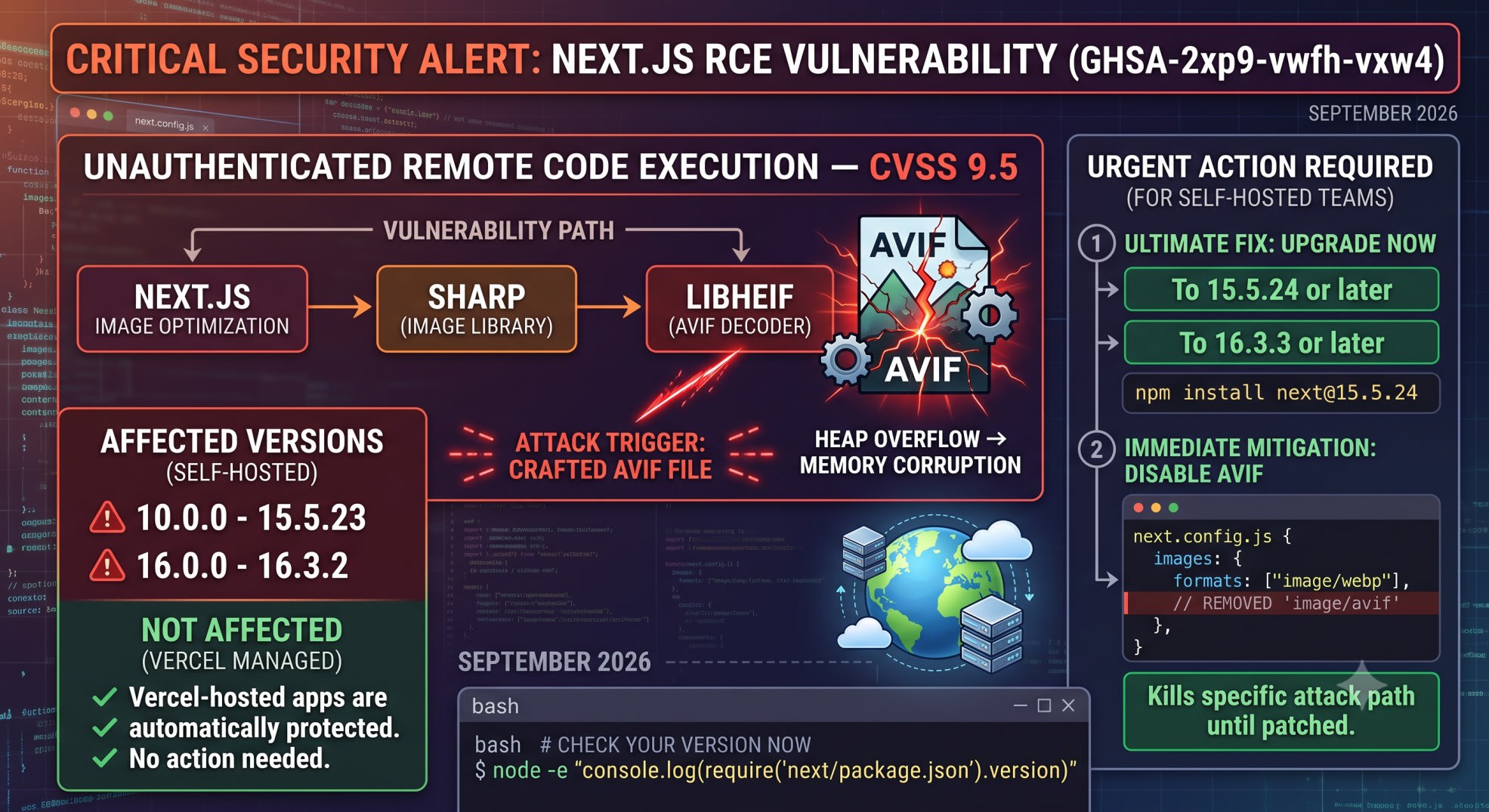
Next.js has a critical RCE flaw. It's tracked as GHSA-2xp9-vwfh-vxw4. The CVSS score is 9.5, and no login is needed to trigger it.
The bug lives in libheif. sharp calls libheif to decode AVIF images. Next.js inherits the exposure through that chain.
It affects self-hosted Next.js 10.0.0 through 15.5.23, and 16.0.0 through 16.3.2. Vercel-hosted apps are already protected and need no action.
Self-hosted teams should upgrade today, to 15.5.24 or 16.3.3. If you can't upgrade right now, remove image/avif from your images.formats config and redeploy. That one change closes this specific hole tonight.
You open your terminal at 11pm. A teammate pinged Slack with a CVSS 9.5 and the word "unauthenticated."
You check your Next.js version. It's old. Nobody has touched next.config.js in months.
You Google it. You land on five security blogs. They all say the same thing: critical, patch now.
None of them tell you if your setup is exposed. None give you a command to check.
Here's what's actually happening. Here's whether your self-hosted app is exposed. And here's exactly what to run tonight.
What GHSA-2xp9-vwfh-vxw4 Actually Is
The libheif Heap Overflow
Next.js does not decode AVIF images itself. It hands that job to sharp.
sharp hands the AVIF-specific work to libheif. That's where the bug lives.
A crafted AVIF file can trick libheif in a specific way. It contains two nested references. Those references make libheif build an image with two Alpha-plane entries at different bit depths.
The decoder allocates a buffer sized for the first entry. That entry is only 8-bit. Then it writes 16-bit values from the second entry into that same buffer.
The write overshoots the allocation. It overshoots by roughly 16,384 bytes. That corrupts adjacent heap memory.
That memory corruption is the primitive an attacker needs. It's enough for remote code execution. No login, no session, no special headers required.
Why Sharp and Next.js Inherit It
This bug was not written by the Next.js team. It lives three layers down.
Next.js calls sharp. sharp calls libheif. libheif has the actual defect.
The upstream libheif advisory is tracked separately, as GHSA-g89c-p67h-r497. Next.js only inherits the exposure because of one thing: its Image Optimization API calls into that vulnerable code path whenever AVIF output is enabled.
There is no fix in libheif itself yet. That's why the Next.js patch takes a different approach. It disables AVIF optimization entirely, rather than patching a bug it doesn't control.
This is the same lesson as auditing a dependency you didn't write yourself. If you haven't checked your lockfile for tampering recently, checking your lockfile for compromised packages covers the same risk from a different angle.
Are You Affected? Check Your Version Now
The One Command to Run
Run this from your project root. It prints the installed Next.js version.
bash
# Prints the exact version of next currently installed
node -e "console.log(require('next/package.json').version)"
Compare the output against the affected ranges below.
Affected:  10.0.0 - 15.5.23   (fixed in 15.5.24)
Affected:  16.0.0 - 16.3.2    (fixed in 16.3.3)
Safe:      15.5.24 or later, on the 15.x line
Safe:      16.3.3 or later, on the 16.x line
A caret range like "next": "^16.2.0" in package.json doesn't tell you the real version. Lockfiles pin exact versions. Always check the installed package, not the range.
If you already ran this same check for the July 2026 Next.js security release, you know the drill. Check the installed version, not the range in package.json, and check it on the actual deployed instance.
Docker and Kubernetes Version Checks
For a running container, exec into it. Run the same check against the built image's node_modules.
bash
# Replace <container-name> with your actual container or pod name
docker exec <container-name> node -e \
  "console.log(require('/app/node_modules/next/package.json').version)"
For Kubernetes, the pattern is the same. Use kubectl exec instead:
bash
kubectl exec <pod-name> -- node -e \
  "console.log(require('/app/node_modules/next/package.json').version)"
Adjust /app to match your actual WORKDIR. If you run multiple services, script this check across every deployment. Don't check one and assume the rest match.
Vercel-Hosted vs Self-Hosted
If You're on Vercel
Vercel has confirmed something important: apps on its managed platform are already protected. Vercel disabled AVIF optimization across its managed Image Optimization service as soon as the flaw was identified.
No upgrade, config change, or redeploy is required for this specific issue. Still plan to upgrade to 15.5.24 or 16.3.3 on a normal schedule, since that release also fixes a separate Windows path traversal CVE.
If You're Self-Hosted
If you run Next.js yourself, on your own servers, Docker, or Kubernetes, none of Vercel's platform protection applies to you. The vulnerable code path only stops being reachable once your own deployment is patched or reconfigured.
This is the exact distinction most current coverage blurs. Reading "Next.js patches critical RCE" and assuming you're safe because "Vercel" and "Next.js" share a name is the most common wrong assumption right now, and it's incorrect.
This is the same managed-vs-self-hosted distinction that mattered for the Next.js middleware proxy bypass CVE earlier this year. Worth checking that one too if you haven't already.
The Real Fix: Upgrade to a Patched Version
Upgrading on the 15.x Line
If you're tracking Next.js 15 as your Maintenance LTS, upgrade to 15.5.24:
bash
npm install next@15.5.24
# or
yarn add next@15.5.24
# or
pnpm add next@15.5.24
Rebuild your application. Deploy a fresh artifact. Editing package.json alone does nothing until the lockfile updates and a new build actually ships.
Upgrading on the 16.x Line
If you're on Next.js 16, the Active LTS track, upgrade to 16.3.3:
bash
npm install next@16.3.3After upgrading, confirm the live production version. Run the same check command from earlier, against the deployed instance, not your local machine. A patch that only exists in your repository has fixed nothing.
Can't Upgrade Today? Disable AVIF Optimization
Sometimes a major version bump needs QA time you don't have tonight. This interim fix removes the trigger condition for this flaw, with no version bump required.
The next.config.js Change
javascript
// Wrong: AVIF enabled, vulnerable to GHSA-2xp9-vwfh-vxw4 on affected versions
module.exports = {
  images: {
    formats: ["image/avif", "image/webp"],
  },
};
javascript
// Correct: AVIF removed, this specific attack surface is closed
module.exports = {
  images: {
    formats: ["image/webp"],
  },
};
Redeploy after this change. The Image Optimization API stops offering AVIF as an output format. The code path that reaches the vulnerable libheif decoder no longer runs.
Why This Actually Stops the Attack
The vulnerable code only runs during one specific step. It's when the Image Optimization API decodes an AVIF input. Remove image/avif from your allowed formats, and that decode step never happens for attacker-supplied files.
This is not a full fix. It does nothing for the separate Windows path traversal CVE. It also won't help if some other part of your stack decodes AVIF outside of next/image.
Harden remotePatterns While You're In There
Wrong Config
An unrestricted image source configuration is risky. It lets the optimizer fetch and decode a file from almost any URL. That's exactly the delivery mechanism this flaw needs.
javascript
// Wrong: any remote domain can supply an image to be decoded
module.exports = {
  images: {
    domains: ["*"],
  },
};
Correct Config
javascript
// Correct: only explicitly trusted domains can supply remote images
module.exports = {
  images: {
    remotePatterns: [
      {
        protocol: "https",
        hostname: "assets.yourdomain.com",
      },
      {
        protocol: "https",
        hostname: "cdn.yourtrustedvendor.com",
      },
    ],
  },
};
A short remotePatterns allowlist removes the easiest attack path. That path is an attacker linking to a malicious AVIF file hosted anywhere online. It won't stop a user-upload path that feeds into your own optimizer, so this is a hardening step, not a replacement for the upgrade.
What This Means If You're Not Using AVIF
Older Next.js image pipelines default images.formats to WebP only. Plenty of self-hosted apps were never exposed, unless AVIF was added deliberately.
Newer image pipeline releases changed that default. AVIF became automatic. A project upgraded in the last year may be exposed, without anyone typing avif into a config file.
Don't assume either way. Run the check:
bash
# Prints your current images.formats setting from next.config.js
node -e "console.log(require('./next.config.js').images?.formats)"
If the output includes image/avif, and your Next.js version falls in the affected range, treat this as urgent tonight. Not next sprint.
Key Takeaways
The next.js avif optimization rce flaw, tracked as GHSA-2xp9-vwfh-vxw4, has no CVE ID assigned as of this writing.
It affects self-hosted Next.js 10.0.0-15.5.23 and 16.0.0-16.3.2, fixed in 15.5.24 and 16.3.3.
Vercel-hosted apps are already protected. Self-hosted apps are not, no matter how reassuring the framework name sounds.
The trigger condition is AVIF enabled in images.formats, combined with an unpatched version.
The fastest interim fix is removing image/avif from images.formats and redeploying. No version bump required.
Tightening remotePatterns reduces exposure, but doesn't eliminate it on its own.
Always verify the live production version after patching, not just the version in your repository.
FAQ
Is there a CVE number for the Next.js AVIF RCE?
No. As of this writing the flaw is tracked only as GHSA-2xp9-vwfh-vxw4. The GitHub advisory lists the CVE field as no known CVE.
Which Next.js versions are affected by GHSA-2xp9-vwfh-vxw4?
Versions 10.0.0 through 15.5.23, and 16.0.0 through 16.3.2. The fix ships in 15.5.24 and 16.3.3.
Am I affected if I don't use AVIF images?
Only if AVIF output is enabled in your images.formats config. Older projects default to WebP only. Newer image pipeline releases made AVIF a default, so check explicitly rather than assume.
Is Vercel-hosted Next.js affected?
No. Vercel disabled AVIF optimization across its managed service as soon as the flaw was identified, and confirms no customer action is required.
Can I fix this without upgrading Next.js?
Yes, as an interim step. Removing image/avif from images.formats closes the trigger condition. It does not fix the separate Windows path traversal issue from the same release.
Does restricting remotePatterns fully protect me?
No, but it helps. It removes the easiest delivery path, an attacker-hosted file at an arbitrary URL. It doesn't stop a user-upload path that feeds into your optimizer.
Is there a public exploit for this vulnerability?
The researchers who reported it published a proof-of-concept. It demonstrates the underlying heap corruption under AddressSanitizer. No confirmed in-the-wild exploitation had been reported as of late August 2026.
What about the separate Windows RCE from the same release?
CVE-2026-75604 is a different, unrelated flaw. It affects Windows-hosted servers using both routers without Cache Components. It has no workaround besides upgrading, and it's fixed in the same 15.5.24 and 16.3.3 releases.
Getting This Patched Tonight
The pattern here isn't new. A framework is only as secure as the dependency three layers down that almost nobody audits directly.
What matters right now is closing one gap. That's the gap between "there is a critical patch" and "every self-hosted instance is running it." Run the version check, patch or disable AVIF, and confirm production, in that order.
For more on tracking version-specific security releases as they land, subscribe to the newsletter below.