
Prisma 7 Neondb Nextjs Driver Adapter - Working Setup
Skilldham
Engineering deep-dives for developers who want real understanding.
Last updated: June 2026
TL;DR - Quick Fix
Two errors hit in this order:
Error 1:
PrismaClientConstructorValidationError: requires either 'adapter' or 'accelerateUrl'Error 2:
Module not found: Can't resolve 'fs'Fix both in 3 steps:
Step 1 - Install adapter:
bash
npm install @prisma/adapter-pg pg
npm install -D @types/pg
Step 2 - Update schema.prisma:
prisma
generator client {
  provider = "prisma-client"
  output   = "./generated/prisma"
}

datasource db {
  provider = "postgresql"
}
Step 3 - Pass connectionString directly in lib/db.ts:
typescript
const adapter = new PrismaPg({
  connectionString: process.env.DATABASE_URL,
  connectionTimeoutMillis: 5000,
  max: 10,
});
Tested on: Prisma 7.6 - NeonDB - Next.js 15 - Vercel
You install Prisma 7. You copy the setup from the docs. You run the dev server.
It crashes before a single query runs.
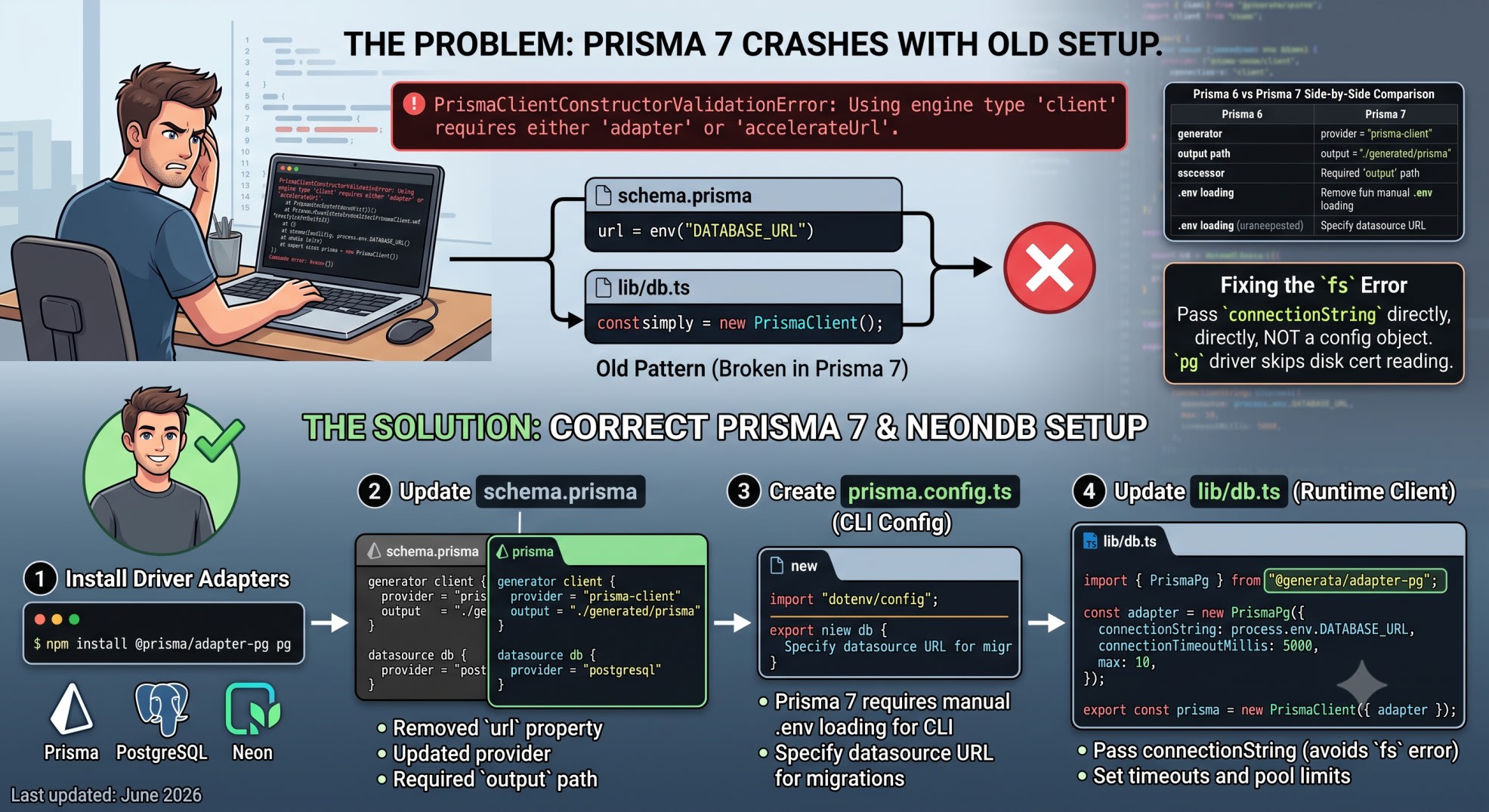
PrismaClientConstructorValidationError: Using engine type 'client'
requires either 'adapter' or 'accelerateUrl'
You go back to the docs. You follow every step. You try again.
Module not found: Can't resolve 'fs'The official guide assumes you use Prisma Postgres - their hosted product. If you use NeonDB with Next.js on Vercel, the guide leaves you stuck. Every tutorial still shows the Prisma 5 pattern. It breaks in Prisma 7.
I hit both errors building Munshi - a production Next.js app on NeonDB. Here is the exact setup that works.
Quick Answer
Prisma 7 removed the Rust query engine. Every database now needs a driver adapter. For NeonDB in Next.js, install @prisma/adapter-pg and pg. Move your database URL from schema.prisma into prisma.config.ts. Pass the adapter into PrismaClient. The fs error appears because the pg driver reads SSL certs from disk. Fix it by passing connectionString directly.
Why Prisma 7 Breaks the Old Setup
Prisma 6 had a built-in Rust engine. You passed a URL. Prisma handled the rest.
Prisma 7 removed that engine. The client is smaller and edge-friendly now. But it cannot open a database connection on its own. You must pass a driver adapter.
What the Old Pattern Looks Like
typescript
// Wrong: Prisma 6 pattern - throws in Prisma 7
import { PrismaClient } from "@prisma/client";

export const prisma = new PrismaClient({
  datasourceUrl: process.env.DATABASE_URL,
});
This throws on startup. There is no engine to use the URL.
What Changed in the Schema Too
The datasource block no longer accepts a url property. The generator provider changed too.
prisma
// Wrong: Prisma 6 schema - P1012 error in Prisma 7
generator client {
  provider = "prisma-client-js"
}

datasource db {
  provider = "postgresql"
  url      = env("DATABASE_URL")
}
Both blocks need updating.
The Correct schema.prisma for Prisma 7
prisma
// Correct: Prisma 7 schema
generator client {
  provider = "prisma-client"
  output   = "./generated/prisma"
}

datasource db {
  provider = "postgresql"
}
Two things changed. The generator is now prisma-client - not prisma-client-js. And output is required. Prisma 7 will not generate into node_modules for you.
The URL moves out of the schema. It goes into prisma.config.ts.
Setting Up prisma.config.ts for NeonDB
Create this file at your project root - next to package.json.
typescript
// prisma.config.ts - Correct: Prisma 7 CLI config for NeonDB
import "dotenv/config";
import { defineConfig, env } from "prisma/config";

export default defineConfig({
  schema: "prisma/schema.prisma",
  migrations: {
    path: "prisma/migrations",
  },
  datasource: {
    url: env("DATABASE_URL"),
  },
});
The import "dotenv/config" line is required. Prisma 7 stopped loading .env files on its own. Without it, env("DATABASE_URL") returns undefined. Every migration command fails.
Why This url Is Different
The url here is only for the CLI. It is used by prisma migrate dev and prisma db push. The runtime client gets its connection through the adapter - not this file.
Use your direct NeonDB URL here. Not the pooled one. The CLI needs a direct connection to run migrations.
Installing the Right Packages
bash
# For NeonDB with Next.js App Router
npm install @prisma/adapter-pg pg
npm install -D @types/pg
NeonDB uses standard PostgreSQL protocol. @prisma/adapter-pg is the right adapter. Do not use @neondatabase/serverless here. That is a different driver for Neon's HTTP protocol. It does not work with Prisma's adapter system.
The Correct lib/db.ts for NeonDB
typescript
// lib/db.ts - Correct: Prisma 7 client with pg adapter for NeonDB
import { PrismaClient } from "./generated/prisma/client";
import { PrismaPg } from "@prisma/adapter-pg";

const adapter = new PrismaPg({
  connectionString: process.env.DATABASE_URL,
  connectionTimeoutMillis: 5000,
  max: 10,
});

const globalForPrisma = globalThis as unknown as {
  prisma?: PrismaClient;
};

export const prisma =
  globalForPrisma.prisma ?? new PrismaClient({ adapter });

if (process.env.NODE_ENV !== "production") {
  globalForPrisma.prisma = prisma;
}
Three things to note.
The import path is ./generated/prisma/client - not @prisma/client. Prisma 7 generates the client into the output path you set in the schema.
connectionTimeoutMillis: 5000 brings back Prisma 6 timeout behavior. The pg driver has no timeout by default. A bad connection hangs forever without this.
max: 10 caps the pool. On Vercel, each function can open a new connection. Without a cap, NeonDB's connection limit runs out fast.
The Module not found: Can't resolve 'fs' Error
This is the second error most developers hit.
Module not found: Can't resolve 'fs'Why It Happens in Next.js
The pg driver reads SSL certs from disk. It uses Node.js's fs module to do this. Next.js's serverless bundler does not include fs. The error shows up at build time on Vercel - not in local dev. Local dev runs in full Node. Vercel's bundler strips it.
The Fix
Pass connectionString directly. Do not use a config object with separate host, port, and ssl fields. When you pass a string, the pg driver reads SSL mode from the URL. It skips the disk-based cert reading.
typescript
// Wrong: config object triggers fs cert reading
const adapter = new PrismaPg({
  host: "ep-xyz.us-east-1.aws.neon.tech",
  port: 5432,
  ssl: { rejectUnauthorized: true },
  database: "mydb",
  user: "user",
  password: "password",
});

// Correct: connection string skips fs cert reading
const adapter = new PrismaPg({
  connectionString: process.env.DATABASE_URL,
  connectionTimeoutMillis: 5000,
  max: 10,
});
Your NeonDB URL already includes ?sslmode=require. The pg driver reads that from the string. No fs access needed.
Prisma 6 vs Prisma 7 - Side by Side
WhatPrisma 6Prisma 7Generatorprisma-client-jsprisma-clientOutput pathAuto (node_modules)Required (./generated/prisma)datasource urlIn schema.prismaIn prisma.config.tsClient import@prisma/client./generated/prisma/clientConnectiondatasourceUrl propDriver adapter required.env loadingAutomaticManual (dotenv/config)
Running Your First Migration
Once the config is in place:
bash
# Generate the Prisma client
npx prisma generate

# Run migrations
npx prisma migrate dev --name init

# Or push schema directly
npx prisma db push
If migrate dev fails with a URL error, check two things. First, import "dotenv/config" must be the first line in prisma.config.ts. Second, DATABASE_URL must be set in your .env file.
For builds failing on Vercel, the Next.js Build Fails on Vercel post covers environment variable patterns in detail.
Key Takeaways
Prisma 7 NeonDB Nextjs setup requires a driver adapter - new PrismaClient() with just a URL throws PrismaClientConstructorValidationError
Move your database URL from schema.prisma into prisma.config.ts - the schema keeps only the provider
Add import "dotenv/config" as the first line of prisma.config.ts - Prisma 7 does not load .env on its own
Pass connectionString directly to the adapter - not a config object - to avoid the fs error in Next.js builds
The client import path changes to ./generated/prisma/client - not @prisma/client
Set connectionTimeoutMillis: 5000 and max: 10 on the adapter - the pg driver has no timeout and will hang on bad connections
Use your direct NeonDB URL in prisma.config.ts and the pooled URL in lib/db.ts
FAQs
Why does Prisma 7 throw PrismaClientConstructorValidationError with NeonDB?
Prisma 7 removed the Rust engine. The client cannot open a connection on its own. You must pass @prisma/adapter-pg into new PrismaClient({ adapter }). Passing datasourceUrl alone no longer works.
What is the difference between @prisma/adapter-pg and @neondatabase/serverless?
@prisma/adapter-pg uses the standard pg driver over TCP. This is what Prisma needs. @neondatabase/serverless is Neon's HTTP driver. It does not work with Prisma's adapter system.
Why does prisma.config.ts exist in Prisma 7?
The CLI and the runtime client are now separate. The CLI reads its database URL from prisma.config.ts. Without this file, migration commands fail.
Why do I get Module not found: Can't resolve 'fs' in Next.js?
The pg driver reads SSL certs from disk using fs. Next.js's serverless bundler does not include fs. Pass connectionString to the adapter instead of a config object. The driver reads SSL mode from the URL string - no disk access needed.
Do I still need @prisma/client installed in Prisma 7?
Yes. But do not import from it in your app code. Import from ./generated/prisma/client instead. @prisma/client is still needed as a peer dependency.
Why does my DATABASE_URL come back as undefined in prisma.config.ts?
Prisma 7 stopped loading .env files in the CLI. Add import "dotenv/config" as the first line of prisma.config.ts. It must run before env("DATABASE_URL") is called. Bun users can skip this - Bun loads .env on its own.
Can I use NeonDB's pooled URL with Prisma 7?
For lib/db.ts - yes. For prisma.config.ts - no. The CLI needs a direct connection for migrations. Use the direct URL in prisma.config.ts and the pooled URL in the adapter.
Does Prisma 7 work with Next.js Edge Runtime?
Not with @prisma/adapter-pg. The pg driver uses Node.js APIs. Edge Runtime does not have them. Use @prisma/adapter-neon with @neondatabase/serverless for Edge - but that is a different setup.
Conclusion
Prisma 7 did not break NeonDB support. It split one job into three parts - the runtime client, the CLI config, and the connection driver. Set each one up correctly and it works in production.
Both errors trace back to the same root cause. The old pattern assumed a Rust engine that no longer exists. Replace it with an adapter and a connection string. Both errors go away.
For every Prisma 7 error that appears during migration - adapter, P1012, SSL, and timeout - the Prisma 7 Migration Errors guide walks each one in order.
If this saved you a few hours, the SkillDham newsletter covers one real debugging breakdown like this each week.