

Fix Prisma Studio Pipe Error After Upgrading to v7
Skilldham
Engineering deep-dives for developers who want real understanding.
Last updated: August 2026
TL;DR
The Prisma Studio pipe error is Error [ERR_STREAM_UNABLE_TO_PIPE]: Cannot pipe to a closed or destroyed stream. It started after Prisma 7 rebuilt Studio into a standalone tool.
It fires when a browser request closes early. Often that's a favicon call. Sometimes it's a cancelled request. Studio tries to pipe a response anyway, and Node throws.
For most people it's just log noise. For some, Studio actually stops responding.
Below is the version matrix, the real cause, and the workarounds that stop it.
You open Prisma Studio. Data loads fine.
Then your terminal fills with this:
Error [ERR_STREAM_UNABLE_TO_PIPE]: Cannot pipe to a closed or destroyed stream
You check your schema. Nothing changed.
You check your connection string. Also fine.
You Google the exact error string. You get three GitHub issues. Nothing else.
No blog post explains it. No Stack Overflow answer exists. No official word from Prisma either.
That's the prisma studio pipe error. It has been showing up since Prisma 7 rewrote Studio from scratch.
I hit this the same week I moved Munshi's backend to the v7 driver adapter setup. The error showed up within a day of the upgrade.
Here's what's actually happening, and how to make it stop.
Why the Prisma Studio Pipe Error Started in v7
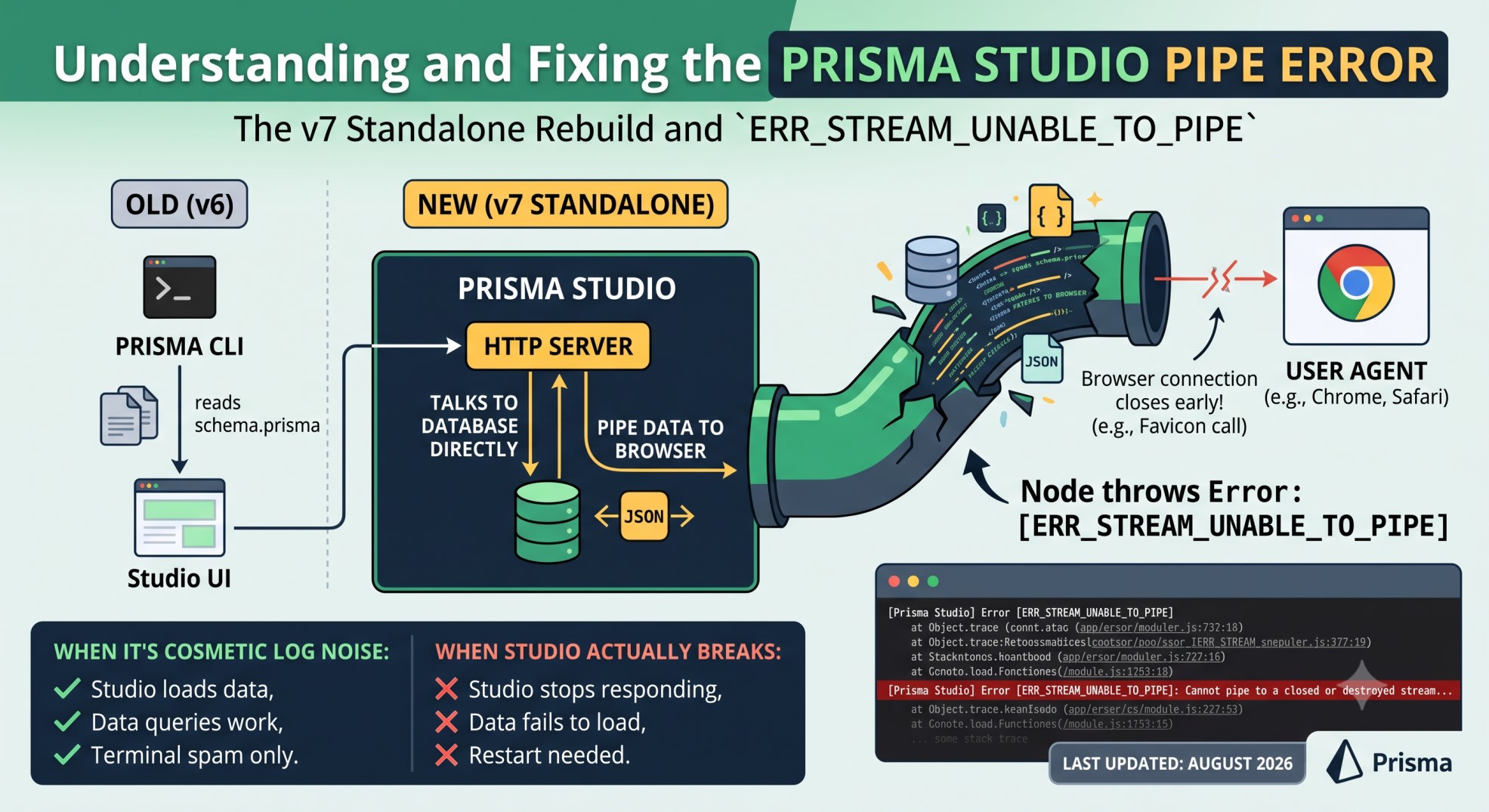
The Old Studio vs the New Standalone Studio
Prisma 6 Studio read your schema.prisma file directly. It ran inside the same process as your Prisma CLI.
Prisma 7 changed that completely. Studio is now standalone and SQL-driven. It no longer reads schema.prisma at all.
It talks to your database directly. It pipes data to your browser over its own HTTP server. That new piping layer is where this error lives.
This is a structural change, not a small patch. New code paths bring new failure modes. The pipe error is one of them.
Where ERR_STREAM_UNABLE_TO_PIPE Actually Comes From
ERR_STREAM_UNABLE_TO_PIPE is a Node.js stream error. It isn't Prisma-specific on its own.
Node throws it when something pipes data into a stream that's already closed.
In Studio's case, the "something" is an HTTP response. The "closed stream" is a browser connection that ended early.
Favicon requests do this often. So do preflight OPTIONS requests. So does closing a tab mid-request.
Studio's server tries to pipe a response anyway. The connection is already gone. Node throws the error.
The Exact Error You're Seeing
The Full Stack Trace
Three independent reports. Three different setups. The same stack trace:
[Prisma Studio] Error [ERR_STREAM_UNABLE_TO_PIPE]: Cannot pipe to a closed or destroyed stream
    at pipelineImpl (node:internal/streams/pipeline:264:15)
    at node:stream/promises:31:5
    at new Promise ()
    at pipeline (node:stream/promises:20:10)
    at Ror (/node_modules/prisma/build/index.js:4648:10029)
    at Server. (/node_modules/prisma/build/index.js:4648:9221)
    at process.processTicksAndRejections (node:internal/process/task_queues:104:5) {
  code: 'ERR_STREAM_UNABLE_TO_PIPE'
}
If your error matches this line for line, you're hitting the same bug. It isn't a local misconfiguration.
Version and OS Matrix
Here's every confirmed report as of this writing.
ReportOSNodePrisma / Studio versionTriggerGitHub prisma/studio#1479Windows 1124.14.1Prisma 7.6.0, Studio 0.27.3Opening the Studio UI, PostgreSQLGitHub prisma/studio#1479 (separate reporter)macOS24.10.0Prisma / adapter-pg 7.7.0Running prisma dev with local PostgresGitHub prisma/studio#1501WindowsNot specifiedPrisma 7.8.0Opening Studio UIGitHub prisma/prisma#29649Not specifiedNot specifiedPrisma 7.8.0Studio launched inside a NestJS dev server
That spread matters. This isn't one machine or one OS.
It's three operating systems. Three Node versions. Three separate Prisma 7.x releases. All producing the same stack trace.
Is the Prisma Studio Pipe Error Actually Safe to Ignore
When It's Just Log Noise
For most reporters, Studio keeps working. Data loads. Queries run.
The only symptom is the error printing every time you open the UI.
One reporter summed it up well. The errors are cosmetic. Studio keeps running and stays reachable at your local URL.
If that matches what you're seeing, treat this as noise, not a real failure.
When It's Not Cosmetic
Not every report agrees, though. One user on the same thread said it plainly: for them, the errors were not cosmetic. Studio became unusable.
No one has published what makes that case different yet. If Studio actually stops responding for you, this isn't the log-noise version. The stack trace can look identical either way.
Check that Studio still loads data before you assume it's harmless. If it doesn't, restart the process. Watch whether the error appears before or after Studio stops responding.
How to Stop the Log Spam
Confirm It's Cosmetic For You First
Open Studio. Load a table. Edit a row.
If everything works and the error is only in your terminal, you're in the cosmetic case. The fixes below clean up your output. They don't touch broken functionality, because nothing is broken.
Filter the Error From Your Terminal Output
If the noise is the only problem, filter it at the shell level. Don't touch your Prisma setup for this.
bash
# Wrong: piping stderr and stdout together buries real errors in the noise
npx prisma studio

# Correct: filter the known pipe error out of your terminal output
npx prisma studio 2>&1 | grep -v "ERR_STREAM_UNABLE_TO_PIPE"
This doesn't fix the underlying bug. It stops the noise from drowning out errors you actually need to see.
Pin to a Working Prisma 7 Version
Reporters on GitHub have seen this on 7.6.0 through 7.8.0. No one has confirmed a patched version yet.
If the noise is disrupting your workflow, pinning your version can help. Treat it as a temporary step, not a real fix.
json
{
  "dependencies": {
    "prisma": "7.6.0",
    "@prisma/client": "7.6.0"
  }
}
Pin the exact version, not a caret range. A caret range can silently pull in a later patch where this still happens.
Root Cause in Plain Terms
HTTP Connections That Close Early
Here's the mechanism in one line. Studio's server starts streaming a response. The browser connection closes first. Node has nowhere to pipe the data.
Browsers cancel requests constantly. A favicon fetch that never resolves. A preflight check for a request that gets superseded. A tab closed mid-load.
None of that is unusual browser behavior. What's unusual is Studio's server not checking whether the stream is still open first.
Why v6 Never Had This Problem
Prisma 6 Studio didn't run its own standalone HTTP server this way. It leaned on a different internal transport between the CLI and the browser UI.
Prisma 7 replaced that entire layer. Studio became SQL-driven and standalone, and this new transport came with it.
The pipe error is a side effect of that rebuild. It isn't a regression in something that used to be solid.
Is This Fixed Yet?
Confirmed On
As of this writing, the prisma studio pipe error has been independently reported on:
Prisma 7.6.0 (Windows and macOS)
Prisma 7.7.0 (Windows and macOS, including plain prisma dev)
Prisma 7.8.0 (Windows, and inside a NestJS dev server)
That's three minor versions over roughly eleven weeks. No patch release has addressed it yet.
What To Do If You're Filing a New Issue
If you hit this, add your report to the existing GitHub thread. That helps get it fixed. Don't open a new one.
Include your OS, your Node version, and your exact Prisma and Studio version. Also note whether Studio actually stops responding, or just logs the error.
That last detail is missing from most reports so far. It's exactly what the Prisma team needs to tell the two cases apart.
Key Takeaways
The prisma studio pipe error is ERR_STREAM_UNABLE_TO_PIPE. Studio's server throws it when it pipes a response into a browser connection that already closed.
It started after Prisma 7 rebuilt Studio into a standalone, SQL-driven tool. It no longer reads schema.prisma.
It's been reported on Prisma 7.6.0, 7.7.0, and 7.8.0. That spans Windows, macOS, and a NestJS dev server.
For most people, Studio keeps working and the error is just log noise.
For a smaller group, Studio actually stops responding - check that before you assume it's harmless.
Filtering the error out of your terminal output stops the noise without touching your Prisma setup.
Pinning your Prisma version is a temporary workaround, not a confirmed fix.
No official Prisma patch has addressed this as of this writing.
Frequently Asked Questions
What does ERR_STREAM_UNABLE_TO_PIPE mean in Prisma Studio?
It's a Node.js stream error. It means Studio's server tried to send a response through a connection the browser already closed. It has nothing to do with your schema or database.
Is the Prisma Studio pipe error dangerous?
For most reporters, no. Data still loads and queries still run. A minority say Studio stops responding. Check that Studio is actually working before you ignore it.
Which Prisma versions have this bug?
It's been reported on 7.6.0, 7.7.0, and 7.8.0 so far. No version has been confirmed as fixed.
Does downgrading to Prisma 6 fix it?
Downgrading avoids the new standalone Studio entirely. That isn't realistic if you need v7's driver adapters. Filtering the log output is usually the better move.
Why does this only happen in Prisma 7 and not Prisma 6?
Prisma 7 replaced Studio's entire transport layer when it became standalone and SQL-driven. That new HTTP piping layer is where the bug lives. Prisma 6 Studio never had this code path.
Does this happen on every OS?
Yes. It's confirmed on Windows and macOS. It also showed up inside a NestJS dev server where the OS wasn't specified. This isn't a Windows-only or Postgres-only bug.
Can I disable this error through a config flag?
No documented flag exists for this yet. Filtering the output at the shell level is the only workaround confirmed to work right now.
Should I open a new GitHub issue if I hit this?
Add your report to the existing thread instead. Include your OS, Node version, exact Prisma version, and whether Studio actually stops responding for you.
Stopping the log spam is one small piece of a bigger v7 migration. If you're mid-upgrade, the driver adapter setup is usually where the real breakage happens.
The Prisma 7 migration errors and driver adapter config fix post covers those changes in full. It's worth locking down first.
Fighting bloated Docker images too after moving to v7? The Prisma Docker image bloat v7 fix post walks through the exact build changes. It shrinks the image back down.
This bug will likely get patched eventually. Rebuilds this size usually settle within a few releases.
Until then, the fixes above keep Studio usable. Watch the GitHub threads if you want to know the moment a real fix ships.