
I Built a React Native Expense Tracker App - Here's How
Skilldham
Engineering deep-dives for developers who want real understanding.
I build complex systems for clients every day. Enterprise React applications, .NET backends, production deployments that serve real users. And for two years running, I could not tell you where my own money was going.
Every month the same thing. Salary comes in, month ends, nothing saved. I knew I was spending but had no idea on what. I tried Walnut. I tried Money Manager. I tried a few others. The problem was not that those apps were bad - the problem was that none of them fit the way I actually think about money.
Too many features I did not use. Missing the ones I did. And somewhere in the back of my head, a developer's quiet frustration - why am I paying for something I could build better myself?
So one night I opened VS Code and started building. That app is Munshi - and it taught me more about real product development than any tutorial I have taken. This is the full story of how I built a react native expense tracker app from scratch, what I got wrong, and what surprised me.
What Munshi Actually Does
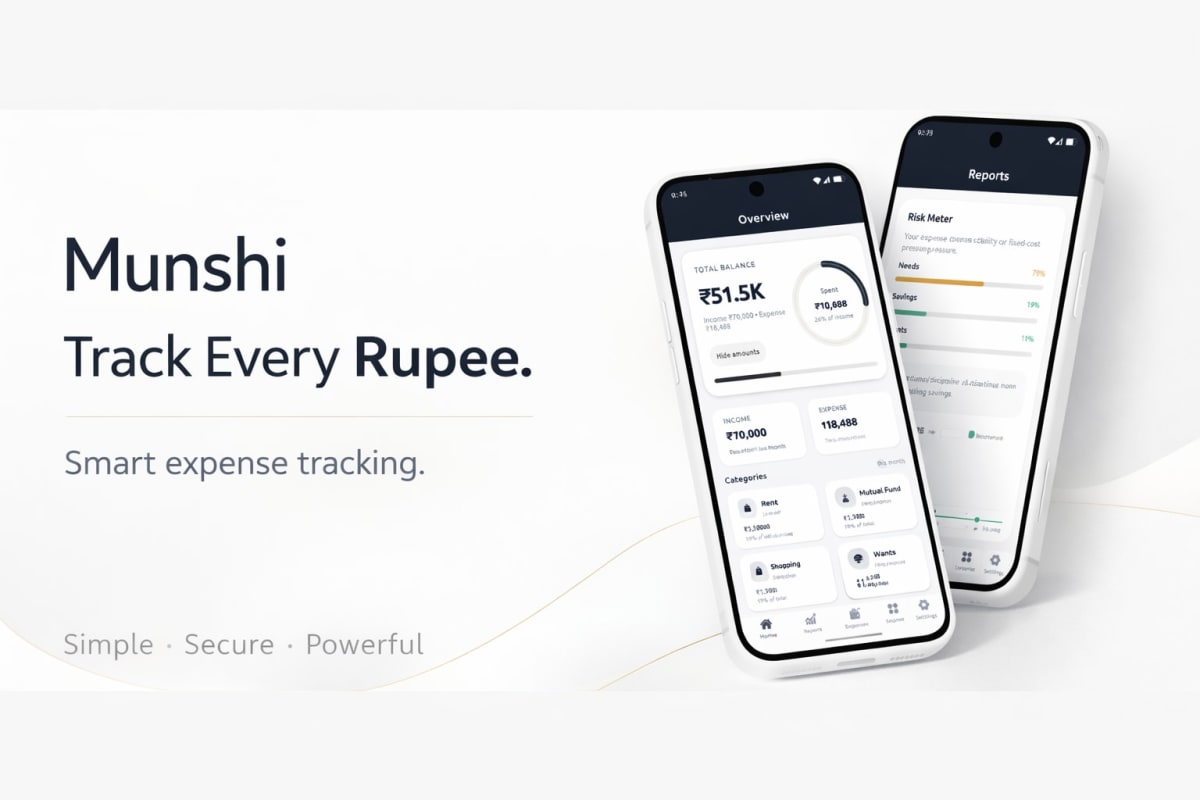
Munshi is a personal finance tracker built in React Native. The name means someone who keeps accounts - which is exactly what it does, nothing more.
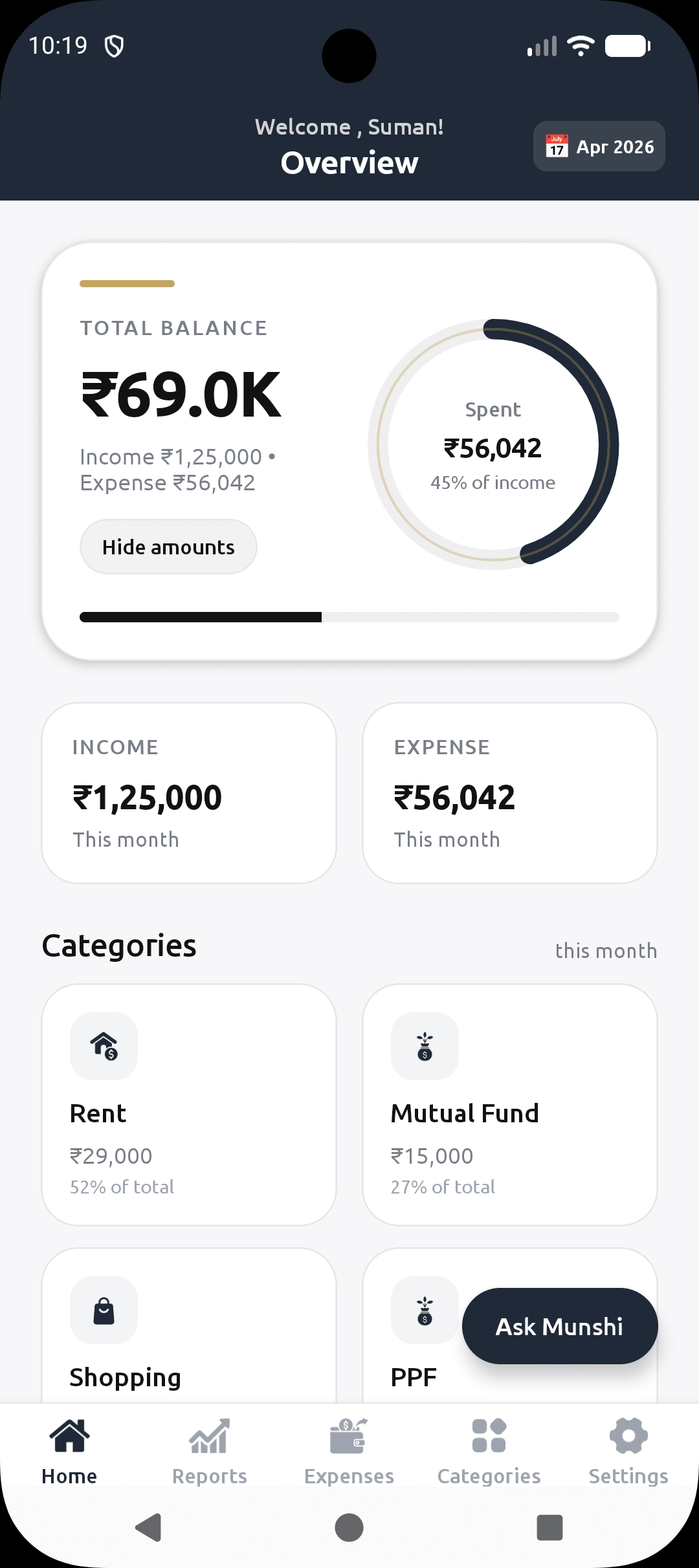
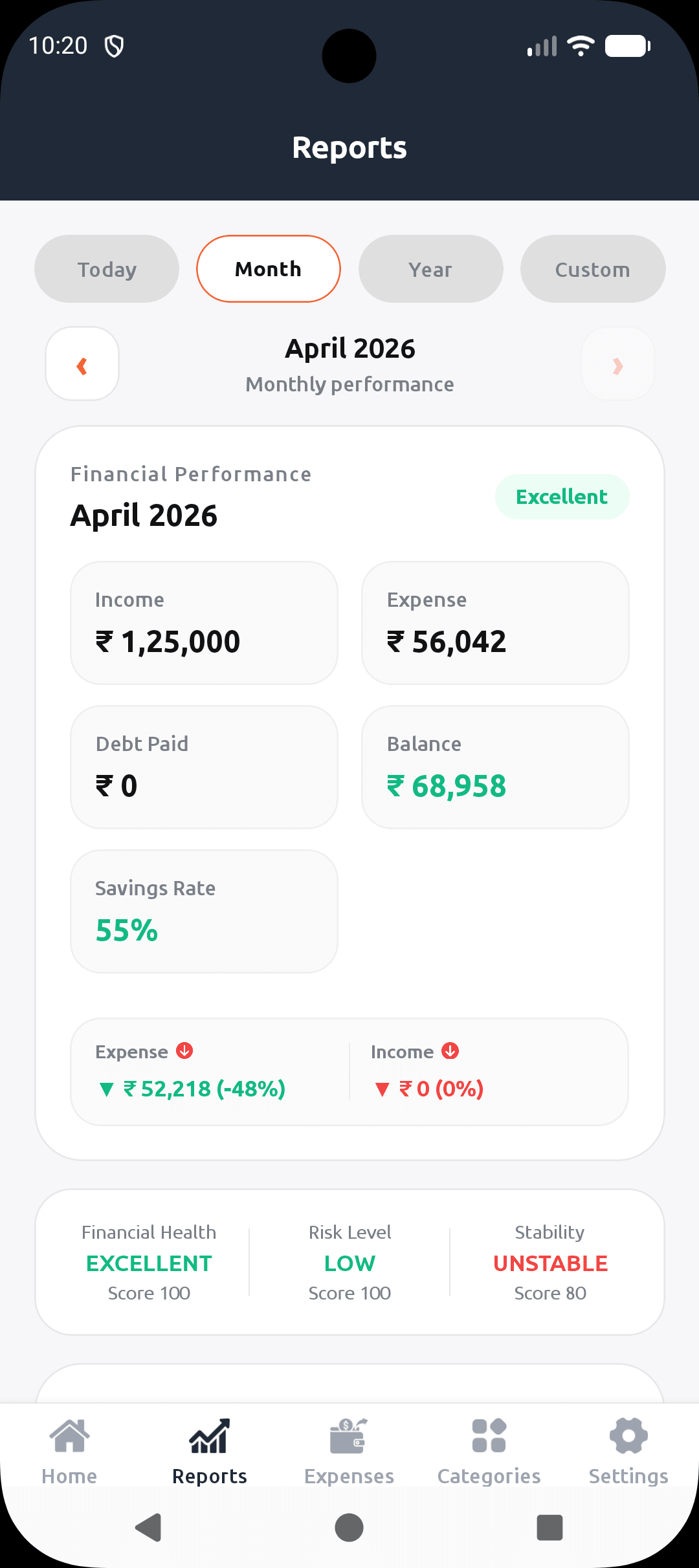
The home screen shows your total balance, income versus expense for the current month, and a category breakdown of where money went. The reports screen shows a financial health score, risk level, and how your spending splits across needs, wants, and savings. The expenses screen shows every transaction in chronological order with categories and amounts.
It runs on my phone right now. I use it every day.
What it does not have: social features, bank sync, investment tracking, subscription management, or any of the other things that make general-purpose finance apps feel bloated. I built it for one person - me - and that constraint made it sharper than anything I would have built trying to satisfy everyone.
Watch the full walkthrough:
Why Build Instead of Use Something Existing
Three reasons pushed me from "I should build this" to actually building it.
The first was data privacy. Every finance app I tried stored my transaction data on their servers. I wanted my expense data to stay mine - on a database I control, with no third party having access to it. When you track every rupee you spend, that is sensitive data. I did not want it sitting in someone else's system.
The second was exact features. Not more, not less. I wanted categories I define myself, a budget model that matches how I think about money, and export options that work the way I need them to. Off-the-shelf apps make assumptions about how you manage money. Building your own means you get to make those assumptions yourself.
The third was learning. This is the one that is hardest to explain until you have experienced it. Building a real product you actually use every day forces a different kind of problem-solving than tutorials ever create. You hit edge cases nobody wrote about. You make decisions under real constraints. You care about the outcome in a way that a todo app clone simply never makes you care.
Our guide on why React apps feel slow even when APIs are fast covers performance patterns I applied directly in Munshi - real problems from a real production app.
The Tech Stack and Why I Chose It
React Native for the frontend.
I chose React Native because I wanted the app on both iOS and Android from a single codebase. I work with React every day at work so the component model, hooks, and state management patterns were already familiar. No context switching, no learning a new paradigm from scratch. The React Native documentation is solid - I referenced it constantly in the early weeks.
NeonDB with Prisma for the database.
NeonDB is a serverless Postgres database. The free tier is generous enough for a personal app and the connection pooling handles serverless environments correctly - something that tripped me up early when I was connecting directly without pooling and running into connection limit errors.
Prisma sits on top as the ORM. Type-safe queries, clean migrations, readable schema definition. When I needed to add a new field to the expenses table, the migration workflow took minutes rather than the manual SQL I would have written otherwise.
A premium UI theme.
White background, dark charcoal headers, gold accent lines. I wanted it to feel like a fintech product, not a developer side project. This was a deliberate decision - if I am going to look at this app every day, it should look good. The visual quality of a personal project affects how much you use it.
PDF and CSV export.
Built in from early on. Monthly reports you can save and actually share. This turned out to be one of the most-used features.
What Building This Actually Taught Me
This is the part that tutorials leave out entirely.
Solo product work is fundamentally different from client work. When you build for a client, requirements come to you. Deadlines exist. Scope is defined. When you build your own product, you are your own worst enemy. I added features nobody asked for. I redesigned screens three times. I kept finding reasons not to ship. I had to force myself to set a rule - ship first, improve after. That rule is the only reason Munshi exists as a usable app rather than a permanent work in progress.
Your own problems are not universal problems. Munshi is built exactly for how I think about money. That means it works perfectly for me and might not work for someone else at all. Early on that felt like a problem. Eventually I understood it as a product decision. Building for a specific person - even if that person is yourself - produces a sharper product than building for everyone at once.
Real constraints produce real learning. I learned how NeonDB handles connections in serverless environments properly because I ran into actual production errors, not because I read about it. I figured out React Native performance issues because the app was slow on my own phone and that bothered me enough to dig in. No course replicates that level of motivation.
You ship differently when you are the user. Every bug I find, I find because I use the app daily. Every missing feature is one I actually want. This feedback loop is something you genuinely cannot replicate with a fake project. The moment you stop being a developer building an app and become a user frustrated by your own app, the quality of your work changes.
For more on React Native development patterns I used throughout Munshi, our post on React state not updating covers the async state issues I ran into repeatedly during development.
The AI Layer I Added
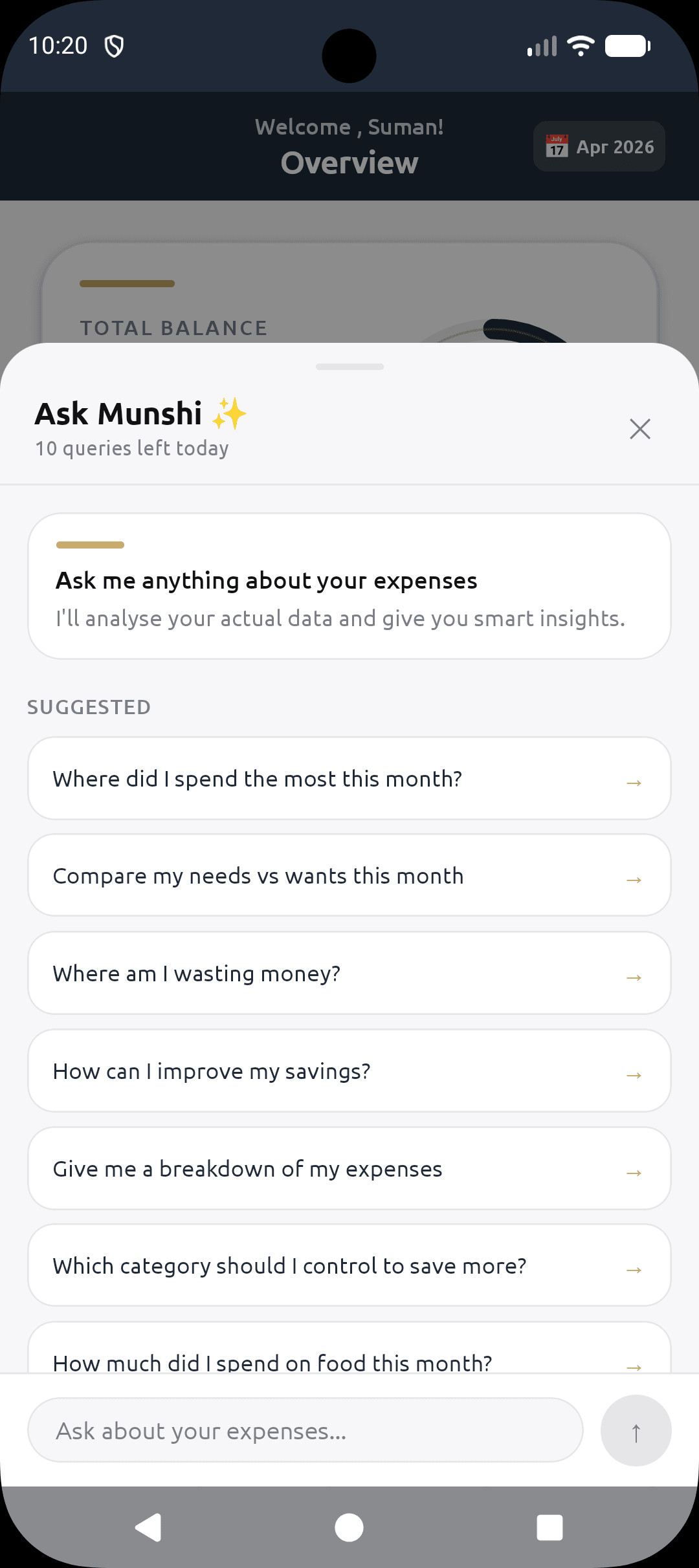
The next version of Munshi has something I did not plan from the start - AI-powered expense queries.
You can ask Munshi questions about your spending in plain Hindi, English, or Hinglish and it answers using your actual transaction data. "Pichle mahine kitna khana pe kharch kiya?" works exactly as you would expect. The entire AI stack costs under five hundred rupees a month to run in production.
The implementation uses a RAG architecture - the app retrieves relevant transactions, passes them as context to the language model, and gets back answers grounded in your real data rather than generic responses. I will cover the full technical breakdown in the next post - how I built a production RAG system inside a mobile app on a budget that would probably surprise you.
If you want early access to Munshi before the next version ships, send your Gmail ID to skilldham24@gmail.com and I will add you to the testing group.
Key Takeaway
Building a react native expense tracker app from scratch taught me that the technology matters less than you think. What matters is that you are solving a real problem for a real person - even if that person is you.
Munshi exists because I was genuinely frustrated with every alternative I tried. That frustration was more useful than any structured course I have taken. It gave me a problem I cared about, which gave me motivation that did not require discipline to maintain.
If you have a problem you keep working around - an app that almost fits, a workflow that almost works - that irritation is probably your next project waiting to be built.
FAQs
Is the Munshi react native expense tracker app available to download? Munshi is currently in beta testing on Android. Send your Gmail ID to skilldham24@gmail.com to join the early access group and get access before the public launch.
What tech stack powers Munshi? React Native for the mobile frontend, Prisma ORM with NeonDB serverless Postgres for the database, and a Node.js backend. The UI uses a custom white and gold premium theme built entirely with React Native StyleSheet.
Why build a react native expense tracker app instead of using an existing one? Data privacy, exact feature control, and genuine learning. Off-the-shelf apps store your transaction data on third-party servers and make assumptions about how you manage money. Building your own gives you full control over both the data and the experience.
How long did building Munshi take? The core app took a few weeks of evenings and weekends alongside a full-time job. The ongoing improvements - AI features, export options, UI polish, performance work - are still in progress. A personal app is never really finished.
What is coming in the next version of Munshi? AI-powered expense queries in Hindi, English, and Hinglish using a RAG architecture that grounds answers in your actual transaction data. Full technical breakdown in the next post - including how the entire AI stack runs for under five hundred rupees a month in production.