
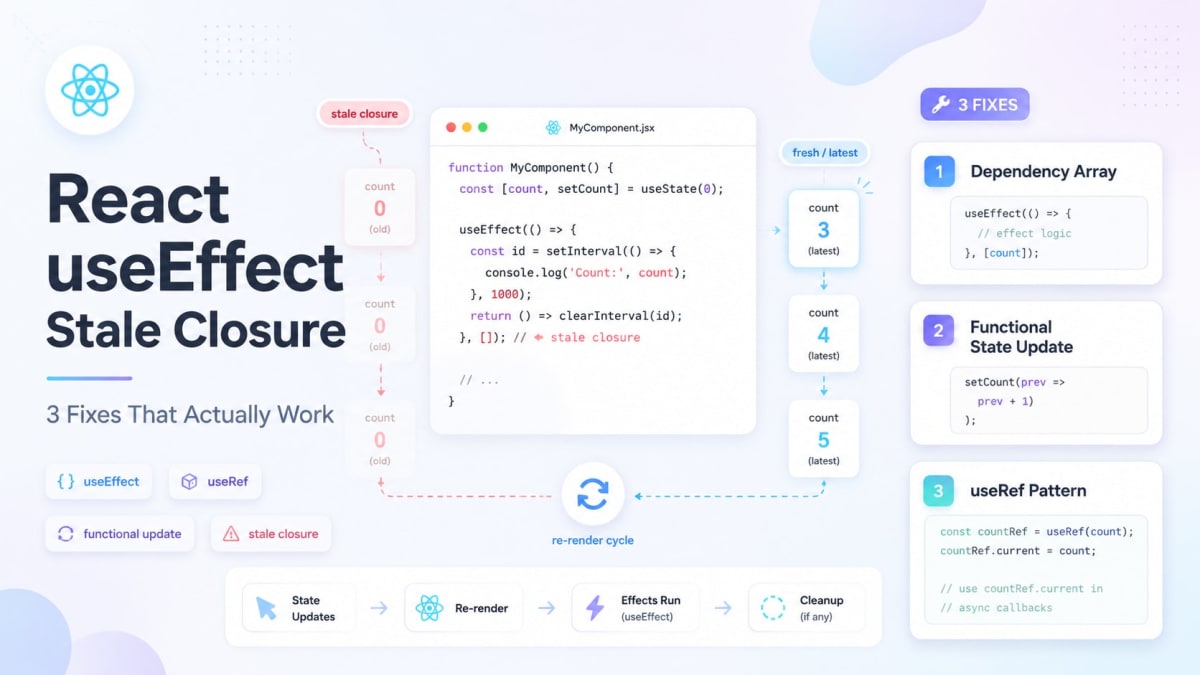
React useEffect Stale Closure: 3 Fixes That Actually Work
Skilldham
Engineering deep-dives for developers who want real understanding.
Last Updated: July 2026
TL;DR - Quick Fix
react useEffect stale closure happens when a function inside useEffect captures a variable's value at creation time and never updates.
Three fixes — pick based on your situation:
Fix 1 - Only updating state from previous value:
javascript
// Correct: bypass the closure entirely
setCount(prev => prev + 1);
Fix 2 - Timer or event listener, React 18:
javascript
// Correct: ref always holds latest value
const queryRef = useRef(query);
queryRef.current = query; // sync on every render
Fix 3 - React 19.2+ (cleanest solution):
javascript
// Correct: useEffectEvent reads fresh values always
const onKeyDown = useEffectEvent((e) => {
  searchAPI(query); // always current
});
Tested on: React 18 - React 19.2 - Next.js 15
You set up a setInterval inside useEffect.
The interval runs. It reads count. It logs it.
You click the button five times. Count goes to 5. But the interval keeps logging 0.
You add count to the dependency array. Now the interval logs correctly - but it's tearing down and re-creating every second because count keeps changing.
Neither version feels right. And both are caused by the same thing: a stale closure.
This is one of the most common bugs in React, and the fix depends on exactly which version of the problem you're hitting. This article covers all three patterns with wrong code, right code, and a clear explanation of why each fix works.
Quick Answer
A React useEffect stale closure happens when a function inside useEffect captures a variable's value at the time the effect ran - and keeps using that old value even after the variable updates. There are three fixes depending on your situation: add the value to the dependency array (when re-running the effect is fine), use useRef to read the latest value without re-running (for timers and event listeners), or use useEffectEvent in React 19.2 for event handlers that need fresh values without effect re-runs.
Why React useEffect Stale Closures Happen
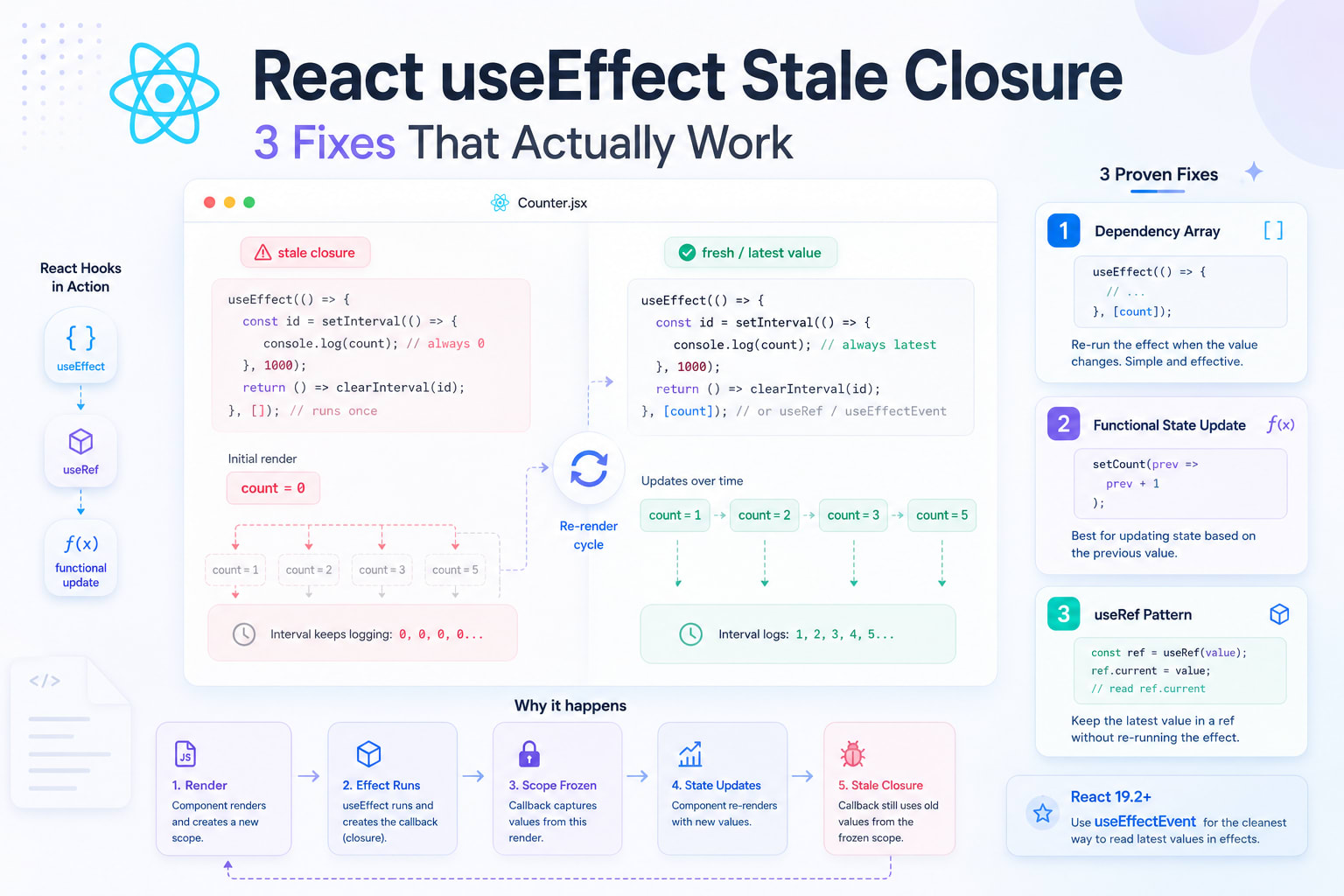
Every time a React component renders, it creates a new scope. Every function defined in that scope - including the callback inside useEffect - captures the variables from that specific render.
When you write this:
javascript
// Wrong: this effect's interval captures count = 0 forever
useEffect(() => {
  const id = setInterval(() => {
    console.log(count); // always logs 0
  }, 1000);
  return () => clearInterval(id);
}, []); // empty array = runs once = scope frozen at first render
The empty dependency array tells React: "run this effect once after the first render." So the setInterval callback is created once - and it captures count as 0. When count changes to 1, 2, 3, the interval doesn't know. It's holding a reference to the old scope.
Why the "obvious" fix has a side effect
The instinct is to add count to the dependency array:
javascript
// Works, but creates a new interval on every count change
useEffect(() => {
  const id = setInterval(() => {
    console.log(count); // now reads correct value
  }, 1000);
  return () => clearInterval(id);
}, [count]); // re-runs every time count changes
Now count is always fresh. But the effect re-runs on every count change - which means React calls the cleanup (clearInterval), then creates a brand new setInterval. On rapid state changes this is expensive, and for WebSocket connections or subscriptions it causes constant disconnects and reconnects.
This is the core tension: you want the effect to run once, but you want the handler to always read fresh values.
All three fixes below solve this in different ways.
Fix 1: Functional setState - When You Only Need to Update State
This is the simplest fix and works specifically when your stale closure is inside a setInterval or setTimeout that updates state based on its previous value.
javascript
// Wrong: reads stale count from the closure
useEffect(() => {
  const id = setInterval(() => {
    setCount(count + 1); // count is frozen at 0, so this always sets 1
  }, 1000);
  return () => clearInterval(id);
}, []);
The interval always sets count to 0 + 1 = 1. It never increments past 1.
javascript
// Correct: functional update bypasses the closure entirely
useEffect(() => {
  const id = setInterval(() => {
    setCount(prev => prev + 1); // React passes the actual current value
  }, 1000);
  return () => clearInterval(id);
}, []);
The functional form of setCount receives the real current value directly from React - the closure never touches count at all. No dependency array change needed.
When to use Fix 1
Use this when your effect only needs to update state and the new value is derived from the previous one. It doesn't help when you need to read state for some other purpose (like logging it, sending it to an API, or using it in a condition).
Fix 2: useRef - When the Effect Must Run Once
This is the pattern most React developers reach for before React 19.2. It works for timers, event listeners, WebSocket handlers - anything where you need to read the latest value but can't afford to re-run the effect.
javascript
// Wrong: stale closure in an event listener
function KeyboardLogger() {
  const [query, setQuery] = useState('');

  useEffect(() => {
    const handleKeyDown = (e) => {
      if (e.key === 'Enter') {
        console.log('Searching for:', query); // always logs the initial value
        searchAPI(query);
      }
    };
    window.addEventListener('keydown', handleKeyDown);
    return () => window.removeEventListener('keydown', handleKeyDown);
  }, []); // runs once, query is stale immediately after first change

  return <input onChange={e => setQuery(e.target.value)} />;
}
Every time the user types, query updates and the component re-renders. But the handleKeyDown function inside the effect was created once, on mount. It captured query as ''. Enter will always search for an empty string.
The useRef fix:
javascript
// Correct: ref always holds the latest query value
function KeyboardLogger() {
  const [query, setQuery] = useState('');
  const queryRef = useRef(query);

  // Keep the ref in sync on every render
  // This runs synchronously during render - before the effect
  queryRef.current = query;

  useEffect(() => {
    const handleKeyDown = (e) => {
      if (e.key === 'Enter') {
        console.log('Searching for:', queryRef.current); // always latest
        searchAPI(queryRef.current);
      }
    };
    window.addEventListener('keydown', handleKeyDown);
    return () => window.removeEventListener('keydown', handleKeyDown);
  }, []); // still runs once, listener is added once

  return <input onChange={e => setQuery(e.target.value)} />;
}
queryRef.current = query runs on every render, keeping the ref updated. When handleKeyDown fires and reads queryRef.current, it always gets the latest value - even though the effect itself only ran once.
Why this works
A ref is a plain JavaScript object: { current: someValue }. Reading .current is not a closure - it's a property access on a shared object. The function doesn't capture the value; it captures the ref object, and the ref object's .current is always mutated to the latest value.
When to use Fix 2
Use useRef for timers, event listeners, WebSocket message handlers, and any effect that registers a persistent callback. For anything beyond storing a mutable value or DOM access, there's now a cleaner option in React 19.2.
Fix 3: useEffectEvent - The React 19.2 Native Solution
React 19.2 shipped useEffectEvent as a stable hook - and it solves the stale closure problem directly, without the manual ref sync pattern.
If you've ever felt like the useRef workaround was too much boilerplate for a common problem, this is why it exists.
javascript
import { useState, useEffect, useEffectEvent } from 'react';

// Wrong: old useRef workaround - two effects, extra ref, manual sync
function KeyboardLogger() {
  const [query, setQuery] = useState('');
  const queryRef = useRef(query);

  useEffect(() => {
    queryRef.current = query;
  }, [query]);

  useEffect(() => {
    const handleKeyDown = (e) => {
      if (e.key === 'Enter') searchAPI(queryRef.current);
    };
    window.addEventListener('keydown', handleKeyDown);
    return () => window.removeEventListener('keydown', handleKeyDown);
  }, []);
}
javascript
// Correct: useEffectEvent handles this in one clean block
function KeyboardLogger() {
  const [query, setQuery] = useState('');

  // This function always reads the latest query
  // but it is NOT a reactive dependency of useEffect
  const onKeyDown = useEffectEvent((e) => {
    if (e.key === 'Enter') {
      searchAPI(query); // always reads current query
    }
  });

  useEffect(() => {
    window.addEventListener('keydown', onKeyDown);
    return () => window.removeEventListener('keydown', onKeyDown);
  }, []); // empty array is correct - effect has no reactive deps of its own

  return <input onChange={e => setQuery(e.target.value)} />;
}
One effect. No extra ref. No manual sync. onKeyDown always reads the current query at the moment it fires.
What useEffectEvent actually does
Think of it as splitting the effect into two parts: the part that reacts to changes (the dependency array), and the part that just reads values when called (the event handler). useEffectEvent wraps the second part - giving it a stable reference that never goes stale, without making it a dependency of the effect.
The ESLint exhaustive-deps rule in eslint-plugin-react-hooks@6 (shipped with React 19.2) understands this - it won't warn you to add the useEffectEvent function to your dependency array.
Important constraints
javascript
// Wrong: calling useEffectEvent during rendering throws an error
function Component() {
  const handler = useEffectEvent(() => doSomething());

  handler(); // this throws - cannot call during render
  return <div />;
}

// Correct: only call inside effects or other event handlers
function Component() {
  const handler = useEffectEvent(() => doSomething());

  useEffect(() => {
    handler(); // fine - called inside an effect
  }, []);
}
useEffectEvent is not a general memoization tool. It exists specifically for functions called from inside effects. If you need a stable function reference to pass as a prop to a child component, use useCallback.
For a practical deep dive on when to use useCallback vs useRef, check out the SkillDham guide on React performance optimization.
Which Fix Should You Use?
SituationFixUpdating state based on its previous value (counter, toggle)Functional setState: setState(prev => ...)Timer or event listener, React 18 or olderuseRef - manual sync patternTimer or event listener, React 19.2+useEffectEventEffect needs to actually re-run when value changesAdd to dependency array (not a stale closure fix, just correct behavior)Async fetch that should re-run when a param changesDependency array - the effect should re-run
The rule: if re-running the effect is acceptable and intentional, use the dependency array. If the effect must run once but the handler needs fresh values, use useRef (React 18) or useEffectEvent (React 19.2).
If you're still getting the react-hooks/exhaustive-deps ESLint warning after applying one of these fixes, read the SkillDham guide on useEffect dependency array - it covers every case the linter catches and what the warning actually means.
ESLint Will Catch Most of These Before You Even Run the Code
Enable eslint-plugin-react-hooks in your project if you haven't already. The exhaustive-deps rule flags missing dependencies in useEffect - which is what causes stale closures in the first place.
bash
# Install
npm install eslint-plugin-react-hooks --save-dev
json
// .eslintrc.json
{
  "plugins": ["react-hooks"],
  "rules": {
    "react-hooks/exhaustive-deps": "warn"
  }
}
The linter won't catch stale closures in useRef-based patterns (because the ref is always "stable"), but it will catch the most common case: using a variable inside useEffect without including it in the dependency array.
See the React hooks ESLint plugin docs for the full setup.
Key Takeaways
A React useEffect stale closure happens when a function inside an effect captures a variable's value at creation time - and keeps reading that old value even after it changes
An empty dependency array ([]) means the effect runs once and all closures inside it are permanently frozen to the values from the first render
Use functional setState (setState(prev => ...)) when your effect only needs to compute the next state from the previous one - this bypasses the closure entirely
Use useRef when the effect must run once but handlers need to read the latest value - assign ref.current = value at the top level of the component (not inside another effect)
Use useEffectEvent in React 19.2 for the cleanest pattern - it replaces the manual ref sync workaround with a dedicated hook that always reads fresh values
Never call a useEffectEvent function during rendering - it's only for inside effects and event handlers
Enable eslint-plugin-react-hooks with the exhaustive-deps rule - it catches the missing dependency cases that cause most stale closure bugs before runtime
FAQs
What exactly is a stale closure in React?
A stale closure is when a function inside your component captures a variable's value at the time the function was created - and never updates, even when the variable changes later. In useEffect, this usually shows up as handlers that always read the initial state value, no matter how many times the user has interacted with the page.
Why does useEffect with an empty dependency array cause stale closures?
The empty array tells React to run the effect exactly once - after the first render. Every function created inside that effect captures all variables from the first render's scope. When state updates happen and the component re-renders, those inner functions don't get recreated. They're still holding references to the original values.
Is useEffectEvent stable in React 19.2?
Yes. useEffectEvent was experimental in earlier React 19.x versions, but React 19.2 (released October 2025) shipped it as a stable, supported hook. You can import it directly from react without any experimental flags.
Can I just disable the ESLint exhaustive-deps rule to fix the warning?
Technically yes - but don't. The ESLint warning exists because missing a dependency is almost always the cause of a stale closure bug. Disabling the rule hides the warning but doesn't fix the underlying problem. Use one of the three patterns in this article instead.
What's the difference between useEffectEvent and useCallback for fixing stale closures?
useEffectEvent is for functions called inside effects - it always reads the latest values but is never a dependency of the effect. useCallback gives you a stable function reference that updates when its dependencies change - it's for passing functions as props to child components or using them as dependencies in other hooks. They solve different problems. Using useCallback to "fix" a stale closure inside useEffect will still cause re-runs when its dependencies change.
Does the useRef pattern work for async functions inside useEffect too?
Yes. The ref holds a reference to the object, not a captured value. So even inside a setTimeout, a fetch callback, or a Promise.then, reading ref.current gives you the latest value at the moment of execution - not the value from when the async function was created.
Will React Compiler fix stale closures automatically?
No. The React Compiler (released alongside React 19) handles memoization - it automatically wraps components and values to prevent unnecessary re-renders. But stale closures are a runtime scoping issue, not a memoization issue. The compiler does not rewrite your effect logic. You still need one of the three patterns.
How do I know which fix to use when I'm debugging a stale closure?
Ask two questions. First: should re-running the effect be acceptable when this value changes? If yes - add it to the dependency array. If no - should the effect produce a side effect once, but handlers need fresh reads? Then use useRef (React 18) or useEffectEvent (React 19.2). Third case: are you only updating state from previous state? Use functional setState. Most bugs fit one of these three cases cleanly.
Conclusion
Stale closures in useEffect are not a React bug - they're a direct consequence of how JavaScript closures and React's rendering model interact. Once you understand that effects capture a snapshot of your scope, the fix becomes obvious for each scenario.
Functional setState bypasses the problem entirely for state updates. useRef solves it for persistent handlers in React 18. useEffectEvent in React 19.2 is the cleanest solution for the same pattern - less boilerplate, clearer intent.
If you want to understand how React's rendering model creates these scopes in the first place, the SkillDham post on why useEffect runs twice goes deep on the execution model behind effects.