

React useEffect Not Working? 7 Reasons and Fixes
Skilldham
Engineering deep-dives for developers who want real understanding.
You write a useEffect hook. You refresh the page. Nothing happens. You add a console.log inside. Still nothing. You change the dependency array. Now it fires on every render and breaks the entire app. You stare at the code for ten minutes. It looks exactly like the tutorial you copied it from.
This is the daily reality of working with React hooks. The useEffect hook is supposed to be simple. In practice, it is one of the most confusing APIs in React, and half the bugs in modern React apps trace back to a useEffect doing something nobody expected.
React useEffect not working is almost never about the hook itself. It is about how React schedules effects, how dependency arrays actually work, and how React 18's strict mode changed the rules. Once you understand these three things, every useEffect bug becomes predictable.
Here is exactly why React useEffect stops working and how to fix each specific cause with real code.
Understanding How useEffect Actually Runs
Before fixing anything, you need the mental model. React useEffect runs after the component renders. Not before. Not during. After.
When your component mounts for the first time, React renders the JSX, commits it to the DOM, and then runs your effect. When any value in the dependency array changes, React re-renders the component, then checks if any dependency is different from the previous render. If yes, it runs the effect again.
The dependency array is not magic. It is a shallow comparison using Object.is. That means objects and arrays created inside your component count as new values every render, even if they look identical. This single fact explains 80 percent of useEffect bugs.
React 18 added strict mode behavior that intentionally runs effects twice in development. This is not a bug. It is React forcing you to write effects that can handle being run multiple times safely. If your effect breaks with double-invocation, your effect has a real bug that would eventually show up in production too.
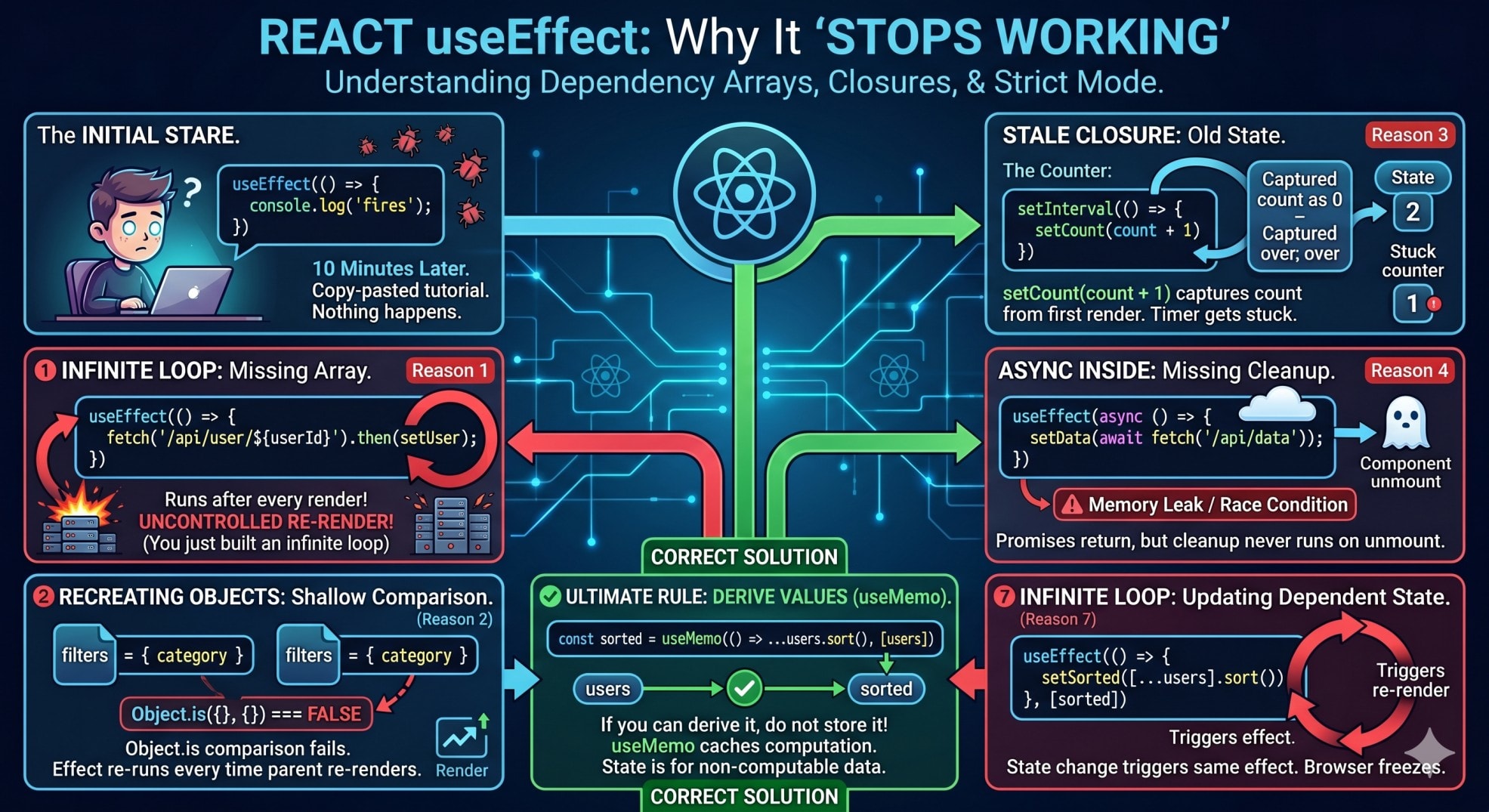
Reason 1: Missing Dependency Array Makes useEffect Not Working
The most common cause of React useEffect not working is a missing or wrong dependency array. The array is not optional. It controls when your effect runs.
jsx
// Wrong - No dependency array
import { useEffect, useState } from 'react';

function UserProfile({ userId }) {
  const [user, setUser] = useState(null);

  useEffect(() => {
    fetch(`/api/users/${userId}`)
      .then(res => res.json())
      .then(setUser);
  });

  return <div>{user?.name}</div>;
}
Without a dependency array, this effect runs after every single render. setUser triggers a re-render. That triggers the effect again. Which calls the API again. Which triggers another re-render. You just built an infinite loop that hammers your server.
jsx
// Correct - Dependency array with userId
useEffect(() => {
  fetch(`/api/users/${userId}`)
    .then(res => res.json())
    .then(setUser);
}, [userId]);
Now the effect runs once when the component mounts, and again only if userId changes. This is the dependency array working as intended.
The rule is simple. Always include every variable from your component scope that your effect uses. The React ESLint plugin react-hooks/exhaustive-deps catches missing dependencies automatically. Install it and actually listen to its warnings.
Reason 2: Object and Array Dependencies Breaking useEffect
This is the most frustrating useEffect bug. Your effect runs on every render even though the data "looks the same." The cause is always an object or array being recreated in the parent component.
jsx
// Wrong - Object recreated on every render
function ProductList({ category }) {
  const filters = { category, sortBy: 'price', inStock: true };

  return <Products filters={filters} />;
}

function Products({ filters }) {
  const [products, setProducts] = useState([]);

  useEffect(() => {
    fetchProducts(filters).then(setProducts);
  }, [filters]);

  return <div>{/* render products */}</div>;
}
Every render of ProductList creates a new filters object. The values inside are identical, but Object.is({}, {}) is false. So Products thinks the dependency changed and runs the effect every render.
jsx
// Correct - Depend on primitive values
function Products({ category, sortBy, inStock }) {
  const [products, setProducts] = useState([]);

  useEffect(() => {
    fetchProducts({ category, sortBy, inStock }).then(setProducts);
  }, [category, sortBy, inStock]);

  return <div>{/* render products */}</div>;
}
Pass primitive values instead of objects. Strings, numbers, and booleans compare correctly. The effect runs only when one of them actually changes.
If you must pass an object, memoize it with useMemo in the parent. This is the same problem behind React useEffect running twice in development, where referential equality trips developers up.
Reason 3: Stale Closure Making useEffect Not Updating
A stale closure is when your effect captures a value from an old render. The effect runs, but uses outdated data. This looks like the effect is "not working" because it shows wrong values.
jsx
// Wrong - Stale closure in useEffect
function Counter() {
  const [count, setCount] = useState(0);

  useEffect(() => {
    const timer = setInterval(() => {
      console.log('Count is:', count);
      setCount(count + 1);
    }, 1000);

    return () => clearInterval(timer);
  }, []);

  return <div>{count}</div>;
}
This effect captures count at the time it runs, which is 0. The empty dependency array means it never re-runs. So setCount(count + 1) is forever setCount(0 + 1). The counter gets stuck at 1.
jsx
// Correct - Use functional updater
function Counter() {
  const [count, setCount] = useState(0);

  useEffect(() => {
    const timer = setInterval(() => {
      setCount(prev => prev + 1);
    }, 1000);

    return () => clearInterval(timer);
  }, []);

  return <div>{count}</div>;
}
The functional updater form prev => prev + 1 always gets the latest state. No stale closure. No dependency needed.
When you need to read the latest value of something outside state, use a useRef. Store the value in ref.current and update it in another effect. This pattern is essential for timers, subscriptions, and event listeners that live longer than one render.
Reason 4: Async Function Inside useEffect Breaking It
Developers often try to make the effect function itself async. This breaks useEffect in subtle ways that cause bugs.
jsx
// Wrong - Making effect function async
useEffect(async () => {
  const data = await fetch('/api/data').then(r => r.json());
  setData(data);
}, []);
An async function returns a promise. React expects the effect to return either nothing or a cleanup function. When it gets a promise, the cleanup never runs. This causes memory leaks and race conditions when the component unmounts mid-fetch.
jsx
// Correct - Declare async inside the effect
useEffect(() => {
  let cancelled = false;

  async function loadData() {
    const data = await fetch('/api/data').then(r => r.json());
    if (!cancelled) setData(data);
  }

  loadData();

  return () => {
    cancelled = true;
  };
}, []);
This pattern handles three things correctly. The effect itself is synchronous, returning a proper cleanup function. The cancelled flag prevents state updates if the component unmounts before the fetch completes. The cleanup function runs when the component unmounts.
Without the cancelled flag, you get the classic "Cannot update state on unmounted component" warning. The React documentation on effects covers this pattern in detail.
Reason 5: Event Listener useEffect Not Working Due to Cleanup
Event listeners added inside useEffect need proper cleanup. Missing cleanup causes duplicate listeners, which makes the effect appear to run multiple times or not work at all.
jsx
// Wrong - No cleanup for event listener
function ResponsiveComponent() {
  const [width, setWidth] = useState(window.innerWidth);

  useEffect(() => {
    window.addEventListener('resize', () => {
      setWidth(window.innerWidth);
    });
  }, []);

  return <div>Width: {width}</div>;
}
Every time this component mounts, a new listener is added. If the component mounts and unmounts multiple times, listeners accumulate. Memory leaks. Performance degrades. Eventually the resize event fires ten copies of the handler.
jsx
// Correct - Return cleanup function
function ResponsiveComponent() {
  const [width, setWidth] = useState(window.innerWidth);

  useEffect(() => {
    const handleResize = () => setWidth(window.innerWidth);
    window.addEventListener('resize', handleResize);

    return () => {
      window.removeEventListener('resize', handleResize);
    };
  }, []);

  return <div>Width: {width}</div>;
}
The cleanup function removes the listener when the component unmounts or before the effect re-runs. Always store the handler in a named function so you can remove exactly the same reference you added.
This same pattern applies to subscriptions, WebSocket connections, and any external resource. If your effect sets something up, it must clean it up. This is especially important to avoid hydration errors in Next.js caused by inconsistent event handling.
Reason 6: useEffect Running Twice in Development
If your useEffect is running twice and you are on React 18, this is intentional. Strict mode mounts components twice in development to help you find bugs. It does not happen in production.
jsx
// This looks broken but is actually fine
function Chat({ roomId }) {
  useEffect(() => {
    const connection = createConnection(roomId);
    connection.connect();

    return () => connection.disconnect();
  }, [roomId]);
}
React mounts this component. Runs the effect. Connects to chat. Then immediately unmounts and remounts. Runs the cleanup. Disconnects. Runs the effect again. Connects. You see two connections in your logs and assume something is broken.
The fix is not to disable strict mode. The fix is to make sure your cleanup is correct. If your effect handles its own setup and teardown properly, double-invocation does no harm. The chat example above works fine because disconnect and reconnect leave no lingering state.
If you are seeing actual bugs from double-invocation, your cleanup is incomplete. Check that you are cleaning up all timers, subscriptions, and state changes. Our detailed guide on React useEffect running twice covers every scenario.
Reason 7: Infinite Loop When useEffect Updates State
Every React developer hits this bug once. Your useEffect updates state. That state is in the dependency array. The effect runs again. Updates state. Runs again. Browser freezes.
jsx
// Wrong - Infinite loop
function UserList() {
  const [users, setUsers] = useState([]);
  const [sorted, setSorted] = useState([]);

  useEffect(() => {
    setSorted([...users].sort((a, b) => a.name.localeCompare(b.name)));
  }, [sorted]); // Wrong dependency

  return <div>{sorted.map(u => <div key={u.id}>{u.name}</div>)}</div>;
}
The effect reads users but depends on sorted. It sets sorted, which triggers the effect, which sets sorted again, which triggers the effect. Infinite loop.
jsx
// Correct - Derive values during render
function UserList() {
  const [users, setUsers] = useState([]);

  const sorted = useMemo(
    () => [...users].sort((a, b) => a.name.localeCompare(b.name)),
    [users]
  );

  return <div>{sorted.map(u => <div key={u.id}>{u.name}</div>)}</div>;
}
Any value that can be computed from props or state should not live in state. Use useMemo to cache the computation. The sorted list now updates automatically when users change, with no effect needed.
This is the single most important rule in React hooks. If you can derive it, do not store it. State is for values that cannot be computed, like user input or fetched data. Everything else should be derived.
Key Takeaway
React useEffect not working is almost always about how React handles dependencies, closures, and cleanup, not about the hook being broken.
Remember these seven fixes:
Always include a dependency array, with every variable your effect uses
Depend on primitive values, not objects or arrays recreated on every render
Use functional updaters to avoid stale closures in timers and subscriptions
Never make the effect function itself async, declare async inside instead
Always return a cleanup function for listeners, subscriptions, and timers
Double invocation in development is strict mode, not a bug
Do not store derived state, use useMemo during render instead
The mental model to carry forward is simple. React useEffect runs after render, compares dependencies with shallow equality, and expects proper cleanup. Once those three things click, useEffect becomes predictable instead of magical.
If you are debugging state issues alongside effects, check our guide on why React state is not updating for related patterns. And if your effects are running but your app still feels slow, the problem might be React performance in production.
FAQs
Why is my React useEffect not working on first render? React useEffect always runs after the first render, never before or during it. If your effect is not running on mount, check that you actually included a dependency array and that the component is actually rendering. Also verify that the effect is not conditionally skipped, since calling hooks conditionally violates the rules of hooks and causes silent failures.
How do I fix React useEffect running on every render? Add a dependency array to your useEffect. Without one, the effect runs after every render. If you already have a dependency array but the effect still runs every render, one of your dependencies is an object or array being recreated on each render. Replace object dependencies with their primitive properties, or memoize the object with useMemo in the parent component.
Does React 18 strict mode make useEffect not work correctly? No, strict mode does not break useEffect. It intentionally runs your effect twice in development to help you find missing cleanup functions. If your effect breaks with double invocation, your cleanup is incomplete and would cause bugs in production too. Strict mode does not affect production builds.
Why does useEffect with async function not work? Making the useEffect function itself async breaks the expected return type. React expects the effect to return nothing or a cleanup function, but an async function returns a promise. Instead, declare an async function inside the effect and call it. Use a cancelled flag to prevent state updates after the component unmounts.
What is the difference between useEffect and useLayoutEffect in React? useEffect runs asynchronously after the browser paints, which is correct for most cases like data fetching and subscriptions. useLayoutEffect runs synchronously after DOM updates but before the browser paints, which is useful only when you need to measure DOM elements or prevent visual flicker. Using useLayoutEffect when useEffect would work causes unnecessary blocking and hurts performance.