
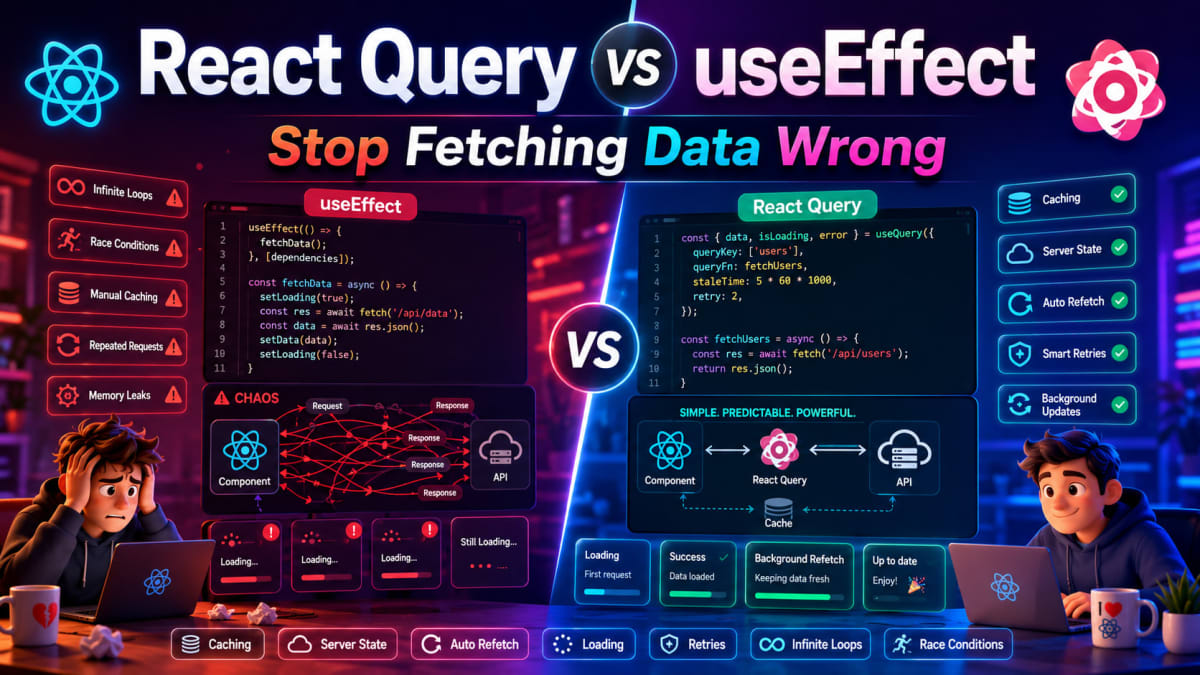
React Query vs useEffect - Stop Fetching Data Wrong
Skilldham
Engineering deep-dives for developers who want real understanding.
You write a useEffect to fetch user data.
It works. You deploy. Users start reporting stale data. Sometimes the old data flashes before the new data loads. Sometimes two API calls fire at the same time. On slow connections, the component unmounts mid-fetch and React throws a warning about updating state on an unmounted component.
You add more code. A loading state. An error state. A cleanup function. A cancelled flag. A cache check. Suddenly your simple data fetch is fifty lines of code that still does not handle every edge case correctly.
Then you see someone fetch the same data in five lines with React Query and wonder what just happened.
The react query vs useeffect debate is not about which hook is newer or more fashionable. It is about understanding that data fetching is a genuinely hard problem, and useEffect was never built to solve it alone. Here is exactly what the difference is, where each one breaks, and how to decide which one your project actually needs.
Why useEffect Breaks for Data Fetching in Production
useEffect is a synchronization tool. React designed it to synchronize your component with something outside React - a DOM event, a subscription, a timer. Fetching data and putting it in state fits that description loosely, which is why it works in simple cases.
The problems appear when you get to production with real users.
javascript
// Wrong - the naive useEffect data fetch
function UserProfile({ userId }) {
  const [user, setUser] = useState(null)
  const [loading, setLoading] = useState(true)
  const [error, setError] = useState(null)

  useEffect(() => {
    fetch(`/api/users/${userId}`)
      .then(res => res.json())
      .then(data => {
        setUser(data)
        setLoading(false)
      })
      .catch(err => {
        setError(err)
        setLoading(false)
      })
  }, [userId])

  if (loading) return <div>Loading...</div>
  if (error) return <div>Error loading user</div>
  return <div>{user.name}</div>
}
This code has at least four production bugs hiding inside it.
First - if the component unmounts before the fetch completes, setUser and setLoading still run. React throws a warning. In older React, it was a memory leak. Second - if userId changes quickly (user clicks through profiles fast), two fetches fire. Whichever one finishes last wins, which might not be the most recent one. Third - no caching. Every time this component mounts, it fetches again even if you just had this data ten seconds ago. Fourth - no retry logic. If the network hiccups, the user sees an error with no recovery.
javascript
// Correct - useEffect with proper cleanup and race condition handling
function UserProfile({ userId }) {
  const [user, setUser] = useState(null)
  const [loading, setLoading] = useState(true)
  const [error, setError] = useState(null)

  useEffect(() => {
    let cancelled = false
    setLoading(true)
    setError(null)

    fetch(`/api/users/${userId}`)
      .then(res => {
        if (!res.ok) throw new Error('Failed to fetch')
        return res.json()
      })
      .then(data => {
        if (!cancelled) {
          setUser(data)
          setLoading(false)
        }
      })
      .catch(err => {
        if (!cancelled) {
          setError(err)
          setLoading(false)
        }
      })

    return () => {
      cancelled = true
    }
  }, [userId])

  if (loading) return <div>Loading...</div>
  if (error) return <div>Error loading user</div>
  return <div>{user?.name}</div>
}
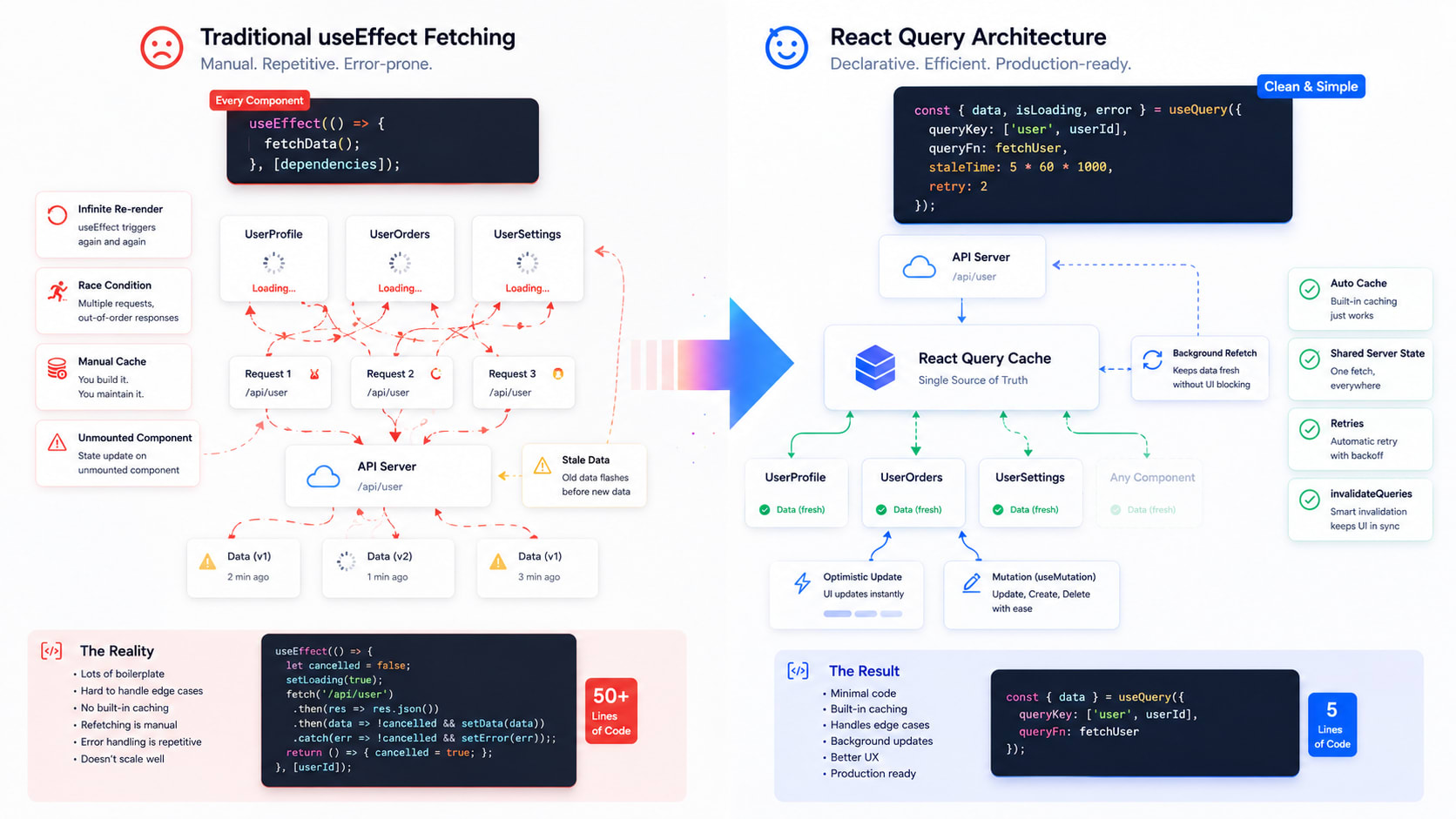
This version handles cancellation and race conditions. But it still has no caching, no retries, no background refetching, and no way to share this data with another component without fetching again. You are writing infrastructure code every time you fetch data.
This is why React useEffect not working correctly in production is such a consistent problem - the tool works, but data fetching adds complexity that needs to be rebuilt from scratch every time.
What React Query Actually Does Differently
React Query is not a replacement for useEffect. It is a server state management library. It manages the full lifecycle of remote data - fetching, caching, synchronizing, and updating data from a server.
The key mental shift is understanding what React Query considers state. In a typical React app, you treat server data as local state - you fetch it, put it in useState, and manage it yourself. React Query treats server data as a cache of what exists on the server. Your component subscribes to that cache and React Query keeps it fresh.
javascript
// Wrong - treating server data as local state (common mistake with useEffect)
function Dashboard() {
  const [stats, setStats] = useState(null)
  const [loading, setLoading] = useState(false)

  // Every component that needs stats has to fetch and manage its own copy
  useEffect(() => {
    setLoading(true)
    fetchStats().then(data => {
      setStats(data)
      setLoading(false)
    })
  }, [])

  // If another component also needs stats, it fetches again
  // No sharing, no coordination, no caching
}
javascript
// Correct - React Query manages server state as a shared cache
import { useQuery, QueryClient, QueryClientProvider } from '@tanstack/react-query'

// Set up once at app root
const queryClient = new QueryClient({
  defaultOptions: {
    queries: {
      staleTime: 5 * 60 * 1000,  // data stays fresh for 5 minutes
      retry: 2,                    // retry failed requests twice
    }
  }
})

function App() {
  return (
    <QueryClientProvider client={queryClient}>
      <Dashboard />
    </QueryClientProvider>
  )
}

// Any component can access the same cached data
function Dashboard() {
  const { data: stats, isLoading, error } = useQuery({
    queryKey: ['stats'],
    queryFn: fetchStats,
  })

  if (isLoading) return <div>Loading...</div>
  if (error) return <div>Failed to load stats</div>
  return <div>Total users: {stats.totalUsers}</div>
}

// If StatsWidget also needs this data, React Query returns the cache
// No second network request - same data, zero duplication
function StatsWidget() {
  const { data: stats } = useQuery({
    queryKey: ['stats'],
    queryFn: fetchStats,
  })

  return <span>{stats?.totalUsers ?? 0}</span>
}
Both components use the same query key ['stats']. React Query makes one network request and shares the result. If Dashboard already fetched and the data is fresh, StatsWidget gets it instantly from cache. This is the difference that matters most in real applications.
React Query vs useEffect for Dependent Data Fetching
One of the most common data fetching patterns is fetching data that depends on the result of a previous fetch. useEffect handles this with nested calls or multiple effects that trigger each other. React Query has a cleaner solution built in.
javascript
// Wrong - nested useEffect for dependent fetching
function UserOrders({ userId }) {
  const [user, setUser] = useState(null)
  const [orders, setOrders] = useState(null)
  const [loading, setLoading] = useState(true)

  useEffect(() => {
    fetchUser(userId).then(userData => {
      setUser(userData)
      // Fetch orders only after user is loaded
      fetchOrders(userData.accountId).then(orderData => {
        setOrders(orderData)
        setLoading(false)
      })
    })
  }, [userId])

  // Error handling is completely missing from this
  // What if fetchUser fails? What if fetchOrders fails?
  // Cleanup is missing too
}
javascript
// Correct - React Query handles dependent queries cleanly
function UserOrders({ userId }) {
  // First query - fetch user
  const { data: user } = useQuery({
    queryKey: ['user', userId],
    queryFn: () => fetchUser(userId),
  })

  // Second query - only runs when user.accountId exists
  const { data: orders, isLoading } = useQuery({
    queryKey: ['orders', user?.accountId],
    queryFn: () => fetchOrders(user.accountId),
    enabled: !!user?.accountId,  // disabled until user loads
  })

  if (isLoading) return <div>Loading orders...</div>
  return (
    <div>
      <h2>{user?.name}'s Orders</h2>
      {orders?.map(order => (
        <div key={order.id}>{order.total}</div>
      ))}
    </div>
  )
}
The enabled option is one of React Query's most useful features. It prevents the second query from running until the data it depends on is available. No nested callbacks. No race conditions between the two fetches. No manual state coordination. The dependency is expressed declaratively.
Caching and Background Refetching - Where React Query Pulls Away
This is where react query vs useeffect has the clearest winner. useEffect has no built-in caching. React Query's entire value proposition is built around it.
javascript
// Wrong - useEffect refetches every single time the component mounts
function ProductPage({ productId }) {
  const [product, setProduct] = useState(null)

  useEffect(() => {
    // User goes to product page
    // Goes back to home
    // Returns to product page
    // Fetches AGAIN - even if nothing changed
    fetchProduct(productId).then(setProduct)
  }, [productId])
}
javascript
// Correct - React Query serves from cache, refetches smartly
function ProductPage({ productId }) {
  const { data: product } = useQuery({
    queryKey: ['product', productId],
    queryFn: () => fetchProduct(productId),
    staleTime: 10 * 60 * 1000,  // treat as fresh for 10 minutes
  })

  // First visit: fetches from network
  // Go back, return: serves from cache instantly - no loading state
  // After 10 minutes: serves stale cache immediately, refetches in background
  // User sees data instantly, gets updated data when available
}
The stale-while-revalidate pattern is what makes React Query feel fast to users. They never stare at a loading spinner for data they just saw. They get the cached version immediately, and if the data has changed, it updates quietly in the background.
React Query also automatically refetches when the user focuses the browser tab after being away. If a user leaves your app open, switches to another tab for ten minutes, and comes back, React Query silently refreshes the data. With useEffect, they would see whatever data was there when they first loaded.
This same concept of keeping data fresh without user intervention is what powers the Munshi AI expense tracking RAG system - keeping embeddings synchronized with the latest expense data without manual refresh triggers.
Mutations - Updating Server Data the Right Way
React Query also handles mutations - creating, updating, and deleting data. useEffect is not designed for mutations at all. Most developers use event handlers with fetch directly, which works but misses error handling, optimistic updates, and cache invalidation.
javascript
// Wrong - manual mutation with fetch, no cache invalidation
function AddProductButton({ onAdd }) {
  const [loading, setLoading] = useState(false)

  async function handleAdd(productData) {
    setLoading(true)
    try {
      await fetch('/api/products', {
        method: 'POST',
        body: JSON.stringify(productData)
      })
      onAdd() // call parent to trigger refetch somehow
    } catch (err) {
      console.error(err) // user never knows this failed
    } finally {
      setLoading(false)
    }
  }

  // After adding, the product list is still showing old data
  // unless the parent manually triggers a refetch
}
javascript
// Correct - React Query mutation with automatic cache invalidation
import { useMutation, useQueryClient } from '@tanstack/react-query'

function AddProductButton() {
  const queryClient = useQueryClient()

  const addProduct = useMutation({
    mutationFn: (productData) => fetch('/api/products', {
      method: 'POST',
      body: JSON.stringify(productData)
    }).then(r => r.json()),

    onSuccess: () => {
      // Invalidate products cache - React Query automatically refetches
      queryClient.invalidateQueries({ queryKey: ['products'] })
    },

    onError: (error) => {
      // Centralized error handling
      toast.error(`Failed to add product: ${error.message}`)
    }
  })

  return (
    <button
      onClick={() => addProduct.mutate(newProduct)}
      disabled={addProduct.isPending}
    >
      {addProduct.isPending ? 'Adding...' : 'Add Product'}
    </button>
  )
}
invalidateQueries tells React Query that the products cache is now stale. It automatically triggers a background refetch. The product list updates without the parent component needing to know anything happened. No prop drilling of refetch functions. No manual state coordination between the form and the list.
When useEffect for Data Fetching Is Still the Right Choice
React Query is not the answer to everything. There are real situations where useEffect is the better tool and adding React Query would be over-engineering.
javascript
// Wrong - adding React Query when useEffect is perfectly fine
// A one-off fetch that only happens once and never needs caching
import { useQuery } from '@tanstack/react-query'

function AppVersion() {
  // Installing React Query just for this is absurd
  const { data } = useQuery({
    queryKey: ['version'],
    queryFn: fetchAppVersion,
    staleTime: Infinity  // never refetch
  })

  return <span>v{data?.version}</span>
}
javascript
// Correct - useEffect is fine for simple one-time fetches
function AppVersion() {
  const [version, setVersion] = useState(null)

  useEffect(() => {
    fetchAppVersion().then(data => setVersion(data.version))
  }, [])

  return <span>v{version}</span>
}
Use useEffect when the fetch happens once, the data does not need to be shared, no caching is required, and the component is simple. One-time initialization, analytics pings, non-critical data that does not affect user experience - these are fine with useEffect.
Use React Query when multiple components need the same data, the data needs to stay fresh, you need loading and error states handled consistently, you need retry logic, or you are building anything beyond a personal project.
The honest answer to react query vs useeffect is that they solve different problems. useEffect is a lifecycle tool that can fetch data. React Query is a data synchronization tool built specifically for server state. Using the right tool saves you from rebuilding the same infrastructure over and over. The official React Query documentation covers every pattern with examples that go far beyond what fits here.
Key Takeaway
React query vs useeffect is the wrong framing. The real question is whether you need a synchronization primitive or a server state management library.
useEffect works for simple one-time fetches with no caching requirements
useEffect breaks in production for anything that needs caching, retry, or shared state
React Query gives you caching, background refetching, retry, and shared data out of the box
The enabled option handles dependent queries cleanly without nested callbacks
useMutation handles server updates with automatic cache invalidation
React Query's stale-while-revalidate pattern makes your app feel instant for returning users
Do not add React Query for genuinely simple fetches - useEffect is fine there
If your app has more than one component fetching from the same endpoint, React Query will save you more time than it costs to set up.
FAQs
Is React Query a replacement for useEffect? No. React Query is a server state management library that handles fetching, caching, and synchronizing remote data. useEffect is a React primitive for synchronizing with external systems. React Query uses useEffect internally. You will still use useEffect for subscriptions, DOM manipulation, and side effects that are not about server data.
When should I use React Query instead of useEffect for data fetching? Use React Query when multiple components need the same data, when you need caching to prevent redundant requests, when you need automatic retry on failure, when you need background refetching to keep data fresh, or when you are building a production application where data fetching complexity matters. For simple one-time fetches in small components, useEffect is perfectly adequate.
Does React Query work with Next.js App Router? Yes, but with some setup. React Query runs client-side, so components using useQuery need the "use client" directive. For server-side data fetching in Next.js App Router, use server components with fetch or your ORM directly. The recommended pattern is to prefetch data in server components and hydrate the React Query cache on the client for the best of both approaches.
What is staleTime in React Query and why does it matter? staleTime controls how long React Query treats cached data as fresh before considering it stale. With staleTime of 0 (the default), every component mount triggers a background refetch. With staleTime of 5 minutes, data fetched within the last 5 minutes is served from cache without any network request. Setting appropriate staleTime values is the most impactful React Query optimization for reducing unnecessary API calls.
How does React Query handle loading and error states? useQuery returns isLoading, isFetching, isError, and error alongside the data. isLoading is true only on the very first fetch with no cached data. isFetching is true any time a request is in progress, including background refetches. This distinction lets you show a full loading spinner on first load and a subtle indicator on background refreshes, which is a much better user experience than treating both the same way.
Can I use React Query with React Native? Yes. TanStack Query (the library behind React Query) works with React Native without any modification. The same hooks, the same query client, the same caching behavior. This is one reason it is worth learning properly - the knowledge transfers directly between web and mobile React development.
What is the difference between invalidateQueries and refetchQueries in React Query? invalidateQueries marks matching queries as stale and triggers a background refetch only if the query is currently being observed by a component. refetchQueries forces an immediate refetch regardless of whether anything is currently using the data. invalidateQueries is almost always the right choice after a mutation - it respects React Query's caching strategy instead of forcing unnecessary network requests.