
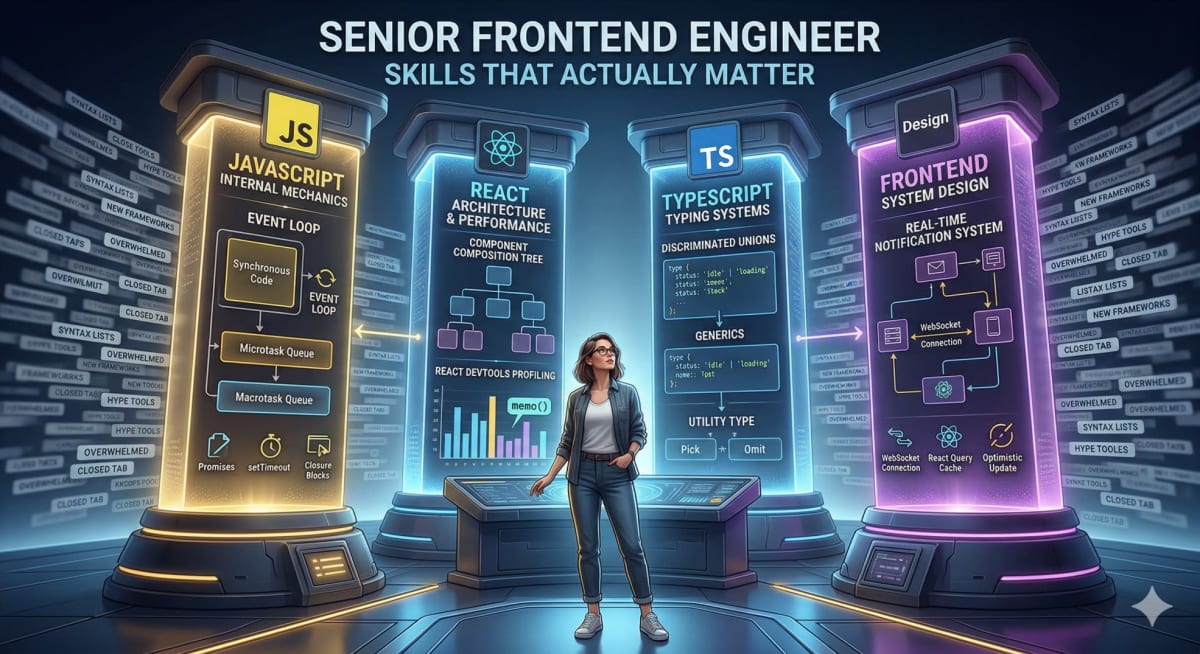
Senior Frontend Engineer Skills That Actually Matter
Skilldham
Engineering deep-dives for developers who want real understanding.
Senior Frontend Engineer Skills That Actually Matter
Most "senior frontend skills" articles give you a list of 50 topics and call it a guide. You read through it, feel overwhelmed, and close the tab without knowing what to actually do next.
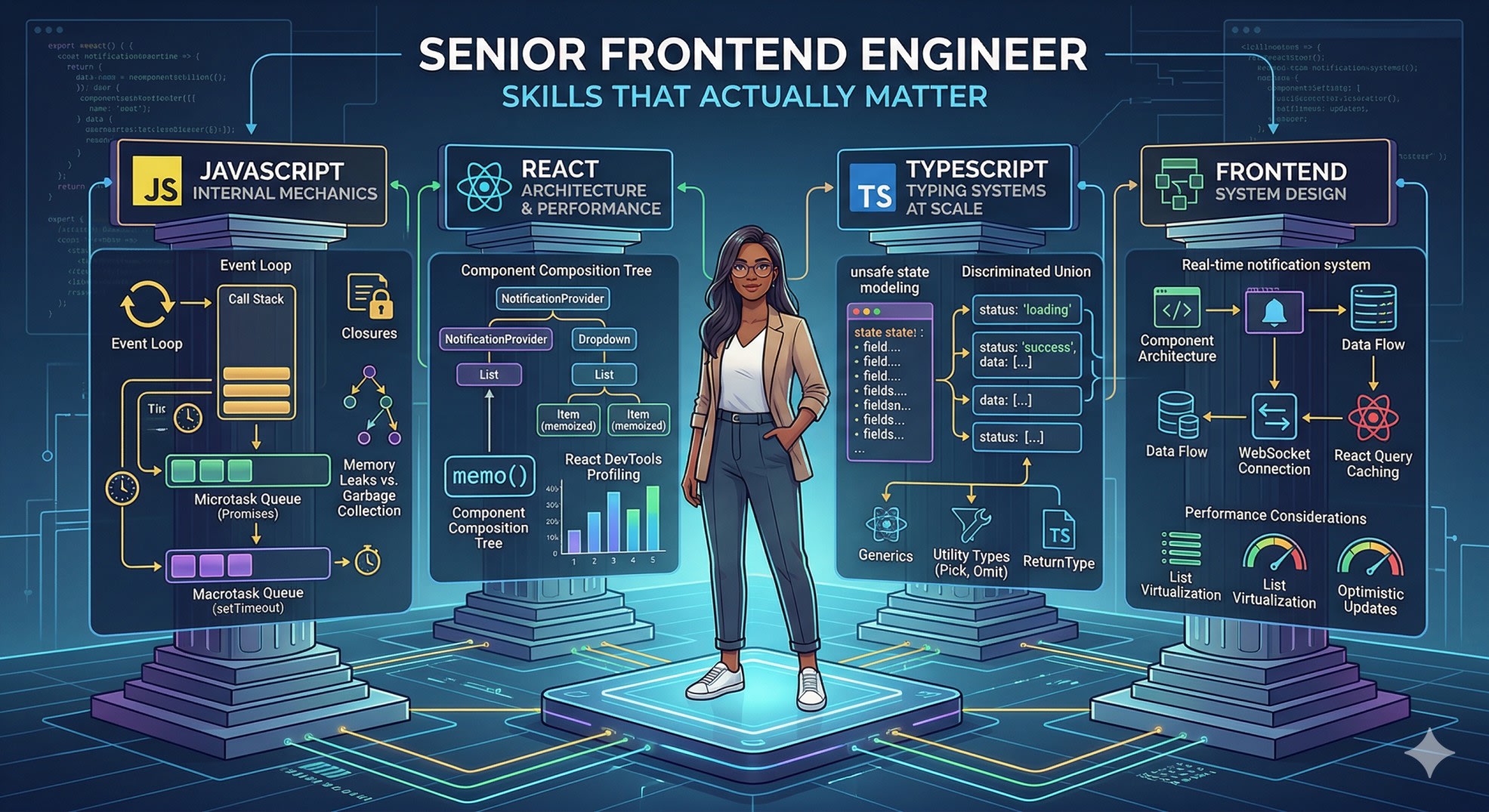
The reality is that companies testing senior frontend engineers are not checking whether you have heard of every topic on a list. They are checking whether you can reason clearly about a small set of things that actually matter in production - JavaScript execution, React architecture, system design tradeoffs, and TypeScript at scale.
This is what those things look like in practice, with the depth level that senior roles actually require.
JavaScript Internals - What Senior Frontend Engineers Actually Need to Know
Senior frontend engineer skills at the JavaScript level are not about syntax. They are about understanding how the language executes - so you can predict behavior, debug production issues, and write code that performs well.
The event loop is the most important area. Not the definition - the ability to reason about execution order when synchronous code, promises, and timers are mixed together.
js
console.log('start');

setTimeout(() => console.log('timeout'), 0);

Promise.resolve()
  .then(() => console.log('promise 1'))
  .then(() => console.log('promise 2'));

console.log('end');

// Output: start, end, promise 1, promise 2, timeout
The reason promise 1 and promise 2 come before timeout - even though both are async - is that promise callbacks go into the microtask queue, which is drained completely before the event loop moves to the macrotask queue where setTimeout lives. If you cannot explain this from first principles, interviewers at senior level will notice.
Closures are the second area that trips people up in interviews:
js
// Classic closure trap with var:
for (var i = 0; i < 3; i++) {
  setTimeout(() => console.log(i), 100);
}
// Output: 3, 3, 3 - all reference the same i

// Fix with let (block scope):
for (let i = 0; i < 3; i++) {
  setTimeout(() => console.log(i), 100);
}
// Output: 0, 1, 2 - each iteration has its own i

// Or fix with IIFE:
for (var i = 0; i < 3; i++) {
  ((j) => setTimeout(() => console.log(j), 100))(i);
}
// Output: 0, 1, 2
Memory management is the third area that separates senior from mid-level. Understanding when closures cause memory leaks - and how to prevent them - is something you will face in production regardless of whether it comes up in interviews.
js
// Memory leak - event listener holds reference to large object
function setupHandler() {
  const largeData = new Array(1000000).fill('data');

  document.addEventListener('click', function handler() {
    console.log(largeData.length); // largeData can never be GC'd
  });
  // handler is never removed - largeData stays in memory forever
}

// Fix - remove listener when done:
function setupHandler() {
  const largeData = new Array(1000000).fill('data');

  function handler() {
    console.log(largeData.length);
  }

  document.addEventListener('click', handler);

  return () => document.removeEventListener('click', handler);
}
The MDN guide on memory management covers garbage collection and closure memory behavior in detail.
React Architecture - Beyond Hooks
Hooks are mid-level React. Senior frontend engineer skills in React are about architecture - how you structure components so they stay maintainable as the codebase grows, and how you make performance decisions based on actual measurements rather than guesses.
The composition pattern is the most underused tool in React architecture. It solves prop drilling more elegantly than Context in many cases, with less overhead:
jsx
// Prop drilling - common but not scalable:
function App() {
  const [theme, setTheme] = useState('light');
  return <Layout theme={theme} setTheme={setTheme} />;
}
function Layout({ theme, setTheme }) {
  return <Sidebar theme={theme} setTheme={setTheme} />;
}
function Sidebar({ theme, setTheme }) {
  return <ThemeToggle theme={theme} setTheme={setTheme} />;
}

// Composition - cleaner, no prop drilling:
function App() {
  const [theme, setTheme] = useState('light');
  return (
    <Layout>
      <Sidebar>
        <ThemeToggle theme={theme} setTheme={setTheme} />
      </Sidebar>
    </Layout>
  );
}
On memoization - the most common mistake senior candidates make is either never using it or using it everywhere. Neither is right:
jsx
// Wrong - useMemo on trivial computation:
const doubled = useMemo(() => count * 2, [count]); // overhead > benefit

// Right - useMemo on expensive computation:
const filtered = useMemo(
  () => products.filter(p => p.category === activeCategory),
  [products, activeCategory]
);

// Wrong - useCallback not needed here:
const handleClick = useCallback(() => {
  setCount(c => c + 1);
}, []); // inline function is fine, no memoized children

// Right - useCallback when passed to memoized child:
const handleSubmit = useCallback((data) => {
  onSave(data); // onSave came from parent
}, [onSave]);
The rule is: profile first with React DevTools, memoize where you see actual performance issues, not as a default pattern.
For a deeper look at React rendering behavior, our guide on why React state is not updating covers the async batching and closure patterns that cause the most confusing production bugs.
TypeScript at Senior Level - Where Most Engineers Fall Short
TypeScript knowledge is a core senior frontend engineer skill in 2026. Most developers know the basics - types, interfaces, generics. What separates senior engineers is knowing how to use TypeScript to make APIs safer and catch errors at compile time rather than runtime.
Discriminated unions are the most powerful pattern for modeling complex state:
ts
// Without discriminated union - unsafe:
type ApiState = {
  loading: boolean;
  data: User[] | null;
  error: string | null;
};
// Nothing stops you from having loading: true AND data: [...] at the same time

// With discriminated union - safe and exhaustive:
type ApiState =
  | { status: 'idle' }
  | { status: 'loading' }
  | { status: 'success'; data: User[] }
  | { status: 'error'; error: string };

function render(state: ApiState) {
  switch (state.status) {
    case 'idle':    return <EmptyState />;
    case 'loading': return <Spinner />;
    case 'success': return <UserList users={state.data} />; // data is User[] here
    case 'error':   return <ErrorMessage msg={state.error} />; // error is string here
  }
}
Utility types are the second area that senior engineers use fluently:
ts
type User = {
  id: string;
  name: string;
  email: string;
  role: 'admin' | 'user';
  createdAt: Date;
};

// Pick - only the fields you need:
type UserCard = Pick<User, 'id' | 'name' | 'role'>;

// Omit - everything except:
type CreateUserInput = Omit<User, 'id' | 'createdAt'>;

// Partial - all optional (for update payloads):
type UpdateUserInput = Partial<Omit<User, 'id'>>;

// ReturnType - infer from function:
async function getUser(id: string): Promise<User> { ... }
type GetUserResult = Awaited<ReturnType<typeof getUser>>; // User
```

---

## State Management - Knowing When Not to Use a Library

A senior frontend engineer skill that is often overlooked: knowing that most applications do not need a state management library. The decision tree matters more than knowing every library:
```
Is this data fetched from a server?
  → Yes: Use React Query or RTK Query (they handle caching, refetching, loading states)
  → No: Is it needed in more than 2-3 deeply nested components?
    → Yes: Consider Zustand or Context (depending on update frequency)
    → No: useState or useReducer is enough
React Query for server state is one of the highest-impact patterns a senior engineer can introduce to a codebase:
js
// Without React Query - manual loading states, no caching:
function UserList() {
  const [users, setUsers] = useState([]);
  const [loading, setLoading] = useState(true);
  const [error, setError] = useState(null);

  useEffect(() => {
    fetch('/api/users')
      .then(r => r.json())
      .then(data => { setUsers(data); setLoading(false); })
      .catch(err => { setError(err); setLoading(false); });
  }, []);
  // No caching - every mount triggers a new fetch
  // No background refetch
  // No automatic retry
}

// With React Query - caching, loading states, error handling built in:
function UserList() {
  const { data: users, isLoading, error } = useQuery({
    queryKey: ['users'],
    queryFn: () => fetch('/api/users').then(r => r.json()),
    staleTime: 5 * 60 * 1000, // cached for 5 minutes
  });

  if (isLoading) return <Spinner />;
  if (error) return <ErrorState />;
  return <List items={users} />;
}
```

Our guide on [why your API works in Postman but fails in the browser](https://skilldham.com/blog/why-your-api-works-in-postman-but-fails-in-the-browser) covers the network and caching behaviors that affect how you structure data fetching in production.

---

## Frontend System Design - The Skill That Gets You Hired

This is the single highest-leverage senior frontend engineer skill to develop. Most engineers with strong JavaScript and React knowledge still struggle with system design because it requires a different mode of thinking - top-down architecture rather than bottom-up implementation.

A well-structured system design answer for a complex UI feature covers five things: component architecture, data flow, API and caching strategy, performance considerations, and error handling.

Design a real-time notification system:

**Component architecture:**
```
NotificationProvider (context + WebSocket connection)
  NotificationBell (unread count badge)
  NotificationDropdown
    NotificationList
      NotificationItem (memoized)
    LoadMoreButton
Data flow and real-time updates:
js
// WebSocket for real-time, React Query for initial load + caching
function useNotifications() {
  const queryClient = useQueryClient();

  // Initial load
  const { data } = useQuery({
    queryKey: ['notifications'],
    queryFn: fetchNotifications,
  });

  // Real-time updates via WebSocket
  useEffect(() => {
    const ws = new WebSocket('/ws/notifications');

    ws.onmessage = (event) => {
      const newNotification = JSON.parse(event.data);
      // Add to cache without refetch
      queryClient.setQueryData(['notifications'], (old) => [
        newNotification,
        ...(old || []),
      ]);
    };

    return () => ws.close();
  }, [queryClient]);

  return data;
}
Performance:
Virtualize the list if notifications exceed 50 items
Debounce mark-as-read calls - batch them every 2 seconds
Optimistic updates for mark-as-read so UI feels instant
That level of end-to-end thinking - from component structure through real-time data handling to performance - is what a senior system design answer requires.
Key Takeaway
Senior frontend engineer skills come down to depth in four areas that every senior interview tests:
JavaScript execution model - event loop, closures, memory management, and async patterns at a level where you can predict behavior and debug production issues
React architecture - composition patterns, memoization strategy based on profiling, and understanding when rerenders happen and why
TypeScript at scale - discriminated unions for safe state modeling, utility types for DRY type definitions, and generics for reusable patterns
Frontend system design - component architecture, data flow, caching strategy, and performance thinking applied to real-world UI problems
The companies hiring senior frontend engineers are not checking whether you know every framework. They are checking whether you understand how the web works deeply enough to make good decisions under constraints.
FAQs
What are the most important senior frontend engineer skills for getting hired in 2026? Frontend system design and deep JavaScript knowledge are what most candidates are weak on and what most senior interviews heavily test. Strong React and TypeScript skills are expected at this level - system design is what differentiates senior candidates from mid-level ones who also know React well.
How is a senior frontend engineer different from a mid-level engineer? Mid-level engineers know how to use the tools. Senior engineers understand why the tools work the way they do, can make architecture decisions that scale, mentor others effectively, and can design systems from scratch rather than just implementing features within existing systems.
Do senior frontend engineers need to know TypeScript? Yes - TypeScript is effectively mandatory for senior frontend roles in 2026. The question is not whether you know it but how deeply. Senior engineers are expected to use discriminated unions, generics, utility types, and type inference - not just basic type annotations.
What React knowledge is expected at senior level? React reconciliation and the Fiber architecture, rendering performance optimization based on profiling, component composition patterns beyond prop drilling, React Server Components in Next.js, and the ability to design scalable component architectures. Hooks are assumed knowledge, not a differentiator.
How long does it take to develop senior frontend engineer skills? The technical skills - JavaScript internals, React architecture, TypeScript depth - can be developed with focused practice over 3-6 months if you already have solid mid-level foundations. System design takes longer because it requires building intuition through practice, not just reading. Doing one system design exercise per day for a month makes a significant difference.