
TypeScript 7 Broke ESLint & ts-jest: The Real Fix
Skilldham
Engineering deep-dives for developers who want real understanding.
Last updated: August 2026
TL;DR
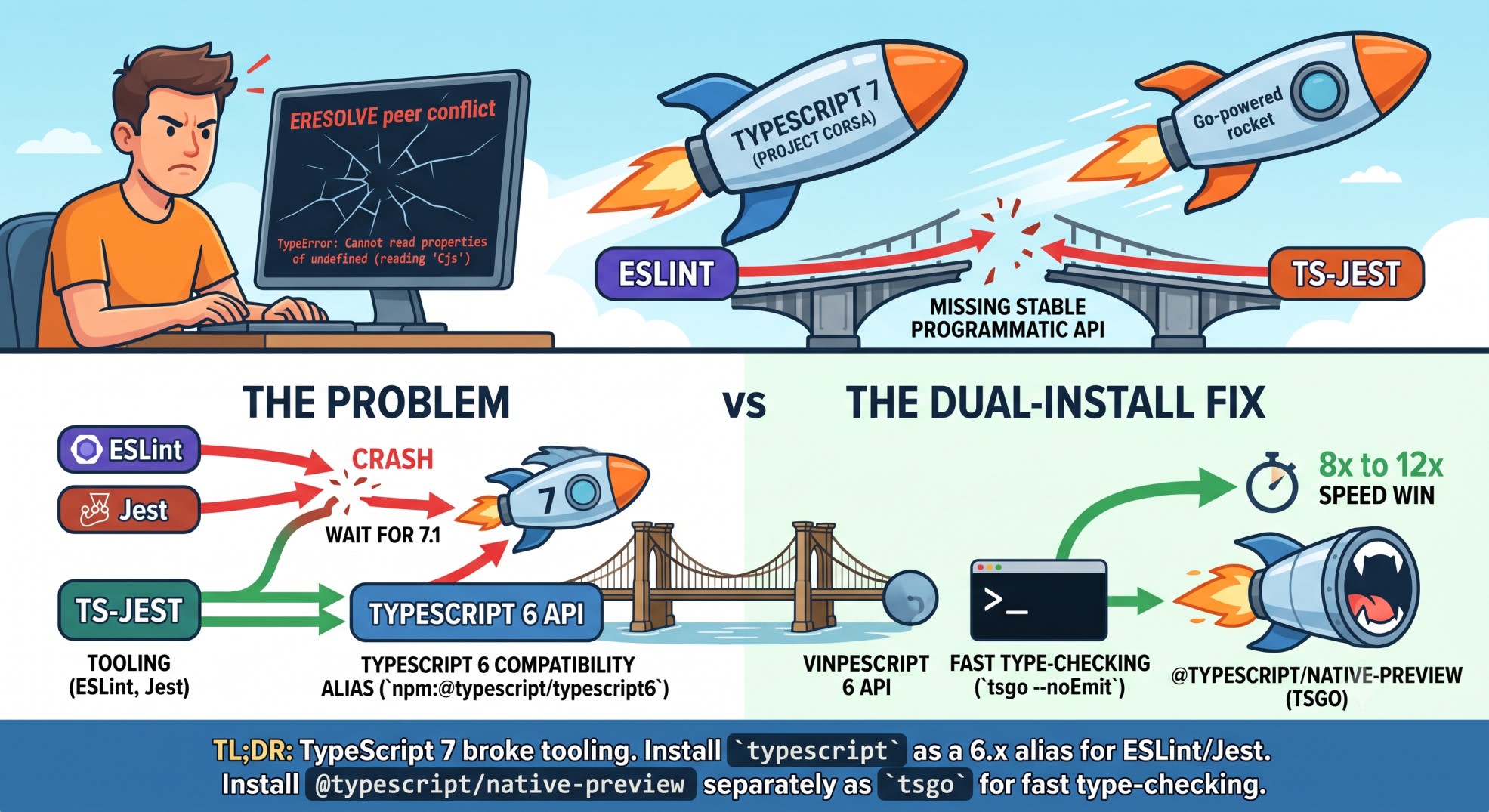
TypeScript 7 broke ESLint and ts-jest. The cause: no stable programmatic API until version 7.1. Installing typescript@7 next to typescript-eslint throws an ERESOLVE peer conflict. Forcing the install through crashes ESLint with Cannot read properties of undefined (reading 'Cjs'). The fix is a dual install. Alias typescript to the @typescript/typescript6 compatibility package for your tooling. Install @typescript/native-preview separately as tsgo for fast type-checking in CI. Below is the exact recipe, plus a tool-by-tool matrix for what's safe to upgrade now.
I upgraded a Next.js API service to TypeScript 7 the week it went GA.
npm install fine. tsc --noEmit fine, and fast - stupidly fast.
Then I ran the lint step.
npm error ERESOLVE could not resolve. A wall of peer dependency text. I skimmed it, saw --force, and used it.
ESLint died instantly: TypeError: Cannot read properties of undefined (reading 'Cjs').
Here's what's actually happening, and the five-minute setup that fixes it without giving up the speed.
The Two Errors You're Actually Hitting
TypeScript 7 broke ESLint for one specific reason. The 7.0 release ships a rewritten Go compiler. It does not ship a stable programmatic API for tools to hook into. That API is what typescript-eslint, ts-jest, and ts-morph all depend on.
Without it, npm refuses to even install the combination.
npm error ERESOLVE could not resolve
While resolving: typescript-eslint@8.63.0
Found: typescript@7.0.2
Could not resolve dependency:
peer typescript@">=4.8.4 <6.1.0" from typescript-eslint@8.63.0
typescript-eslint's published peer range tops out below 6.1.0. TypeScript 7 falls outside it. npm stops before anything runs.
Force the install with --force or --legacy-peer-deps and npm will let it through. ESLint will not.
ESLint: 10.6.0

TypeError: Cannot read properties of undefined (reading 'Cjs')
    at .../node_modules/typescript-eslint/node_modules/@typescript-eslint/typescript-estree/dist/create-program/shared.js
This is typescript-estree reaching into a compiler internal that TypeScript 7 no longer exposes. It is not a bug you can patch around in your own code. The fix has to happen at the dependency level.
Why This Is Happening
Microsoft calls the TypeScript 7 rewrite Project Corsa. The compiler moved from TypeScript-on-Node to native Go. The team measured 8x to 12x faster full builds.
The RC shipped June 18, 2026. GA landed July 8, 2026.
The catch was known before launch. TypeScript 7.0 has no stable programmatic API. That API is what lets a tool embed the compiler for linting, testing, and AST transformation.
Microsoft's TypeScript 7.0 announcement confirms it. The new API lands in TypeScript 7.1, expected around October 2026.
Until then, anything that calls into compiler internals is stuck. typescript-eslint filed a TS7 support request on GA day. It was closed the same day, marked "not planned." The fix sits on TypeScript's side.
Already hit the useTypeScriptCli error in a Next.js build? The TypeScript 7 Next.js useTypeScriptCli fix covers that failure. It comes from this same missing API.
The Dual-Install Fix
The pattern is two compilers, living side by side, each doing a different job.
Your linter and test runner keep talking to a TypeScript 6.x API. That happens through a compatibility package. Your actual type-check step in CI runs the real Go compiler directly.
Step 1 - Alias typescript to the 6.x compatibility package.
json
{
  "devDependencies": {
    "typescript": "npm:@typescript/typescript6@^6.0.0",
    "typescript-7": "npm:typescript@^7.0.0",
    "@typescript/native-preview": "^7.0.0"
  }
}
This does three things at once. typescript-eslint, ts-jest, and ts-morph still import typescript and get an API they understand. typescript-7 gives you an explicit alias to the real 7.x package. Use it if you need its tsc binary directly. @typescript/native-preview installs the fast native compiler under its own name, tsgo.
Step 2 - Reinstall clean.
bash
rm -rf node_modules package-lock.json
npm install
Do not run this on top of an old, forced typescript@7 lockfile. Delete the lockfile first. Otherwise the ERESOLVE ghost comes back.
Step 3 - Point your fast type-check at tsgo, not tsc.
json
{
  "scripts": {
    "typecheck": "tsgo --noEmit",
    "typecheck:legacy": "tsc --noEmit",
    "lint": "eslint ."
  }
}
npm run typecheck now runs the native Go compiler. npm run lint still resolves typescript to the 6.x compatibility package. typescript-eslint never touches the thing that was crashing it.
Step 4 - Verify both paths actually run.
bash
npx tsgo --version
npx eslint . --max-warnings=0
Check that tsgo --version prints a 7.x version. Check that eslint finishes without the Cjs error. If both pass, the split is wired up correctly.
Tool-by-Tool: Upgrade Now or Wait for 7.1
Not every tool in a typical stack is broken the same way. Some are safe today. Some need the alias. Some need you to wait.
typescript-eslint - wait for 7.1. The peer range blocks TypeScript 7 outright. Keep it on the aliased 6.x compatibility package. Tracked as issue #12518, closed "not planned" on TypeScript's side.
ts-jest - wait for 7.1, use the alias.
It's fine as long as typescript resolves to the 6.x package. That's the version living in node_modules. Point it at @typescript/native-preview instead and it breaks. It calls internal Strada APIs that Corsa does not expose.
ts-morph - wait for 7.1. Same root cause as typescript-eslint. It walks the compiler API directly for AST manipulation. No stable API, no support yet.
tsc, plain type-checking - safe to upgrade now. This is where TypeScript 7 actually delivers. Run tsgo --noEmit in CI today for the speed win. It does not depend on the programmatic API at all.
Vue, Svelte, Astro template checking - wait for 7.1. Volar-based tooling needs the same missing API. Editor template type-checking stays on 6.x until then.
Webpack loaders and custom transformers - wait for 7.1.
Anything that imports typescript as a library hits the same wall. That includes tools that don't just shell out to tsc.
If your stack is React Native, Node, or a Next.js API layer, this is simple. No Vue or Svelte templates means one rule applies. Run tsgo for speed. Keep everything else pinned. You are done.
New tsconfig Defaults That Also Bite
Even after the dual install is working, TypeScript 7 hard-adopts TypeScript 6.0's stricter defaults. If you skipped 6.0 entirely, this shows up as new errors. None of them have anything to do with ESLint.
rootDir now defaults to ./ instead of being inferred from your source files.
types defaults to an empty array. Ambient type packages you relied on implicitly stop being picked up.
target: es5, moduleResolution: node, and baseUrl are removed outright. A tsconfig.json written for TypeScript 4 or 5 can fail to compile on 7. The reasons have nothing to do with your code.
Audit your tsconfig.json before the upgrade, not after. Add types explicitly if you relied on the old default. Replace moduleResolution: node with bundler or node16.
None of these are TypeScript 7 bugs. They're 6.0 defaults finally becoming mandatory. The broader TypeScript build errors and fixes roundup covers the same builds.
Verifying the Fix Works
Run these three checks after wiring up the aliases. Do not assume it worked because the install finished quietly.
bash
npm ls typescriptThis should show the 6.x compatibility package under the typescript name. Not a raw 7.x version.
bash
npx tsgo --noEmitThis should complete fast - single-digit seconds on a mid-size project, versus what tsc took before.
bash
npx eslint . --max-warnings=0This should run clean with no Cjs crash. If it still throws, check your lockfile for a stray forced install and delete it.
Key Takeaways
TypeScript 7 broke ESLint because 7.0 has no stable programmatic API until version 7.1, expected around October 2026.
The exact failure is an ERESOLVE peer conflict on install, followed by Cannot read properties of undefined (reading 'Cjs') if you force it through.
Fix it by aliasing typescript to @typescript/typescript6 for your tooling and installing @typescript/native-preview separately as tsgo for fast type-checking.
typescript-eslint, ts-jest, and ts-morph all need the 6.x alias today. None of them support TypeScript 7 natively yet.
Plain tsc-style type-checking is the one workflow safe to move to the native compiler right now.
Audit your tsconfig.json separately - rootDir, types, and moduleResolution defaults changed regardless of the tooling issue.
Delete node_modules and the lockfile before reinstalling if you already forced a TypeScript 7 install once.
FAQ
Does this affect projects that don't use ESLint at all?
No. If your project only runs tsc for type-checking, this doesn't apply to you. With no typescript-eslint, ts-jest, or ts-morph in the dependency tree, you can install TypeScript 7 directly. No alias needed.
Will upgrading typescript-eslint to a newer version fix the ERESOLVE error?
Not yet. As of TypeScript 7's GA, typescript-eslint's peer range still excludes 7.x by design. The compiler API it needs does not exist until 7.1.
Is @typescript/native-preview the same thing as TypeScript 7?
Yes for practical purposes. It is the package name for the native Go compiler, and its binary is tsgo. TypeScript 7's own typescript package ships the same compiler under the standard tsc name.
Can I just use --legacy-peer-deps and ignore the ERESOLVE error?
You can get past the install. But ESLint will still crash with the Cjs error the moment it runs. The peer conflict is not the real problem. It's npm correctly warning you about the crash you're about to hit.
Does this same fix apply to ts-jest and ts-morph, not just ESLint?
Yes. Both depend on the same compiler API that isn't stable in 7.0. Keep typescript aliased to the 6.x compatibility package and they keep working exactly as before.
When will typescript-eslint officially support TypeScript 7?
There's no committed date yet. Microsoft has said the stable API lands in TypeScript 7.1. That's expected around October 2026. Tool support typically follows within weeks of that, not before.
Do I need to change my CI pipeline's Node version for any of this?
No. This is purely a TypeScript/npm dependency resolution issue. It has no relationship to your Node.js version.
Should I hold off on TypeScript 7 entirely until 7.1?
Not necessarily. The native compiler itself is stable and safe to use for tsc-only type-checking today. Only hold off on pointing your linter, test runner, or AST tooling at it directly.
Conclusion
TypeScript 7 broke ESLint and ts-jest for one documented reason: no stable API until 7.1. The fix isn't a workaround. It's an intentional dual-install pattern, and Microsoft ships a package for it. Alias typescript to the 6.x compatibility package for your tooling. Run tsgo separately for speed. You get both without waiting months. If you're tracking Next.js and TypeScript build errors, the newsletter covers each one. It covers the week it breaks, not months later.