

Next.js October 2026 Security Release - npm audit Missed It
Skilldham
Engineering deep-dives for developers who want real understanding.
Last updated: October 2026
TL;DR
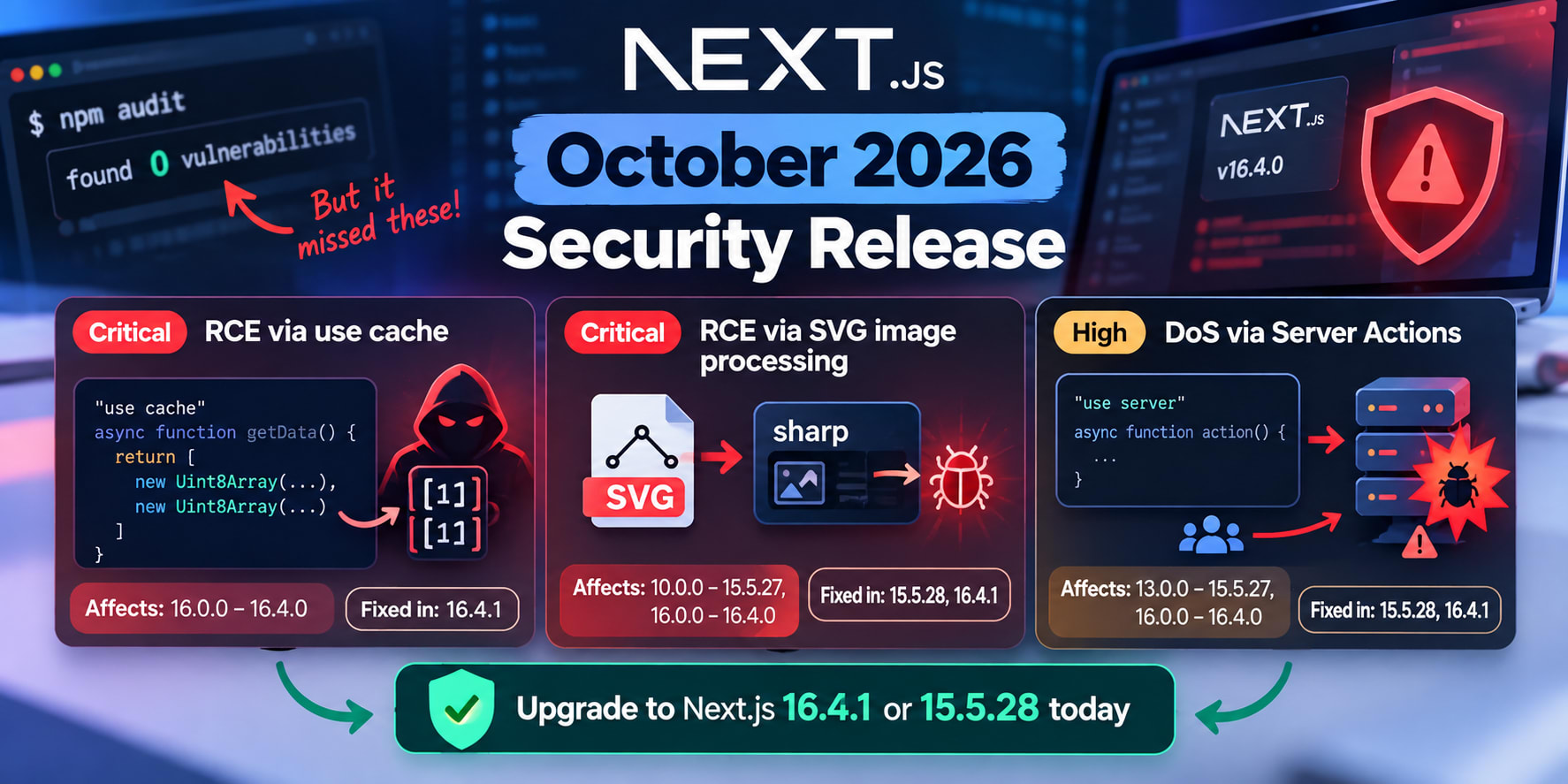
Upgrade to Next.js 16.4.1 or 15.5.28 today. The Next.js October 2026 security release fixes two critical RCEs and one DoS.
The use cache RCE hits 16.0.0 to 16.4.0. The SVG RCE hits 10.0.0 to 15.5.27 and 16.0.0 to 16.4.0. The Server Actions DoS hits App Router apps from 13.0.0.
Run npm ls next to see your real version.
On 15.5.28, also confirm sharp is 0.35.5 or later.
Do not trust a clean npm audit yet.
You open your terminal on October 15. You run npm audit. It says found 0 vulnerabilities.
Then you see the headline. Two unauthenticated RCEs in Next.js. Both rated critical, CVSS 9.5.
Your stomach drops a little. You check package.json and see "next": "^16.4.0". The caret should cover you, right?
It does not. Your lockfile still pins 16.4.0. And npm audit was not showing two of the three advisories when this release shipped.
This is the Next.js October 2026 security release. It landed on October 14, 2026, as an out-of-band patch. That means it did not wait for the normal monthly cycle.
Here is how to check if you are exposed, in about five minutes. Then we patch it properly.
What the Next.js October 2026 Security Release Fixes
The release fixes three advisories. Two are critical. One is high severity.
Vercel published fixes in two lines. Next.js 16.4.1 is the Active LTS fix. Next.js 15.5.28 is the Maintenance LTS fix.
Advisory Type Affected versions Fixed in GHSA-673q-mjm6-r5xr RCE via use cache 16.0.0 to 16.4.0 16.4.1 CVE-2026-96889 (GHSA-2464-fhr4-w9xw) RCE via SVG image processing 10.0.0 to 15.5.27, 16.0.0 to 16.4.0 15.5.28, 16.4.1 GHSA-p3m5-59mp-jv5r DoS via Server Actions 13.0.0 to 15.5.27, 16.0.0 to 16.4.0 15.5.28, 16.4.1
The use cache typed-array RCE
This one only exists on Next.js 16. It needs Cache Components and a use cache function. That function must return more than one typed array.
The advisory text is blunt: "There is no known workaround for affected applications." The root bug sits upstream in React. The React advisory is GHSA-xqc2-xf4c-x3h3.
Vercel still says to upgrade even if you have no such function. Take that advice seriously.
The SVG image optimizer RCE
This is CVE-2026-96889. It is a memory bug in sharp, the image library Next.js uses. It affects apps running on glibc-based Linux.
Most Docker images like node:24-bookworm-slim are glibc. Alpine images use musl instead. Vercel's fix is sharp 0.35.5 or later.
This is the second image optimizer RCE in two months. The Next.js AVIF optimization RCE patch guide covers the August one. Same component, different file format.
The Server Actions DoS
A crafted request can pin your CPU. While it runs, that Node.js process stops serving other requests. One bad request can freeze a whole instance.
It needs App Router plus at least one Server Action. Pages Router apps are not affected.
Am I Affected? Run These 4 Checks
Do not guess from package.json. That file shows a range, not what is installed. Run these checks from your project root.
Check 1: Your real Next.js version
# Correct: ask npm what is actually installed
npm ls next

# Same answer, read straight from node_modules
node -p "require('next/package.json').version"
If it prints 16.4.1, you are patched for all three. On 15.5.28, you still need Check 4.
Anything from 16.0.0 to 16.4.0 is exposed to all three. Anything from 13.0.0 to 15.5.27 is exposed to the SVG and DoS bugs.
Check 2: Do you use 'use cache'?
# Correct: find every file with a use cache directive
grep -rlE "[\"']use cache" app src lib 2>/dev/null
No output means no use cache functions. Next, open each file it finds. Look for return values holding Uint8Array, Buffer, or other typed arrays.
Check 3: Do you have Server Actions?
# Correct: find every file that declares Server Actions
grep -rlE "[\"']use server[\"']" app src lib 2>/dev/null
One match is enough to be exposed to the DoS. Forms with action={...} usually mean you have one.
Check 4: Is SVG reaching sharp?
# Correct: check the SVG flag and the installed sharp version
grep -n "dangerouslyAllowSVG" next.config.* 2>/dev/null
npm ls sharp
The Next.js image optimizer rejects SVG by default. The images.dangerouslyAllowSVG flag turns that off. Security coverage of this release also flags next/og on the Node.js runtime.
If npm ls sharp shows anything below 0.35.5, treat yourself as exposed.
Which Apps to Patch First
Most teams run more than one Next.js app. You cannot patch everything in the same hour. Use the check results to sort them.
Patch tonight
These apps match a critical condition right now. Do not wait for a sprint.
Any app on 16.0.0 to 16.4.0 with a use cache function that returns binary data.
Any app with dangerouslyAllowSVG: true running on a glibc Linux image.
Any app that lets users upload SVG files and then resizes them.
Each of these is a path to unauthenticated code execution. That means no login needed. Treat it like a leaked production key.
Patch this week
These apps are exposed, but the trigger is less direct. Still, schedule them now.
App Router apps with Server Actions but no use cache and no SVG.
Next.js 16 apps with Cache Components on, but no typed arrays in cached returns.
Internal tools behind a VPN or login wall.
The DoS is not a data breach. But one crafted request can stall a whole instance. On a small server, that is a full outage.
Monorepos and multiple apps
A monorepo can hide two Next.js versions. One app gets patched, and another quietly stays on 16.3.x.
# Correct: list every installed copy of next in the workspace
npm ls next --all

# pnpm workspaces
pnpm why next -r
Every line should show 16.4.1 or 15.5.28. Fix any app that does not, one by one.
Why npm audit Says You Are Clean
This is the part that catches careful teams. You ran the scanner. The scanner said zero.
The advisory feed was behind
As of October 15, two advisories were missing from the npm feed. Those were the use cache RCE and the Server Actions DoS. The Hacker News reported this gap the day after release.
So npm audit only knew about the SVG bug. A green CI check meant nothing here.
The fix is simple. During a fresh release, read the advisories on the Next.js GitHub security page. Compare their version ranges to your npm ls next output yourself.
Scanners catch up within days. Attackers often move faster than that.
Next.js ships its own React server code
Here is the subtle one. The use cache bug lives in react-server-dom-webpack and its sibling packages. React fixed it in 19.3.1.
# Wrong: bumping React alone does not patch a Next.js app
npm install react@latest react-dom@latest
Next.js bundles its own compiled copy of the React server renderer. Your react version does not change that copy. Only a new next version does.
# Correct: the fix ships inside the next package itself
npm install next@16.4.1
If you run React Server Components without Next.js, it is different. Then you update react-server-dom-* directly to 19.3.1 or the matching patch line.
How to Patch Next.js 16 and Next.js 15
Pick your line and patch it. Do not jump majors in a hurry during an incident.
Next.js 16: upgrade to 16.4.1
// Wrong: a caret range does not upgrade an existing lockfile
{
  "dependencies": {
    "next": "^16.4.0"
  }
}
The caret allows 16.4.1. But npm ci installs what the lockfile says. Your lockfile still says 16.4.0.
# Correct: pin the patched version and rewrite the lockfile
npm install next@16.4.1
npm ls next
Commit both package.json and package-lock.json. Then redeploy.
Next.js 15: 15.5.28 plus a sharp check
This is where most 15.x teams stop too early. Next.js 15.5.28 still accepts the older sharp 0.34.x line.
# Wrong: this patches Next.js but can leave sharp vulnerable
npm install next@15.5.28
So a lockfile can keep an old sharp even after the upgrade. Force the safe version with an npm override.
// Correct: package.json for a Next.js 15 app
{
  "dependencies": {
    "next": "15.5.28"
  },
  "overrides": {
    "sharp": "^0.35.5"
  }
}
Run npm install, then npm ls sharp again. Every sharp entry should now read 0.35.5 or higher.
Still on Next.js 13 or 14?
The advisories list no patched 13.x or 14.x release. The DoS reaches back to 13.0.0. The SVG bug reaches back to 10.0.0.
Your only fix is moving to 15.5.28 or 16.4.1. Until then, keep dangerouslyAllowSVG off. Rate-limit routes that hit Server Actions.
The Prisma Bytes Trap Inside use cache
This section matters if you use Prisma with Cache Components. It is the most likely way to hit the typed-array condition without knowing.
Why Bytes columns are typed arrays
Prisma 6 changed Bytes fields from Buffer to Uint8Array. Prisma 7 kept that. And Buffer is a Uint8Array subclass anyway.
So a findMany that selects a Bytes column returns many typed arrays. Wrap that in use cache, and you match the advisory exactly.
Wrong and correct versions
// Wrong: every row carries a Uint8Array into the cache
import { prisma } from "@/lib/prisma";
import { cacheLife } from "next/cache";

export async function getAvatars() {
  "use cache";
  cacheLife("hours");

  return prisma.user.findMany({
    select: { id: true, avatar: true }, // avatar is Bytes
  });
}
On 16.0.0 to 16.4.0, this is the vulnerable shape. Each row adds another typed array to the cached response.
// Correct: return strings, not raw bytes, from cached functions
import { prisma } from "@/lib/prisma";
import { cacheLife } from "next/cache";

export async function getAvatars() {
  "use cache";
  cacheLife("hours");

  const users = await prisma.user.findMany({
    select: { id: true, avatar: true },
  });

  return users.map((user) => ({
    id: user.id,
    avatar: user.avatar ? Buffer.from(user.avatar).toString("base64") : null,
  }));
}
Other typed arrays hiding in cached code
Prisma is not the only source. Plenty of normal code returns typed arrays without saying so.
fs.readFile() with no encoding returns a Buffer.
crypto.createHash().digest() with no encoding returns a Buffer.
sharp(...).toBuffer() returns a Buffer of image bytes.
await response.arrayBuffer() wrapped in new Uint8Array() is one too.
# Correct: list cached files that also touch binary data
grep -rlE "[\"']use cache" app src lib 2>/dev/null \
  | xargs grep -lE "Uint8Array|Buffer|arrayBuffer|toBuffer|readFile" 2>/dev/null
Any file this prints needs a closer look. Two or more of these values in one return matches the advisory.
Upgrade still comes first
To be clear, upgrading is the fix. This change does not replace 16.4.1. It keeps raw binary out of your cache, which also keeps cache entries easy to inspect.
Does your cached function return stale data after this change? The cache key may be the cause. The SkillDham guide on Next.js use cache not working covers those silent cache failures.
Verify the Patch Actually Shipped
A patched laptop is not a patched server. Check what production really runs.
Trust the lockfile, not package.json
# Correct: confirm the lockfile pins the patched versions
grep -A2 '"node_modules/next"' package-lock.json
grep -A2 '"node_modules/sharp"' package-lock.json
The version field there is what npm ci installs. If it still says 16.4.0, your deploy will too. The same habit drives the guide to checking your npm lockfile after a supply chain attack.
Rebuild Docker images without stale layers
Docker caches the npm ci layer. If the lockfile did not change, the old layer gets reused.
# Correct: force a clean dependency layer, then check inside the image
docker build --no-cache -t my-app:patched .
docker run --rm my-app:patched node -p "require('next/package.json').version"
The second command should print 16.4.1 or 15.5.28. Anything else means the image is still exposed.
Check the build log
next build prints the Next.js version on its first line. Look for Next.js 16.4.1 in your CI or hosting build logs.
Netlify said its platform does not run the affected image path. It still recommends upgrading.
Treat every host the same way. Patch your code, then redeploy.
Make the Next Security Release Painless
Next.js shipped security fixes in July, August, September and now October 2026. Expect more. Build the check once.
Add a CI version gate
// Correct: scripts/check-next-patch.mjs - fail CI below the October 2026 patch
import { createRequire } from "node:module";

const require = createRequire(import.meta.url);
const { version } = require("next/package.json");
const current = version.split("-")[0].split(".").map(Number);

const minimum = { 15: [15, 5, 28], 16: [16, 4, 1] }[current[0]];

function isBelow(a, b) {
  for (let i = 0; i < 3; i++) {
    if (a[i] !== b[i]) return a[i] < b[i];
  }
  return false;
}

if (!minimum || isBelow(current, minimum)) {
  console.error(`Next.js ${version} is not patched. Use 16.4.1 or 15.5.28.`);
  process.exit(1);
}

console.log(`Next.js ${version} includes the October 2026 security fixes.`);
Run it with node scripts/check-next-patch.mjs before next build. Bump the minimums on each release.
Turn on upgrade reminders in 16.4
Next.js 16.4 added experimental.agentUpgrade. Its 'security' policy nudges you during next dev and next build. It fires when an upgrade fixes a known vulnerability in your version.
// Correct: next.config.ts - remind me about security upgrades
import type { NextConfig } from "next";

const nextConfig: NextConfig = {
  experimental: {
    agentUpgrade: "security",
  },
};

export default nextConfig;
It is experimental, so do not rely on it alone. Keep the CI gate too.
Still on 16.3.x? The September fixes matter first.
The breakdown of the Next.js 16.3.8 cache poisoning CVEs explains what 16.3.8 closed. Going straight to 16.4.1 covers both releases.
Key Takeaways
The Next.js October 2026 security release fixes two critical RCEs and one high DoS.
Patched versions are 16.4.1 and 15.5.28. Nothing older gets a fix.
Run npm ls next. Your package.json range is not your installed version.
A clean npm audit proved nothing at launch. Two advisories were missing from the feed.
Bumping react does not patch Next.js. The fix ships inside the next package.
On 15.5.28, force sharp to 0.35.5 or later with an npm override.
Prisma Bytes fields inside use cache match the typed-array RCE condition.
Rebuild Docker images with --no-cache and confirm the version inside the image.
FAQ
Is my app affected if I am on Next.js 16.4.0?
Yes. Version 16.4.0 is inside the affected range for all three advisories. Upgrade to 16.4.1, then confirm with npm ls next.
Does the October 2026 security release affect Next.js 15?
Yes, two of the three bugs do. The SVG RCE and the Server Actions DoS reach Next.js 15 up to 15.5.27. The use cache RCE is Next.js 16 only.
Why does npm audit show 0 vulnerabilities?
When the release shipped, two advisories were missing from the npm advisory feed. So npm audit could only see the SVG bug. Check your installed version by hand instead.
Can I fix the use cache RCE by updating React?
No. Next.js bundles its own compiled React server renderer. Updating react and react-dom does not touch that copy. Only upgrading next to 16.4.1 fixes it.
Is there a workaround if I cannot upgrade today?
Only for the SVG bug. Set sharp to 0.35.5 or later, and keep dangerouslyAllowSVG off. The use cache RCE and the Server Actions DoS have no workaround.
Am I safe if I use the Pages Router?
You are safe from the Server Actions DoS. The use cache RCE also needs App Router with Cache Components. The SVG bug can still hit Pages Router apps, so upgrade anyway.
Does hosting on Vercel or Netlify patch my app automatically?
No host can change the next version in your lockfile. Netlify said its platform avoids the affected image path. Still, upgrade and redeploy on any host.
Do Next.js 13 and 14 get a patch?
No. The advisories list only 15.5.28 and 16.4.1 as patched. Move to one of those lines as soon as you can.
Conclusion
Patch to 16.4.1 or 15.5.28, then prove it with npm ls next and a clean build. Scanners lagged on this release, so your own checks are the real safety net. Add the CI gate once, and the next advisory takes minutes instead of a panic.
If you skipped earlier releases, read the Next.js August 2026 security release breakdown next. Official details live in the Next.js security update for October 14, 2026.
Get the next one of these the day it ships, not a week later. Subscribe to the SkillDham newsletter.