
Nextjs 16.3.8 cache poisoning: 3 CVEs, real fixes
Skilldham
Engineering deep-dives for developers who want real understanding.
Last updated: October 2026
TL;DR
Next.js 16.3.8 fixes three cache poisoning flaws. They are CVE-2026-94544, CVE-2026-94543, and CVE-2026-94484. CVE-94544 affects Cache Components with Draft Mode. CVE-94543 affects self-hosted Pages Router apps using SSG or ISR. CVE-94484 affects SSG or ISR apps with a root-level catch-all route. Upgrade to 16.3.8 or newer.
The Next.js 16.3.8 cache poisoning problem
You update Next.js and your build still looks normal.
Your pages render.
Your tests pass.
Then you read the security release.
Three cache poisoning CVEs were fixed around the same release.
That changes the question.
It is not only "Do I use Next.js 16?"
The real question is "Do I use the cache features that these CVEs target?"
That distinction matters here.
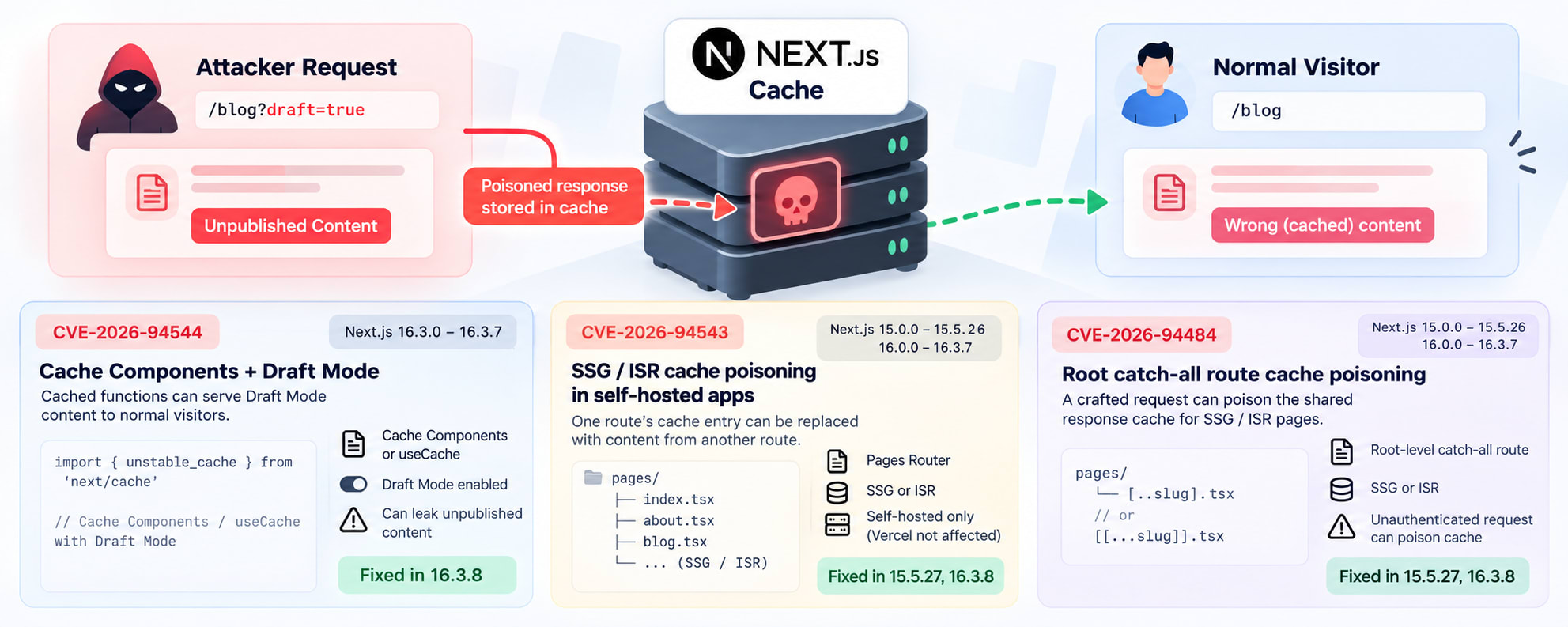
CVE-2026-94544 affects Next.js 16.3.0 through 16.3.7. It needs Cache Components or the experimental useCache feature. It can expose unpublished Draft Mode content through a shared cache entry.
CVE-2026-94543 targets SSG and ISR pages in self-hosted Next.js apps. It can replace one route's cache entry with content from another route.
CVE-2026-94484 targets a different SSG and ISR setup. A root-level catch-all route can allow a crafted request to poison the shared response cache.
So, do not stop at npm update.
Check your setup first.
Then patch the version.
Three cache poisoning CVEs compared
The quick comparison
CVEMain triggerAffected versionsFixed versionCVE-2026-94544Cache Components or useCache with Draft Mode16.3.0 to 16.3.716.3.8CVE-2026-94543Self-hosted Pages Router with SSG or ISR15.0.0 to 15.5.26, 16.0.0 to 16.3.715.5.27, 16.3.8CVE-2026-94484Root catch-all route with SSG or ISR15.0.0 to 15.5.26, 16.0.0 to 16.3.715.5.27, 16.3.8
The release page confirms that Next.js 16.3.8 includes fixes for both cache poisoning advisories.
The GitLab advisory data also lists 15.5.27 and 16.3.8 as fixed versions for CVE-94543 and CVE-94484.
CVE-2026-94544
This one is different.
It targets Cache Components.
It also affects the experimental useCache path in Next.js 16.3.0 through 16.3.7.
A site can be affected when cached functions return Draft Mode content.
The problem appears when a Draft Mode request and a normal request overlap.
The cache key does not separate those fills correctly.
The second request can receive the first request's cached result.
That can leak unpublished content.
If the normal request also prerenders a page, that content can persist in the generated page.
The official advisory says later visitors can receive the poisoned page until revalidation.
This is the first setup you should check.
CVE-2026-94543
This CVE targets self-hosted applications.
It affects the Pages Router.
The vulnerable setup also needs SSG or ISR pages.
The attack can replace one route's cache entry with content from another route.
That wrong content can then be served to visitors.
The advisory gives an important deployment detail.
Applications deployed on Vercel are not affected by CVE-2026-94543.
That does not mean every cache CVE is safe on Vercel.
It only gives that specific exemption for CVE-94543.
Keep that distinction in mind.
CVE-2026-94484
This is the third cache poisoning issue.
It involves SSG or ISR rendering.
The vulnerable application also needs a root-level catch-all page.
A single unauthenticated crafted request can poison the shared response cache.
The result can affect later visitors.
The advisory rates this issue as Moderate.
Its CVSS score is 4.8 under CVSS 3.1.
This CVE does not use the same Draft Mode condition as CVE-94544.
It also does not use the same self-hosted Pages Router condition as CVE-94543.
That is why checking only one advisory is not enough.
Am I affected by Next.js 16.3.8 cache poisoning?
Check your installed version
Start with the version.
// Correct: Check the installed Next.js version

npm ls next
You can also inspect your package file.
// Correct: Check the declared Next.js version

cat package.json | grep '"next"'
If you run Next.js 16.3.0 through 16.3.7, upgrade now.
The official CVE-94544 record lists that exact affected range.
Check Cache Components
CVE-94544 needs Cache Components or experimental useCache.
Search your Next.js config.
// Correct: Find Cache Components settings

grep -R "cacheComponents" next.config.* 2>/dev/null
grep -R "useCache" next.config.* 2>/dev/null
You should also search your application code.
// Correct: Find use cache directives

grep -R "'use cache'" app pages src 2>/dev/null
Next.js documents cacheComponents as the switch for Cache Components. The use cache directive then marks data or component output as cacheable.
Check SSG and ISR
CVE-94543 and CVE-94484 involve SSG or ISR.
Look for common Pages Router patterns.
// Correct: Find common SSG and ISR APIs

grep -R "getStaticProps" pages 2>/dev/null
grep -R "getStaticPaths" pages 2>/dev/null
grep -R "revalidate" pages 2>/dev/null
Then check whether your deployment is self-hosted.
A Docker container, Node.js server, or custom server needs more attention than a Vercel deployment for CVE-94543.
Next.js supports self-hosted Node.js and Docker deployments for Cache Components.
Check root catch-all routes
CVE-94484 has one more clue.
Look for a root-level catch-all route.
Examples include:
pages/[...slug].tsx
pages/[...path].tsx
pages/[[...slug]].tsx
A route like this alone does not prove that you are vulnerable.
You also need the SSG or ISR conditions described in the advisory.
That combination is the important part.
How to fix the three CVEs
Upgrade to Next.js 16.3.8
For a Next.js 16 project, use the patched release.
// Correct: Upgrade Next.js 16 to the patched release

npm install next@16.3.8
Then update your lockfile.
// Correct: Verify the resolved version

npm ls next
You should see:
next@16.3.8The safer long-term choice is to move to a newer supported release when available.
The important point is that your deployed version must contain the security fix.
The official Next.js upgrade guide supports manual package upgrades and version-specific upgrade guides.
If you are on Next.js 15
CVE-94543 and CVE-94484 also affect Next.js 15.
Their fixed version is 15.5.27.
So a Next.js 15 application should move to 15.5.27 or newer.
CVE-94544 is different.
Its affected range starts at Next.js 16.3.0.
So do not treat the three CVEs as one version rule.
Do not rely on deleting the cache
Deleting .next can help with stale local output.
It does not patch a security vulnerability.
The vulnerable logic lives inside the framework.
You need the patched Next.js package.
// Correct: Reinstall after changing the Next.js version

rm -rf .next
npm install
npm run build
The .next cleanup is a build validation step.
It is not the security fix.
Vercel versus self-hosted deployments
CVE-94543 has a Vercel exception
The official advisory is very clear here.
CVE-2026-94543 affects self-hosted Next.js applications.
It states that applications deployed on Vercel are not affected.
So if you use Vercel, do not mark CVE-94543 as an active exposure without checking the advisory scope.
Do not apply that exception to every CVE
This is where security summaries often become misleading.
CVE-94544 concerns Cache Components and Draft Mode.
Its advisory does not give the same Vercel exemption.
CVE-94484 concerns SSG and ISR rendering with a root-level catch-all route.
Its advisory describes shared response cache poisoning.
So deployment type is only one part of the decision.
The framework feature and route structure matter too.
For a wider Next.js security check, the Next.js July 2026 security release guide covers the same kind of affected-version analysis.
What about custom cache handlers?
Next.js supports custom cache handlers.
These can store cached data outside the default process memory.
Do not assume a custom handler removes the vulnerability.
The security issue depends on how Next.js builds and shares cache entries.
The right fix is still the patched framework version.
Verify the fix after upgrading
Verify the package tree
Run this after installation.
// Correct: Confirm the resolved dependency

npm ls next
You want to see a patched version.
For Next.js 16, that means 16.3.8 or newer.
For the affected Next.js 15 paths, use 15.5.27 or newer.
Build the production app
Do not stop after npm install.
Run the production build.
// Correct: Build the application after the security upgrade

npm run build
Then start the production server.
// Correct: Run the production build

npm start
Test the routes that use SSG, ISR, or Cache Components.
Also test Draft Mode if your application uses previews.
Test cache separation
For CVE-94544, test a Draft Mode request.
Then test a normal request.
The normal request must never receive unpublished content.
For CVE-94543, test two routes that can produce different static content.
Check that one route cannot return the other route's content.
For CVE-94484, test your root catch-all route.
Check that crafted paths do not replace the response for another cached path.
The exact exploit request should not be reproduced in production.
Use a safe staging test instead.
Common wrong fixes
"I only need to clear .next"
No.
Clearing .next does not change vulnerable framework code.
It only removes generated build output.
"Vercel means all three are safe"
No.
The Vercel exemption is explicitly stated for CVE-94543.
Do not extend that statement to CVE-94544 or CVE-94484.
"My app uses App Router, so I cannot be affected"
That is also too broad.
CVE-94544 specifically involves Cache Components.
It can therefore matter to modern Next.js applications using that feature.
"npm update will always fix it"
Do not rely on that blindly.
Check the resolved version after the update.
Your lockfile can keep an older version in some dependency workflows.
Use npm ls next after installation.
What should you do today?
If your project uses Next.js 16, check the version first.
// Correct: Check the current version

npm ls next
If you are on 16.3.0 through 16.3.7, upgrade.
// Correct: Install the patched Next.js release

npm install next@16.3.8
Then rebuild.
// Correct: Validate the production build

rm -rf .next
npm run build
If you are on Next.js 15, check for the SSG and ISR conditions.
Upgrade to 15.5.27 or newer when those conditions apply.
If you are self-hosting, pay extra attention to CVE-94543.
If you use Cache Components and Draft Mode, pay extra attention to CVE-94544.
If you have a root catch-all route with SSG or ISR, check CVE-94484.
That is the practical decision tree.
Key Takeaways
nextjs 16.3.8 cache poisoning is not one bug. It covers three distinct cache-related CVEs.
CVE-2026-94544 affects Next.js 16.3.0 through 16.3.7 with Cache Components or useCache and Draft Mode.
CVE-2026-94543 targets self-hosted Pages Router apps using SSG or ISR.
CVE-2026-94484 targets SSG or ISR apps with a root-level catch-all route.
Next.js 16 users should upgrade to 16.3.8 or newer.
Next.js 15 users affected by CVE-94543 or CVE-94484 should upgrade to 15.5.27 or newer.
Clearing .next is not a security fix. Verify the installed package and rebuild.
Do not assume a Vercel deployment is exempt from every CVE in this release.
FAQ
What is nextjs 16.3.8 cache poisoning?
It refers to three cache-related security flaws fixed around Next.js 16.3.8. The CVEs target different cache configurations and route patterns. The main CVEs are CVE-2026-94544, CVE-2026-94543, and CVE-2026-94484.
Is Next.js 16.3.7 vulnerable?
Yes, under the affected conditions. CVE-2026-94544 affects Next.js 16.3.0 through 16.3.7. CVE-94543 and CVE-94484 also affect Next.js 16 versions before 16.3.8 when their required configurations are present.
Is Next.js 16.3.8 safe from these three CVEs?
Yes. Next.js 16.3.8 contains fixes for these three cache-related advisories. The release also contains other security fixes.
Does CVE-2026-94543 affect Vercel?
The official advisory says Vercel deployments are not affected by CVE-2026-94543. The issue targets self-hosted Next.js applications using the vulnerable Pages Router setup.
Does CVE-2026-94544 affect App Router applications?
It can. CVE-94544 affects applications that enable Cache Components or experimental useCache and use cached functions that return Draft Mode content.
Do I need to delete the .next folder?
Deleting .next can help create a clean build. It does not fix the vulnerability. The important step is upgrading Next.js to a patched version.
Is Next.js 15 affected by these CVEs?
Next.js 15 is affected by CVE-94543 and CVE-94484 under their stated conditions. The fixed release for those paths is 15.5.27. CVE-94544 starts at Next.js 16.3.0.
How do I check my installed Next.js version?
Run npm ls next. You can also inspect package.json and your lockfile. The installed dependency tree matters because it shows the version your project actually resolves.
Conclusion
Next.js 16.3.8 is more than a routine patch for applications using the affected cache features. Three cache poisoning CVEs have different triggers, so checking only your Next.js version is not enough. Check Cache Components, Draft Mode, SSG, ISR, self-hosting, and root catch-all routes. Then upgrade to a patched release and verify the production build. If you are tracking Next.js security changes, keep the Next.js August 2026 security release guide nearby for the earlier fixes. For more practical Next.js debugging guides, visit SkillDham.