
Next.js 16.3 MaxListenersExceededWarning - 3 Real Fixes
Skilldham
Engineering deep-dives for developers who want real understanding.
Last updated: October 2026
TL;DR
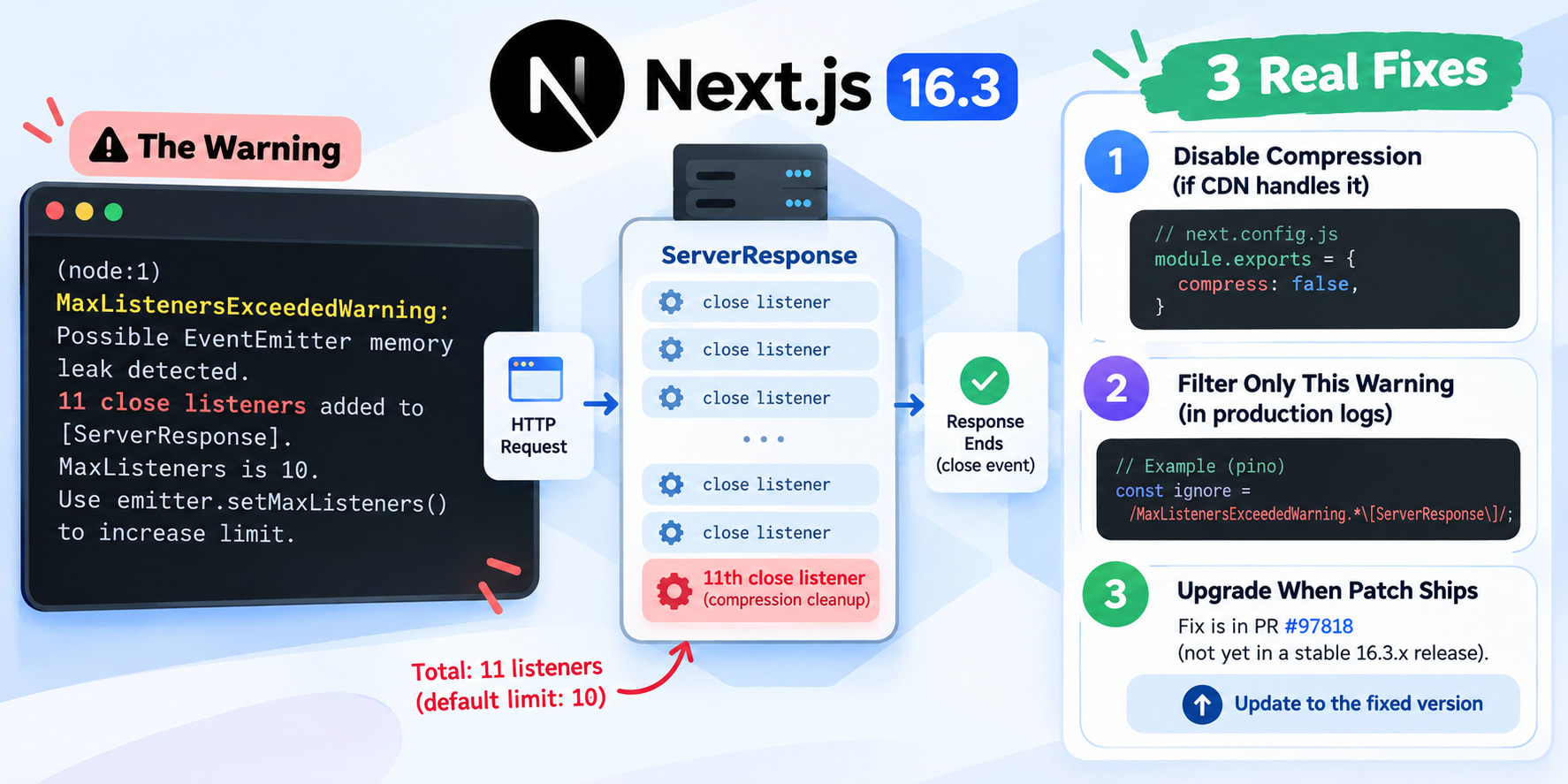
The Next.js 16.3 MaxListenersExceededWarning comes from one new close listener for compression cleanup. On some request paths, that pushes the count from 10 to 11. Node then prints the warning.
It is not a growing memory leak. The real fix is PR #97818, not yet in a stable 16.3.x release.
Until it ships, pick one:
Set compress: false if your CDN already compresses
Filter only this warning from production logs
Upgrade once the #97818 patch ships
You upgrade to Next.js 16.3. The deploy goes green. Then your logs fill up with one line.
MaxListenersExceededWarning: Possible EventEmitter memory leak detected.
It repeats thousands of times a day. One team in the GitHub thread counted about 11,000 a day.
The words "memory leak" make your stomach drop. So you ask an AI assistant. It tells you to call setMaxListeners(20) and move on.
Don't. That hides the warning for every emitter in your process. That includes the ones that really leak.
The Next.js 16.3 MaxListenersExceededWarning has one specific cause. It has three honest fixes. And there is a clear answer to whether it is dangerous.
Let's go through it.
The Exact Next.js 16.3 MaxListenersExceededWarning
Here is the full line Node 24 prints. It is the same from Next.js 16.3.0 through 16.3.5.
text
(node:1) MaxListenersExceededWarning: Possible EventEmitter memory leak detected. 11 close listeners added to [ServerResponse].
MaxListeners is 10. Use emitter.setMaxListeners() to increase limit
Three parts matter. The event is close and the emitter is [ServerResponse].
The count is 11.
What Each Part Tells You
ServerResponse is the Node object behind each HTTP response. Next.js gets a fresh one for every request.
The close event fires when the response ends or the client leaves. Code listens for it to clean up streams.
Node allows 10 listeners per event by default. The 11th one triggers the warning. The Node.js events docs explain this limit.
Why It Always Says 11
Every report in the thread shows exactly 11. One team sampled about 1,400 lines and never saw 12.
That sounds reassuring. But the number alone proves very little.
Node warns only once per emitter. It fires the moment the 11th listener lands. So any warning like this will read 11.
The useful clue is the emitter. A new ServerResponse per request means the listeners die with it.
Which Next.js 16.3 Versions Are Affected
This is a regression. It started in the 16.3 line and is still present in 16.3.5.
Next.js versionStatusWhy16.2.12 and earlierNot affectedThe heaviest path peaks at 10 listeners16.3.0 to 16.3.2AffectedCompression cleanup listener added (#96173)16.3.3AffectedAugust 2026 security release, same listener16.3.4 to 16.3.5AffectedProxy files are byte-identical in bothFirst 16.3.x with #97818Expected fixProxy listeners get removed after each request
Reports cover Node 24.18 and Node 24.20. Node is not the trigger. The Next.js version is.
Why Rolling Back to 16.2.12 Fails
One team rolled one app back to 16.2.12 for a full day. Warnings dropped from about 4,800 a day to zero.
Then they returned to 16.3.3. The count jumped straight back to 4,895.
So the rollback works. But 16.3.3 was the August 2026 security release. Staying on 16.2.x leaves you on code that misses those patches.
The Next.js August 2026 security release guide shows what 16.3.3 patched. Read it before you pin an old version.
Check Your Installed Version
Your package.json range can hide the real version. Ask npm what actually resolved.
bash
# Prints the exact Next.js version your app resolves
npm ls next
If it prints 16.3.0 through 16.3.5, you are in the affected range.
Where the 11th Listener Comes From
Next.js 16.3 shipped two changes that touch responses. One moved the internal proxy from http-proxy to httpxy (#96060). The other added compression stream cleanup (#96173).
The second change adds the 11th listener. It registers a close handler that releases the zlib stream.
The Listener Count Per Request Path
One production team counted every close listener on each path. They compared 16.2.12 with 16.3.2.
Their app ran Sentry, which adds 2 listeners. Here is what they found.
Request path16.2.1216.3.2Warns?App Router page through proxy.ts67NoRoute handler56No/_next/static asset45NoExternal rewrite (Sentry tunnel)1011Yes
Ordinary pages never get close to 10. The external rewrite path was already at 10. Next.js 16.3 added one more.
Who Crosses the Line
You hit the warning when two things stack on the same response. The first is a heavy path. The second is an APM tool.
A heavy path is usually a rewrite to an external origin. Middleware can also add listeners.
Reports name Sentry, Azure Monitor and New Relic. Another team saw it on four apps with no external rewrites. All four used proxy.ts or middleware.ts with Sentry.
Every report in the thread runs self-hosted. That means next start or output: 'standalone', often in Docker.
Find Your Path With --trace-warnings
Don't guess which route crosses 10. Make Node print the stack instead.
bash
# Run once in staging - prints a stack trace with each warning
NODE_OPTIONS='--trace-warnings' npx next start
Hit your routes one by one. Look for proxy-request.js or httpxy in the stack. That points to a rewrite path.
If you use the Sentry tunnel, you can reproduce it without real traffic.
bash
# Use your own tunnelRoute path, org and project values
curl -X POST --data '' 'https://your-host/monitoring?o=YOUR_ORG&p=YOUR_PROJECT&r=us'
One warning per request means you found the crossing path.
Fix 1 - Set compress: false Behind a Compressing Proxy
Next.js compresses responses with gzip by default. The Next.js compress docs cover the option.
The 16.3 cleanup listener exists to serve that compression. Turn compression off and that listener goes away.
One team shipped this to production. Their warnings went from about 11,000 a day to zero.
The Config Change
Here is a typical self-hosted config before the change.
ts
// Before: default config - Next.js compresses and adds the 11th listener
import type { NextConfig } from 'next';

const nextConfig: NextConfig = {
  output: 'standalone',
};

export default nextConfig;
And here it is with compression handed to your proxy.
ts
// Correct: the CDN or ingress compresses, so Next.js skips the listener
import type { NextConfig } from 'next';

const nextConfig: NextConfig = {
  output: 'standalone',
  compress: false,
};

export default nextConfig;
That team ran behind DigitalOcean ingress and Cloudflare. Both already compressed every response. So Next.js was doing the same work twice.
Check Compression Before You Ship It
Do not flip this flag blind. Deploy it to staging first. Then check the response headers.
bash
# Look for content-encoding: gzip or br in the output
curl -s -o /dev/null -D - -H 'Accept-Encoding: gzip, br' https://staging.your-domain.com/ | grep -i content-encoding
If you see gzip or br, your proxy compresses. You are safe to ship.
If the command prints nothing, stop. Your responses now go out uncompressed.
What It Costs
On a bare next start with no proxy, this flag hurts. HTML and JSON grow several times larger. Load times and bandwidth bills go up.
A Next.js maintainer in the thread called compress: false a triage tool. He warned against it as a blanket workaround.
Take that seriously. Use it only when the curl check above proves a proxy compresses for you.
Fix 2 - Filter Only This Warning From Logs
Sometimes you can't touch compression. Maybe nothing sits in front of Next.js. Then the honest move is a precise log filter.
The Wrong Way to Silence It
Most quick fixes reach for a Node flag. Both of these are too wide.
bash
# Wrong: hides every Node warning in the process
NODE_OPTIONS='--no-warnings' next start

# Wrong: hides every MaxListeners warning, including real leaks
NODE_OPTIONS='--disable-warning=MaxListenersExceededWarning' next start
A real leak on a database client or socket would vanish too. You would learn about it from a crash, not a log line.
That crash looks like the one in Node.js OOMKilled on Kubernetes. Keep real warnings visible.
The Safe Filter
This file drops only close warnings on a ServerResponse. Every other warning still prints.
js
// Correct: warning-filter.cjs - hides only the known ServerResponse close warning
'use strict';

let suppressed = 0;

function isServerResponseCloseWarning(warning) {
  return (
    warning.name === 'MaxListenersExceededWarning' &&
    warning.type === 'close' &&
    warning.emitter?.constructor?.name === 'ServerResponse'
  );
}

process.on('warning', (warning) => {
  if (isServerResponseCloseWarning(warning)) {
    suppressed += 1;
    return;
  }

  // Re-print every other warning in Node's own format
  const code = warning.code ? `[${warning.code}] ` : '';
  console.warn(`(node:${process.pid}) ${code}${warning.name}: ${warning.message}`);
});

// One summary line per minute instead of thousands of warnings
setInterval(() => {
  if (suppressed > 0) {
    console.info(`[warning-filter] suppressed ${suppressed} ServerResponse close warnings in 60s`);
    suppressed = 0;
  }
}, 60_000).unref();
Node attaches emitter, type and count to this warning. That lets you match the exact source.
The summary line keeps a trend you can graph. It also stops the flood if Sentry captures console output.
Wire It Into next start and Standalone
--no-warnings stops Node's default printer. The warning event still fires, so the filter prints the rest. --require loads the filter before Next.js boots.
json
{
  "scripts": {
    "start": "NODE_OPTIONS='--no-warnings --require ./warning-filter.cjs' next start"
  }
}
On Windows, inline NODE_OPTIONS needs the cross-env package.
For output: 'standalone' in Docker, copy the file next to server.js.
dockerfile
# Standalone output does not copy root files, so copy the filter in
COPY warning-filter.cjs ./
CMD ["node", "--no-warnings", "--require", "./warning-filter.cjs", "server.js"]
Fix 3 - Upgrade to the 16.3.x Patch With #97818
This is the real fix. Everything above is a bridge until it ships.
What PR #97818 Changes
The proxy code adds close listeners to abort upstream requests. Before the fix, it never removed them. PR #97818 removes them in a finally block once proxying ends.
That takes the rewrite path back under 10, even with Sentry. A related PR, #97824, tried to drop two listeners. Maintainers closed it.
Confirm Your Install Has the Fix
At the time of writing, 16.3.5 does not include it. A thread member diffed both tarballs to confirm that.
So don't trust a version bump alone. Check the release notes for #97818. Then check the installed code.
bash
# No match suggests your installed version still lacks the #97818 cleanup
grep -n "removeListener" node_modules/next/dist/server/lib/router-utils/proxy-request.js
Compiled code can change shape between releases. Treat a match as a hint. Treat the release notes as proof.
Remove the Workaround After Upgrading
Once you run the fixed patch, undo Fix 1 or Fix 2. Turn compression back on if you only disabled it for this.
Then delete the warning filter. Future warnings should print normally again.
Fixes That Do Not Work
These show up in forums and AI answers. Each one either fails or costs too much.
setMaxListeners(20)
This is the answer most AI tools give.
js
// Wrong: raises the limit for every emitter in the process
import { EventEmitter } from 'node:events';

EventEmitter.defaultMaxListeners = 20;
It changes the default for every emitter. A real leak on a long-lived object now hides until 20 listeners.
You also can't reach the per-request ServerResponse in a stock next start. So there is no clean place to raise it narrowly.
cacheComponents: false
A related issue, #97938, suggested turning off cacheComponents. One user tried it in production. The warnings stayed.
That makes sense. The 11th listener comes from compression and proxying, not caching.
Removing Sentry or Your APM
Removing Sentry clears the warning for some teams. It also removes your error tracking. You trade a noisy log for a blind production app.
If the Sentry tunnel is your only crossing path, there is a smaller trade. Drop tunnelRoute. Ad blockers may then block some Sentry events.
Should You Ignore It? Leak or Noise
Short answer: it is noise, with one caveat. Here is how to tell the difference yourself.
Why This One Is Not a Growing Leak
A real leak means listeners pile up on one long-lived object. Memory grows with each request until the process dies.
That is not happening here. Each request gets its own ServerResponse. Its listeners go away when the response is garbage collected.
A maintainer described the warning as mostly bookkeeping. He did not expect a critical issue behind it.
When to Worry Anyway
One team on 16.3.3 saw 502 errors and a slow storefront. This warning was firing at the same time.
They could not prove the warning caused it. A restart fixed the outage. Still, it is worth watching.
Worry if you see any of these:
Heap that climbs and never drops back
A close warning on an emitter that is not ServerResponse
A different event name, like error or data
A Quick Heap Check
Add this to instrumentation.ts for a day of real traffic.
ts
// instrumentation.ts - logs heap and RSS every 5 minutes on the Node runtime
export async function register() {
  if (process.env.NEXT_RUNTIME !== 'nodejs') return;

  const toMb = (bytes: number) => Math.round(bytes / 1024 / 1024);

  setInterval(() => {
    const { heapUsed, rss } = process.memoryUsage();
    console.info(`[heap] used=${toMb(heapUsed)}MB rss=${toMb(rss)}MB`);
  }, 5 * 60_000).unref();
}
A sawtooth that returns to the same floor is normal. A floor that keeps rising is a real leak.
Seeing that rising floor? Start with the Node 24.19 out of memory guide.
Key Takeaways
The Next.js 16.3 MaxListenersExceededWarning comes from one new compression cleanup listener (#96173).
It only fires when a heavy path and an APM tool share one response.
The count always reads 11, because Node warns once per emitter.
compress: false removes the listener. Use it only behind a proxy that compresses.
Filter the exact ServerResponse close warning. Never use --no-warnings alone.
setMaxListeners(20) and cacheComponents: false are not real fixes.
PR #97818 is the real fix. Remove your workaround once you upgrade.
Frequently Asked Questions
Is the Next.js 16.3 MaxListenersExceededWarning a memory leak?
No, not a growing one. Each request gets a fresh ServerResponse, and its listeners go away with it. Check your heap trend to rule out a separate leak.
Does this warning still happen in Next.js 16.3.5?
Yes. The proxy and router files are byte-identical between 16.3.4 and 16.3.5. You need the patch that includes PR #97818.
Why does the warning only happen on some routes?
Each path adds a different number of close listeners. Ordinary pages sit at 6 or 7. External rewrites with Sentry reach 11.
Can I fix it with setMaxListeners(20)?
It hides the warning, but it does not fix anything. It raises the limit for every emitter in your process. A real leak elsewhere would then go unnoticed.
Is it safe to set compress: false in production?
Only if a proxy or CDN already compresses your responses. Check for a content-encoding header with curl first. Without upstream compression, your pages ship uncompressed.
Will disabling cacheComponents fix this warning?
No. One user tried it in production and the warnings stayed. The extra listener comes from compression and proxying, not caching.
Do I need Sentry installed to see this warning?
No. Reports also name Azure Monitor and New Relic. Any APM that adds close listeners can push a heavy path past 10.
Should I roll back to Next.js 16.2.12?
A rollback removes the warning, but it is a bad trade. 16.3.3 was the August 2026 security release. Use a workaround and stay on the 16.3.x line.
Conclusion
The warning is a counting problem, not a memory problem. Next.js 16.3 added one listener, and APM tools filled the rest.
Knowing that keeps you from the worst fix - raising the limit for everything.
Use compress: false behind a compressing proxy, or filter the exact warning. Then upgrade when #97818 ships.
Running self-hosted Next.js 16.3? The Turbopack bugs in Next.js 16.3 post covers its other regressions.
Want fixes like this before AI tools learn them? Join the SkillDham newsletter.