

Nextjs Metadata Not Working? 6 Common Fixes
Skilldham
Engineering deep-dives for developers who want real understanding.
Intro
You add metadata to your Next.js page expecting the browser tab title to change, but nothing happens. The page loads fine, your code looks correct, yet the title, description, or Open Graph tags never update.
This is a frustrating situation many developers run into when working with the Next.js App Router. The issue usually appears when Nextjs metadata is not working, especially for developers migrating from the older Pages Router to the newer App Router introduced in Next.js 13.
The confusing part is that the metadata API works differently than traditional <Head> tags. If you place metadata in the wrong file or use it inside a client component, it simply won’t work.
If you are facing the issue of nextjs metadata not working in your App Router project, you are not alone.
In this guide, we’ll walk through the 6 most common reasons why Next.js metadata is not working, and show exactly how to fix them with practical code examples.
Let’s fix this.
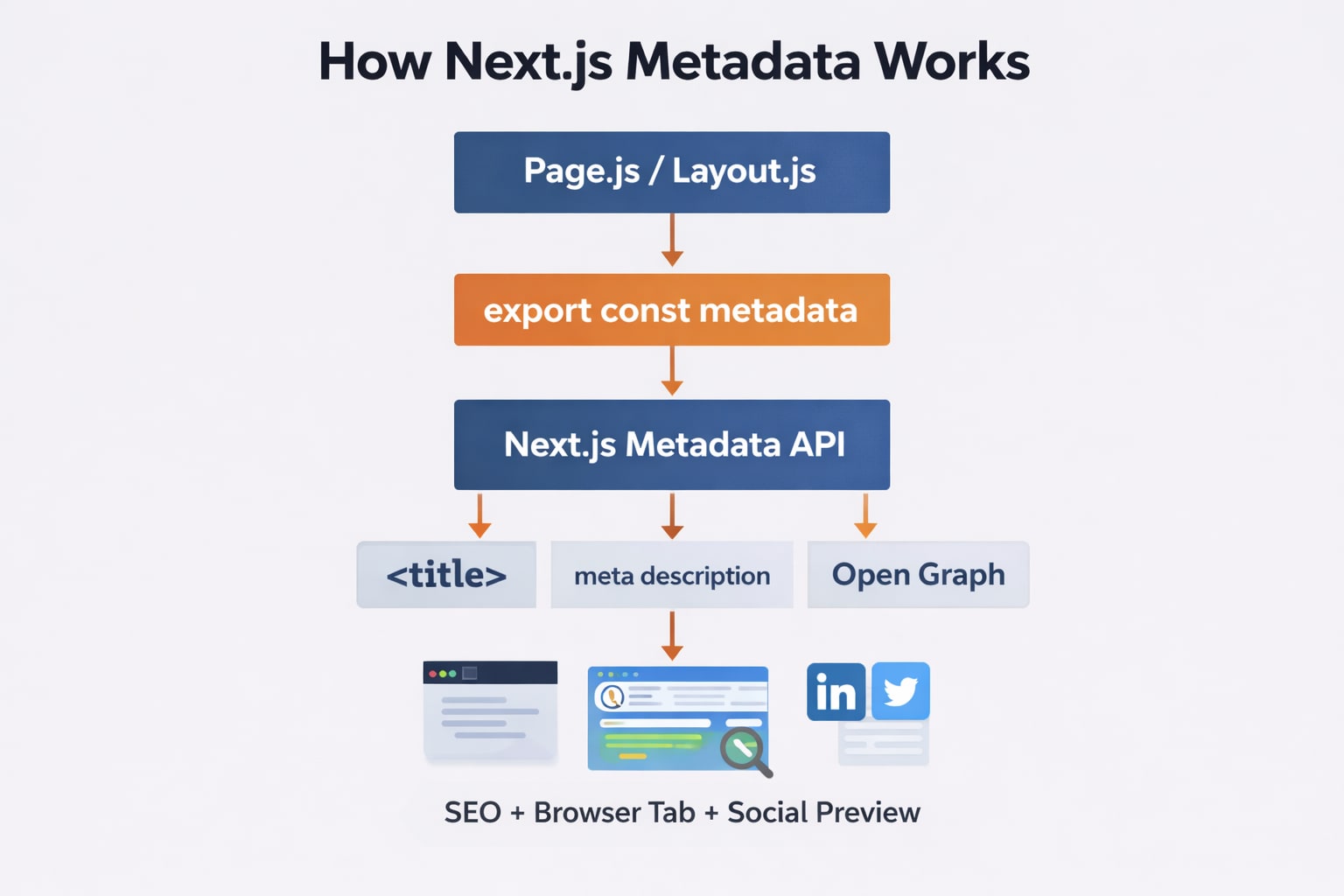
1. Placing Metadata in the Wrong File
One of the most common reasons Nextjs metadata not working occurs is placing metadata in the wrong file.
In the App Router, metadata must be defined in:
page.js
layout.js
If you try adding metadata inside a random component, it will not work.
Wrong Example
// components/Header.js

export const metadata = {
  title: "My Page"
}
This does nothing because metadata only works in layout or page files.
Correct Example
// app/page.js
export const metadata = {
title: "My Page",
description: "Welcome to my Next.js application"
}
export default function Page() {
return Hello World
;
}Now Next.js can properly apply the metadata to your page.
For deeper understanding of the App Router architecture, read our SkillDham guide on Next.js App Router Explained.
2. Forgetting to Export the Metadata Object
Another reason developers encounter Nextjs metadata not working is forgetting to export the metadata object.
Next.js only recognizes metadata when it is exported.
Wrong Example
const metadata = {
  title: "Blog Page"
}
This variable exists but Next.js will ignore it.
Correct Example
export const metadata = {
  title: "Blog Page",
  description: "Read our latest articles"
}
By exporting the metadata object, Next.js includes the tags automatically during rendering.
This is documented in the official Next.js documentation:
https://nextjs.org/docs/app/api-reference/functions/generate-metadata
External documentation like this improves SEO trust signals (E-E-A-T).
3. Using Metadata Inside Client Components
Another hidden cause of Nextjs metadata not working is placing metadata inside client components.
Metadata only works inside server components.
If your file contains "use client", metadata will not work.
Wrong Example
"use client"

export const metadata = {
  title: "Dashboard"
}
This will not work because client components run in the browser.
Correct Example
export const metadata = {
  title: "Dashboard"
}

export default function Dashboard() {
  return Dashboard
}
If you need interactive UI, you can still use client components inside the page, but metadata must stay in a server component.
If you want to understand the difference between server and client components, check our SkillDham guide on Next.js Server vs Client Components.
4. Using Metadata Instead of generateMetadata for Dynamic Pages
If your page uses dynamic routes, static metadata will not work correctly.
Many developers think nextjs metadata not working is a framework bug, but it usually happens because metadata is defined in the wrong file.
Example dynamic route:
/blog/[slug]In this case you must use generateMetadata().
Wrong Example
export const metadata = {
  title: "Blog Post"
}
This creates the same title for every post.
Correct Example
export async function generateMetadata({ params }) {

  const post = await getPost(params.slug)

  return {
    title: post.title,
    description: post.description
  }

}
This allows Next.js to generate metadata dynamically for each page.
Dynamic metadata is critical for SEO-friendly blog pages.
5. Metadata Caching Issues
Sometimes developers think Nextjs metadata is not working, but the real problem is caching.
Next.js aggressively caches pages in development and production.
If metadata changes do not appear:
Possible causes
browser cache
build cache
server restart required
Quick Fix
Restart the dev server:
npm run devOr rebuild the project:
npm run buildClearing the browser cache can also solve metadata update issues.
6. Open Graph Metadata Not Showing on Social Media
Another common issue occurs when Open Graph metadata does not appear correctly on platforms like:
Twitter
LinkedIn
Facebook
Discord
Wrong Example
export const metadata = {
  title: "My Blog"
}
This only sets the page title.
Correct Example
export const metadata = {
  title: "My Blog",
  description: "Latest articles on web development",
  openGraph: {
    title: "My Blog",
    description: "Latest articles on web development",
    images: [
      {
        url: "/cover.png",
        width: 1200,
        height: 630
      }
    ]
  }
}
Open Graph metadata ensures your page appears correctly when shared.
Key Takeaway
When Next.js metadata is not working, the problem is usually related to how the metadata API is used inside the App Router.
Here are the most important things to remember:
Metadata must be placed inside page.js or layout.js.
The metadata object must be exported.
Metadata only works in server components.
Use generateMetadata() for dynamic routes.
Restart the server if caching prevents updates.
Add Open Graph metadata for better social sharing previews.
Once you understand these patterns, working with metadata in Next.js becomes straightforward and reliable.
Frequently Asked Questions
Why is Nextjs metadata not working in App Router?
Next.js metadata may not work if it is placed inside the wrong file or inside a client component. Metadata should be exported from page.js or layout.js.
How do I fix Nextjs metadata not updating?
Restart the development server or clear browser cache. Sometimes metadata appears unchanged because Next.js caches the page during development.
Can I use metadata in client components?
No. Metadata only works in server components because it must be rendered on the server before the page loads.
What is the difference between metadata and generateMetadata?
metadata is static and used for pages with fixed SEO information. generateMetadata() allows dynamic metadata generation based on route parameters or fetched data.