

Next.js App Router Not Working? 7 Common Mistakes
Skilldham
Engineering deep-dives for developers who want real understanding.
You migrate your Next.js project to the App Router. You follow the official guide. You move your pages into the app directory. You run npm run dev and half your components throw errors. useState is undefined. useRouter does not work. Your metadata is missing from the page source. Navigation refuses to update anything.
You are staring at the same Next.js project that worked perfectly yesterday, and now nothing makes sense.
This is the frustration every developer hits when the Next.js App Router is not working as expected. The App Router is powerful, but it breaks almost every assumption you had from the Pages Router. The error messages are vague. The documentation assumes you already understand Server Components. Stack Overflow is full of outdated answers.
Here is exactly why the Next.js App Router stops working for most developers, and how to fix each specific cause with real code.
Understanding Why Next.js App Router Breaks So Easily
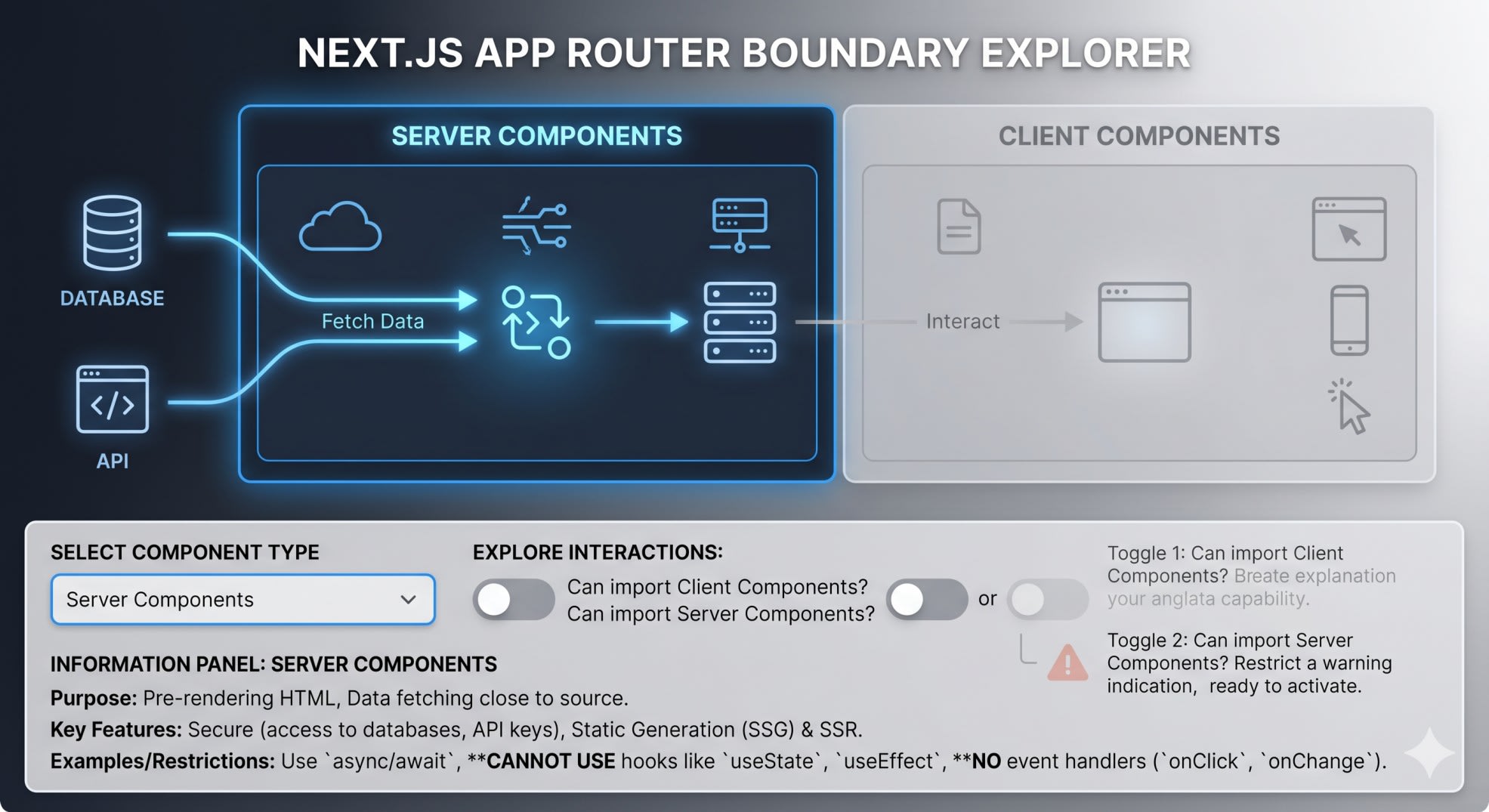
Before fixing anything, you need to understand one core shift. The App Router treats every component as a Server Component by default. This is the opposite of the Pages Router, where every component ran in the browser.
Server Components run on the server, generate HTML, and send it to the client. They have no access to browser APIs, hooks, event handlers, or state. They cannot use useState, useEffect, onClick, window, or localStorage. If you try, Next.js throws a cryptic error or silently fails.
Client Components run in the browser and have full React capabilities, but only if you explicitly mark them. The marker is a single string at the top of the file: "use client". Miss this, and the App Router will act like it is not working, even though your code looks correct.
Most issues where the Next.js App Router is not working come from this server-client split. Once you understand it, the fixes become obvious.
Mistake 1: Forgetting the use client Directive
This is the number one reason developers think the Next.js App Router is not working. You write a component with state or an event handler, and nothing happens. No error. No warning. The button just does not click.
jsx
// Wrong - Missing "use client" directive
import { useState } from 'react';

export default function Counter() {
  const [count, setCount] = useState(0);

  return (
    <button onClick={() => setCount(count + 1)}>
      Count: {count}
    </button>
  );
}
This component is treated as a Server Component by default. useState is a React hook, which only works on the client. The build will either fail with an error like "You are importing a component that needs useState" or silently break in production.
jsx
// Correct - Mark as Client Component
"use client";

import { useState } from 'react';

export default function Counter() {
  const [count, setCount] = useState(0);

  return (
    <button onClick={() => setCount(count + 1)}>
      Count: {count}
    </button>
  );
}
The "use client" directive must be the first line of the file, before any imports. It tells Next.js that this component and everything it imports runs in the browser. Use it whenever your component has useState, useEffect, event handlers, or browser APIs.
The pattern to remember is simple. If your component needs interactivity, mark it as client. If it only renders data, keep it as a server component. This ties directly into why React useEffect runs twice in development, because effects only work in Client Components.
Mistake 2: Using useRouter From the Wrong Import Path
The Pages Router and App Router both have a useRouter hook. They look identical. They come from different packages. Using the wrong one is one of the most common reasons the Next.js App Router is not working properly.
jsx
// Wrong - Pages Router import in App Router
"use client";
import { useRouter } from 'next/router';

export default function ProfileButton() {
  const router = useRouter();

  return (
    <button onClick={() => router.push('/profile')}>
      Go to Profile
    </button>
  );
}
This will either throw NextRouter was not mounted or fail silently during navigation. The next/router package is for the Pages Router only.
jsx
// Correct - Use next/navigation
"use client";
import { useRouter } from 'next/navigation';

export default function ProfileButton() {
  const router = useRouter();

  return (
    <button onClick={() => router.push('/profile')}>
      Go to Profile
    </button>
  );
}
The App Router exposes useRouter from next/navigation. The API is also different. There is no router.query anymore. Use useSearchParams for query strings and useParams for dynamic route parameters. The official Next.js navigation docs list every method.
Search your entire codebase for from 'next/router' after migrating. Every single one needs to change.
Mistake 3: Trying to Export Metadata From a Client Component
You add SEO metadata to your page. You check the page source in production. The metadata is missing. This happens because metadata exports only work in Server Components.
jsx
// Wrong - Metadata in client component
"use client";

export const metadata = {
  title: 'My Product Page',
  description: 'Best products online',
};

export default function ProductPage() {
  const [filter, setFilter] = useState('all');
  return <div>{/* client UI */}</div>;
}
Next.js silently ignores the metadata export. Your page has no title, no description, and no Open Graph tags. Google crawls the page and sees nothing useful.
jsx
// Correct - Separate server and client concerns
// app/products/page.jsx (Server Component)
import ProductList from './ProductList';

export const metadata = {
  title: 'My Product Page',
  description: 'Best products online',
};

export default function ProductPage() {
  return <ProductList />;
}

// app/products/ProductList.jsx (Client Component)
"use client";
import { useState } from 'react';

export default function ProductList() {
  const [filter, setFilter] = useState('all');
  return <div>{/* client UI */}</div>;
}
The page file stays as a Server Component so it can export metadata. The interactive UI lives in a separate Client Component. This pattern is the foundation of the App Router. Server Components handle data fetching, metadata, and SEO. Client Components handle user interactions.
Missing metadata directly hurts ranking. If your pages are not showing up in search, this is often the cause, similar to why Next.js image optimization fails in production.

Mistake 4: Using Hooks in Server Components
This is the inverse of Mistake 1. You add useEffect or useState to a component that does not have "use client". The build fails with a confusing error about hooks being called in a server environment.
jsx
// Wrong - Hooks in server component
import { useEffect } from 'react';

export default function Dashboard() {
  useEffect(() => {
    console.log('mounted');
  }, []);

  return <h1>Dashboard</h1>;
}
The error message usually says something like "You are importing a component that needs useEffect. This React hook only works in a client component." This confuses developers because they did import the hook correctly.
jsx
// Correct - Mark as client component
"use client";
import { useEffect } from 'react';

export default function Dashboard() {
  useEffect(() => {
    console.log('mounted');
  }, []);

  return <h1>Dashboard</h1>;
}
Remember the rule. Any component that uses React hooks needs "use client" at the top. If you only need data fetching without interactivity, use the new App Router pattern with async Server Components and await directly in the component body.
jsx
// Server Component with data fetching (no hooks needed)
export default async function Dashboard() {
  const data = await fetch('https://api.example.com/stats').then(r => r.json());
  return <h1>Visitors: {data.visitors}</h1>;
}
This is one of the most powerful App Router features. No more useEffect for data fetching on the server.
Mistake 5: Async Params Breaking in Next.js 15
Next.js 15 changed how dynamic route parameters work. If your old code accesses params.id directly, your App Router will stop working after upgrading.
jsx
// Wrong - Next.js 15 breaks this
export default function ProductPage({ params }) {
  return <div>Product ID: {params.id}</div>;
}
In Next.js 15, params became a Promise. Accessing it synchronously throws a runtime warning or error, depending on your setup. This is why code that worked on Next.js 14 suddenly fails.
jsx
// Correct - Await the params
export default async function ProductPage({ params }) {
  const { id } = await params;
  return <div>Product ID: {id}</div>;
}
For Client Components, use the use hook from React to unwrap the promise.
jsx
"use client";
import { use } from 'react';

export default function ProductPage({ params }) {
  const { id } = use(params);
  return <div>Product ID: {id}</div>;
}
The same rule applies to searchParams. Both are now async in Next.js 15. This change catches everyone upgrading from older versions. Check the Next.js upgrade guide for the complete migration steps.
Mistake 6: API Routes Written in the Old Format
You move your API routes to the app directory. They stop working. The old export default function handler(req, res) pattern does not exist in the App Router.
jsx
// Wrong - Old Pages Router API format
// app/api/users/route.js
export default function handler(req, res) {
  if (req.method === 'GET') {
    res.status(200).json({ users: [] });
  }
}
This will either 404 or throw an error. The App Router uses a completely different API called Route Handlers.
jsx
// Correct - App Router Route Handler
// app/api/users/route.js
import { NextResponse } from 'next/server';

export async function GET(request) {
  return NextResponse.json({ users: [] });
}

export async function POST(request) {
  const body = await request.json();
  return NextResponse.json({ success: true, data: body });
}
Each HTTP method becomes its own named export: GET, POST, PUT, DELETE, PATCH. The request is a standard Web Request object, not the Node-style request you had before. Use NextResponse to send responses.
This is a common trap when migrating. Every API route needs to be rewritten, not just moved. The syntax looks cleaner once you get used to it, but the migration itself is tedious.
Mistake 7: Layout Not Re-rendering on Route Change
Developers migrating from the Pages Router often expect layouts to re-mount on every route change. In the App Router, layouts stay mounted across navigations. This causes bugs where data does not refresh, counters do not reset, and animations do not replay.
jsx
// Wrong - Expecting layout to re-mount
// app/dashboard/layout.jsx
"use client";
import { useEffect, useState } from 'react';

export default function DashboardLayout({ children }) {
  const [notifications, setNotifications] = useState([]);

  useEffect(() => {
    // This only runs once, not on every route change
    fetchNotifications().then(setNotifications);
  }, []);

  return (
    <div>
      <Sidebar notifications={notifications} />
      {children}
    </div>
  );
}
The layout is mounted once when the user first enters /dashboard. Navigating to /dashboard/settings or /dashboard/profile keeps the same layout instance. The useEffect does not run again.
jsx
// Correct - Use pathname to trigger updates
"use client";
import { useEffect, useState } from 'react';
import { usePathname } from 'next/navigation';

export default function DashboardLayout({ children }) {
  const [notifications, setNotifications] = useState([]);
  const pathname = usePathname();

  useEffect(() => {
    fetchNotifications().then(setNotifications);
  }, [pathname]);

  return (
    <div>
      <Sidebar notifications={notifications} />
      {children}
    </div>
  );
}
By adding pathname to the dependency array, the effect runs whenever the route changes. This is the correct pattern for layout-level behavior that needs to respond to navigation.
For full layout refresh with fresh data, you can use the revalidatePath function in a Server Action, or structure your data fetching inside the page rather than the layout.
Key Takeaway
When the Next.js App Router is not working as expected, the cause is almost always the server-client boundary. Understanding which components run where fixes 90 percent of App Router issues.
Remember these seven fixes:
Add "use client" to any component using hooks or event handlers
Import useRouter from next/navigation not next/router
Keep metadata exports in Server Components only
Do not use React hooks without the "use client" directive
Await params and searchParams in Next.js 15
Rewrite API routes using the new Route Handler syntax
Use pathname as a dependency to refresh layout effects on navigation
The Next.js App Router rewards developers who embrace the server-client split. Trying to write App Router code the way you wrote Pages Router code is the fastest path to frustration.
If your builds are still failing after these fixes, check our guide on why Next.js builds fail on Vercel for deployment-specific issues.
FAQs
Why is my Next.js App Router not working after migrating from Pages Router? The App Router uses Server Components by default, which cannot use hooks, state, or event handlers. Most migration issues come from forgetting to add "use client" to interactive components. Also, the useRouter import changed from next/router to next/navigation, and API routes now use named HTTP method exports instead of a single handler function.
How do I fix use client error in Next.js App Router? Add "use client" as the very first line of your file, before any imports. This directive marks the component as a Client Component, allowing it to use React hooks, browser APIs, and event handlers. Any component that imports a Client Component can remain a Server Component, but any file that directly uses hooks must have this directive.
Does metadata work in Next.js App Router client components? No, metadata exports only work in Server Components. If you add export const metadata to a file with "use client", Next.js silently ignores it, leaving your page without SEO tags. The fix is to keep your page file as a Server Component for metadata, and move interactive UI into separate Client Components.
What is the difference between useRouter in Pages Router and App Router? The App Router useRouter comes from next/navigation and only includes navigation methods like push, replace, and back. It does not have query or asPath. For query strings, use useSearchParams. For dynamic route parameters, use useParams. The Pages Router useRouter from next/router still exists but only works in the pages directory.
Why does my Next.js 15 App Router break with async params error? Next.js 15 made params and searchParams asynchronous. You must await them before accessing their properties. In Server Components, add async to your component and use await params. In Client Components, use the use hook from React to unwrap the promise. Old code that accesses params.id directly will throw a warning or error in Next.js 15.