
Node 24 Native Module Docker Build Fails? Here's the Fix
Skilldham
Engineering deep-dives for developers who want real understanding.
You migrate to Node 24. Your native module Docker build fails. CI goes red.
npm ci hangs for two minutes, then fails. The error mentions node-gyp. Then Python. Then a 404 from a GitHub releases page you've never opened before.
You try npm install instead. Same failure. You clear the npm cache. Same failure. You add --legacy-peer-deps because that's what worked last time something broke. Same failure.
You finally read the actual error and see it: prebuild-install warn install No prebuilt binaries found. Your lockfile has a perfectly good version of better-sqlite3. It just doesn't have a binary for Node 24 yet.
Here's exactly what changed, which packages it hits, and the Dockerfile that fixes it for good.
Quick Answer
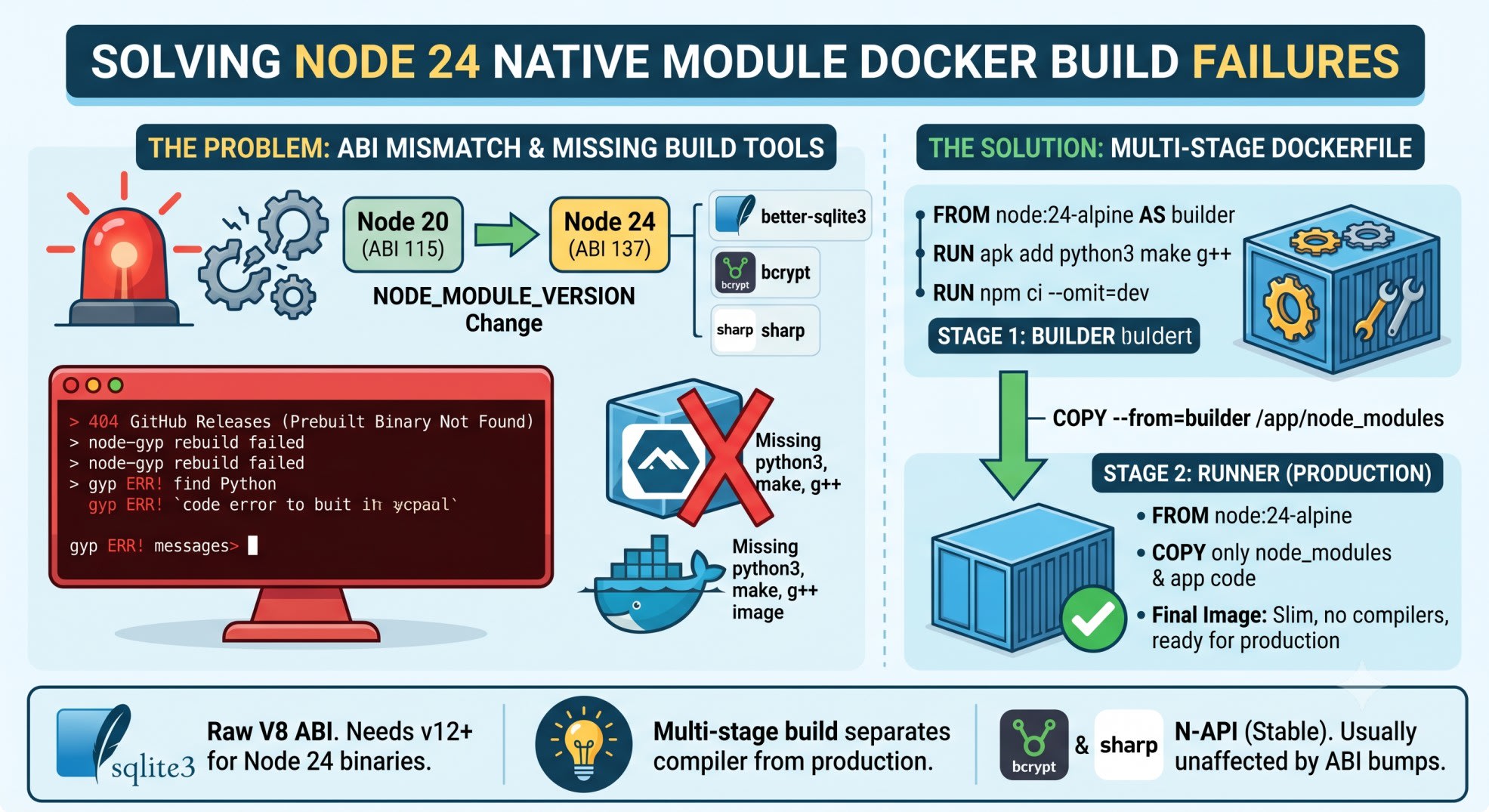
A Node 24 native module Docker build fails most often because Node 24 changed its ABI version. The new number is NODE_MODULE_VERSION 137. Several popular native packages, including older better-sqlite3 releases, don't ship a prebuilt binary for that ABI yet. At least not for every OS and libc combination. The install falls back to compiling from source with node-gyp. That needs Python and build tools. Your slim or Alpine production image usually has neither.
The fix isn't one npm install retry. It's a multi-stage Dockerfile. One stage compiles native modules with full build tools. A second, slim stage copies over only the compiled output.
Why Node 24 Native Module Docker Build Fails Right Now
Node 20 reached end of life on April 30, 2026. After that date, upstream stopped shipping security and bug fixes for the 20.x line.
Every team still on Node 20 is now migrating. Most are jumping straight to Node 24. It has the longer runway. Node 22 is already in Maintenance LTS.
That migration is the trigger. Native modules don't recompile themselves. Every package with a compiled C++ addon needs a new prebuilt binary for the new ABI. That means a new binary for every OS. Every CPU architecture. Both glibc and musl libc.
The ABI Number That Breaks Everything
Run node -p process.versions.modules on any Node version and you get a number called NODE_MODULE_VERSION. It's the contract between a compiled .node binary and the runtime loading it.
Node 18 uses 108. Node 20 uses 115. Node 22 uses 127. Node 24 uses 137.
A binary built for 115 will not load on a runtime expecting 137. Node doesn't try to make it work. It throws.
Error: The module '/app/node_modules/better-sqlite3/build/Release/better_sqlite3.node'
was compiled against a different Node.js version using
NODE_MODULE_VERSION 115. This version of Node.js requires
NODE_MODULE_VERSION 137. Please try re-compiling or re-installing
the module (for instance, using `npm rebuild` or `npm install`).
That message is honest. Recompiling does fix it. The problem is what recompiling requires inside a container that was never built for compiling anything.
Mistake 1: Assuming npm install Will Just Get a Binary
Most native packages use a tool called prebuild-install. On install, it checks GitHub releases for a binary matching your exact Node ABI, OS, CPU, and libc. If it finds one, it downloads it. No compiler needed.
If it doesn't find one, it silently falls back to node-gyp rebuild. That's a full C++ compile, run as a postinstall script, inside whatever environment your npm install happens to run in.
What Actually Breaks on better-sqlite3
better-sqlite3 versions before 12.0.0 only published binaries up to NODE_MODULE_VERSION 131. Node 24 needs 137. There's no binary to download.
prebuild-install info looking for local prebuild @ prebuilds/better-sqlite3-v12.0.0-node-v137-linux-x64.tar.gz
prebuild-install http request GET https://github.com/WiseLibs/better-sqlite3/releases/download/v12.0.0/better-sqlite3-v12.0.0-node-v137-linux-x64.tar.gz
prebuild-install http 404 https://github.com/WiseLibs/better-sqlite3/releases/download/v12.0.0/better-sqlite3-v12.0.0-node-v137-linux-x64.tar.gz
prebuild-install warn install No prebuilt binaries found (target=24.1.0 runtime=node arch=x64 libc= platform=linux)
The fix sounds simple: upgrade to better-sqlite3 v12 or later, which added Node 24 support. But here's the part that costs people an afternoon. The musl (Alpine) arm64 binary lagged behind the glibc ones for months after v12 shipped. Say your build agent is Apple Silicon, pushing to an Alpine arm64 image. You can be on the latest better-sqlite3 and still hit a 404. Meanwhile your x64 teammate's build passes fine.
Why This Specific Library, and Not Every Package
Not every native module has this problem the same way. better-sqlite3 builds against the raw V8/Node internal API, which changes every major version. That's why it needs a fresh binary, and a fresh NODE_MODULE_VERSION match, every single time Node bumps its ABI.
sharp and bcrypt build against N-API instead. N-API is a stable, versioned C interface that Node promises not to break across major versions. A bcrypt binary built for N-API version 3 keeps working on Node 18, 20, 22, and 24. N-API itself didn't change.
That's why sharp and bcrypt usually survive a Node version bump without drama. They don't usually need a new binary at all.
Mistake 2: Blaming Node 24 When It's Actually Alpine
Here's the part that confuses people, because the error from sharp or bcrypt looks identical to the better-sqlite3 one. But the cause is different.
sharp and bcrypt fail in Docker for a separate reason: missing OS dependencies, not missing Node ABI support. When N-API has no prebuild for your specific libc, platform, or CPU, it falls back to node-gyp too. And node-gyp needs Python.
gyp info using node-gyp@11.1.0
gyp info using node@24.2.0 | linux | arm64
gyp ERR! find Python
gyp ERR! find Python   Python is not set from command line or npm configuration
gyp ERR! find Python   Python is not set from environment variable PYTHON
gyp ERR! find Python   checking if "python3" can be used
gyp ERR! find Python   - executable path is ""
gyp ERR! find Python   - "" could not be run
A slim or Alpine production image doesn't ship Python or a C++ toolchain on purpose. That's what keeps the image small. The same minimalism that makes your image fast to deploy is exactly what makes node-gyp fail.
This isn't a one-library bug either. A separate, unrelated bump to the official node Docker image broke node-gyp's Python detection while building sharp. That happened in a repo with nothing to do with SQLite. Same root cause, different package. It's systemic to how native addons get built inside containers, not a quirk of any single dependency.
node-canvas Is the Worst Offender
If your stack uses canvas for server-side image generation, know this going in: canvas has never shipped npm prebuilt binaries. Every install compiles from source against system Cairo and Pango libraries. That happens on every Node version, ABI bump or not.
Node 24 made this worse in a second way. An internal V8 change to how external memory gets tracked caused crashes in canvas at runtime. Not just at install time. This hit versions before the maintainers patched it. Pin a current canvas release before you touch Node 24 in production.
The Fix: A Multi-Stage Dockerfile
The actual fix isn't a flag or a cache clear. It's separating where you compile from where you run.
dockerfile
# Wrong: Wrong - one stage, ships a full build toolchain into production
FROM node:24-alpine
RUN apk add --no-cache python3 make g++
WORKDIR /app
COPY package*.json ./
RUN npm ci
COPY . .
CMD ["node", "server.js"]
This works, but it ships gcc, Python, and every header file into your production image. That's 200MB-plus of attack surface and slow deploys for code that only runs once, at install time.
dockerfile
# Correct: Correct - build tools only exist in the builder stage
FROM node:24-alpine AS builder

# Build deps needed only for native module compilation
RUN apk add --no-cache python3 make g++ pkgconfig

WORKDIR /app
COPY package*.json ./

# Force npm to fail loudly instead of silently rebuilding from source
# when a prebuilt binary is genuinely unavailable (catches CI surprises early)
RUN npm ci --omit=dev

# Stage 2: clean runtime image, no compiler, no Python
FROM node:24-alpine AS runner
WORKDIR /app

# Copy only the installed node_modules and app code - not the build tools
COPY --from=builder /app/node_modules ./node_modules
COPY . .

USER node
CMD ["node", "server.js"]
Why This Works
The builder stage has Python, make, and g++. node-gyp has everything it needs if it falls back to compiling from source. The final image starts from a clean node:24-alpine again and copies over only the compiled node_modules folder. No compiler ships to production.
Your image stays slim. Your install still succeeds even on the packages that don't have a prebuilt binary yet. You get both.
Pin Your libc Explicitly for sharp
If you're on sharp, skip the guesswork entirely and tell npm exactly which binary you want before install:
bash
# Wrong: Wrong - lets npm guess the right libc, fails silently on mismatch
npm install sharp

# Correct: Correct - explicit target for Alpine (musl) on x64
npm install --cpu=x64 --os=linux --libc=musl sharp
This skips the detection step entirely. It goes straight for the binary that matches your actual container, not your build machine.
Native Package Status for Node 24 (as of June 2026)
PackageABI typeNode 24 statusCommon failure pointbetter-sqlite3Raw V8/Node ABIFixed in v12.0.0+musl/arm64 binaries lagged behind glibc for monthssharpN-API (stable)Generally unaffectedFalls back to node-gyp only on missing libc/arch prebuilds or detected global libvipsbcryptN-API (stable)Generally unaffectedSame node-gyp + Python trap if a platform prebuild is missingcanvasNo prebuilds, everAlways compiles from sourceNeeds Cairo/Pango system libs in every image; had a separate Node 24 runtime crash, fixed in recent releases
Treat this table as a snapshot, not a guarantee. Run npm ls <package> and check the maintainer's releases page before you trust any of these rows blindly.
Key Takeaways
Node 24 native module Docker build fails most often because of a NODE_MODULE_VERSION mismatch (137), not a Node bug
better-sqlite3 needs v12.0.0 or later for any Node 24 support at all - anything older will always fail
musl (Alpine) arm64 binaries can lag behind glibc binaries by months, even after a package "supports" Node 24
sharp and bcrypt use N-API, so they usually survive Node version bumps without a rebuild
canvas never ships prebuilt binaries and needs system Cairo/Pango libraries in every image, every time
A multi-stage Dockerfile keeps build tools out of your final image. node-gyp can still succeed when it has to run
Pinning --libc=musl or --libc=glibc explicitly for sharp skips a whole class of silent detection failures
FAQs
Why does my Docker build work locally but fail in CI on Node 24?
Your local machine and CI runner likely use different architectures or libc. A binary that resolves on your Apple Silicon Mac targeting glibc won't match a musl-based Alpine CI image. Check both arch and libc, not just the Node version.
Does upgrading better-sqlite3 to the latest version always fix Node 24 installs?
Mostly, but not universally. Versions 12.0.0 and later added Node 24 support. But specific platform combinations, especially musl on arm64, took longer to get a published binary. Check the releases page for your exact platform before assuming a version bump alone solves it.
Do I need Python and build-essential in my final Docker image?
No. Keep them in a builder stage only. Copy the compiled node_modules folder into a clean final stage so your production image never carries a compiler.
Will Node 22 avoid this problem entirely?
Mostly yes, since Node 22 has been out long enough that most native packages have stable prebuilds for it. But Node 22 reaches end of life in April 2027, so you're deferring the same migration, not avoiding it.
Why does sharp fail even though it uses N-API?
N-API binaries are still platform-specific. If npm can't find a prebuild matching your exact OS, CPU, and libc, it still falls back to node-gyp. That needs Python and a compiler your slim image may not have.
Is npm rebuild a real fix or a band-aid?
It's a real fix for a single, already-running container, since it forces a fresh compile against the current Node ABI. It's not a fix for your Dockerfile, because the next clean build hits the same missing binary again.
What's the difference between glibc and musl, and why does it matter here?
glibc is the standard C library used by Debian, Ubuntu, and most non-Alpine images. musl is a smaller, different implementation used by Alpine. Binaries compiled against one don't run against the other, so a package needs separate prebuilds for each.
Should I avoid Alpine entirely to dodge this?
You can switch to a Debian-based slim image and most musl-specific failures disappear, at the cost of a larger image. That's a reasonable trade-off if you've already lost hours to musl binary gaps. It's not required if you pin libc explicitly and use a proper multi-stage build.
The Bigger Pattern
Node 24 didn't break better-sqlite3, sharp, and bcrypt on purpose. It bumped its ABI like every major version does, and the ecosystem is catching up at different speeds.
The packages building against raw V8 internals will keep doing this on every major Node bump. The ones on N-API mostly won't. Once you know which category a dependency falls into, you stop guessing and start checking the right thing first.
If you're mid-migration off Node 20, this is worth reading next: Prisma 7 Migration Errors and Driver Adapter Config Fix. It covers a closely related failure on the Prisma side of this exact stack.
Express part of your upgrade too? Express 5 Missing Parameter Name is worth reading before you touch routes.