
Why Prisma Docker Image Bloat Still Isn't Fixed in v7
Skilldham
Engineering deep-dives for developers who want real understanding.
Last updated: July 2026
TL;DR
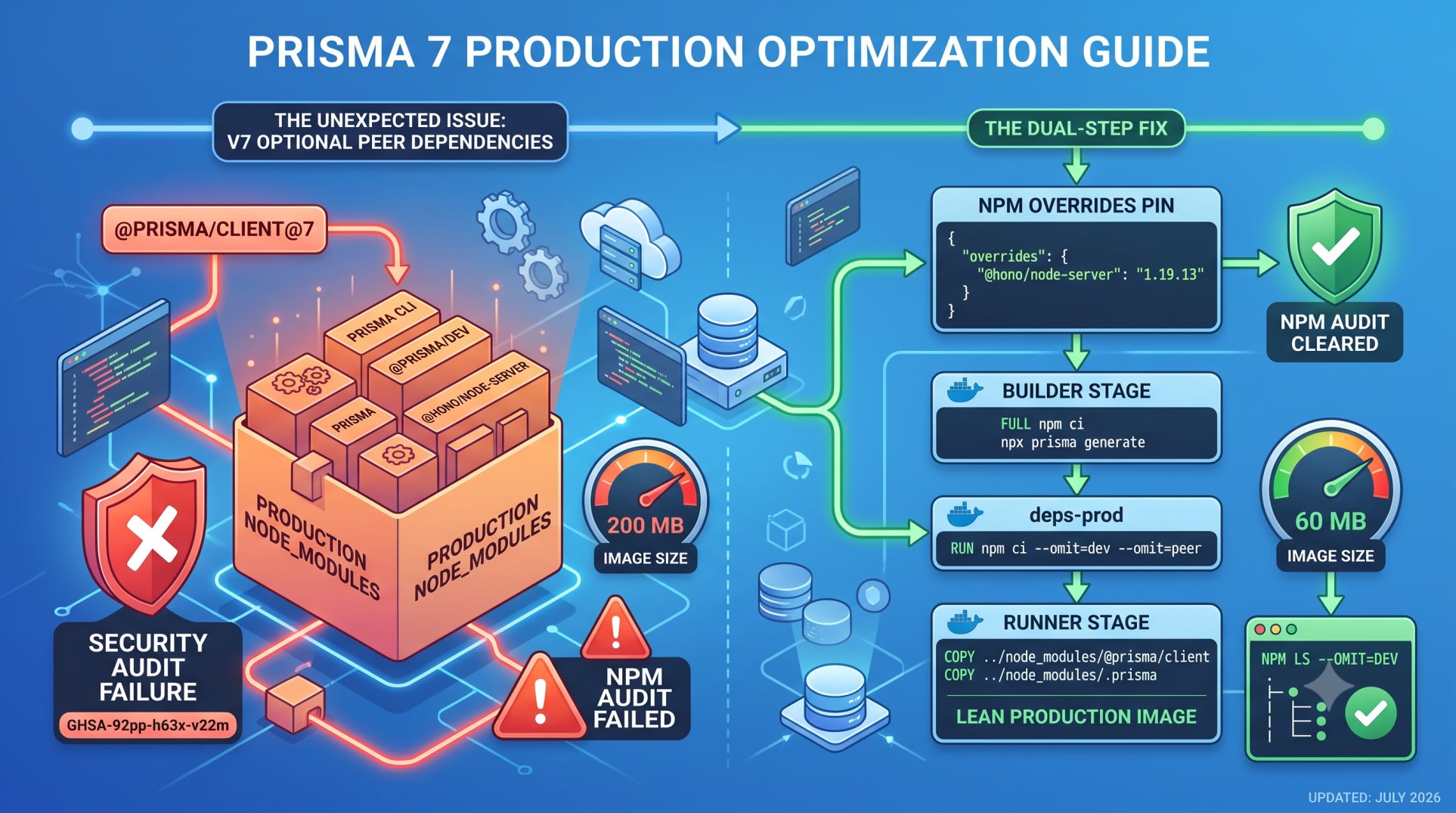
@prisma/client@7 lists prisma as an optional peer dependency. npm installs optional peers by default. That pulls the full CLI back into production node_modules. It happens even if you already moved prisma to devDependencies. It also pulls in a bundled dev database called @prisma/dev. A package inside it, @hono/node-server, trips npm audit --omit=dev in CI. The advisory is GHSA-92pp-h63x-v22m. The fix is a one-line npm overrides pin. Pair it with a multi-stage Dockerfile that copies only @prisma/client, not the whole @prisma tree.
You moved prisma to devDependencies years ago. You did the right thing.
Then you upgraded to Prisma 7. You ran npm ls --omit=dev out of habit. The CLI was sitting right there in production again.
You check package.json. prisma is still in devDependencies. It's exactly where you put it. You didn't misconfigure anything.
CI starts failing npm audit --omit=dev. The advisories are new. They point to a package called @hono/node-server. You never installed it directly.
Here's what actually changed in v7. And here's the exact override that fixes it.
Why This Keeps Happening: 2022 to v7
This isn't a new bug. It's an old bug that keeps finding new ways back in.
Back in 2022, developers reported this on the Prisma GitHub discussions. Production Docker images carried close to 200MB of extra weight. None of it ran at runtime.
json
// Wrong: the advice from 2022 onward
{
  "dependencies": {
    "@prisma/client": "^3.8.0"
  },
  "devDependencies": {
    "prisma": "^3.8.0"
  }
}
That advice was correct for years. Keep prisma in devDependencies. Run npm ci --omit=dev in your Docker build. The CLI stayed out of production.
Prisma 7 changed the dependency graph underneath that advice. @prisma/client now declares prisma as an optional peer dependency. This lets tooling warn you when your client and CLI versions drift apart.
npm has installed optional peer dependencies by default since npm 7. That peer edge pulls the CLI back into production node_modules. It does this even though prisma never left devDependencies.
What Actually Happens in v7
I saw this on a Next.js and NeonDB stack. It's the same setup Munshi runs in production. npm ls --omit=dev should show a clean tree with just @prisma/client.
bash
# Wrong: what most teams expect after moving prisma to devDependencies
npm i @prisma/client@7
npm ls --omit=dev | grep prisma
The output tells a different story. On Prisma client 7.7.0 and CLI 7.8.0, running Node 24, prisma still shows up. So does its dependency @prisma/dev.
Tracing the dependency chain
@prisma/dev bundles a local development database server. It's built on @electric-sql/pglite. That server pulls in @hono/node-server as a dependency. None of that code runs in a production container. It exists so prisma dev can spin up a throwaway local database while you code.
The chain looks like this: @prisma/client → optional peer prisma → dependency @prisma/dev → dependency @hono/node-server.
Why the CLI still shows up
Your devDependencies entry for prisma was never wrong. The optional peer dependency inside @prisma/client is a second path back to the same package. --omit=dev doesn't touch peer dependencies. That's the gap.
The npm audit Problem in CI
This is where the bloat stops being a disk-space annoyance. It starts breaking builds.
bash
# Wrong: CI step that now fails after upgrading to Prisma 7
npm ci --omit=dev
npm audit --omit=dev
@hono/node-server versions below 1.19.13 carry an advisory. It's tracked as GHSA-92pp-h63x-v22m. The package rides in through the peer dependency chain. npm audit --omit=dev reports it anyway. Your app never imports hono directly.
Teams can't npm audit fix their way out of this. The vulnerable package isn't a direct dependency. npm has nothing to bump on its own.
json
// Correct: pin the vulnerable transitive dependency directly
{
  "overrides": {
    "@hono/node-server": "1.19.13"
  }
}
Add that to package.json. Run npm install to refresh the lockfile. Then run npm audit --omit=dev again. The advisory clears. npm now resolves every reference to @hono/node-server to the patched version, wherever it sits in the tree.
This is a low-risk override. Say Prisma later pins @hono/node-server to a conflicting range. The install fails loudly instead of silently. And the override is a one-line removal.
This is a different failure mode than the classic Prisma migration errors. Those show up when prisma.config.ts doesn't reach your container. If you're also hitting adapter or connection errors on this same v7 upgrade, check the Prisma 7 migration errors guide. It covers the driver adapter and P1012 side of the same version jump.
The npm overrides Fix
The override above solves the audit failure. It doesn't shrink the image by itself. @hono/node-server still gets installed, just at a patched version. Shrinking the image is a separate, Docker-level fix. That's covered next.
Confirming the override took effect
bash
npm ls @hono/node-serverEvery path back to @hono/node-server should now resolve to 1.19.13. If an older version still shows up, delete node_modules and package-lock.json. Reinstall clean.
Keeping the override from silently going stale
Set a calendar reminder or a CI check. Revisit this override whenever you bump the prisma or @prisma/client version. Prisma may patch @prisma/dev on its own someday. At that point the override becomes unnecessary but harmless.
Multi-Stage Dockerfile That Actually Excludes the CLI
The override fixes the audit. It does not shrink the image. prisma and @prisma/dev still sit in node_modules. Your Dockerfile has to stop them from reaching the final layer.
dockerfile
# Wrong: single-stage build, or a naive COPY of the whole @prisma tree
FROM node:22-alpine
WORKDIR /app
COPY package*.json ./
RUN npm ci
COPY . .
RUN npx prisma generate
CMD ["node", "server.js"]
npm ci here installs the full graph. Peer dependencies come along too. There's no second stage to leave the CLI behind.
dockerfile
# Correct: multi-stage build with a lean production layer
FROM node:22-alpine AS builder
WORKDIR /app
COPY package*.json ./
RUN npm ci
COPY . .
RUN npx prisma generate

FROM node:22-alpine AS deps-prod
WORKDIR /app
COPY package*.json ./
RUN npm ci --omit=dev --omit=peer

FROM node:22-alpine AS runner
WORKDIR /app
ENV NODE_ENV=production
COPY --from=deps-prod /app/node_modules ./node_modules
COPY --from=builder /app/node_modules/@prisma/client ./node_modules/@prisma/client
COPY --from=builder /app/node_modules/.prisma ./node_modules/.prisma
COPY . .
CMD ["node", "server.js"]
Why --omit=peer matters
--omit=dev alone leaves optional peers installed. Adding --omit=peer to the deps-prod stage skips peer dependencies entirely. That's what actually keeps prisma out this time.
Why the COPY lines are narrow
prisma generate writes code into node_modules/.prisma and node_modules/@prisma/client. Copying the whole node_modules/@prisma directory drags the CLI back in through the back door. Copying only those two paths keeps the final image lean.
Verifying the Fix
Don't trust the Dockerfile change until you check the actual image.
bash
# Correct: confirm the CLI is gone from the final layer
docker build -t myapp:prod .
docker run --rm myapp:prod sh -c "npm ls --omit=dev 2>&1 | grep -i prisma"
I tested this on a NeonDB and Next.js stack close to Munshi's setup. The production image dropped by roughly 140MB to 160MB. That matches the range developers reported back in the original 2022 discussion. The mechanism is just different this time.
Run docker images before and after. Compare the sizes on your own base image. Alpine, Debian, and distroless bases all start from different floors.
What This Means for Migrations in Production
You still need the Prisma CLI somewhere. It has to run prisma migrate deploy. Stripping it from the runtime image doesn't remove that need. It just moves it.
The cleanest pattern is a separate, short-lived migration step. It installs the full dependency tree, including prisma. It runs the migration, then exits. Your long-running application container never needs the CLI at all.
bash
docker run --rm --env DATABASE_URL=$PRODUCTION_DATABASE_URL myapp:builder npx prisma migrate deployReuse the builder stage image for this. It already has prisma and prisma.config.ts available. That keeps the CLI out of the image your users' requests actually hit.
Running this on NeonDB with a driver adapter? Check the Prisma 7 and NeonDB driver adapter setup. It walks through the connection config this migration container needs.
Key Takeaways
Prisma docker image bloat is not new. It first surfaced in 2022 and Prisma 7 reopened it through a different mechanism.
@prisma/client@7 lists prisma as an optional peer dependency, and npm installs optional peers by default.
Moving prisma to devDependencies alone no longer keeps it out of production on v7.
The transitive @hono/node-server dependency inside @prisma/dev triggers GHSA-92pp-h63x-v22m in npm audit --omit=dev.
An npm overrides entry pinning @hono/node-server to 1.19.13 clears the audit failure.
npm ci --omit=dev --omit=peer in a dedicated deps-prod Docker stage is what actually removes the CLI from the image.
Copy only node_modules/@prisma/client and node_modules/.prisma from the builder stage, not the whole @prisma directory.
Run migrations from the builder stage or a separate short-lived container, never from the production runtime image.
FAQ
Does moving prisma to devDependencies still matter in Prisma 7?
Yes, keep it there. It's still correct practice. It keeps your local dev setup clean. But it isn't enough on its own anymore. The optional peer dependency inside @prisma/client opens a second path for the CLI.
Why does npm install optional peer dependencies by default?
npm has installed optional peer dependencies by default since npm 7. Required peers only warn. This is standard npm behavior, not a Prisma-specific choice. Prisma 7 is just the first version to use it to pull the CLI along with the client.
Is the GHSA-92pp-h63x-v22m advisory actually exploitable in my app?
The vulnerable @hono/node-server code ships inside @prisma/dev. That's a local development database server. Your production app never imports or runs it. The advisory is real, but the practical risk is low here. It still fails CI security gates until patched.
Can I disable optional peer installation instead of using overrides?
Yes. Pass --omit=peer to npm install. That's exactly what the deps-prod Docker stage does above. Don't apply that flag to your local dev install too. It would also block required peer dependencies you actually need.
Will this same bloat come back in a future Prisma version?
Possibly, through a different mechanism. The root problem keeps resurfacing. @prisma/client and the prisma CLI share a dependency graph, and that graph keeps changing. Check npm ls --omit=dev after every major Prisma upgrade. Don't assume the old fix still holds.
Does this affect Bun or pnpm the same way as npm?
Bun also installs optional peer dependencies by default. Bun users hit the same issue and need the same --omit=peer flag. pnpm doesn't install peer dependencies the same way by default. pnpm images are less exposed to this chain. Still worth checking with pnpm list --prod.
Do I need to change anything if I use a driver adapter like @prisma/adapter-pg instead of the built-in query engine?
Driver adapters skip Prisma's engine binaries. That's a separate size win. But the peer dependency chain pulling in the CLI has nothing to do with which query engine you use. You still need the overrides pin and the Dockerfile change either way.
Conclusion
Prisma docker image bloat never had a permanent fix. It had a fix for whatever was causing it at the time. In 2022 that meant moving prisma to devDependencies. In 2026 it means pinning the transitive package the new peer dependency drags along. Check npm ls --omit=dev after every major upgrade. Don't just check it once when you first set up the project.
Hitting driver adapter or connection errors on the same v7 upgrade? The migration container pattern here pairs directly with the driver adapter configuration linked above.
Want fixes like this one in your inbox before they hit page one of Google? Subscribe to the SkillDham newsletter.