
nodejs OOMKilled kubernetes max-old-space-size Fix
Skilldham
Engineering deep-dives for developers who want real understanding.
Last updated: July 2026
TL;DR - Quick Fix
Your pod is crashing with OOMKilled even though --max-old-space-size is set.
The flag is not wrong. It is incomplete.
Node.js has two memory pools. The flag controls only one.
The fix:
yaml
# In your Kubernetes Deployment args:
args:
  - "--max-old-space-size-percentage=65"
  - "dist/server.js"
For fixed limits without VPA:
Formula: (container_limit_MB x 0.75) - 75 = your flag value
Example: 512MB container → use --max-old-space-size=300
Also fix your streaming code - see Step 3 below.
Tested on: Node.js 18+ - Kubernetes 1.26+ - Express 5
Your Node.js pod keeps dying with OOMKilled.
You set --max-old-space-size to 75% of your container limit. You redeployed.
It crashed again.
You doubled the container memory. It crashed again - just took longer.
You are reading Kubernetes logs at 2am. Pod limit is 2GB. Heap limit is 1.4GB. Still OOMKilled.
Here is what is actually happening - and the fix that holds in production.
Quick Answer
nodejs OOMKilled kubernetes max-old-space-size set correctly still crashes because Kubernetes watches total RSS - not the V8 heap. Buffer memory, native modules, and process overhead all live outside the heap. When they push total RSS past your container limit, the pod gets killed. The heap never hit its cap. The pod crashes anyway.
Why the Flag Is Not Enough
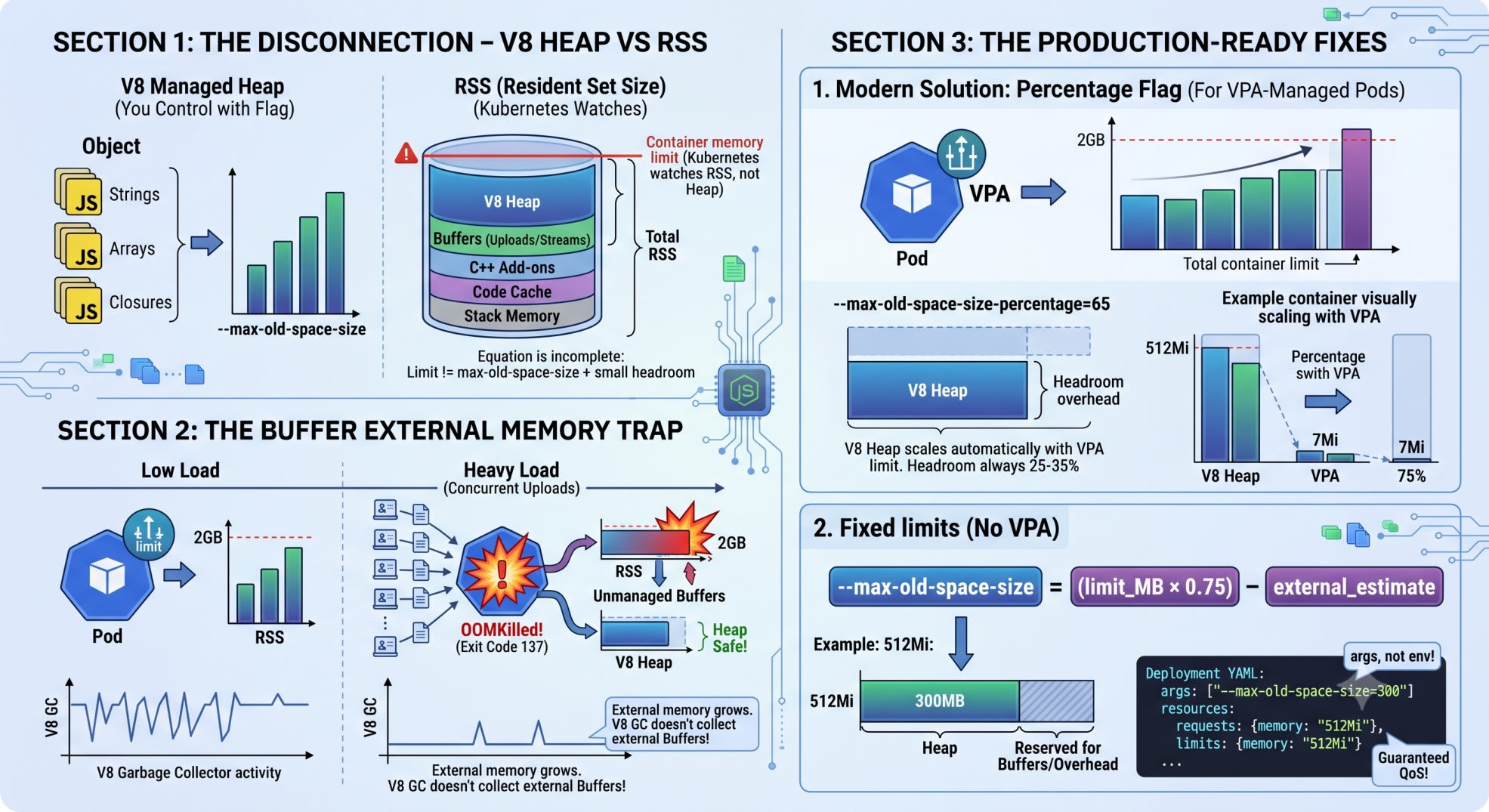
Most developers think the equation is this:
container limit = --max-old-space-size + some headroomThat equation is wrong.
Node.js has two separate memory pools.
Pool 1 - V8 Managed Heap
This is what --max-old-space-size controls.
Your JavaScript objects live here - strings, arrays, closures, objects. V8's garbage collector manages this pool. The flag caps it.
Pool 2 - External Memory (RSS)
This is everything outside the heap.
Buffer.alloc() and Buffer.from() allocations
File reads and streams
Native module memory (database drivers, image processors)
V8 compiled bytecode cache
Per-thread stack memory
Kubernetes watches RSS - not the heap.
When RSS exceeds resources.limits.memory, the Linux OOM killer fires. Exit code 137. Pod shows OOMKilled.
The Numbers
Say your container limit is 512MB. You set --max-old-space-size=384.
Your app handles file uploads. At normal load:
Heap: 280MB (under the 384MB cap)
Buffer: 80MB
Overhead: 50MB
Total RSS: 410MB - fine
Three large uploads hit at once:
Heap: 280MB (still under cap - GC is working)
Buffer: 310MB (no GC manages this)
Overhead: 50MB
Total RSS: 640MB - OOMKilled
Your heap never touched its limit. The pod crashed anyway.
Step 1 - Understand the Buffer Trap
Here is the exact code pattern that causes this crash.
Wrong: Buffering the entire file
javascript
// Wrong: entire file sits in Buffer memory until the function returns
import express from 'express';

const app = express();

app.post('/upload', async (req, res) => {
  const chunks = [];
  for await (const chunk of req) {
    chunks.push(chunk);
  }
  const fileBuffer = Buffer.concat(chunks);
  res.json({ size: fileBuffer.length });
});
What happens: each concurrent request holds a full Buffer in memory. New Buffers pile up faster than anything can release them. V8's GC does not manage external Buffer memory. From its view, the heap looks fine. RSS climbs toward the container limit.
Correct: Stream the file
javascript
// Correct: stream directly to disk - Buffer never accumulates
import express from 'express';
import { createWriteStream } from 'fs';
import { pipeline } from 'stream/promises';

const app = express();

app.post('/upload', async (req, res) => {
  const dest = createWriteStream('/tmp/upload-' + Date.now());
  await pipeline(req, dest);
  res.json({ saved: true });
});
Memory stays flat under concurrent load. The Buffer never accumulates. If your Next.js API route is handling these uploads, the nextjs api routes vs express guide covers when to move heavy operations to a standalone Express server instead.
Step 2 - Set the Flag Correctly
For fixed container limits (no VPA)
Use this formula:
--max-old-space-size = (container_limit_MB x 0.75) - external_memory_estimateFor a 512MB container with file I/O:
(512 x 0.75) - 75 = 309MB → use 300Here is the complete Deployment YAML:
yaml
# Correct: Node.js Deployment with proper memory limits
apiVersion: apps/v1
kind: Deployment
metadata:
  name: node-api
  namespace: production
spec:
  replicas: 2
  selector:
    matchLabels:
      app: node-api
  template:
    metadata:
      labels:
        app: node-api
    spec:
      containers:
        - name: node-api
          image: your-registry/node-api:latest
          command: ["node"]
          args:
            - "--max-old-space-size=300"
            - "dist/server.js"
          resources:
            requests:
              memory: "512Mi"
              cpu: "250m"
            limits:
              memory: "512Mi"
              cpu: "500m"
Two things matter here.
The flag goes in args - not env. Passing it as an environment variable does nothing. Node.js reads memory flags from CLI arguments only.
Requests equal limits. This gives your pod Guaranteed QoS in Kubernetes. It will not be evicted under memory pressure - only killed if it actually breaches the limit.
For VPA-managed pods (Node.js 18.11+)
Static MB values break with a Vertical Pod Autoscaler. VPA adjusts your memory limit dynamically. If it moves from 512Mi to 768Mi, your --max-old-space-size=300 is now too conservative.
Use the percentage flag instead:
yaml
# Correct: percentage flag scales with VPA automatically
args:
  - "--max-old-space-size-percentage=65"
  - "dist/server.js"
At 65%, a 512Mi container gets 332MB of heap. If VPA scales to 768Mi, heap becomes 499MB automatically. No redeployment needed.
Why 65% and not 75%? Buffer and overhead together consume 25-35% of RSS on any app doing I/O. 65% leaves that room.
Which flag to use
SituationUseFixed limits, no VPA--max-old-space-size with calculated MBVPA-managed pods--max-old-space-size-percentage=65Node.js below 18.11Fixed MB only (percentage flag does not exist)Heavy file streamingDrop to 55-60% and fix streaming tooPure JSON API, no I/OCan go up to 70-75%
Step 3 - Verify the Fix in Production
Add this to your startup logs. Run it once on boot.
javascript
// Add to server startup - confirms Node.js is reading limits correctly
import v8 from 'v8';
import process from 'process';

function logMemoryConfig() {
  const heapStats = v8.getHeapStatistics();
  const heapLimitMB = Math.round(heapStats.heap_size_limit / 1024 / 1024);
  const rssMB = Math.round(process.memoryUsage().rss / 1024 / 1024);
  const externalMB = Math.round(process.memoryUsage().external / 1024 / 1024);

  console.log({
    heap_limit_mb: heapLimitMB,
    current_rss_mb: rssMB,
    external_buffer_mb: externalMB,
  });
}

logMemoryConfig();
What to check:
heap_limit_mb should match your calculated value. If it shows 1500MB on a 512Mi pod, the flag is not being read.
external_buffer_mb at startup should be under 20MB. If it is 100MB+ before any requests, a native module is eating memory on init.
Under load, if external_buffer_mb climbs past 150MB on a 512Mi container, fix your streaming patterns.
Check if the flag is being read
Run this inside the pod:
bash
node -e "const v8 = require('v8'); console.log(v8.getHeapStatistics().heap_size_limit / 1024 / 1024 + 'MB')"If output is 1500MB or 4096MB on a 512Mi pod - the flag is not working. Check that it is in args, not env.
What About Node.js 20 Auto-Detection?
Node.js 20 added automatic cgroup v2 detection. It reads the memory limit from the container and sizes the heap automatically - no flags needed.
But it is not a full solution. Two problems:
It uses around 80-85% of the container limit by default. That leaves less headroom for Buffer than you want.
It may fail on cgroup v1 or older Kubernetes versions.
The explicit flag still wins. Auto-detection is a safety net, not a plan.
Key Takeaways
nodejs OOMKilled kubernetes max-old-space-size set correctly is still not enough. Kubernetes watches RSS, not the V8 heap. Buffer memory lives in the gap.
Buffer allocations are not managed by V8's GC. Under concurrent I/O load, they pile up without triggering collection.
For a 512Mi container, set heap to 300MB - not 384MB. Leave 35% for Buffer, code cache, and stack.
Use --max-old-space-size-percentage=65 when running with VPA. The heap scales with the limit automatically.
The flag must be in args - not env. Environment variables are ignored for memory flags.
Stream files instead of buffering them. No flag setting compensates for accumulating full file Buffers under load.
Add v8.getHeapStatistics() to your startup log. Verify the flag is actually being read before going to production.
FAQ
Why does my Node.js pod OOMKill even when the flag is set correctly?
Because --max-old-space-size only limits the V8 heap. Buffer allocations, native module memory, and process overhead live outside it. Kubernetes watches total RSS. When Buffer memory plus heap memory exceeds your container limit, the pod gets OOMKilled - even when the heap never hit its cap.
What is the right flag value for a 512MB container?
Around 300MB for apps doing I/O or using native modules. Formula: (512 x 0.75) - 75 = 309. For pure JSON API servers with no file handling, you can push to 360MB. For heavy streaming, go lower and fix the streaming pattern too.
What is the percentage flag and when should I use it?
--max-old-space-size-percentage was added in Node.js 18.11.0. It sets the V8 heap as a percentage of total container memory. Use it when pods are managed by VPA. The heap scales automatically when VPA adjusts the container limit. Set it to 65% for most apps.
What is exit code 137 in Kubernetes?
Exit code 137 means the process was killed by SIGKILL. In Kubernetes, this is the Linux OOM killer terminating a container that exceeded its memory limit. It shows as OOMKilled in kubectl describe pod. The process is killed immediately with no cleanup.
Should the flag go in env or args?
In args. Node.js reads memory flags from CLI arguments passed directly to the node binary. NODE_OPTIONS=--max-old-space-size=300 works as an alternative in env, but putting it in args in the Deployment YAML is more explicit and easier to audit.
Why do Buffer allocations not trigger garbage collection?
V8's GC manages the heap. Buffer allocations use native memory via malloc - outside the heap. The GC does not see it. Under sustained I/O, new Buffers are created faster than the heap GC cycles. External memory grows until RSS crosses the container limit.
Does Node.js 20 auto-detect container memory?
Yes. Node.js 20+ reads the cgroup v2 memory limit and sizes the heap automatically. But it uses around 80-85% by default - leaving less headroom for Buffer. On older Kubernetes or cgroup v1, it may not work at all. Use the explicit flag anyway.
Does setting requests equal limits help?
It does not prevent OOMKilled. But it gives your pod Guaranteed QoS. Kubernetes will not evict it under node memory pressure before it hits the OOM killer. With Burstable QoS, the pod can be evicted early and unpredictably. Guaranteed QoS makes the container limit the single clear boundary.
Conclusion
--max-old-space-size is not broken. It is just incomplete.
The V8 heap is one pool. RSS is everything. The gap is where OOMKilled lives.
Use the percentage flag with VPA. Fix streaming patterns. Put the flag in args. Verify with v8.getHeapStatistics() on startup. For Prisma connection pool issues that appear after Kubernetes restarts, the Prisma 7 NeonDB Next.js driver adapter setup covers the singleton pattern that survives pod restarts cleanly.