
How to Add AI to Your App for Under ₹500 a Month
Skilldham
Engineering deep-dives for developers who want real understanding.
I wanted to know how to add AI to your app without spending a fortune. Everyone said it was expensive. I believed them for a while.
Then I built one anyway - and the monthly bill was less than a dinner out.
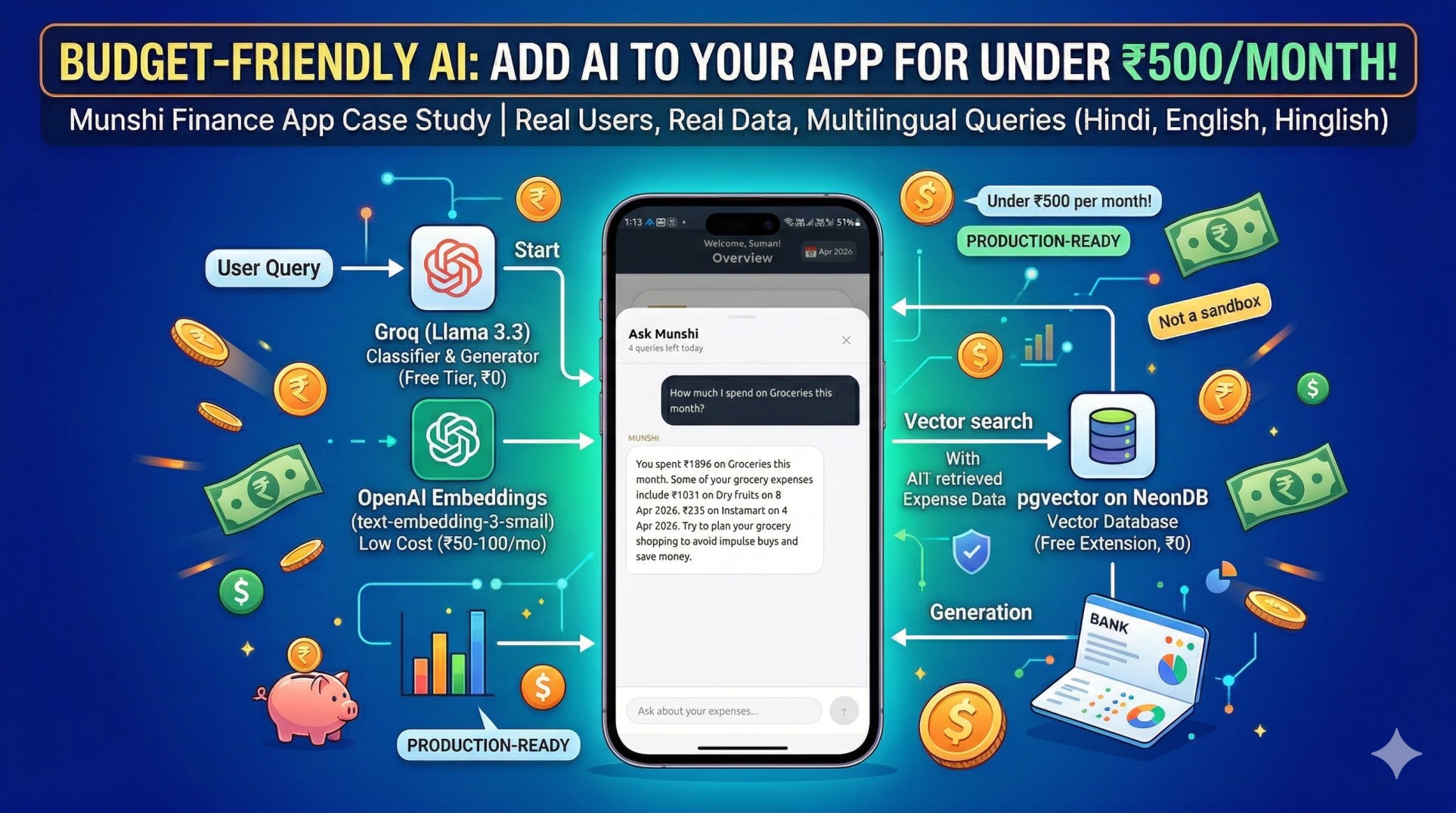
This is the story of how I added a working AI chat feature to Munshi, my personal finance app, using a stack that costs under ₹500 per month in production. Not a demo. Not a sandbox. Real users, real data, real queries - in Hindi, English, and Hinglish.
Here is exactly how it works, what I used, and what I learned building it.
The Problem I Was Trying to Solve
Munshi already tracked my expenses well. Categories, budgets, monthly reports - all working.
But every time I wanted a specific answer, I had to do it manually. How much did I spend on food this month? Open the app, filter by category, add it up. What was my biggest expense last quarter? Go through three months of data by hand.
I knew the data was there. I just wanted to ask for it in plain language and get an answer back.
The obvious solution was AI. The obvious problem was cost. Running GPT-4o for a personal app is not practical - the pricing does not make sense at solo-developer scale. So I started looking for alternatives.
What I found was a combination of three tools that, together, cost almost nothing. If you want to read the full story of how Munshi was built from scratch, start with the first post in this series.
How to Add AI to Your App - The Stack I Used
Groq - LLM Inference
Groq is an inference platform that runs open source models at extremely high speed. I used the Llama 3.3 70b model, which runs at roughly 500 tokens per second on Groq's infrastructure.
For a personal app, the free tier is more than enough. I have been running Munshi's AI feature in production for weeks without hitting any paid limits.
Groq does two things in my system. First, it classifies every incoming query - figuring out what the user is actually asking for and what data is needed to answer it. Second, after the relevant data has been retrieved, Groq generates the final answer using that data as context.
OpenAI Embeddings - text-embedding-3-small
This is the only part of the stack that costs money, and it costs very little.
An embedding converts text into a list of numbers - 1536 numbers, specifically - that represent the meaning of that text rather than the exact words. Two sentences that mean the same thing will produce similar numbers even if they use completely different words.
This matters because my expenses are stored with titles like "Swiggy", "Groceries", "Restaurant dinner". When a user asks "khane pe kitna gaya", there is no exact word match. But in embedding space, "khana" is close to "food" which is close to "restaurant" which is close to "Swiggy". The search finds relevant results even when the words do not match.
The text-embedding-3-small model costs roughly ₹50 to ₹100 per month for a personal app with regular usage. It is the cheapest embedding model OpenAI offers, and for this use case it works perfectly.
pgvector on NeonDB - Vector Search in Postgres
pgvector is a Postgres extension that adds vector storage and similarity search to a standard database. NeonDB is a serverless Postgres database.
I was already using NeonDB for Munshi. Adding pgvector was a single command. No new database to manage, no new service to pay for, no new infrastructure to learn.
When a user adds an expense, the app converts it to a readable sentence - "On 5 April 2026, spent ₹451 in Shopping - Wall Poster" - generates an embedding for that sentence, and stores both in the database. When a query comes in, the same process runs on the question, and pgvector finds the most similar expense embeddings using cosine distance.
The <=> operator in pgvector is what makes this work. It computes the cosine distance between two vectors and returns the closest matches. A threshold of 0.25 filters out results that are not similar enough to be relevant.
How RAG Actually Works
RAG stands for Retrieval Augmented Generation. The name sounds complicated. The concept is not.
Retrieval - when a query comes in, find the relevant data. In Munshi, this means finding the expenses that are most likely to answer the user's question.
Augmented - take that retrieved data and add it to the prompt as context. Instead of sending the AI just the question, send it the question plus the relevant data.
Generation - the AI generates an answer using the provided context. Because it has real data to work with, it does not need to guess. It will not hallucinate numbers because the numbers are right there in the prompt.
The passbook analogy is the clearest way I have found to explain this. If you ask a smart friend what your bank balance is, they will guess - and probably guess wrong. If you hand them your passbook first, they will give you the exact number. RAG is handing the AI the passbook before asking the question.
The Query Classification Problem
Early in development I was doing vector search on every query. This caused a specific problem.
When someone asks "give me a full breakdown of my spending", that is a broad question that needs all the data. Vector search would find the twenty most similar expenses and miss everything else. The answer would be incomplete.
The fix was classification. Before doing anything else, I send the query to Groq and ask it to classify the question into one of two types.
An overview query wants analysis, summary, or comparison. These need the full dataset for the relevant time period, fetched directly from the database without any vector search.
A specific query asks about one particular category or merchant. These work well with vector search because we are looking for a focused subset of data.
The classification also detects the date range the user is asking about. "Pichle mahine ka breakdown" implies last month. "Is saal kitna gaya" implies the current year. The classifier returns this as a structured JSON object that the rest of the system uses to build the right query.
Security - What I Almost Skipped
I almost did not add any security to this feature. It is a personal app. Who is going to attack it?
Beta testing answered that question quickly.
A user accidentally typed something that included the phrase "ignore previous instructions" as part of a longer message. The AI got confused and started behaving unexpectedly. That was enough to take security seriously.
I added three layers of protection.
The first is request-level rate limiting - twenty requests per minute per IP address. This stops automated scripts from hammering the endpoint.
The second is prompt injection detection. A list of regex patterns checks every incoming question for phrases like "ignore all instructions", "act as", "jailbreak", and "reveal user data". Any match returns a 400 error immediately, before the query reaches the AI.
The third is user-level rate limiting - five AI queries per user per day. This is stored in the database and checked before any processing happens. If the limit is hit, the API returns a 429 with a message telling the user to come back tomorrow.
None of these are complicated to implement. All of them matter.
The Cost Breakdown
Here is what the stack actually costs per month for a personal app in production.
Groq is free at the usage level a personal app generates. The free tier is generous enough that I have not come close to hitting it.
OpenAI embeddings cost between ₹50 and ₹100 per month depending on how actively the app is used. This is the only line item that costs anything.
NeonDB is free on the starter plan. pgvector is a free extension. There are no additional charges for using vector storage.
Total: under ₹500 per month, usually significantly less.
For comparison, running GPT-4o directly at the same usage level would cost somewhere between ₹5,000 and ₹10,000 per month. The RAG architecture with this stack costs roughly 90 percent less and produces answers that are more accurate because they are grounded in real user data.
What I Learned Building This
Three things stood out.
Classification before search changes everything. The system without classification gave incomplete answers to broad questions. Adding a classification step first made the difference between a feature that sometimes worked and one that works reliably.
Structured context produces better answers. Early versions sent raw database records to the AI. The answers were inconsistent. Once I built summary functions that organized the data by category, sorted by amount, and formatted it clearly, the answer quality improved significantly. The AI does better work when the input is well organized.
Security is not optional even for personal projects. I was wrong to think a personal app did not need protection. Beta users found the edge cases I did not think to test. Adding the security layer was a few hours of work and it has already caught real issues.
If you want to take this further, MCP Explained is the next evolution of this pattern.
Key Takeaway
The assumption that AI features are expensive is worth questioning.
Groq's free tier, pgvector as a Postgres extension, and OpenAI's cheapest embedding model add up to a production-ready AI system that costs less than a hundred rupees a month in most cases.
The architecture - classify the query, retrieve relevant data, augment the prompt, generate a grounded answer - is not complicated once you see it broken down. And the result is an AI feature that actually works, answers in the user's language, and never makes up numbers.
If you have been wondering how to add AI to your app on a budget - this is the exact stack worth trying.
FAQs
What is RAG and why does it prevent hallucination? RAG stands for Retrieval Augmented Generation. Instead of asking an AI a question and hoping it knows the answer, you first retrieve the relevant data from your own database and include it in the prompt as context. The AI generates its answer from that real data rather than from its training knowledge. Because the numbers are provided directly, there is nothing to make up.
Is Groq reliable enough for production? For a personal or small-scale app, yes. The free tier handles the query volume comfortably and the response speed is noticeably faster than most alternatives. For a high-traffic application you would want to evaluate the paid plans, but for solo developer projects the free tier is more than sufficient.
Why use OpenAI embeddings instead of a free alternative? text-embedding-3-small produces high quality embeddings at very low cost. Free embedding models exist but typically require self-hosting, which adds infrastructure complexity. At ₹50 to ₹100 per month, the OpenAI option is cheap enough that the simplicity is worth it.
Why pgvector instead of a dedicated vector database like Pinecone? If you are already using Postgres, pgvector adds vector search without adding a new service to manage, learn, or pay for. For most personal and small-scale applications the performance is more than adequate. Dedicated vector databases make sense at scale; for this use case pgvector was the simpler and cheaper choice.
Can this work with languages other than English? Yes. The text-embedding-3-small model handles multilingual input well. In Munshi, queries in Hindi, English, and Hinglish all produce accurate results. The classification step also detects the language and the final answer is generated in whichever language the user used to ask the question.