
React Hydration Error? Here Is Why and How to Fix It
Skilldham
Engineering deep-dives for developers who want real understanding.
You deploy your Next.js app to Vercel. Everything works locally. You open production and the console lights up red with a cryptic warning about hydration mismatch and text content not matching the server rendered HTML. Your UI flickers for a split second, then renders fine. But the error keeps showing up, and deep down you know something is broken.
This is one of the most confusing problems in modern React development. The code looks correct. Nothing is obviously wrong. And yet Google, Vercel, and your users are all seeing something is off.
The react hydration error happens for very specific reasons, and once you understand what hydration actually is, fixing it takes two minutes. Here is exactly why this happens and how to fix it properly.
What Is Hydration in React Actually
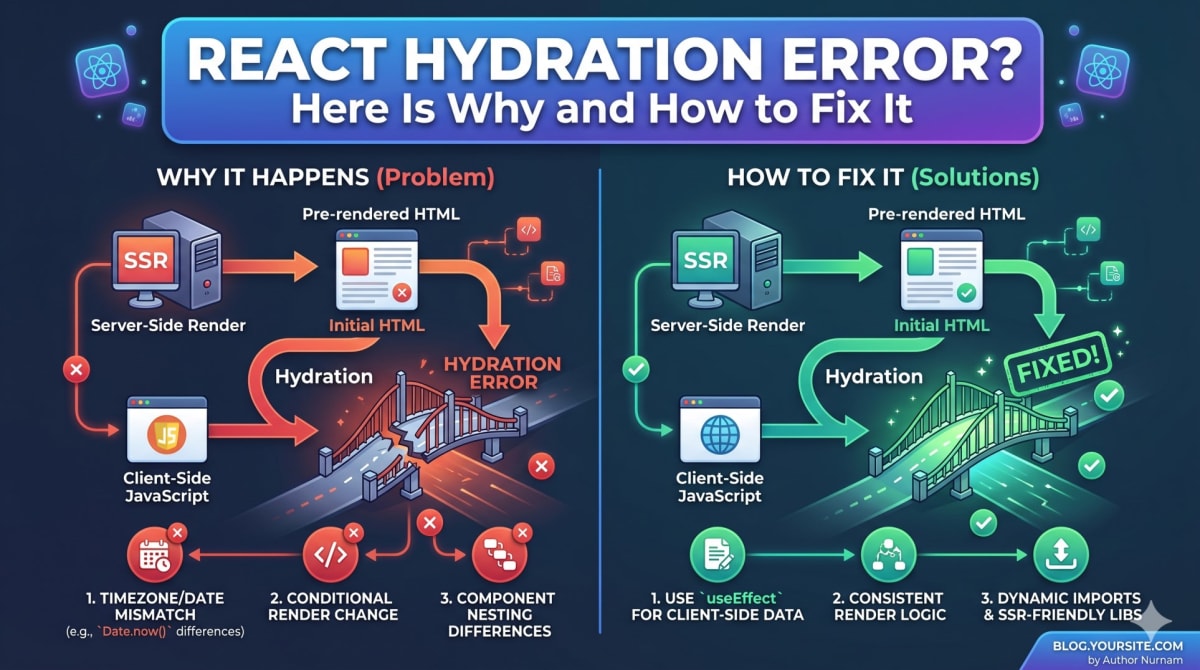
Before fixing the error, you need to understand what hydration means. When you use Next.js or any React framework with server-side rendering, two things happen.
First, the server renders your React components into plain HTML and sends this HTML to the browser. This is what the user sees immediately. It is fast, SEO friendly, and works even before JavaScript loads.
Second, once JavaScript loads in the browser, React "hydrates" that static HTML. It attaches event listeners, runs effects, and takes over the page. During this process, React compares the HTML that the server sent with what it would render on the client. If these two do not match, you get a hydration error.
The rule is simple. The HTML rendered on the server must exactly match the HTML rendered on the client during the first render. If even one character is different, React throws a hydration mismatch warning.
This is important because hydration errors are not just warnings. They break interactivity, cause layout shifts, hurt your Core Web Vitals score, and in some cases cause parts of your page to stop working entirely.
Reason 1: Date and Time Causing Hydration Mismatch
This is the most common cause of react hydration error in production. You render a date or time directly in your component, and the server time is different from the browser time.
jsx
// Wrong
export default function Home() {
  return (
    <div>
      <p>Current time: {new Date().toLocaleString()}</p>
    </div>
  );
}
The server renders this at 10:00:00 AM. By the time the browser hydrates, it is 10:00:02 AM. The strings do not match. React panics.
Even worse, if your server is in a different timezone than the user, the date format and value will be completely different. You will see hydration errors for every single user in a different region.
jsx
// Correct
import { useState, useEffect } from 'react';

export default function Home() {
  const [time, setTime] = useState(null);

  useEffect(() => {
    setTime(new Date().toLocaleString());
  }, []);

  return (
    <div>
      <p>Current time: {time ?? 'Loading...'}</p>
    </div>
  );
}
The trick here is to render nothing or a placeholder on the server, then update the value only after the component mounts on the client. useEffect runs only in the browser, so there is no server-client mismatch.
If you are hitting similar issues with effects running unexpectedly, read our detailed guide on why React useEffect runs twice.
Reason 2: Using typeof window for Conditional Rendering
Developers often try to check if they are in the browser using typeof window. This looks clever but breaks hydration in a dangerous way.
jsx
// Wrong
export default function Navbar() {
  const isMobile = typeof window !== 'undefined' && window.innerWidth < 768;

  return (
    <nav>
      {isMobile ? <MobileMenu /> : <DesktopMenu />}
    </nav>
  );
}
On the server, window is undefined, so isMobile is false. The server sends the DesktopMenu HTML. On the client, window exists, so isMobile might be true for mobile users. React renders MobileMenu during hydration. Mismatch. Error.
This pattern is especially bad because it fails silently for most desktop users during development, but breaks in production the moment a real mobile user visits your site.
jsx
// Correct
import { useState, useEffect } from 'react';

export default function Navbar() {
  const [isMobile, setIsMobile] = useState(false);

  useEffect(() => {
    const checkMobile = () => setIsMobile(window.innerWidth < 768);
    checkMobile();
    window.addEventListener('resize', checkMobile);
    return () => window.removeEventListener('resize', checkMobile);
  }, []);

  return (
    <nav>
      {isMobile ? <MobileMenu /> : <DesktopMenu />}
    </nav>
  );
}
Now the server and client both render DesktopMenu during first paint. After hydration, the useEffect checks the window and updates state if needed. No mismatch because the initial render is identical on both sides.

Reason 3: localStorage and sessionStorage Causing Hydration Error
Reading from localStorage directly in your component is another classic way to get a hydration error. The server has no access to localStorage. The client does. Instant mismatch.
jsx
// Wrong
export default function ThemeSwitcher() {
  const savedTheme = localStorage.getItem('theme') || 'light';

  return (
    <div className={`app ${savedTheme}`}>
      Welcome
    </div>
  );
}
This code will actually throw a ReferenceError on the server because localStorage is not defined. Even if you guard it with typeof window, you will still get a hydration mismatch because the server renders with light theme and the client renders with whatever is saved.
jsx
// Correct
import { useState, useEffect } from 'react';

export default function ThemeSwitcher() {
  const [theme, setTheme] = useState('light');

  useEffect(() => {
    const savedTheme = localStorage.getItem('theme') || 'light';
    setTheme(savedTheme);
  }, []);

  return (
    <div className={`app ${theme}`}>
      Welcome
    </div>
  );
}
The first render on both server and client uses light. After mounting, the effect reads from localStorage and updates the theme. Users will see a brief flash of the wrong theme, which is the tradeoff of server-side rendering.
If the flash bothers you, store the theme in a cookie instead. Cookies are accessible on both server and client, so you can read the theme during server rendering itself. The Next.js cookies API makes this straightforward.
Reason 4: Browser Extensions Modifying Your HTML
This one drives developers crazy. Your code is perfect. Hydration still fails. The culprit is a browser extension.
Extensions like Grammarly, LastPass, and dark mode toggles inject attributes into your HTML before React hydrates. These attributes are not present in the server HTML, so React sees a mismatch.
Common offending attributes include data-gramm, data-gramm_editor, data-enable-grammarly, and various cz-shortcut-* attributes from ColorZilla.
jsx
// Wrong
export default function ContactForm() {
  return (
    <form>
      <textarea placeholder="Your message" />
    </form>
  );
}
Grammarly adds data-gramm="false" to your textarea. React compares and screams.
jsx
// Correct
export default function ContactForm() {
  return (
    <form>
      <textarea
        placeholder="Your message"
        suppressHydrationWarning
      />
    </form>
  );
}
The suppressHydrationWarning prop tells React to ignore the mismatch for this specific element. Use this only when you are sure the mismatch is caused by an external source like a browser extension. Do not use it to hide real bugs because it will come back to bite you.
For persistent extension issues on the body or html tag, you can apply this at the root level in your layout file.
Reason 5: Random Values and Math.random Breaking Hydration
Any random value generated during render will produce different results on the server and client. This includes IDs, keys, and random content.
jsx
// Wrong
export default function Card() {
  const id = Math.random().toString(36);

  return <div id={id}>Card content</div>;
}
Server generates id="0.abc123". Client generates id="0.xyz789". Hydration error.
jsx
// Correct
import { useId } from 'react';

export default function Card() {
  const id = useId();

  return <div id={id}>Card content</div>;
}
React provides a useId hook specifically for this purpose. It generates a unique ID that is stable across server and client rendering. This is the correct way to create unique identifiers for form labels, accessibility attributes, and any element that needs a deterministic ID.
If you need truly random values, generate them inside useEffect after the component mounts. The server will render without the random value, and the client will update after hydration.
Key Takeaway
The react hydration error is not a random React bug. It is React telling you that the HTML your server sent does not match what the client is rendering. Once you understand that simple rule, every hydration issue becomes predictable.
Remember these five causes:
Date and time values that change between server and client renders
typeof window checks that conditionally render different UI
Reading from localStorage or sessionStorage during render
Browser extensions injecting attributes into your HTML
Random values generated with Math.random() instead of useId
The fix is almost always the same pattern. Render the same thing on the server and client for the first paint. Use useEffect to update values that are only available in the browser. Use suppressHydrationWarning only for external interference you cannot control.
Fixing hydration errors improves your Core Web Vitals, reduces layout shift, and makes your app feel genuinely faster.
FAQs
Why does my React hydration error happen only in production?
Production and development environments have different timing and optimization. In development, React is more forgiving with hydration mismatches and often shows them as warnings. In production, mismatches can cause entire sections of your page to fall back to client rendering, breaking interactivity and hurting performance.
How do I fix hydration error text content does not match server rendered HTML?
This exact error means the text inside an element is different between server and client. Check for dates, times, random values, or anything that reads from localStorage or window. Move those values into a useEffect hook so they only update after the component mounts on the client.
Does suppressHydrationWarning fix all hydration errors in Next.js?
No, and you should not use it as a general fix. suppressHydrationWarning only tells React to ignore mismatches on a specific element. It is meant for cases like browser extensions modifying your HTML or intentional client-only content. Using it to hide real bugs will cause your app to behave unpredictably in production.
What is the difference between hydration error and rendering error in React?
A hydration error happens during the initial page load when React tries to attach to server-rendered HTML. A rendering error happens any time React fails to render a component, including after the page has loaded. Hydration errors are specific to server-side rendering frameworks like Next.js, while rendering errors can happen in any React app.
Can hydration errors affect SEO and Core Web Vitals?
Yes, significantly. When hydration fails, React may discard the server HTML and re-render the entire subtree on the client. This causes layout shifts (bad CLS score), delayed interactivity (bad INP score), and can make parts of your content invisible to crawlers. Fixing hydration errors directly improves how your React app performs in production.