
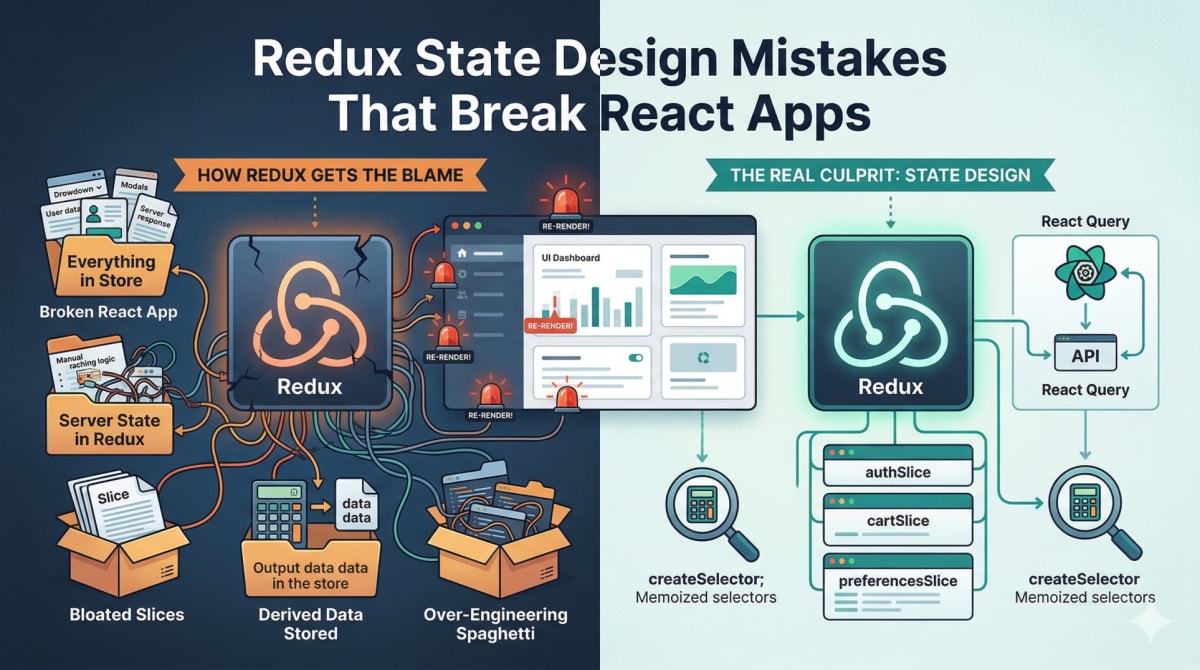
Redux State Design Mistakes That Break React Apps
Skilldham
Engineering deep-dives for developers who want real understanding.
Your Redux store has grown to 400 lines. Adding a new feature requires touching five different files. A simple filter change causes the entire dashboard to re-render. Someone on the team suggests replacing Redux with Zustand or Jotai, and honestly, you are considering it.
Before you do - consider the possibility that Redux is not what broke your app.
Redux takes the blame for a lot of problems it did not cause. The real culprit in almost every case is redux state design - how state was structured, what went into the store, and what should have stayed out.
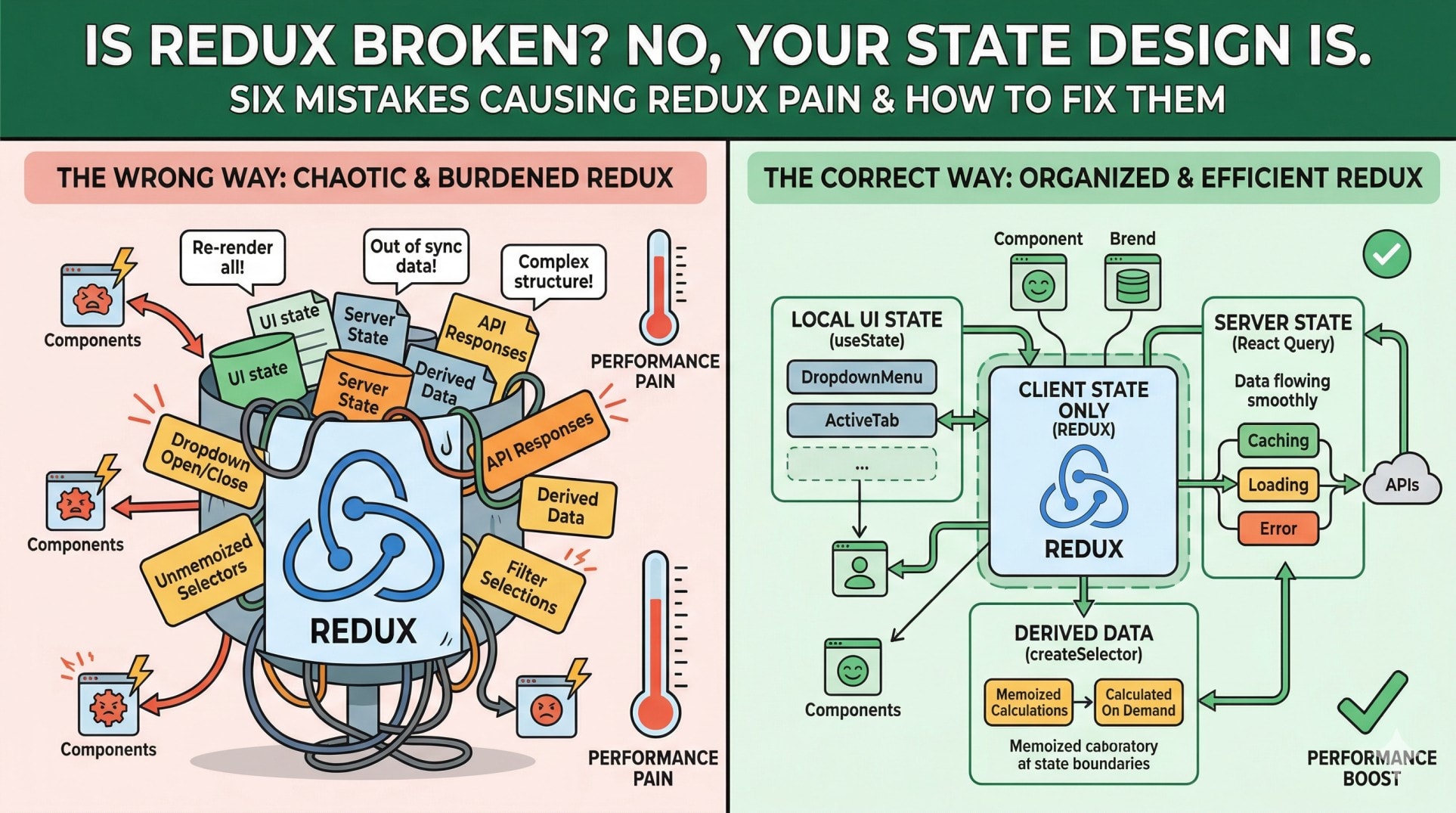
Here are the six state design mistakes that actually cause Redux to feel painful - and what to do about each one.
Redux State Design Mistake 1 - Everything in the Store
This is where most Redux problems start. A developer needs to share some state between two components, puts it in Redux, and establishes a pattern. From that point on, every piece of state goes into the store - because that is what the codebase does.
The result is a store that contains user authentication data sitting next to whether a dropdown is currently open. Server responses live alongside which tab is selected. Business-critical state and throwaway UI state share the same store, the same update pattern, and the same potential to trigger re-renders across the app.
js
// Wrong - UI state in Redux
const uiSlice = createSlice({
  name: 'ui',
  initialState: {
    isDropdownOpen: false,      // local UI state
    activeTab: 'overview',      // local UI state
    isModalVisible: false,      // local UI state
    searchInputValue: '',       // local UI state
    user: null,                 // ← this belongs here
    permissions: [],            // ← this belongs here
  },
});
Every time isDropdownOpen changes, any component subscribed to that slice re-renders. For a dropdown, that is dozens of unnecessary re-renders per second while the user types or moves their mouse.
js
// Correct - UI state stays local
function FilterDropdown() {
  const [isOpen, setIsOpen] = useState(false); // local - no Redux needed
  const [activeTab, setActiveTab] = useState('overview'); // local

  return (
    <div>
      <button onClick={() => setIsOpen(prev => !prev)}>Filter</button>
      {isOpen && <DropdownMenu />}
    </div>
  );
}

// Redux only for shared business state
const authSlice = createSlice({
  name: 'auth',
  initialState: {
    user: null,
    permissions: [],
    status: 'idle',
  },
});
The rule is straightforward: if state is only needed by one component or a small subtree of components, it belongs in local state. Redux is for state that genuinely needs to be shared across distant parts of the app.
Redux State Design Mistake 2 - Server State in Redux
This is the second most common cause of Redux complexity, and it creates problems that are genuinely hard to fix once the pattern is established.
Redux was designed for client state - the state your application owns and controls. API responses are not client state. They are a cache of data that lives on a server and changes independently of your application. Managing them in Redux means writing manual caching logic, manually tracking loading states, manually handling cache invalidation, and manually deciding when to refetch.
js
// Wrong - managing server state manually in Redux
const productsSlice = createSlice({
  name: 'products',
  initialState: {
    data: [],
    loading: false,
    error: null,
    lastFetched: null,
    page: 1,
    hasMore: true,
  },
  reducers: {
    fetchStart: (state) => { state.loading = true; },
    fetchSuccess: (state, action) => {
      state.data = action.payload;
      state.loading = false;
      state.lastFetched = Date.now();
    },
    fetchError: (state, action) => {
      state.error = action.payload;
      state.loading = false;
    },
  },
});
This is hundreds of lines of code that React Query replaces with a single hook - and React Query's version handles background refetching, stale data, cache invalidation, and error retry automatically.
js
// Correct - React Query handles server state
function ProductList() {
  const { data, isLoading, error } = useQuery({
    queryKey: ['products'],
    queryFn: fetchProducts,
    staleTime: 5 * 60 * 1000, // 5 minutes
  });

  if (isLoading) return <Skeleton />;
  if (error) return <ErrorState />;
  return <Products data={data} />;
}

// Redux only for client state
// const cartSlice, const userPreferencesSlice, etc.
The separation is clean: React Query owns server state, Redux owns client state. Each does what it was designed for.
For more on how server state and client state interact with React performance, our guide on why React apps feel slow even when APIs are fast covers the specific patterns that cause slowness when these boundaries are blurred.
A State Shape That Grew Without a Plan
When a Redux store starts small, the state shape is usually flat and simple. As features get added, new properties get appended to existing slices because it is the path of least resistance. After a year of this, you have a store where nobody is quite sure what owns what, and changing one thing risks breaking something else.
js
// Wrong - flat state that grew without design
const appSlice = createSlice({
  name: 'app',
  initialState: {
    user: null,
    products: [],
    cart: [],
    orders: [],
    addresses: [],
    paymentMethods: [],
    notifications: [],
    theme: 'light',
    language: 'en',
    dashboardFilters: {},
    selectedProductId: null,
    checkoutStep: 0,
  },
});
This slice is responsible for everything. A notification update re-renders components that only care about the cart. A theme change re-renders components that only care about orders. The coupling is invisible but real.
js
// Correct - feature-based slices with clear ownership
const authSlice = createSlice({
  name: 'auth',
  initialState: { user: null, status: 'idle' },
});

const cartSlice = createSlice({
  name: 'cart',
  initialState: { items: [], checkoutStep: 0 },
});

const preferencesSlice = createSlice({
  name: 'preferences',
  initialState: { theme: 'light', language: 'en' },
});

// Products, orders, notifications → React Query (server state)
Each slice owns exactly what it is responsible for. Changes in one slice do not trigger re-renders in components that subscribe to a different slice. The boundaries are visible in the code.
Storing Derived Data Instead of Computing It
Derived data is any value that can be calculated from existing state - filtered lists, totals, counts, formatted dates, combined values from multiple sources. Storing derived data in Redux instead of computing it creates a synchronization problem: you now have two sources of truth that can get out of sync.
js
// Wrong - storing derived data in Redux
const ordersSlice = createSlice({
  name: 'orders',
  initialState: {
    all: [],
    filtered: [],        // derived - can get out of sync
    totalRevenue: 0,     // derived - can get out of sync
    pendingCount: 0,     // derived - can get out of sync
  },
  reducers: {
    addOrder: (state, action) => {
      state.all.push(action.payload);
      // Easy to forget updating filtered, totalRevenue, pendingCount
      // Bugs hide here
    },
  },
});
js
// Correct - raw data in Redux, derived data in selectors
const ordersSlice = createSlice({
  name: 'orders',
  initialState: {
    all: [], // only raw data
  },
  reducers: {
    addOrder: (state, action) => {
      state.all.push(action.payload); // one place to update
    },
  },
});

// Selectors compute derived data on demand
export const selectFilteredOrders = createSelector(
  [(state) => state.orders.all, (_, filter) => filter],
  (orders, filter) =>
    filter === 'all'
      ? orders
      : orders.filter((o) => o.status === filter)
);

export const selectTotalRevenue = createSelector(
  [(state) => state.orders.all],
  (orders) => orders.reduce((sum, o) => sum + o.amount, 0)
);
createSelector from Redux Toolkit memoizes the result - it only recalculates when the underlying data changes. You get derived values without storing them, without synchronization bugs, and with better performance than storing and updating them manually.
Over-Engineering Before the App Needs It
This one is less about Redux specifically and more about how Redux gets introduced. A developer sets up the store for a new feature, and because they want to do it properly, they add normalization, complex middleware, abstract action creators, and a folder structure designed for a hundred features before the app has ten.
The result is a codebase that takes a new developer half a day to understand for a feature that needed two hours of actual work.
js
// Wrong - over-engineered from day one
// actions/products/types.js
// actions/products/creators.js
// reducers/products/index.js
// reducers/products/helpers.js
// selectors/products/basic.js
// selectors/products/derived.js
// middleware/products/validation.js
// ... for one feature

// Correct - Redux Toolkit keeps it simple
// features/products/productsSlice.js
const productsSlice = createSlice({
  name: 'products',
  initialState: { items: [], status: 'idle' },
  reducers: {
    setProducts: (state, action) => {
      state.items = action.payload;
    },
  },
});
Start with the simplest Redux Toolkit setup that works. Add complexity when the app actually needs it - when you can point to a specific problem that the complexity solves. Complexity added in anticipation of problems usually creates different problems instead.
Expecting Redux to Fix Performance Problems
Redux is about predictability and consistency, not performance. If your app is slow, putting more things in Redux - or less - will not fix it. Performance in React comes from render boundaries, memoization, and how expensive work is scheduled.
What Redux does affect is how predictably state updates propagate. If your selectors are not memoized, every state update recalculates every derived value and re-renders every subscriber. That is not Redux being slow - that is selectors being written without createSelector.
js
// Wrong - new reference every time, every subscriber re-renders
const selectActiveUsers = (state) =>
  state.users.all.filter((u) => u.active); // new array every call

// Correct - memoized, only recalculates when users.all changes
const selectActiveUsers = createSelector(
  [(state) => state.users.all],
  (users) => users.filter((u) => u.active)
);
If your Redux app is slow, profile it first. Use React DevTools Profiler to find which components are re-rendering and why. Almost always the answer is either an unmemoized selector or a component subscribing to more state than it needs.
Our post on React state not updating covers how React's state update cycle works in detail - understanding that directly explains why memoized selectors matter so much for Redux performance.
The Redux Toolkit documentation covers createSelector and the full modern Redux setup - if you are still using plain Redux without Redux Toolkit, the migration is worth doing.
Key Takeaway
Redux does not make React apps hard to maintain. Poor redux state design makes React apps hard to maintain - not Redux itself.
The six mistakes that actually cause Redux pain are putting UI state in the store, using Redux for server state instead of React Query, letting the state shape grow without intentional design, storing derived data instead of computing it with selectors, over-engineering before complexity is earned, and writing unmonitored selectors that re-render on every update.
Fix any of these and the store that felt like a burden starts feeling like the stabilizing layer it was designed to be.
FAQs
Is Redux still worth using in 2026? Yes, for the right use cases. Redux with Redux Toolkit is significantly less boilerplate than it was in 2018, and for applications with complex client-side state shared across many components, it remains the most predictable option. The mistake is using it for everything - particularly server state, which React Query handles better. Use Redux for client state, React Query for server state, and local useState for component-specific UI state.
Should I replace Redux with Zustand or Jotai? Only if the problem you are trying to solve is actually Redux's architecture rather than your state design. Migrating to a different state management library with the same state design mistakes produces the same problems with less familiar tooling. If your Redux store is painful, audit your state design first. You might not need to migrate at all.
Why does Redux cause so many re-renders? Usually because selectors are not memoized with createSelector. When a selector creates a new array or object reference on every call - even if the values are identical - React sees new props and re-renders the subscriber. createSelector from Redux Toolkit memoizes the result and only recalculates when the input selectors return different values.
What is the difference between client state and server state? Client state is state your application owns and controls - the current user's preferences, which modal is open, the contents of a shopping cart before checkout. Server state is a local cache of data that lives on a server - product listings, user profiles, order history. Server state has its own lifecycle: it can become stale, needs to be refetched, and can change independently of your app. Redux is well-suited for client state. React Query or SWR handle server state more effectively.
When should I actually use Redux? When you have client-side state that needs to be shared across components that are far apart in the component tree, and when that state has enough complexity that local useState and prop drilling become genuinely difficult. A simple app with a few shared values rarely needs Redux - Context or Zustand is likely sufficient. A large app with authentication state, user preferences, multi-step workflows, and complex UI state shared across many features is where Redux earns its complexity.