

Reusable React Components Ruining Your Codebase? Here Is Why
Skilldham
Engineering deep-dives for developers who want real understanding.
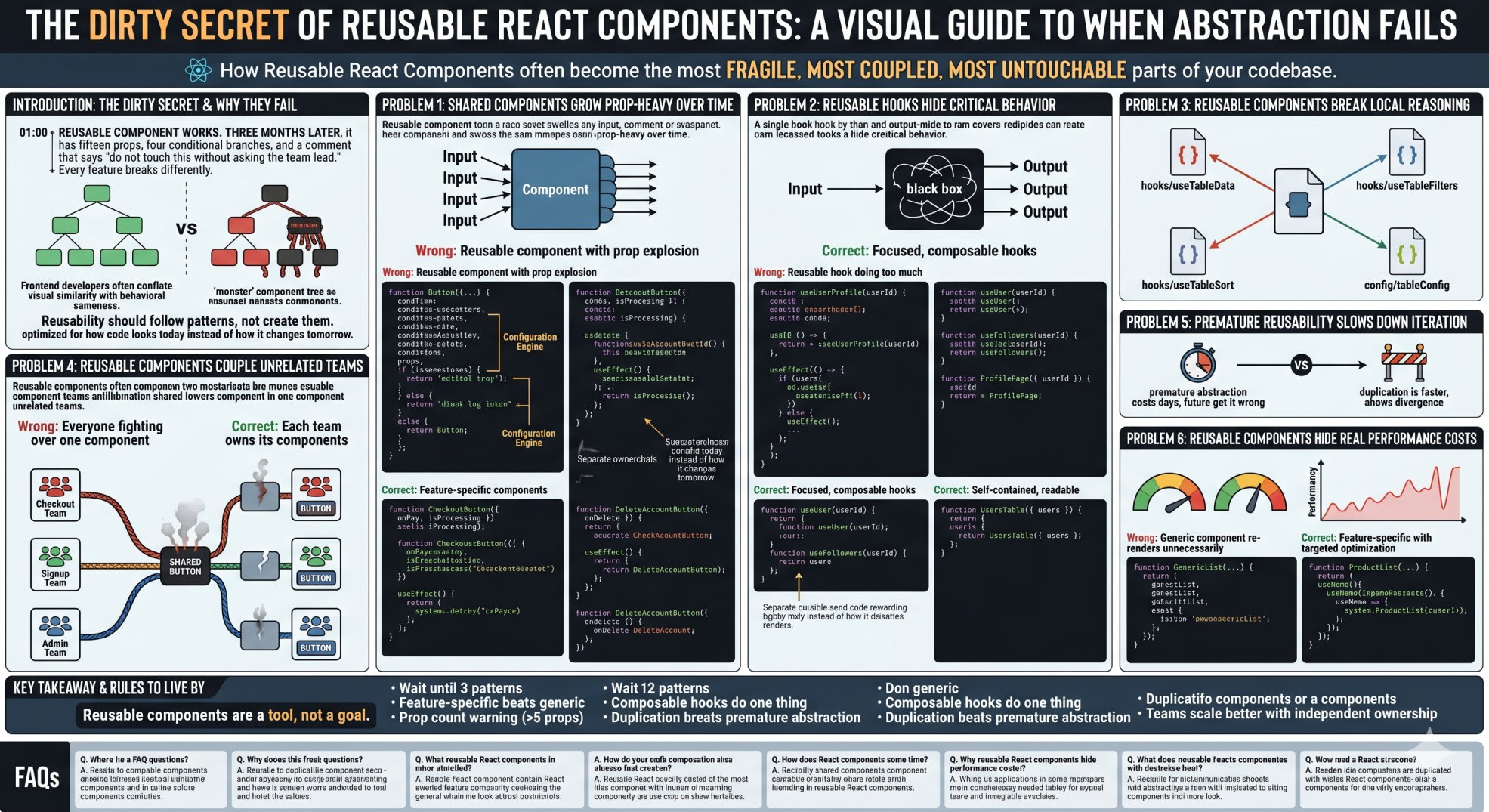
You build a reusable React component. It works. Three months later, that same component has fifteen props, four conditional branches, and a comment that says "do not touch this without asking the team lead." Every feature that uses it breaks differently. Every PR that modifies it triggers a week of bug reports.
You start to wonder if reusability was actually worth it.
This is the dirty secret of frontend architecture. Reusable React components are sold as the path to clean, maintainable code. In reality, they often become the most fragile, most coupled, most untouchable parts of your codebase. The same senior engineers who preach DRY in code reviews are the ones deleting shared components at 2 AM during production fires.
Here is exactly why reusable React components often backfire, what the real cost is, and how to know when you should duplicate code instead of abstract it.
Why Reusable React Components Fail More Often Than They Succeed
The first thing to understand is that "reusable" means different things to different people. A truly reusable component is one that does exactly the same thing in different contexts. A Button that submits a form and a Button that triggers a modal are not doing the same thing, even though they look similar.
Frontend developers often conflate visual similarity with behavioral sameness. Two cards might have the same layout, but one might need analytics tracking, one might need loading states, and one might need a tooltip. Extracting a "reusable Card" forces all three into the same component, which then grows props to handle every case.
The rule most developers miss is simple. Reusability should follow patterns, not create them. If you have seen the exact same component used three times, you might have a reusable pattern. If you are extracting based on what looks similar, you are creating future technical debt.
This mirrors why clean code often makes React harder to maintain. Both come from the same mistake: optimizing for how code looks today instead of how it changes tomorrow.
Problem 1: Shared Components Grow Prop-Heavy Over Time
Every reusable React component starts simple. Then requirements arrive. Each new requirement adds a prop. Each prop adds a branch in the render logic. After one year, your "reusable" Button has more configuration than actual UI.
jsx
// Wrong - Reusable component with prop explosion
function Button({
  children,
  onClick,
  variant = 'primary',
  size = 'medium',
  loading = false,
  disabled = false,
  disabledReason,
  icon,
  iconPosition = 'left',
  fullWidth = false,
  rounded = false,
  tooltip,
  analyticsEvent,
  confirmBeforeClick,
  confirmMessage,
  trackImpression,
}) {
  // 60 lines of conditional logic
  return <button>{/* ... */}</button>;
}
This component is reusable in name only. It has become a configuration engine. Every feature that uses it must understand fifteen props. Every change risks breaking features that use obscure prop combinations. Developers start copy-pasting the component instead of using it, because reading the source is harder than writing something new.
jsx
// Correct - Feature-specific components
function CheckoutButton({ onPay, isProcessing }) {
  return (
    <button
      className="btn-primary"
      onClick={onPay}
      disabled={isProcessing}
    >
      {isProcessing ? <Spinner /> : 'Pay Now'}
    </button>
  );
}

function DeleteAccountButton({ onDelete }) {
  const handleClick = async () => {
    const confirmed = window.confirm('This cannot be undone. Continue?');
    if (confirmed) onDelete();
  };

  return (
    <button className="btn-danger" onClick={handleClick}>
      Delete My Account
    </button>
  );
}
Each button owns its logic. They share CSS classes for visual consistency but not behavioral coupling. Changes to checkout do not risk breaking delete flows. This is what experienced teams mean by feature ownership over global reuse.
Problem 2: Reusable Hooks Hide Critical Behavior
Custom hooks are marketed as the elegant way to share logic in React. In practice, they become black boxes that hide important behavior from the components that use them.
jsx
// Wrong - Reusable hook doing too much
function useUserProfile(userId) {
  const [user, setUser] = useState(null);
  const [loading, setLoading] = useState(true);
  const [followers, setFollowers] = useState([]);
  const [isFollowing, setIsFollowing] = useState(false);
  const { analytics } = useAnalytics();

  useEffect(() => {
    async function load() {
      const userData = await fetchUser(userId);
      const followersData = await fetchFollowers(userId);
      const followStatus = await checkFollowStatus(userId);

      setUser(userData);
      setFollowers(followersData);
      setIsFollowing(followStatus);
      setLoading(false);

      analytics.track('profile_viewed', { userId });
    }
    load();
  }, [userId]);

  return { user, loading, followers, isFollowing };
}
Any component calling useUserProfile now triggers three API calls and an analytics event. A small component that only needs the user's name is making unnecessary network requests. Debugging performance becomes impossible because the cost is hidden behind one innocent-looking line.
jsx
// Correct - Focused, composable hooks
function useUser(userId) {
  const [user, setUser] = useState(null);
  useEffect(() => {
    fetchUser(userId).then(setUser);
  }, [userId]);
  return user;
}

function useFollowers(userId) {
  const [followers, setFollowers] = useState([]);
  useEffect(() => {
    fetchFollowers(userId).then(setFollowers);
  }, [userId]);
  return followers;
}

function ProfilePage({ userId }) {
  const user = useUser(userId);
  const followers = useFollowers(userId);

  useEffect(() => {
    analytics.track('profile_viewed', { userId });
  }, [userId]);

  return <div>{/* render UI */}</div>;
}
Now each hook does one job. A component that only needs the user name calls useUser alone. A component that needs followers opts in explicitly. Analytics tracking lives where it belongs, in the page that actually gets viewed. This pattern also avoids the confusion of useEffect running twice because each effect has a single responsibility.
Problem 3: Reusable Components Break Local Reasoning
Local reasoning is the ability to understand a component by reading only that component's file. Good React code supports local reasoning. Reusable components often destroy it.
jsx
// Wrong - Behavior scattered across files
// src/components/DataTable.jsx
import { useTableData } from '../hooks/useTableData';
import { useTableFilters } from '../hooks/useTableFilters';
import { useTableSort } from '../hooks/useTableSort';
import { tableConfig } from '../config/tableConfig';

function DataTable({ type }) {
  const data = useTableData(type);
  const filters = useTableFilters(type);
  const sort = useTableSort(type);
  const config = tableConfig[type];
  return <table>{/* ... */}</table>;
}

// To understand DataTable for users, you need to open:
// - useTableData.js
// - useTableFilters.js
// - useTableSort.js
// - tableConfig.js
// Each file has branches for "users", "products", "orders"
This component is reusable across three different data types. Understanding what it does for any specific case requires reading five files and mentally filtering out the branches for the other two cases. When something breaks, debugging takes hours instead of minutes.
jsx
// Correct - Self-contained, readable components
function UsersTable({ users }) {
  const [sortBy, setSortBy] = useState('name');
  const [filter, setFilter] = useState('');

  const displayed = users
    .filter(u => u.name.includes(filter))
    .sort((a, b) => a[sortBy].localeCompare(b[sortBy]));

  return (
    <table>
      <thead>
        <tr>
          <th onClick={() => setSortBy('name')}>Name</th>
          <th onClick={() => setSortBy('email')}>Email</th>
        </tr>
      </thead>
      <tbody>
        {displayed.map(user => (
          <tr key={user.id}>
            <td>{user.name}</td>
            <td>{user.email}</td>
          </tr>
        ))}
      </tbody>
    </table>
  );
}
Everything this component does is in this file. A new developer can understand it in two minutes. Changes are predictable. Yes, the ProductsTable will have similar code. That duplication is a feature, not a bug, because it means each table can evolve independently based on its specific domain needs.
Problem 4: Reusable Components Couple Unrelated Teams
This is the organizational cost of reusable React components that nobody talks about in tutorials. A shared component is owned by no team, which means it is effectively owned by everyone, which means every change becomes a negotiation.
The checkout team wants to add a payment-specific state. The signup team wants to add a validation state. The admin panel team wants to add an audit log. All three features need different versions of the same button.
jsx
// Wrong - Everyone fighting over one component
function Button({ variant, showAuditLog, paymentState, validationState, onClick }) {
  if (paymentState === 'processing') {
    // Checkout team added this
  }
  if (validationState === 'invalid') {
    // Signup team added this
  }
  if (showAuditLog) {
    // Admin team added this
  }
  return <button onClick={onClick}>...</button>;
}
Three teams. One component. Every change requires coordination. Every bug in checkout might be caused by signup logic. Release cycles slow down because nobody wants to be the one who breaks the shared button.
jsx
// Correct - Each team owns its components
// Checkout team owns this
function PaymentButton({ state, onPay }) { /* ... */ }

// Signup team owns this
function FormSubmitButton({ isValid, onSubmit }) { /* ... */ }

// Admin team owns this
function AuditableActionButton({ action, onAction }) { /* ... */ }
Now each team ships independently. Shared design tokens, shared CSS classes, and shared primitives like <button> itself create visual consistency. Business logic stays with the team that owns the feature. This is the architecture shift that makes frontend teams actually scale.
Problem 5: Premature Reusability Slows Down Iteration
Reusable React components feel productive in the moment. They actually slow down iteration speed in the long run. Every shared component becomes a decision point: "should I add a prop here or create a new component?" That decision costs time on every feature.
When requirements are uncertain, duplication is faster than abstraction. You can ship two similar components in two hours. Extracting a shared component that handles both cases properly takes two days, and you will likely get it wrong because you do not yet know how the features will diverge.
Experienced teams often write code twice before abstracting. The first version ships. The second version ships. By the third request, patterns are clear and abstraction is safe. Most teams abstract on the first request and pay the price for the next two years.
Problem 6: Reusable Components Hide Real Performance Costs
Shared components are often optimized for the generic case, not your specific case. This creates subtle performance issues that are hard to trace.
jsx
// Wrong - Generic component re-renders unnecessarily
function GenericList({ items, renderItem, onSelect, filters, sorting }) {
  const filtered = applyFilters(items, filters);
  const sorted = applySorting(filtered, sorting);

  return (
    <div>
      {sorted.map(item => (
        <div onClick={() => onSelect(item)}>
          {renderItem(item)}
        </div>
      ))}
    </div>
  );
}
This component applies filters and sorting on every render. If your parent component re-renders for any reason, the entire list re-processes even when nothing changed. Users see lag. You cannot memoize effectively because the component's generic nature means any prop change triggers full reprocessing.
jsx
// Correct - Feature-specific with targeted optimization
function ProductList({ products, activeCategory }) {
  const visibleProducts = useMemo(
    () => products.filter(p => p.category === activeCategory),
    [products, activeCategory]
  );

  return (
    <div>
      {visibleProducts.map(product => (
        <ProductCard key={product.id} product={product} />
      ))}
    </div>
  );
}
Now memoization is targeted. You know exactly which props affect the computation. The React documentation on useMemo explicitly recommends this kind of focused optimization over generic memoization of shared components.
Key Takeaway
Reusable React components are a tool, not a goal. Used correctly, they reduce duplication and enforce consistency. Used reflexively, they create coupling, hide complexity, and make change expensive.
Remember these rules when deciding whether to make something reusable:
Wait until you see the exact same pattern three times before extracting
Feature-specific components almost always beat generic shared components
Prop count is a warning sign, five or more props usually means too much coupling
Custom hooks should do one thing, not orchestrate multiple concerns
Duplication is cheaper than premature abstraction
Teams scale better when they own their components end to end
The best React codebases are not the ones with the most reusable components. They are the ones where changing a feature does not risk breaking three other features. Forced reusability trades short-term cleanliness for long-term pain.
If you want to dive deeper into why this happens, read our analysis of how React performance optimization fails in production for the same pattern applied to performance tuning.
FAQs
Why are reusable React components bad in some cases? Reusable components are not inherently bad, but premature or forced reuse creates coupling between unrelated features. When two features share a component, a change for one feature can break the other. Over time, shared components accumulate conditional props to serve divergent needs, becoming fragile and hard to modify safely.
How many props is too many for a reusable React component? As a rough guideline, more than five or six props usually means the component is trying to serve multiple features. At that point, splitting into focused components is almost always better than adding more configuration. A prop count above ten is a strong signal that the abstraction is hiding unrelated behavior.
When should I create a reusable component in React? Create a reusable component when you have seen the exact same pattern used in three or more places, the behavior is genuinely identical across uses, and the component has clear ownership. Design system primitives like buttons, inputs, and modals are good candidates. Feature-specific business logic rarely meets this bar.
Is code duplication better than reusability in React? In many cases, yes. Local duplication preserves feature ownership, limits the blast radius of changes, and supports local reasoning. Duplicated code that evolves independently is often easier to maintain than shared abstractions forced to serve conflicting requirements. The best rule is to abstract only when the pattern is stable and proven.
What is the difference between reusability and composability in React? Reusability means the same component is used in multiple places as is. Composability means small, focused components are combined in different ways to build different features. Composability is almost always the better pattern in React because it gives you flexibility without coupling. A composable <input>, <label>, and <button> let you build any form without a generic <Form /> component trying to handle every case.