
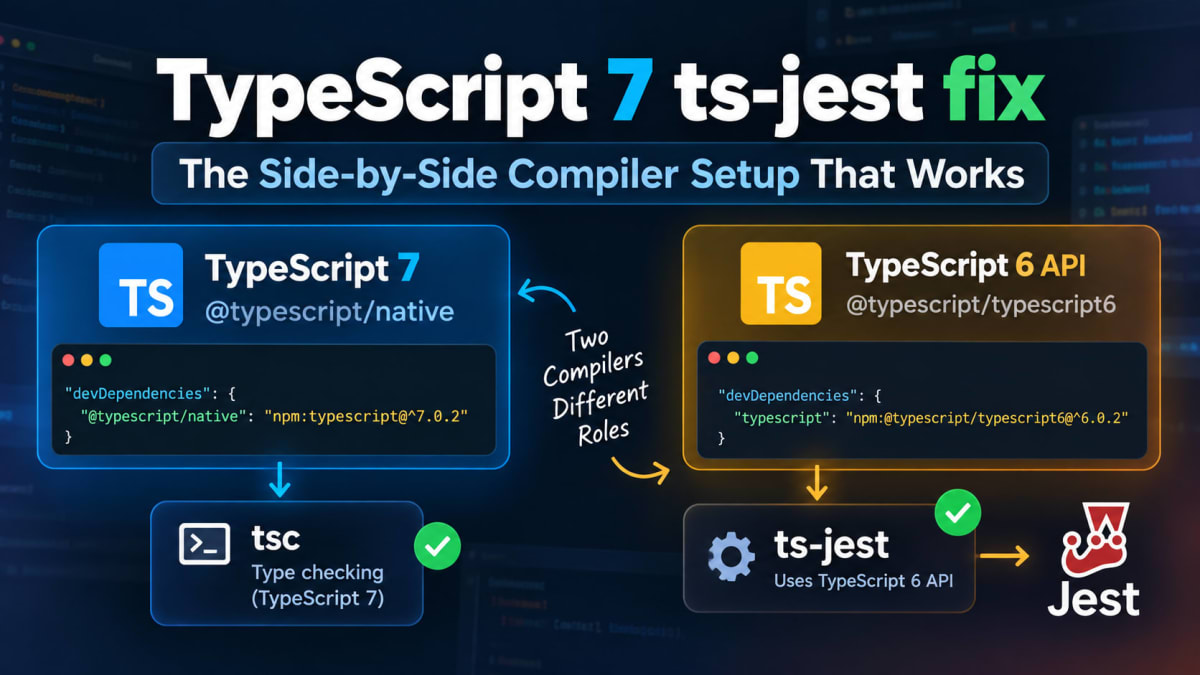
TypeScript 7 ts-jest fix - The Alias Setup Explained
Skilldham
Engineering deep-dives for developers who want real understanding.
Last updated: October 2026
TL;DR
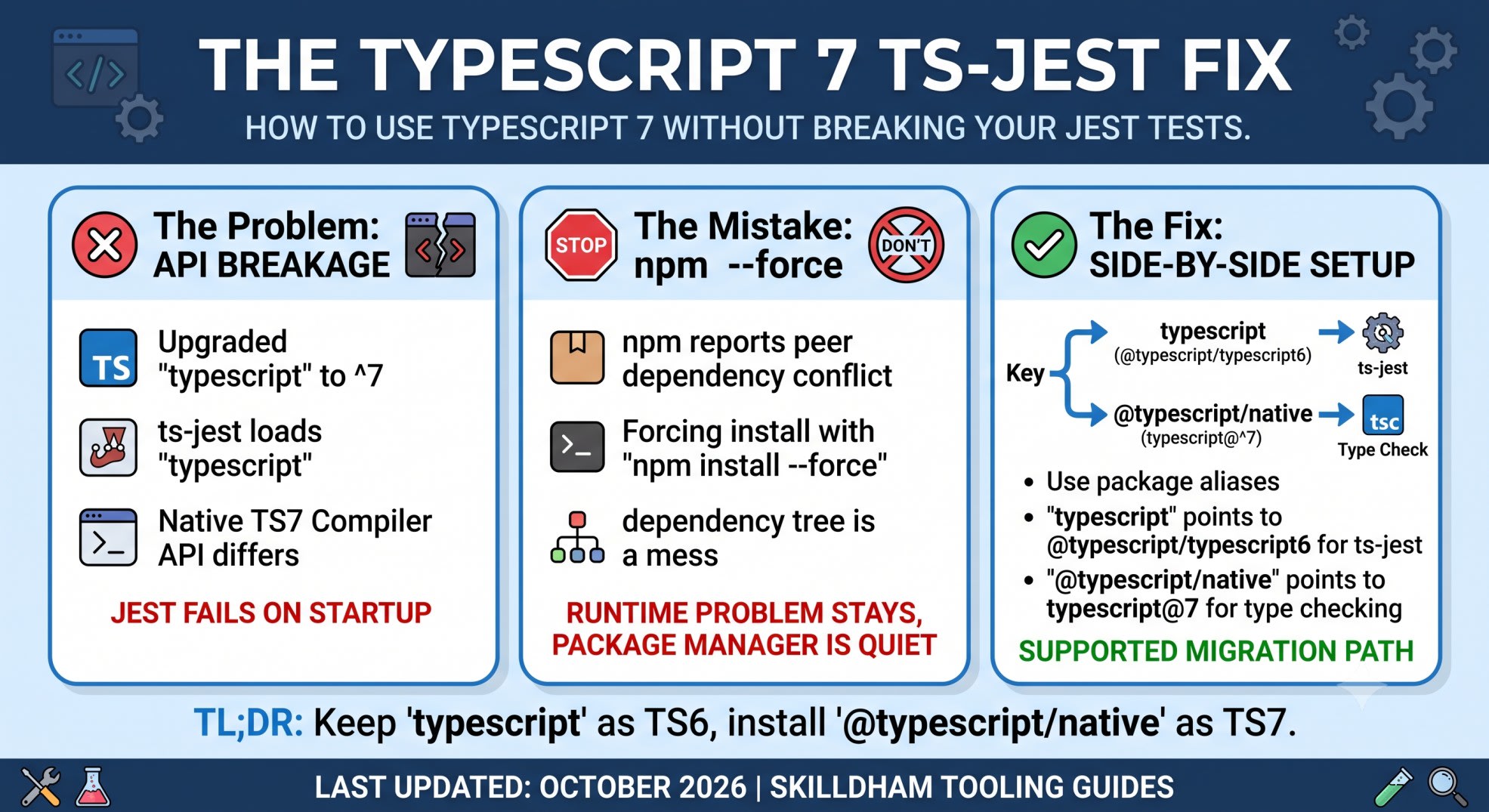
TypeScript 7 cannot sit directly behind the typescript package when ts-jest needs its old Compiler API. Keep TypeScript 6 behind the typescript name. Install TypeScript 7 as @typescript/native. This is the supported side-by-side setup. ts-jest 29.4.12 added TypeScript 7 compatibility through aliases. Current ts-jest releases still document this setup.
TypeScript 7 ts-jest fix: What actually broke
You upgrade a project from TypeScript 6 to TypeScript 7.
Your normal type check works.
Then Jest fails before the first test.
The confusing part is the package name.
You installed typescript@7. Jest still sees a package called typescript.
ts-jest then loads the TypeScript Compiler API from that package.
TypeScript 7 changed this layer. Its native compiler does not expose the API that ts-jest expects.
So this is not a Jest test problem.
It is a compiler package problem.
The mental model is simple:
TypeScript 7
    |
    | native compiler
    v
@typescript/native
    |
    +---- your tsc/type-check workflow

TypeScript 6 API
    |
    | package alias
    v
typescript
    |
    +---- ts-jest
    +---- other Compiler API tools
This split is the key to the fix.
Why TypeScript 7 breaks ts-jest
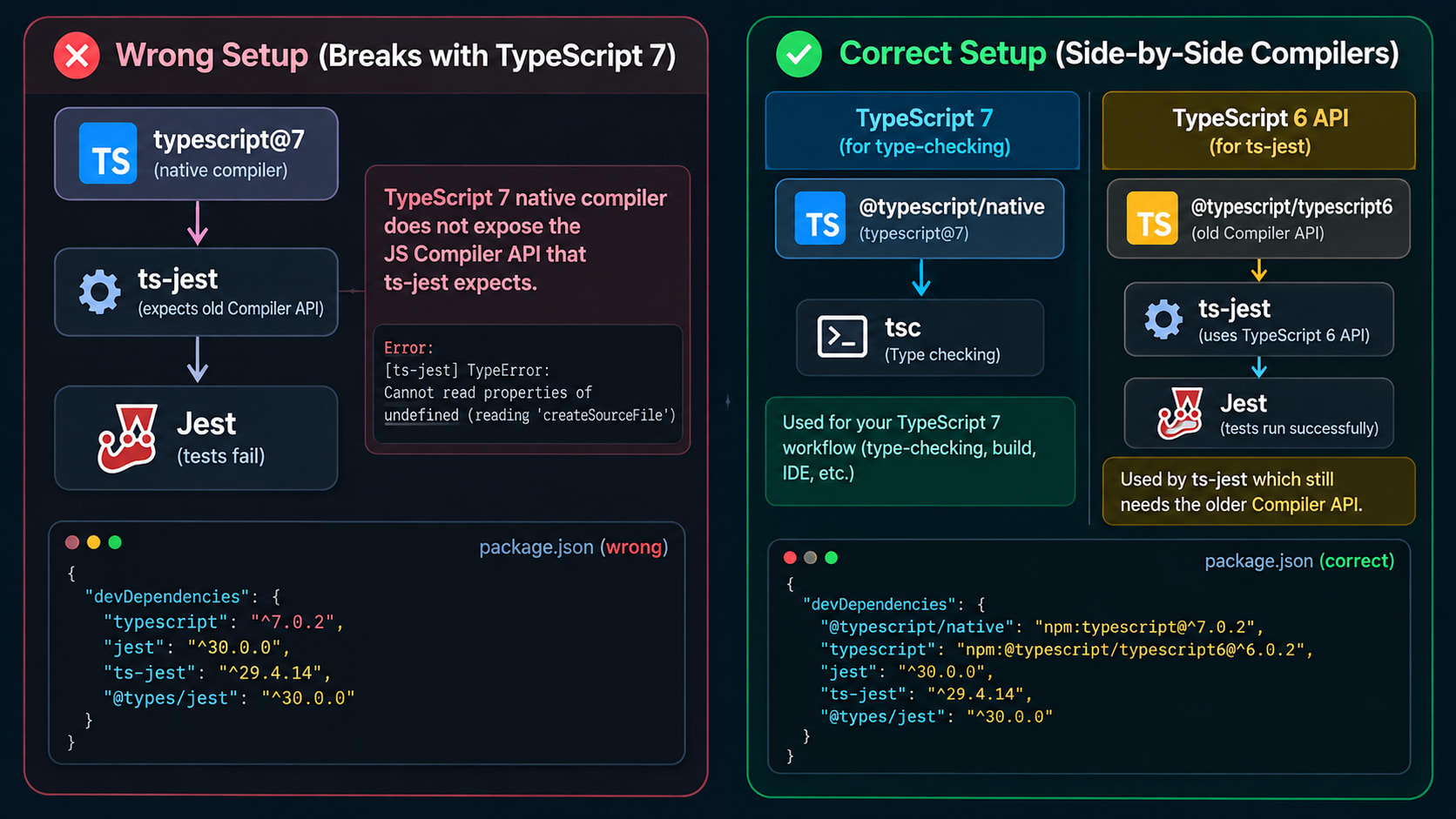
The setup that fails
The first setup looks normal:
{
  "devDependencies": {
    "typescript": "^7.0.2",
    "jest": "^30.0.0",
    "ts-jest": "^29.4.14",
    "@types/jest": "^30.0.0"
  }
}
Then Jest starts with ts-jest.
The transformer loads the package named typescript.
That package now points to TypeScript 7.
The native compiler does not expose the JavaScript Compiler API required by ts-jest.
The current ts-jest documentation warns against selecting the TypeScript 7 native package directly. It points TypeScript 7 projects to the side-by-side setup instead.
If you also hit ESLint problems after the TypeScript 7 upgrade, the TypeScript 7 ESLint and ts-jest fix covers the related migration path.
Why --force is not the fix
You may see npm report a peer dependency conflict.
It is tempting to run npm install --force.
Don't.
A forced install can put TypeScript 7 into a dependency tree that still expects the older API.
The package manager becomes quiet.
The runtime problem stays.
The better question is not:
"How do I force npm to accept TypeScript 7?"
Ask this instead:
"Which tool needs which compiler?"
For ts-jest, the answer is the TypeScript 6 API.
For your TypeScript 7 type check, the answer is the native compiler.
That is why two compiler package names exist.
The TypeScript 7 side-by-side setup
Install both compiler roles
The supported package layout looks like this:
{
  "devDependencies": {
    "@typescript/native": "npm:typescript@^7.0.2",
    "typescript": "npm:@typescript/typescript6@^6.0.2",
    "jest": "^30.0.0",
    "ts-jest": "^29.4.14",
    "@types/jest": "^30.0.0"
  }
}
The Jest and @types/jest versions can vary.
The two compiler aliases are the important part.
@typescript/native points to the real TypeScript 7 package.
Its native tsc binary is available for your TypeScript 7 workflow.
typescript points to @typescript/typescript6.
That package provides the TypeScript 6 API that ts-jest can use.
TypeScript's TypeScript 7 documentation describes this side-by-side pattern.
Why the aliases look backwards
This is the part that feels wrong.
You are using TypeScript 7.
Yet the dependency named typescript is TypeScript 6.
That is intentional.
The package name acts as an API compatibility slot.
Your project can use TypeScript 7 through @typescript/native.
Tooling that still needs the older API gets TypeScript 6 through the normal typescript name.
Many tools import the package literally named typescript.
You cannot tell those tools to magically import another package.
That is why the alias matters.
Do not rename @typescript/native back to typescript.
That would put you back into the same problem.
Configure Jest the normal way
Basic Jest config
You do not need a special TypeScript 7 compiler entry in Jest.
Let ts-jest resolve the package named typescript.
The alias handles that resolution.
A basic jest.config.ts can look like this:
import type { Config } from "jest";

const config: Config = {
  preset: "ts-jest",
  testEnvironment: "node",
};

export default config;
The important part is not a magic compiler: "typescript6" setting.
The important part is the dependency graph.
ts-jest asks for typescript.
npm resolves that name to @typescript/typescript6.
TypeScript 7 stays available under @typescript/native.
That is the trick.
What if you already use a transform block?
You can keep the same transform pattern.
import type { Config } from "jest";

const config: Config = {
  transform: {
    "^.+\\.tsx?$": [
      "ts-jest",
      {
        tsconfig: "tsconfig.json",
      },
    ],
  },
};

export default config;
The tsconfig option still points to your normal project configuration.
The compiler package and TypeScript project settings are separate concerns.
That distinction helps when another migration error appears.
What changed in ts-jest 29.4.12?
The important release
ts-jest 29.4.12 added TypeScript 7 project support through compatibility aliases.
That was the important change.
The TypeScript 7 compatibility issue was opened against ts-jest 29.4.11.
The issue described the old TypeScript peer range as >=4.3 <7.
The 29.4.12 changelog then added TypeScript 7 support through compatibility aliases.
So an old article may tell you to stay on TypeScript 6.
Check its date.
That advice may now be stale.
What about newer ts-jest versions?
There is another easy mistake here.
ts-jest is now newer than 29.4.12.
The current release is 29.4.14.
But current documentation still tells TypeScript 7 users to use the side-by-side compiler setup.
So updating ts-jest is part of the compatibility path.
It does not mean TypeScript 7 can replace the package named typescript in every project.
That is the difference between package compatibility and Compiler API compatibility.
A clean migration that works
Start from a clean dependency tree
If you already tried typescript@7 directly, clean the install first.
rm -rf node_modules package-lock.json
npm install
Then inspect the installed packages.
npm ls typescript @typescript/native @typescript/typescript6 ts-jest jestYour dependency tree should show both compiler roles.
The exact output can vary with npm versions.
The important part is the typescript alias.
It should resolve to the TypeScript 6 compatibility package.
Run type checking and Jest separately
Keep the two jobs clear.
{
  "scripts": {
    "typecheck": "tsc --noEmit",
    "test": "jest"
  }
}
With the side-by-side aliases, tsc can use the native TypeScript 7 compiler.
At the same time, ts-jest can load the TypeScript 6 API.
This gives each tool the compiler layer it needs.
You do not need to make Jest pretend it is using the TypeScript 7 Compiler API.
For a broader look at TypeScript build failures, see the TypeScript build errors fixes guide.
How to verify the fix
Check the compiler
Run:
npx tsc --versionYou want a TypeScript 7 version here.
Then inspect the aliases:
npm ls typescript @typescript/native @typescript/typescript6The typescript entry should resolve to the TypeScript 6 compatibility package.
Check Jest
Now run:
npx jest --runInBandIf the alias is correct, ts-jest can load the API it expects.
If Jest still reports that the compiler does not expose the required API, inspect npm ls first.
Do not change your test code yet.
That error points to compiler package resolution.
Common fixes that do not solve the root problem
Installing TypeScript 7 directly
This setup is simple:
{
  "devDependencies": {
    "typescript": "^7.0.2"
  }
}
It can work for projects that only need the native compiler.
It is not the supported setup for a project where ts-jest still needs the old Compiler API.
Using npm install --force
This tells npm to ignore a dependency conflict.
It does not add the missing Compiler API.
You can get a successful install.
Jest can still crash.
Adding a random compiler value
The ts-jest compiler option can select a compiler module.
It does not turn TypeScript 7 into a TypeScript 6 API.
The current docs show this option for custom compilers. They also state that TypeScript 7's native package cannot be selected directly.
Disabling type checking
You may find suggestions for isolated compilation.
That can change speed and diagnostics.
It does not solve the package API mismatch.
If you need ts-jest, fix compiler resolution first.
Why this matters beyond ts-jest
TypeScript 7 is more than a version bump
TypeScript 7 moves the compiler toward a native implementation.
That brings major speed improvements.
It also changes how ecosystem tools interact with the compiler.
Tools that only call the TypeScript CLI have a simpler upgrade path.
Tools that load the Compiler API have another dependency to consider.
That is why this issue appears across tooling.
Think in toolchain layers
A useful migration model looks like this:
Application code
       |
       v
TypeScript project
       |
       +---- tsc/type-check ----> TypeScript 7
       |
       +---- Jest/ts-jest -----> TypeScript 6 API
       |
       +---- other Compiler API tools
This makes the migration easier to reason about.
You are not keeping TypeScript 6 because your application needs old syntax.
You are keeping it because a tool needs its API.
That is a very different problem.
If your TypeScript 7 migration also causes Next.js compiler errors, the TypeScript 7 Next.js error fix covers another version-specific failure mode.
Key Takeaways
The typescript package name matters because ts-jest loads it directly.
TypeScript 7's native compiler does not expose the API that ts-jest expects.
The typescript alias should point to @typescript/typescript6.
@typescript/native should point to the real TypeScript 7 package.
ts-jest 29.4.12 added TypeScript 7 support through compatibility aliases.
Current ts-jest documentation still recommends the side-by-side setup.
The typescript 7 ts-jest fix is a dependency resolution fix.
If Jest still fails, inspect npm ls before changing test code.
FAQ
Does ts-jest support TypeScript 7?
Yes. The supported setup uses TypeScript 7 and the TypeScript 6 compatibility API side by side.
Can I install TypeScript 7 as typescript and keep ts-jest?
Not with the native TypeScript 7 package in the current supported setup. ts-jest still needs the older Compiler API.
Which ts-jest version added TypeScript 7 support?
ts-jest 29.4.12 added TypeScript 7 project support through compatibility aliases.
Why is typescript actually TypeScript 6?
Tools import the package named typescript. The alias keeps that package compatible. TypeScript 7 then lives under @typescript/native.
Do I need to change my Jest tests?
No. This fix changes dependency resolution. Your test files should not need changes for this specific problem.
Do I need to change tsconfig.json?
Not for this Compiler API mismatch alone. Other TypeScript 7 migration changes can still require tsconfig updates.
Can I use npm install --force?
You can force npm to install the packages. That does not fix the missing Compiler API. Use the side-by-side aliases instead.
Is the setup permanent?
It is a transition setup. When your tools support the TypeScript 7 Compiler API, you can remove the compatibility alias.
Conclusion
The TypeScript 7 ts-jest fix is not another Jest configuration trick.
The real issue is the Compiler API boundary.
TypeScript 7 should handle your native type-checking workflow.
The TypeScript 6 compatibility package should handle tools that still import the old API.
Once you see those as two separate jobs, the strange aliases make sense.
If your upgrade also broke ESLint, continue with the TypeScript 7 ESLint and ts-jest fix. For broader TypeScript problems, read the TypeScript build errors fixes guide.
For more practical frontend and tooling fixes, explore SkillDham and subscribe to the site's developer updates.