
React Developers in AI Era - What Changes
Skilldham
Engineering deep-dives for developers who want real understanding.
There is a version of this conversation that is pure anxiety - AI is going to replace frontend developers, components will write themselves, designers will prompt UIs into existence, and React knowledge will be worthless in three years.
None of that is what is actually happening.
What is happening is more interesting and more useful to understand. The work of a React developer is shifting. Some parts are getting faster and easier. Some parts are becoming more valuable. And a few entirely new things are being added to the job description that did not exist two years ago.
This guide is about what actually changes for React developers in AI era - not the fear version, and not the hype version. The practical one.
What AI Tools Are Actually Good At in Frontend Work
Before talking about what you should learn or do differently, it helps to be honest about what AI tools can and cannot do well in frontend development today.
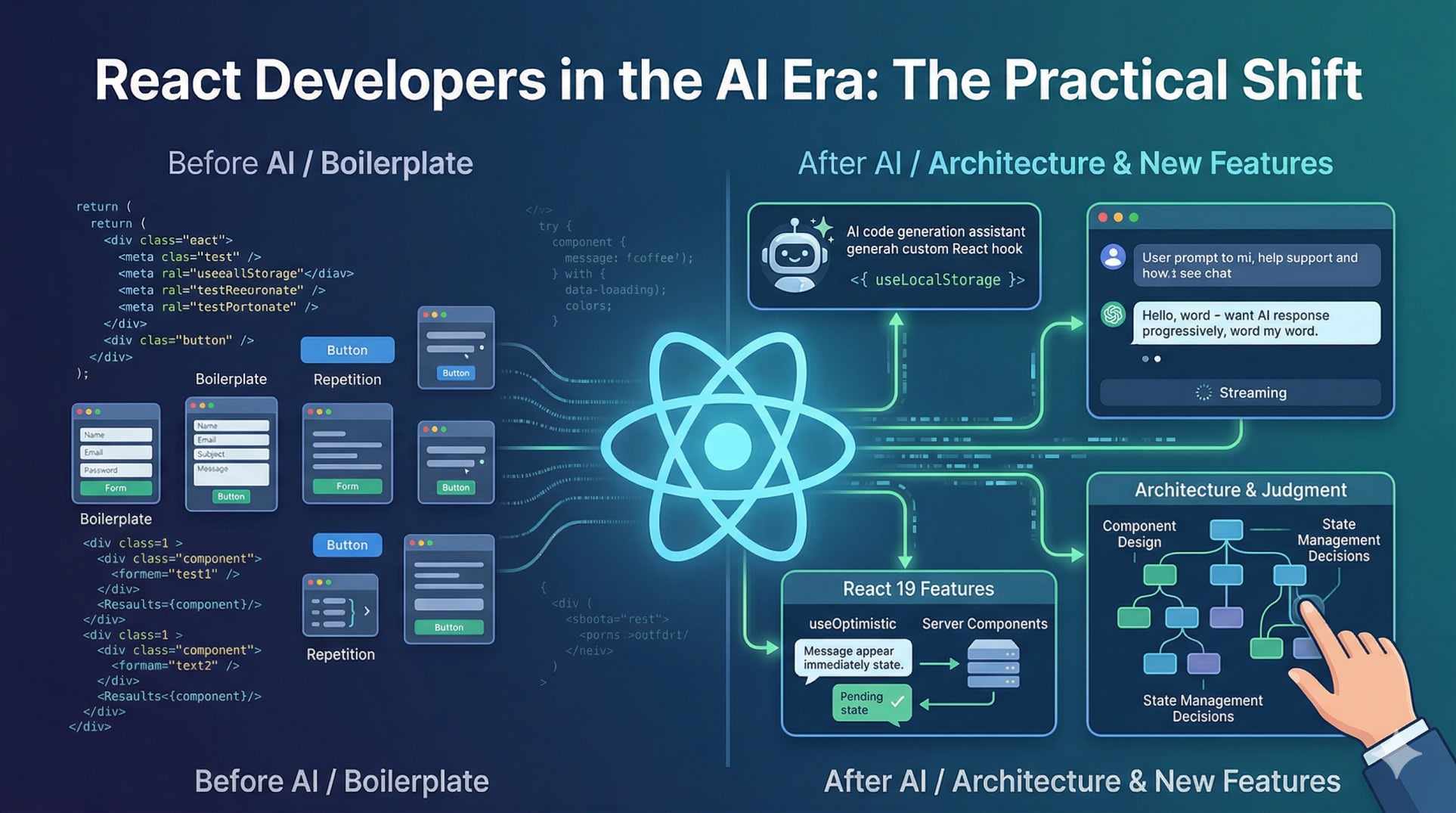
AI code generation is genuinely useful for a specific category of work: boilerplate, repetitive patterns, and code that follows a clear structure. Writing a form component with validation, scaffolding a custom hook that follows an established pattern, generating TypeScript types from an API response, writing Jest test cases for a function - these are things AI tools do well and do quickly.
jsx
// AI handles this kind of thing well
function useLocalStorage(key, initialValue) {
  const [storedValue, setStoredValue] = useState(() => {
    try {
      const item = window.localStorage.getItem(key);
      return item ? JSON.parse(item) : initialValue;
    } catch {
      return initialValue;
    }
  });

  const setValue = (value) => {
    try {
      setStoredValue(value);
      window.localStorage.setItem(key, JSON.stringify(value));
    } catch (error) {
      console.error(error);
    }
  };

  return [storedValue, setValue];
}
A hook like this - well-defined, follows a clear pattern, straightforward logic - AI generates it correctly in seconds. Writing it manually takes five to ten minutes.
What AI tools are not good at is anything that requires understanding the full context of your application. How should this component fit into your existing state management? What are the performance implications of this approach given how this part of the UI renders? Is this the right abstraction given how this feature will need to evolve over the next six months? These decisions require judgment that comes from understanding the system, the codebase, and the product.
The practical result is that AI handles more of the execution work - the writing - and React developers spend more time on the judgment work - the deciding. This is not a threat to the job. It is a shift in where your time goes.
Building AI-Powered Features Is Now Part of the Job
The more significant change is not AI helping you write code faster. It is that products are adding AI features, and someone has to build the frontend for them. That someone is you.
Streaming text responses, chat interfaces, voice input, AI-generated content that renders progressively as it arrives - these are UI patterns that did not exist in mainstream products three years ago and are now common. Building them requires specific knowledge that goes beyond standard React.
The most important one to understand is streaming. When you call an AI API and stream the response, you are reading a stream of chunks and updating the UI as each chunk arrives. This is different from a standard fetch that returns a complete response.
jsx
function AiChat() {
  const [response, setResponse] = useState("");
  const [loading, setLoading]   = useState(false);

  async function handleSubmit(prompt) {
    setLoading(true);
    setResponse("");

    const res = await fetch("/api/chat", {
      method: "POST",
      headers: { "Content-Type": "application/json" },
      body: JSON.stringify({ prompt }),
    });

    if (!res.ok) {
      setLoading(false);
      return;
    }

    const reader = res.body.getReader();
    const decoder = new TextDecoder();

    while (true) {
      const { value, done } = await reader.read();
      if (done) break;

      const chunk = decoder.decode(value, { stream: true });
      setResponse((prev) => prev + chunk);
    }

    setLoading(false);
  }

  return (
    <div>
      <PromptInput onSubmit={handleSubmit} disabled={loading} />
      <div className="response">
        {response}
        {loading && <span className="cursor">|</span>}
      </div>
    </div>
  );
}
The backend for this would use the Vercel AI SDK or a direct API call to Anthropic or OpenAI with streaming enabled. The frontend pattern above works for any streaming text response.
This is a concrete skill - reading a stream, decoding chunks, updating state incrementally - that React developers need to know right now because products are shipping this kind of feature regularly.
Our guide on AI agents for developers covers the backend architecture that powers these features - understanding both sides makes you significantly more effective at building them.
React 19 Features That Matter Specifically for AI Features
React 19 shipped several features that are directly relevant to building AI-powered interfaces. Not all of them are equally important for this use case, but three of them are.
The first is useOptimistic. When a user sends a message in a chat interface, you want the UI to update immediately - show their message in the chat, start the loading state - without waiting for the server to respond. useOptimistic handles this pattern cleanly.
jsx
function ChatInterface({ messages, onSend }) {
  const [optimisticMessages, addOptimistic] = useOptimistic(
    messages,
    (currentMessages, newMessage) => [
      ...currentMessages,
      { ...newMessage, status: "sending" },
    ]
  );

  async function handleSend(content) {
    const newMessage = {
      id: Date.now(),
      role: "user",
      content,
    };

    startTransition(async () => {
      addOptimistic(newMessage);
      await onSend(content);
    });
  }

  return (
    <div className="chat">
      {optimisticMessages.map((msg) => (
        <MessageBubble
          key={msg.id}
          message={msg}
          pending={msg.status === "sending"}
        />
      ))}
      <ChatInput onSubmit={handleSend} />
    </div>
  );
}
The message appears immediately in the UI. If the server call fails, React automatically rolls back to the previous state. This pattern makes AI chat interfaces feel responsive even when the underlying API is slow.
The second is Suspense with streaming. React 19 improves how Suspense works with server-side streaming, which means you can start showing content to the user before the AI response is complete. The page renders a shell immediately, and the AI-generated content streams in as it becomes available.
The third is Server Components and Server Actions. AI API keys should never be in the browser. Server Components let you call AI APIs directly in the component, keeping credentials server-side and reducing the client JavaScript bundle. Server Actions let you handle AI mutations - submitting a prompt, triggering an agent action - without writing API routes.
jsx
// Server Component - API key stays on server
import Anthropic from "@anthropic-ai/sdk";

export default async function AiSummary({ articleContent }) {
  const client = new Anthropic();

  const message = await client.messages.create({
    model: "claude-opus-4-6",
    max_tokens: 300,
    messages: [
      {
        role: "user",
        content: `Summarize this in 3 sentences: ${articleContent}`,
      },
    ],
  });

  return (
    <div className="ai-summary">
      <p className="label">AI Summary</p>
      <p>{message.content[0].text}</p>
    </div>
  );
}
No API route needed, no client-side fetch, no environment variable exposure. The component runs on the server, calls the API, and sends HTML to the browser.
The Architecture Skills That AI Cannot Replace
There is a category of frontend work that AI tools consistently handle poorly - anything that requires designing the system rather than implementing a known pattern.
Deciding how to structure state for a complex AI chat interface that needs to handle multiple concurrent conversations, maintain message history, track streaming state per conversation, and sync with a backend - that is an architecture problem. AI can generate code that works for a simple case, but designing a solution that scales requires understanding your specific constraints and tradeoffs.
The same applies to performance. An AI tool will suggest using useMemo and useCallback everywhere, because that is what it has seen in training data. Knowing when memoization actually helps versus when it adds overhead without benefit - that requires understanding how React's reconciliation works and profiling your specific application.
Component design is another area. Deciding where to draw component boundaries, how to design props APIs that stay maintainable as requirements change, when to lift state versus colocate it, when to use Context versus a state management library - these are judgment calls that depend on the full context of the application.
jsx
// This decision - one component or three - is not something AI decides well
// It depends on how these will be reused, how they will change, who owns them

// Option A - single flexible component
function DataTable({ columns, rows, onSort, onFilter, pagination }) { ... }

// Option B - composable components
function DataTable({ children }) { ... }
function DataTable.Header({ columns, onSort }) { ... }
function DataTable.Body({ rows }) { ... }
function DataTable.Pagination({ page, total, onChange }) { ... }
The right answer depends on things an AI does not know - your design system, your team's conventions, whether this table will be used in three places or thirty, whether the sort behavior needs to vary between uses. React developers who can make these decisions confidently and explain the tradeoffs become more valuable as AI handles more of the implementation work.
For a broader look at the judgment skills that matter at senior level, our guide on senior frontend interview preparation covers architecture thinking in depth.
What Your Day-to-Day Work Actually Looks Like Now
The practical shift is not dramatic. You are still writing React. You are still debugging state issues, optimizing renders, reviewing pull requests, and talking to designers about edge cases.
What changes is the ratio. More of the initial implementation work gets offloaded to AI tools. You spend less time on first drafts of components and more time reviewing them, adjusting them, and integrating them into the larger system. You write more architecture-level code - the pieces that wire everything together - and less boilerplate.
You also spend time on a new category of work: building and debugging AI features. Figuring out why a streaming response is not rendering correctly. Debugging why an AI agent is calling the wrong tool. Optimizing prompts so an AI feature produces consistent output. This is frontend work, it requires React knowledge, and it did not exist in this form two years ago.
The React documentation on hooks remains as relevant as ever - the fundamentals have not changed. What has been added on top is knowledge of how to consume AI APIs, how to handle streaming, and how to build interfaces that feel responsive even when the underlying intelligence is slow and unpredictable.
Key Takeaway
React developers in AI era are not being replaced. The job is shifting in three specific ways:
AI tools handle more boilerplate and pattern-based code, which means React developers spend more time on architecture, integration, and judgment decisions
Building AI-powered features - streaming chat, voice interfaces, optimistic updates on AI actions - is now a standard part of frontend work that requires specific knowledge
React 19 features like useOptimistic, Server Components, and improved Suspense are directly useful for building AI interfaces, not just general performance improvements
The developers who will struggle are the ones who only do what AI can now do - write components from a clear spec. The ones who will thrive understand systems, make architecture decisions, and know how to build the frontend layer for AI features that are shipping in every product.
FAQs
Will AI replace React developers? No - but the work is changing. AI tools handle pattern-based code well, which means React developers spend more time on the parts AI handles poorly: architecture decisions, system design, performance optimization, and building AI-powered features that require understanding both React and AI APIs. The job is shifting, not disappearing.
What React skills matter most in the AI era? Architecture thinking, performance optimization, and knowledge of React 19 features like Server Components and useOptimistic are more valuable than ever. On top of that, understanding how to consume streaming AI APIs, build chat interfaces, and handle the UX patterns specific to AI features - progressive loading, optimistic updates, error recovery - is increasingly part of the job.
How do I start building AI features in React? Start with a simple streaming chat interface. Use the Vercel AI SDK or call the Anthropic or OpenAI API directly with streaming enabled. Learn how ReadableStream works in the browser, how to decode chunks with TextDecoder, and how to update state incrementally. Once you understand streaming, the rest of the patterns build on that foundation.
Should I learn about AI agents as a React developer? Yes - not because you need to build agent systems from scratch, but because understanding how agents work helps you build better frontends for them. If you know that an agent makes multiple tool calls before responding, you can design loading states and streaming UIs that reflect that reality instead of showing a generic spinner that does not communicate what is happening.
Is React 19 necessary for building AI features? No - you can build AI features with React 18. React 19 makes some patterns cleaner, particularly Server Components for keeping API keys server-side and useOptimistic for responsive chat UIs. But the streaming pattern, the core fetch and state management approach, and the component architecture for AI interfaces all work in React 18. Upgrade when it makes sense for your project, not because AI features require it.