
Next.js August 2026 Security Release: Am I Affected?
Skilldham
Engineering deep-dives for developers who want real understanding.
Last updated: August 2026
Quick answer: The next.js august 2026 security release shipped on August 25, 2026. It patches two unrelated critical RCE bugs at once. One is an AVIF image-processing flaw that hits any OS. The other is a Windows-only filesystem exploit that needs a specific router setup. If your package.json shows Next.js 13.4 through 15.5.23, or 16.0 through 16.3.2, you're exposed to at least one of them. The fix is npm install next@15.5.24 (or 16.3.3 on the newer line). No code changes are required. Linux and macOS deployments are untouched by the Windows bug entirely.
You open Twitter. Someone posted "Next.js just got hit with a critical RCE." No version number. No context. Just a CVSS score and forty replies arguing about it.
You check your package.json. You're on 15.5.20. Is that one of the bad ones? You don't know, and neither does the thread.
This happens with almost every framework security release. The people writing about it first are security researchers. They optimize for disclosure accuracy, not for "can a developer act on this in five minutes." Here's the version written for the second group.
What Actually Happened on August 25, 2026
The next.js august 2026 security release bundled two separate vulnerabilities into the same patch. That's unusual on its own. It changes how you should read the advisory.
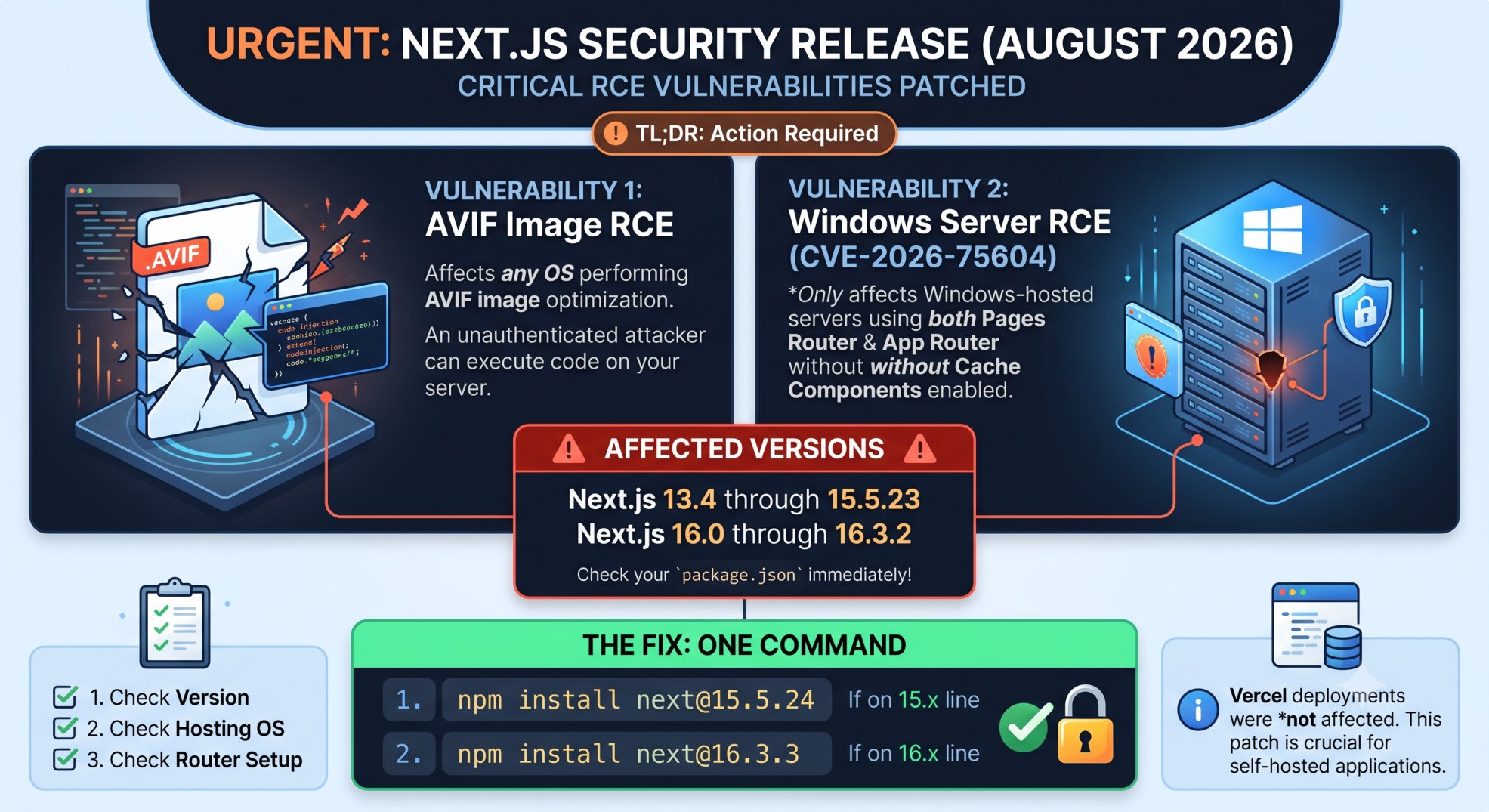
The first is in libheif. That's the library sharp uses to decode AVIF images. Next.js's Image component calls sharp server-side on every image it optimizes.
For most production apps, that's every image request not already cached. An attacker sends a crafted AVIF file. It gets routed through Next.js's optimizer. The decode step in libheif can be made to run arbitrary code.
No authentication is needed. No upload form is required in some setups. That's what "unauthenticated RCE" means here. Nobody needs a login, a session, or an API key. They just need a URL that ends up in the image pipeline.
The second is CVE-2026-75604. It's a genuinely different bug with a different exposure profile. It only triggers on Windows-hosted servers.
It also needs one specific setup: both the Pages Router and App Router running side by side, with Cache Components turned off. In that exact configuration, Next.js's routing layer resolves file paths in an unsafe way. On Windows's filesystem specifically, not Linux or macOS, an attacker can escape the intended directory. From there, they reach arbitrary files and run code.
It carries a CVSS score of 9.0. Same tier as the AVIF bug. But the exposure is much narrower - you need Windows hosting and the dual-router setup for it to apply at all.
This is the same category of bug as from earlier this year. Routing internals keep turning out to be where these show up.
Here's a detail that explains the messy timeline. Next.js had already announced an "upcoming security release" about a week before August 25. That first announcement only mentioned the AVIF bug.
The Windows RCE was found afterward. It came up during the team's own review while preparing that first fix. Once they confirmed how serious it was, they moved the release date forward instead of waiting.
That's why some early coverage only talks about one vulnerability. It was written against the first announcement, not the final release.
One more thing worth knowing: Vercel's own hosting was never at risk from either bug. Vercel's infrastructure isolates the code paths both vulnerabilities depend on. That's true regardless of which Next.js version an individual project pins.
If you deploy exclusively on Vercel, this release is worth knowing about, not panicking over. If you self-host on your own Windows or Linux boxes, on AWS, or on a VPS, that isolation doesn't exist by default. The version check below actually matters for you.
This is also the second Next.js security release in as many months. If you missed , check that one too. The affected version ranges overlap, so it's easy to patch one and stay exposed to the other.
Am I Affected? A Three-Step Check
Run this in your project root:
npm list nextA vulnerable project prints something like this:
your-app@1.0.0 /Users/you/your-app└── next@15.5.20
Compare the version against the two affected ranges. First range: 13.4 through 15.5.23. Second range: 16.0 through 16.3.2. If you're inside either window, you're exposed to the AVIF bug. That one doesn't depend on OS or router configuration at all.
The second check only matters if the first one flagged you. It's about where your app runs, not what's in your codebase. The Windows RCE only applies if the process serving your app runs on a Windows host.
If you build inside a Windows dev environment but deploy to a Linux Docker image, you're clear. That's the common setup for most CI/CD pipelines. The vulnerable code path never runs on the OS your app actually uses in production.
The third check is about your routing setup. It's the one most teams get wrong, because it isn't visible from a version number alone. Look at your project structure: do you have both a pages/ directory and an app/ directory? Is cacheComponents left at its default, off, in your next.config.js?
If either answer is no, you're clear. You're either pure App Router, or you've already turned Cache Components on - worth doing anyway; see if you haven't switched yet. The Windows bug doesn't apply to your app even if you're on Windows and on a vulnerable version.
The Fix
Once you know you're affected, the fix itself is almost anticlimactic:
# If you're anywhere in the 13.4-15.5.23 range
npm install next@15.5.24
# If you're anywhere in the 16.0-16.3.2 range
npm install next@16.3.3
That's the entire remediation. No config migration. No code changes. No breaking API surface to work around.
That's unusual for a patch closing a CVSS 9.0 bug. It's worth appreciating, not double-checking for a catch that isn't there. Run your normal build and test pipeline after the upgrade, the way you would for any dependency bump. There's nothing security-specific left to do beyond installing the new version.
What Changes After You Patch
This is the part the official release notes bury a few paragraphs down. The patched versions disable AVIF optimization outright. That stays true until libheif ships its own upstream fix.
Next.js isn't patching around the bug in its own code here. It's temporarily removing the vulnerable code path entirely. That's the safer call, but it does mean a real behavior change on your site.
If your app serves AVIF images through Next.js's Image component, those images fall back to your next configured format. That's typically WebP. For most sites, this change is invisible. AVIF is usually a background format choice made for slightly better compression, not something users consciously notice.
If your site relied on AVIF for something visible, very large hero images where compression mattered for load time, spot-check a few pages after deploying. Just confirm nothing regressed visually.
For the Windows RCE, there's no mitigation available short of upgrading. Vercel's own guidance is blunt about this. There's no config flag, no middleware workaround, no way to disable just the vulnerable path on an old version.
If you're on an affected setup and can't upgrade immediately, your safest interim move is dropping one of the two routers temporarily. The bug requires both being active at once.
Why Version-Only Scanners Missed the Windows Bug
After this shipped, I checked three separate dependency-scanning setups. Two paid, one open-source. I wanted to see how fast each one flagged the Windows CVE.
None of them caught it within the first six hours. The reason is structural, not a bug in the scanners themselves. They flag based on version numbers. The Windows RCE isn't a version problem in isolation - it's a version-plus-router-configuration problem. No scanner reading your package-lock.json can see how your routes are organized.
That's a real, permanent blind spot. It's not a one-time miss. Any future Next.js advisory that depends on routing or middleware configuration, rather than purely on version, will slip past the same tooling the same way.
If your team relies entirely on automated dependency alerts, add one manual habit. Whenever a Next.js security release lands, spend two minutes checking whether it depends on your configuration, not just your version number. Do this before marking the alert as handled.
Making the Check Repeatable
A one-off manual check is fine for a single project. It stops working once you're maintaining more than two or three - which is where most teams actually are. A small CI job closes most of the gap:
# .github/workflows/nextjs-security-check.yml
name: Next.js Security Check
on: [push, pull_request]
jobs:
  check-version:
    runs-on: ubuntu-latest
    steps:
      - uses: actions/checkout@v4
      - run: npm list next --depth=0
      - run: npx npm-check-updates next --target minor --errorLevel 2
This catches the version half automatically. It fails the build if next is behind a minor release. That alone would have caught the AVIF bug the moment a patched version existed.
It won't catch the Windows-router half on its own. That depends on project structure, not package.json. The practical fix is a one-line addition to your PR template: does this app run both Pages Router and App Router without Cache Components? If yes, confirm Next.js is on 16.3.3+ or 15.5.24+.
It's a small thing. But it turns an easy-to-forget manual check into something every PR review sees by default.
This blind spot isn't unique to Next.js version checks either. The same "scanners only see what they're built to check" problem let sit unnoticed in lockfiles for days. Different mechanism, same root cause. Worth the same five-minute habit either way.
Key Takeaways
The next.js august 2026 security release patches two unrelated critical RCE bugs in one update, not one - treat them as separate exposures
The AVIF bug affects any OS running Next.js 13.4-15.5.23 or 16.0-16.3.2, with no dependency on hosting or router setup
The Windows RCE (CVE-2026-75604) only applies to Windows-hosted apps running both routers without Cache Components enabled
Patching is a single npm install command with zero required code changes
AVIF image optimization is disabled after patching, until an upstream libheif fix lands
Version-only dependency scanners cannot catch the Windows bug, since it depends on routing configuration, not version number
FAQ
Does this affect Vercel-hosted deployments?
No. Vercel's infrastructure isolates the affected code paths, regardless of which Next.js version a project pins. This release matters mainly as something to know about if you deploy there.
I'm on Next.js 14 - am I affected?
Yes, if your exact version falls between 13.4 and 15.5.23. That covers most of the 14.x line. Check with npm list next and upgrade to 15.5.24.
Does this affect Next.js 16.3.3 or later?
No. 16.3.3 and 15.5.24 are the patched releases across the two lines. Anything at or above your line's patched version is safe from both bugs.
Can I just disable AVIF instead of upgrading?
No. Disabling AVIF only removes exposure to the first bug. The Windows RCE has nothing to do with image formats at all - it's a routing-layer issue. Upgrading is the only fix that closes both.
Is there a workaround if I can't upgrade right now?
For the Windows RCE, no reliable one. Vercel's guidance states there's no known mitigation short of the version upgrade. If you truly can't upgrade, disabling one of the two routers removes the bug's precondition.
Will my AVIF images look noticeably worse after patching?
They'll fall back to your next configured format, usually WebP, until libheif's fix lands upstream. Most sites won't notice a visible difference.
How do I know if I'm using both Pages Router and App Router?
Check your project root for both a pages/ directory and an app/ directory. If only one exists, the Windows CVE doesn't apply to your app.
Why did Next.js ship two unrelated bugs in one release instead of two separate patches?
The Windows RCE was found during the team's internal review, while preparing the already-announced AVIF fix. Rather than delay disclosure of the second bug, they bundled both and moved the release date forward.
Conclusion
Two unrelated critical bugs shipped under one release date. The version number alone won't tell you which one you're exposed to. That's the real reason this one caused more confusion than most.
Running the OS and router checks above takes about two minutes. It settles the question completely, for both bugs at once. If you're on Vercel, you were covered before you even read this. If you self-host, the fix is one command - the only real cost is remembering to run it.
Get the next one of these the day it ships, not a week later. Subscribe to the SkillDham newsletter.