
npm Supply Chain Attack: Is Your Lockfile Infected
Skilldham
Engineering deep-dives for developers who want real understanding.
Last updated: July 2026
TL;DR
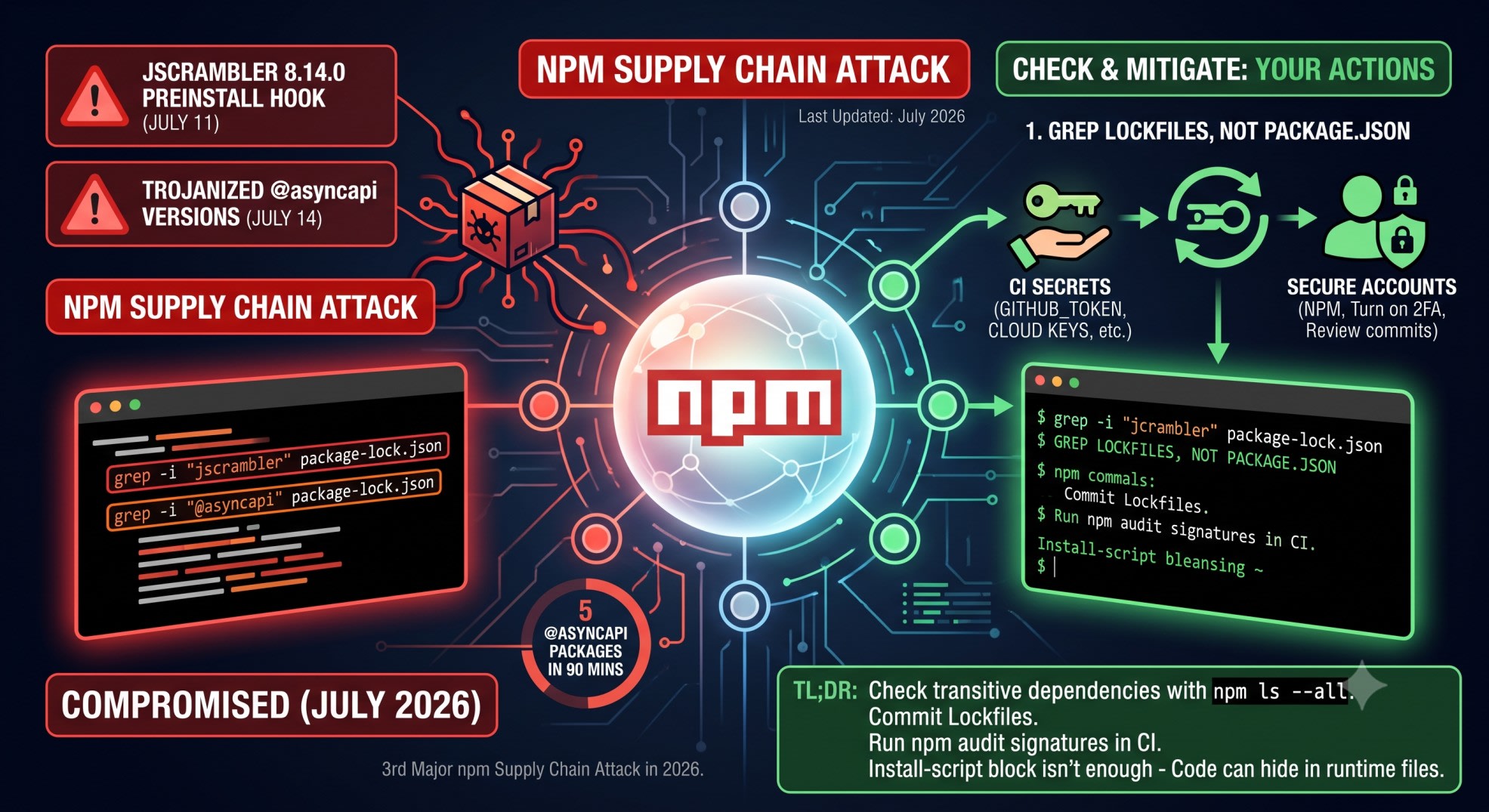
A supply chain attack hit npm this month. It compromised the @asyncapi org and the jscrambler package.
Five trojanized @asyncapi versions went out in about 90 minutes on July 14. A compromised jscrambler 8.14.0 release added a hidden preinstall hook on July 11.
To check yourself: grep your lockfile for both names. Rotate your CI secrets if you find a match. npm 12's install-script block did not fully stop this. The reason why matters for your own setup.
You updated a dependency last week. Maybe it ran on its own - Renovate, Dependabot, or a normal deploy.
Now there's a headline about an npm supply chain attack. Your stomach drops a little.
Was it one of mine?
You don't have a security team. You have a lockfile, a terminal, and ten minutes before your next meeting.
Here's what to check first.
What Happened - AsyncAPI and jscrambler
The AsyncAPI republish window
Microsoft Threat Intelligence found a coordinated attack on the @asyncapi npm org. It happened on July 14, 2026.
Five package versions went out across four package names. All of it happened in about 90 minutes. Every version carried the same injected loader.
That speed matters. A 90-minute window is not one stolen laptop. It looks scripted. One stolen npm publish token can push several packages back to back before anyone notices.
The jscrambler preinstall hook
Days earlier, on July 11, a bad release of jscrambler shipped as version 8.14.0. It added a hidden preinstall hook.
That hook called dist/setup.js. That file then ran hidden native binaries. Versions existed for Linux, macOS, and Windows.
A preinstall hook runs during npm install. It fires before you touch your own code. If jscrambler 8.14.0 sat in your lockfile, the binary ran the moment CI pulled your dependencies.
Why npm 12's Install-Script Block Didn't Stop This
What npm 12 actually disabled
npm 12 shipped three days before the AsyncAPI attack. It turned off install scripts by default. That covers preinstall, install, and postinstall hooks.
That change was built to stop exactly this kind of attack. If you hit build errors after upgrading, the npm 12 install-script block also broke Prisma's postinstall step for a lot of teams - worth a look if your CI started failing around the same time.
If you run npm 12 with default settings, the jscrambler hook should not have fired. That part is good news.
How the attacker adapted
The AsyncAPI attack came after npm 12 shipped. It still worked.
The loader did not rely only on install scripts. Reports say the bad code sat inside the package's normal runtime files. That code ran the moment your app imported the module. Not just at install time.
This is the part most posts skip. Install-script blocking protects one entry point. It does nothing if bad code sits inside index.js itself. It still runs on require() or import. Your CI can block every install script and still run a trojanized package the second your app starts.
Check If You're Exposed Right Now
Grep your lockfile for the compromised packages
Run this from your project root:
bash
# Wrong: checking package.json only misses transitive dependencies
grep -i "jscrambler" package.json

# Correct: check the lockfile, where transitive versions actually live
grep -i "jscrambler" package-lock.json
grep -i "@asyncapi" package-lock.json
package.json only lists your direct dependencies. A bad package can enter through some other tool as a transitive dependency. It won't show up in package.json. The lockfile lists every resolved version, direct and transitive.
If jscrambler shows version 8.14.0, treat that machine as compromised. Treat any CI runner that installed it the same way.
Run npm ls against the exact versions
bash
# Correct: confirms whether the flagged version is actually resolved in your tree
npm ls jscrambler
npm ls --all 2>/dev/null | grep -i asyncapi
npm ls shows the tree that actually ran. Not just what's declared. A version range in package.json can resolve to different versions over time.
Check install timestamps, not just versions
I checked this against Munshi's lockfile after the news broke. The pinned version was not the bad one.
But the lockfile's last-modified date sat close to the attack window. I rotated the CI token anyway, as a precaution. When the timing is close, don't trust a clean version number alone.
What To Rotate If You Find A Match
Say either package shows a flagged version. Don't just delete it and move on. Assume anything that ran during install touched your environment.
CI and pipeline secrets
Rotate GITHUB_TOKEN and any personal access tokens used in CI
Rotate npm publish tokens - a stolen publish token is the usual entry point for this kind of attack
Rotate cloud provider keys stored as CI environment variables (AWS, GCP, Vercel)
Local and cloud credentials
Rotate your own npm account token. Turn on 2FA if it isn't already on.
Check for new SSH keys or OAuth app approvals you didn't add.
Review recent commits and package publishes tied to your account.
This list stays short on purpose. For a solo developer or small team, start with CI secrets. That's what an automated loader steals fastest. Personal accounts come second.
Reduce Your Exposure Going Forward
Lockfile hygiene
Commit your lockfile. Never let CI regenerate it silently. A pinned, committed lockfile is the only thing standing between a version you reviewed and one npm quietly resolved for you.
This matters even more in Docker builds. A native module Docker build failure on Node 24 often traces back to the exact same problem - a lockfile that drifted from what actually got tested.
CI provenance checks
Enable npm audit signatures in your CI pipeline. The official npm CLI documentation for npm audit covers the exact flags for this. It checks packages against npm's registry provenance data. That catches tampering a version number alone won't show.
bash
# Correct: run this in CI before install completes
npm audit signatures
This is the third major npm supply chain attack in 2026. Axios in March. node-ipc in May. Now AsyncAPI and jscrambler in July. Lockfile hygiene is no longer optional for anyone shipping Node.js to production.
Key Takeaways
This npm supply chain attack hit @asyncapi (five versions, about 90 minutes, July 14, 2026) and jscrambler 8.14.0 (preinstall hook, July 11, 2026)
Grep your lockfile, not just package.json, for both names
npm 12's install-script block does not stop code injected into a package's runtime files that fires on require() or import
Find a match? Rotate CI secrets first, then personal account credentials
Run npm audit signatures in CI to catch tampering a version number alone won't show
This is the third major npm supply chain attack in 2026 - lockfile hygiene is a standing habit now, not a one-time cleanup
FAQ
Does npm 12 protect me from this kind of attack at all?
Partly. It blocks bad code hidden in install scripts. That stopped earlier jscrambler-style attacks cold. It does not stop code placed inside a package's normal runtime files. That's what let the AsyncAPI attack work even after npm 12 shipped.
I don't use jscrambler or any @asyncapi package directly. Am I safe?
Check your transitive dependencies too. Run npm ls --all and search the output. Don't stop at package.json. A tool you use might depend on one of these packages without you knowing.
What if my lockfile shows an older, unaffected version?
You're likely fine on that package. Still check the lockfile's last-modified date against July 11 and July 14, 2026. Installed right in that window? Rotate your CI secret as a precaution.
Should I just delete package-lock.json and regenerate it?
No. A fresh install can silently pull a newer, still-bad version if the malicious release isn't unpublished yet. Check first. Then update on purpose to a version you've confirmed is clean.
Is npm audit enough to catch this kind of attack?
Not on its own. Standard npm audit checks known vulnerability databases. Those take time to update after a new attack. npm audit signatures checks package provenance directly. That catches tampering faster.
What's the difference between this attack and the Shai-Hulud campaigns from 2025?
Different technique, same pattern. A stolen publish token pushes trojanized versions of real packages. The 2026 wave shows this technique hasn't gone away. It just adapts around new npm defenses, like the install-script block.
Do I need to worry about this if I only use npm for local development, not production?
Yes. The jscrambler preinstall hook ran hidden binaries the moment npm install fired. That happens on your laptop too. Local dev machines hold SSH keys, cloud credentials, and cached tokens. Those are just as valuable to an attacker.
Where can I check the exact compromised version numbers as new ones get disclosed?
Check the official npm advisory database and your package manager's audit output. Vendor security blogs also publish updated indicator lists as the investigation continues. Version numbers for this kind of attack change fast in the first two weeks.