
Next.js Cache Not Updating? 5 Fixes That Work
Skilldham
Engineering deep-dives for developers who want real understanding.
Quick Answer
Next.js cache not updating after a Server Action usually means you're missing a revalidatePath or revalidateTag call - or calling it before the data write instead of after. Next.js 15 made caching opt-in, but stale cache from a previous build or incorrect revalidation scope still bites developers constantly.
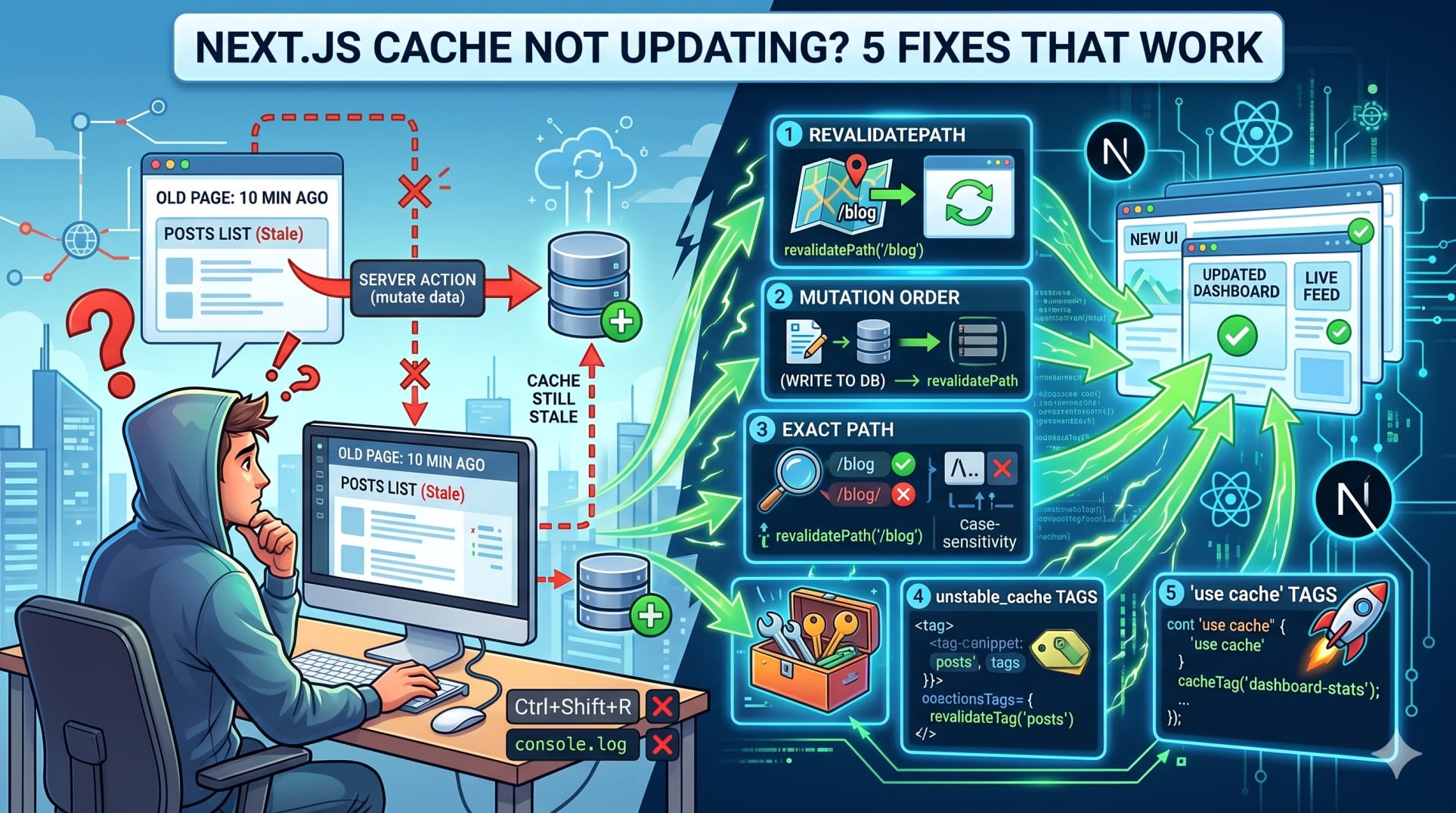
The five most common causes are: missing revalidation call, revalidating the wrong path, calling revalidate before the mutation, using unstable_cache without tags, and not understanding the difference between revalidatePath and revalidateTag.
You submit a form.
The Server Action runs. The database gets updated. You check the database - the data is there.
You go back to the page. Same old data. Refresh. Still old. Hard refresh with Ctrl+Shift+R. Old.
You add a console.log inside your Server Action to confirm it's running. It is. The mutation is working.
But the page shows data from ten minutes ago like nothing happened.
You're not going crazy. This is one of the most commonly reported bugs in Next.js 15 - and it has exactly five causes. Let's fix each one.
Why Next.js 15 Cache Behavior Changed
Next.js 13 and 14 aggressively cached everything by default. Fetch calls, route segments, layouts - all cached unless you explicitly opted out.
Next.js 15 flipped this. Fetch requests and route handlers are now no-cache by default. But the full page rendering cache - specifically cached data from Server Components and unstable_cache - still behaves the same way.
The result? A hybrid model that confuses most developers. Some things cache less. Some things still cache hard. And Server Actions, which are supposed to be the mechanism that updates your UI after mutations, don't automatically invalidate any cache on their own.
That last part is the root of almost every report of "cache not updating."
If you're new to how Next.js data fetching works overall, check out our guide on Next.js App Router Not Working - Real Fixes and Why They Happen before continuing. It covers the routing and rendering model that makes revalidation click much faster.
Fix 1: Missing revalidatePath After the Mutation
This is the most common cause. You write the Server Action, you save the data, but you forget to tell Next.js which page to rebuild.
What Most Developers Write First
typescript
// Wrong: Server Action with no revalidation call
'use server'

import { db } from '@/lib/db'

export async function createPost(formData: FormData) {
  const title = formData.get('title') as string
  const content = formData.get('content') as string

  await db.post.create({
    data: { title, content }
  })

  // Nothing here - no revalidation, page cache never clears
}
You call this action, the post gets saved, but the /blog page still shows the old list because Next.js has no reason to regenerate it.
The Fix
typescript
// Correct: Revalidate the affected path after mutation
'use server'

import { db } from '@/lib/db'
import { revalidatePath } from 'next/cache'

export async function createPost(formData: FormData) {
  const title = formData.get('title') as string
  const content = formData.get('content') as string

  await db.post.create({
    data: { title, content }
  })

  revalidatePath('/blog') // Clear cache for the blog listing page
}
Why This Works
revalidatePath tells Next.js to purge the cached output for that route segment. On the next request to /blog, Next.js re-runs the Server Component, re-fetches the data, and generates a fresh HTML response.
The call must come after the mutation - not before. Not alongside. After.
Fix 2: Calling revalidatePath Before the Data Write
This is subtle but it destroys everything. The order matters completely.
The Broken Order
typescript
// Wrong: Revalidating BEFORE the data is written
'use server'

import { db } from '@/lib/db'
import { revalidatePath } from 'next/cache'

export async function updatePost(id: string, title: string) {
  revalidatePath('/blog') // Called first - cache clears, but old data gets re-cached immediately

  await db.post.update({
    where: { id },
    data: { title }
  })
}
Here's what actually happens: revalidatePath fires, Next.js schedules a cache clear. Before the revalidation completes or before the next request comes in, your mutation runs. But if a request hits /blog in that tiny window after revalidation but before your write completes, Next.js re-fetches the old data and re-caches it. You've just cached the stale version again.
The Correct Order
typescript
// Correct: Write first, then revalidate
'use server'

import { db } from '@/lib/db'
import { revalidatePath } from 'next/cache'

export async function updatePost(id: string, title: string) {
  await db.post.update({ // Mutation runs first
    where: { id },
    data: { title }
  })

  revalidatePath('/blog') // Cache clears AFTER data is committed
}
Why the Order Matters
revalidatePath doesn't pause the world. It schedules an invalidation. The next request to that path after the invalidation runs gets fresh data. If your data isn't written yet when that request comes in, fresh fetch returns old data. Simple as that.
Rule: always mutate first, revalidate second.
Fix 3: Revalidating the Wrong Path
You're calling revalidatePath. The mutation is happening. But the page still doesn't update. This is almost always a path mismatch.
Common Path Mistakes
typescript
// Wrong: Revalidating a path that doesn't match the actual route
'use server'

import { revalidatePath } from 'next/cache'
import { db } from '@/lib/db'

export async function deletePost(id: string) {
  await db.post.delete({ where: { id } })

  revalidatePath('/blog/posts')   // Wrong: actual route is /blog
  revalidatePath('/posts/')       // Wrong: trailing slash mismatch
  revalidatePath('/Blog')         // Wrong: case sensitive
}
Next.js path matching is exact. /blog and /blog/ are different paths. /Blog and /blog are different paths.
Revalidate With Exact Path and Layout Type
typescript
// Correct: Exact path, and optionally specify the revalidation type
'use server'

import { revalidatePath } from 'next/cache'
import { db } from '@/lib/db'

export async function deletePost(id: string) {
  await db.post.delete({ where: { id } })

  revalidatePath('/blog')              // Revalidates the /blog page
  revalidatePath('/blog/[slug]', 'page') // Revalidates all dynamic blog post pages
}
The type Parameter You're Probably Missing
revalidatePath accepts a second argument: 'page' or 'layout'.
CallWhat gets revalidatedrevalidatePath('/blog')Just the /blog page segmentrevalidatePath('/blog', 'page')Same as above, explicitrevalidatePath('/blog', 'layout')The layout AND all pages under itrevalidatePath('/', 'layout')Everything - nuclear option
If your data shows up in a shared layout (like a nav with a post count), you need to revalidate at the 'layout' level, not the 'page' level.
typescript
// Correct: Revalidate layout when shared UI shows the updated data
'use server'

import { revalidatePath } from 'next/cache'
import { db } from '@/lib/db'

export async function updateSiteSettings(data: SiteSettings) {
  await db.settings.update({ data })

  revalidatePath('/', 'layout') // Layout carries the data - revalidate layout
}
Fix 4: Using unstable_cache Without Tags
unstable_cache is Next.js's built-in caching wrapper for any async function - database calls, external APIs, anything. If you're using it without tags, you have no way to invalidate it from a Server Action.
Cached Data With No Way Out
typescript
// Wrong: Cached function with no tags - impossible to invalidate on demand
import { unstable_cache } from 'next/cache'
import { db } from '@/lib/db'

export const getPosts = unstable_cache(
  async () => {
    return db.post.findMany({ orderBy: { createdAt: 'desc' } })
  }
  // No tags - you can only wait for the cache to expire
)
When you call revalidatePath('/blog') and the page data is loaded via this function, Next.js revalidates the route segment but the unstable_cache result is separately cached. You cleared one cache, but the data cache is still stale.
Add Tags and Revalidate by Tag
typescript
// Correct: Cached function with a tag for targeted invalidation
import { unstable_cache } from 'next/cache'
import { db } from '@/lib/db'

export const getPosts = unstable_cache(
  async () => {
    return db.post.findMany({ orderBy: { createdAt: 'desc' } })
  },
  ['posts-list'],        // Cache key
  { tags: ['posts'] }    // Revalidation tag - this is what you call in Server Actions
)
typescript
// Correct: Server Action revalidates by tag
'use server'

import { revalidateTag } from 'next/cache'
import { db } from '@/lib/db'

export async function createPost(formData: FormData) {
  await db.post.create({
    data: {
      title: formData.get('title') as string,
      content: formData.get('content') as string
    }
  })

  revalidateTag('posts') // Invalidates ALL cached functions tagged with 'posts'
}
When to Use revalidateTag vs revalidatePath
ScenarioUseOne page shows the updated datarevalidatePath('/that-page')Multiple pages show the same datarevalidateTag('shared-tag')You're using unstable_cacherevalidateTag - alwaysA layout, a page, and a widget all show the same datarevalidateTag - one call clears all three
This is the part most tutorials skip. revalidatePath is route-level. revalidateTag is data-level. When your cached data appears in more than one place, use tags.
Fix 5: The use cache Directive Needs Tags Too
Next.js 15 introduced the use cache directive as the newer, cleaner alternative to unstable_cache. Same problem applies - if you don't define cacheTag, you can't invalidate it.
use cache Without cacheTag
typescript
// Wrong: use cache with no tag - cannot be invalidated on demand
async function fetchDashboardStats() {
  'use cache'

  const stats = await db.stats.findFirst()
  return stats
}
use cache With Proper Tag Setup
typescript
// Correct: use cache with cacheTag for targeted invalidation
import { cacheTag } from 'next/dist/server/use-cache/cache-tag'

async function fetchDashboardStats() {
  'use cache'
  cacheTag('dashboard-stats') // Tag this cache entry

  const stats = await db.stats.findFirst()
  return stats
}
typescript
// Correct: Server Action revalidates the tag
'use server'

import { revalidateTag } from 'next/cache'
import { db } from '@/lib/db'

export async function updateStats(data: StatsUpdate) {
  await db.stats.update({ data })

  revalidateTag('dashboard-stats') // Clears exactly this cache
}
The use cache directive is still experimental in Next.js 15.x, but it's the direction the framework is heading. If you're already using it - tag everything.
Bonus: The redirect() Trick
If your Server Action redirects the user to the updated page after the mutation, Next.js automatically serves a fresh response for that redirect destination - even without explicit revalidation calls.
typescript
// Correct: redirect after mutation bypasses cache for the destination page
'use server'

import { db } from '@/lib/db'
import { redirect } from 'next/navigation'

export async function createPost(formData: FormData) {
  const post = await db.post.create({
    data: {
      title: formData.get('title') as string,
      content: formData.get('content') as string
    }
  })

  redirect(`/blog/${post.slug}`) // Fresh render guaranteed on redirect
}
This works well for create/update flows where you navigate the user to the result. For cases where you stay on the same page and expect the data to update in place - you still need explicit revalidation.
For more on how Next.js handles data mutation flows end-to-end, see our breakdown of Next.js Build Failing on Vercel - Common Causes and Fixes - most Vercel build failures in production trace back to the same caching misconfigurations.
Key Takeaways
Next.js cache not updating after a Server Action almost always means revalidatePath or revalidateTag is missing, wrong, or called in the wrong order
Always mutate your data first, then call revalidatePath or revalidateTag - never before
revalidatePath is exact and case-sensitive - /blog and /Blog are different paths
If your data appears in multiple pages or a shared layout, use revalidateTag instead of multiple revalidatePath calls
Any function wrapped in unstable_cache or use cache needs a tag - without it, you have no way to invalidate it on demand from a Server Action
The type parameter in revalidatePath('/path', 'layout') revalidates the layout and everything under it - use this when data lives in a shared layout component
FAQs
Why does revalidatePath not work in Next.js 15?
The most common reason is calling revalidatePath before the data mutation completes, or using an incorrect path string. revalidatePath is case-sensitive and exact - /blog and /blog/ are treated differently. Also check whether your data comes from unstable_cache or a use cache directive - these maintain their own cache that revalidatePath does not clear. For those, use revalidateTag.
What is the difference between revalidatePath and revalidateTag in Next.js?
revalidatePath clears the cached output for a specific route segment - it tells Next.js to re-render that page on the next request. revalidateTag clears all cached data entries (from fetch, unstable_cache, or use cache) that are tagged with a specific string. Use revalidatePath when one page changes. Use revalidateTag when the same data appears in multiple places.
Does Next.js 15 still cache by default?
Partially. Next.js 15 changed the defaults so that fetch requests and GET route handlers are no longer cached by default. But Server Components that use unstable_cache, pages using ISR with revalidate exports, and anything using the use cache directive are still cached. The full static rendering cache still applies to pages that have no dynamic functions.
Why does my Next.js Server Action update the database but not the UI?
Because the UI is served from a cached render. The Server Action runs on the server, updates the database, and returns. But the page the user sees is the cached HTML from a previous render. Without revalidatePath or revalidateTag, Next.js has no signal to rebuild that page. Add the revalidation call at the end of your Server Action after the mutation.
Can I revalidate multiple paths in one Server Action?
Yes. Call revalidatePath multiple times or combine revalidatePath and revalidateTag in the same action.
typescript
// Correct: Multiple revalidation calls in one action
'use server'

import { revalidatePath, revalidateTag } from 'next/cache'
import { db } from '@/lib/db'

export async function publishPost(id: string) {
  await db.post.update({ where: { id }, data: { published: true } })

  revalidatePath('/blog')            // Listing page
  revalidatePath(`/blog/${id}`)      // Individual post page
  revalidateTag('posts')             // Any cached fetch tagged 'posts'
}
Does revalidatePath work inside API routes in Next.js 15?
Yes. revalidatePath and revalidateTag both work in API route handlers (route.ts), Server Actions, and server-side helper functions. They do not work in Client Components or any code that runs in the browser.
Should I use revalidatePath or router.refresh() from the client?
They solve different problems. revalidatePath runs on the server - it clears the server-side cache so the next full page request gets fresh data. router.refresh() runs on the client - it triggers a re-fetch of the current route's Server Component data without a full page reload. For Server Action flows, use revalidatePath. For client-triggered refreshes (like a polling interval), use router.refresh().
Conclusion
Next.js caching is not broken - it's precise. Once you understand that Server Actions don't automatically invalidate anything, and that revalidatePath only clears route-level cache while unstable_cache maintains its own separate cache, the behavior makes complete sense.
Most cache bugs come down to one of these five patterns. You're either missing the revalidation call, calling it in the wrong order, pointing it at the wrong path, or not tagging your cached functions.
Fix the pattern, not the framework.
If you're running into related issues with data fetching in Next.js, [Next.js fetch Caching Explained - What Changed in Version 15] covers the full caching model change and what it means for how you write data fetching code.