

Nextjs use cache Not Working? Why It Silently Fails
Skilldham
Engineering deep-dives for developers who want real understanding.
Last Updated: July 2026
TL;DR - Quick Fix
nextjs use cache not working silently. No error. No warning. Three reasons.
Failure 1 - Wrong placement:
typescript
// Wrong: directive inside a wrapper - compiler ignores it
export const getData = someWrapper(async function() {
  'use cache'
  return db.query(...)
})

// Correct: directive on the exported function itself
export async function getData() {
  'use cache'
  cacheLife('hours')
  return db.query(...)
}
Failure 2 - Runtime APIs inside cache:
typescript
// Wrong: cookies() inside cached scope - throws at build
async function UserHeader() {
  'use cache'
  const cookieStore = await cookies() // build error
}

// Correct: read cookies in parent, pass as argument
export default async function Page() {
  const cookieStore = await cookies()
  return <UserProfile userId={cookieStore.get('user-id')?.value} />
}
Failure 3 - Old revalidateTag syntax:
typescript
// Wrong: deprecated in Next.js 16
revalidateTag('products')

// Correct:
revalidateTag('products', 'max')  // public pages
updateTag(`product-${id}`)        // read-your-writes
Also required in next.config.ts:
typescript
const nextConfig = {
  cacheComponents: true,
}
Tested on: Next.js 16 - App Router - Vercel
You upgrade to Next.js 16. You add use cache to your data function. You deploy.
Nothing changes. The function still runs on every request. There is no error, no warning, nothing in the terminal.
This is why so many developers report Next.js use cache not working after the 16 upgrade. The directive can sit in the wrong place, touch the wrong API, or pair with the wrong invalidation call. Each one fails quietly.
You re-add the directive. You re-read the docs. You restart the dev server. Still nothing.
The build passes. The deploy succeeds. Then your app serves stale data, or skips the cache entirely.
Let me show you the three silent failure modes - and the exact fix for each.
Quick Answer
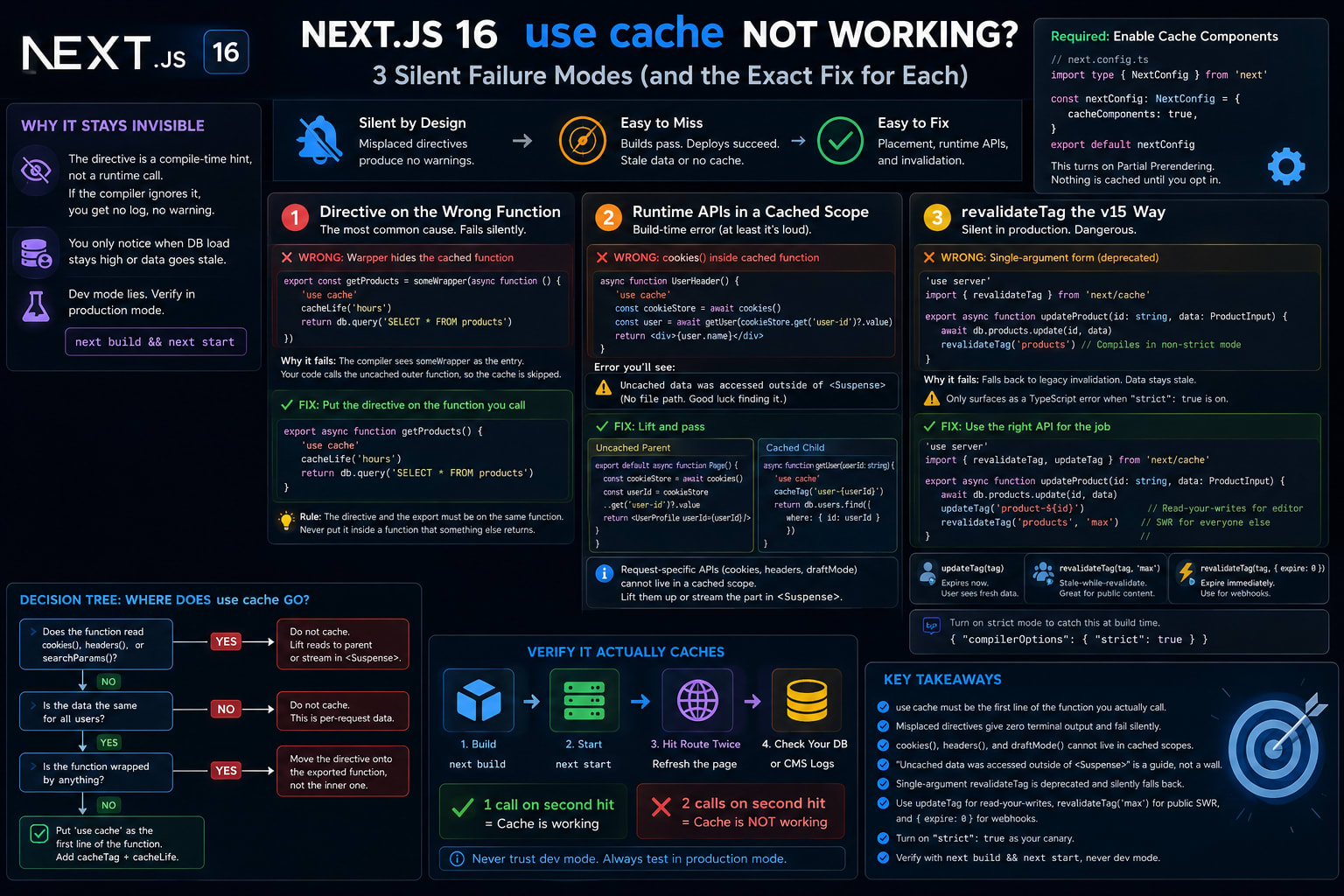
Next.js use cache not working almost always comes down to placement. The directive only caches when it sits as the first line inside the real data function - not on a wrapper around it. Two other silent failures look the same: calling cookies() or headers() inside a cached function, and using the old single-argument revalidateTag. The first throws at build. The second serves stale data in production.
If you want to see the directive working correctly first, our guide on caching Prisma queries with use cache walks through a clean setup. This post covers what happens when it goes wrong.
Why Next.js use cache Not Working Stays Invisible
Next.js 16 flipped the caching model. In version 15, fetch was cached by default and you opted out. In version 16, nothing is cached and you opt in with use cache.
That single change moved the failure mode. Old caching bugs were loud. You got stale pages and obvious config warnings.
New caching bugs are quiet. The directive is a hint to the compiler, not a runtime call. If the compiler does not pick it up, nothing complains.
The Model Is Now Opt-In
To use the directive at all, you must turn on Cache Components in your config.
typescript
// next.config.ts
import type { NextConfig } from 'next'

const nextConfig: NextConfig = {
  cacheComponents: true,
}

export default nextConfig
This one flag turns on the new model. Partial Prerendering becomes the default. Pages render dynamically unless you cache them.
Silent Means No Terminal Output
Here is the part that wastes hours. A misplaced directive produces no log line. The function just runs every time.
You only notice when your database load stays high, or your CMS bill climbs. By then you are debugging the wrong layer.
Failure 1: The Directive Is on the Wrong Function
This is the most common cause of Next.js use cache not working. It fails in dev and never recovers.
The use cache directive marks one function as a cache boundary. The compiler reads it as the first statement of that exact function. Put it anywhere else and it is ignored.
The Wrapper Trap
Most developers hit this when they wrap a data function. A logger, a retry helper, a timing wrapper. The directive ends up one layer too deep.
typescript
// Wrong: the directive is inside an inner function, but someWrapper
// returns a new uncached function - so getProducts runs every request
export const getProducts = someWrapper(async function () {
  'use cache'
  cacheLife('hours')
  return db.query('SELECT * FROM products')
})
This compiles. It deploys. It looks cached. It is not.
The compiler treats someWrapper as the entry point. The cached inner function is hidden behind it. Every call goes through the wrapper, which is not a cache boundary, so the cache is skipped.
The Fix Lives Inside the Data Function
The directive must be the first line of the function you actually call.
typescript
// Correct: directive is the first statement of the exported function
export async function getProducts() {
  'use cache'
  cacheLife('hours')
  return db.query('SELECT * FROM products')
}
Now the compiler sees the boundary at the real entry point. The cache key is generated from the function and its arguments.
If you must keep a wrapper, wrap the already-cached function. Never put use cache inside a function that something else returns. The rule is simple: the directive and the export must be on the same function.
This is the one failure that gives zero feedback. Read on - the next one at least tells you something is wrong.
Failure 2: Runtime APIs Inside a Cached Scope
This one fails at build time. That is good news. It is the only silent-failure cousin that throws.
Cached output is stored and replayed across requests. Request-specific APIs cannot live there. That means cookies(), headers(), and draftMode() are off limits inside use cache.
Why cookies() Breaks the Cache
A cached function returns the same output to everyone. A cookie is different for every user. Those two ideas cannot coexist in one scope.
typescript
// Wrong: cookies() reads request data inside a cached function
async function UserHeader() {
  'use cache'
  const cookieStore = await cookies()
  const user = await getUser(cookieStore.get('user-id')?.value)
  return <div>{user.name}</div>
}
When Cache Components is on, this throws at build with a clear string:
Uncached data was accessed outside of <Suspense>
The message is real, but it gives you no file path and no component name. You get to binary-search your codebase to find it. The official Next.js error doc explains the reasoning behind it.
The Lift-and-Pass Fix
Move the runtime read up to an uncached parent. Pass the value down as an argument.
typescript
// Correct: parent reads the cookie at request time (uncached)
export default async function Page() {
  const cookieStore = await cookies()
  const userId = cookieStore.get('user-id')?.value
  return <UserProfile userId={userId} />
}

// Correct: cached child takes the value as an argument
async function getUser(userId: string) {
  'use cache'
  cacheTag(`user-${userId}`)
  return db.users.find({ where: { id: userId } })
}
The fix works because the argument becomes part of the cache key. Each userId gets its own entry. The runtime read happens outside the cache, where it belongs.
If the data is truly per-request and should not be cached at all, wrap it in <Suspense> instead. That streams it after the static shell. We cover that boundary rule in depth in why useSearchParams needs Suspense. The error is really asking you to pick one: cache it, or stream it.
A Word on use cache: private
Next.js 16 added use cache: private for runtime data like cookies. It caches per user in browser memory only.
Be careful here. It is still experimental and not recommended for production. There is an open bug where use cache: private with cookies() re-runs on every client-side navigation instead of serving from cache. Avoid leaning on it until that is resolved. Use the lift-and-pass pattern above instead.
Failure 3: revalidateTag the Version 15 Way
This is the dangerous one. It fails only in production, after a mutation, with stale data.
In Next.js 15 you called revalidateTag('products') with one argument. In version 16, that single-argument form is deprecated. It now needs a second argument.
The Strict-Mode Canary
Here is the trap. The deprecation only shows up as a TypeScript error when your tsconfig runs in strict mode.
Many projects started on Next.js 13 or 14 are not in strict mode. So the old call compiles clean. It deploys. Then it silently falls back to legacy invalidation.
typescript
// Wrong: single-argument form, deprecated in Next.js 16
// In a loose tsconfig this compiles and falls back to legacy behavior
'use server'
import { revalidateTag } from 'next/cache'

export async function updateProduct(id: string, data: ProductInput) {
  await db.products.update(id, data)
  revalidateTag('products')
}
You update a product. The page stays stale. Nothing throws. Nothing logs. You blame the cache config and hunt in the wrong place.
The Fix and the updateTag Split
The second argument sets the invalidation strategy. Pick based on who needs to see the change first.
typescript
// Correct: read-your-writes for the editor, SWR refresh for everyone else
'use server'
import { revalidateTag, updateTag } from 'next/cache'

export async function updateProduct(id: string, data: ProductInput) {
  await db.products.update(id, data)
  updateTag(`product-${id}`)        // user who edited sees the change now
  revalidateTag('products', 'max')  // everyone else gets SWR refresh
}
revalidateTag('products', 'max') marks the tag stale. The next visitor still gets the cached version while fresh data loads behind it. That is great for a public list page.
It is wrong for the admin who just clicked save. They see the old price and think the save failed. That is what updateTag solves. It expires the entry now, so the acting user waits for fresh data. If your cache still will not refresh after a mutation, our guide on why your Next.js cache doesn't update after a server action covers the rest.
For webhooks that must expire data instantly, use revalidateTag('products', { expire: 0 }) instead. Stripe events and payment updates belong here.
The real fix is structural. Turn on strict mode so the bad call becomes a build error.
json
{
  "compilerOptions": {
    "strict": true
  }
}
With strict mode on, the single-argument call fails the build. You catch it before it ever ships. Treat "strict": true as your canary for this whole class of bug.
A Decision Tree for Where use cache Attaches
Once you know the three failures, placement becomes a quick checklist.
Where the Directive Goes
Ask three questions in order. The first yes decides it.
Does the function read cookies(), headers(), or searchParams? Do not cache it. Lift those reads to a parent and pass values down, or stream the part in <Suspense>.
Is the data the same for all users? Put use cache as the first line of that data function. Add cacheTag and cacheLife.
Is the function wrapped by anything? Move the directive onto the function you export, not the inner one.
Verify It Actually Caches
Do not trust dev mode for this. Caching behaves differently there.
Run next build && next start. Hit the route twice. Check whether your data source logs one call or two. One call means the cache works. Two calls means you are back in Failure 1.
Key Takeaways
Next.js use cache not working is almost always a placement problem - the directive must be the first line of the function you actually call, not a wrapper around it.
A misplaced use cache gives zero terminal output, so it fails silently in dev and stays broken in production.
cookies(), headers(), and draftMode() cannot live inside a cached scope - lift them to an uncached parent and pass the values as arguments.
The build error Uncached data was accessed outside of <Suspense> is a guide, not a wall - it asks you to either cache the data or stream it.
Single-argument revalidateTag is deprecated in Next.js 16 and silently falls back to legacy invalidation unless tsconfig strict mode is on.
Use updateTag in Server Actions for read-your-writes, revalidateTag(tag, 'max') for public SWR, and revalidateTag(tag, { expire: 0 }) for webhooks.
Turn on "strict": true as your canary, and always verify caching with next build && next start, never dev mode.
FAQs
Why is my Next.js use cache directive doing nothing with no error?
The directive is almost certainly on the wrong function. use cache must be the first line inside the exact function you call. If it sits inside a wrapper or helper, the compiler caches the inner function but your code calls the uncached outer one. There is no warning for this.
Do I need to enable anything to use the use cache directive?
Yes. Set cacheComponents: true in next.config.ts. Without it, the directive is not active and Partial Prerendering does not kick in. Every route renders dynamically until you turn the flag on and add the directive.
Can I use cookies or headers inside a use cache function?
No. Those are runtime APIs that read request data, and cached output is shared across requests. Doing this throws Uncached data was accessed outside of <Suspense> at build time. Read them in an uncached parent and pass the values as arguments to the cached function.
Why does my page show stale data after a mutation in Next.js 16?
You are likely calling revalidateTag with one argument. That form is deprecated and falls back to legacy invalidation when strict mode is off. Add a second argument like 'max', or use updateTag in a Server Action for immediate updates.
What is the difference between revalidateTag and updateTag?
revalidateTag(tag, 'max') marks data stale and refreshes it in the background, so the next visitor still sees the cached version once. updateTag(tag) expires the entry immediately, so the user who triggered the change sees fresh data right away. Use updateTag for read-your-writes, revalidateTag for public content.
Why does the wrong revalidateTag call compile without an error?
The deprecation only surfaces as a TypeScript error in strict mode. Older projects often run a loose tsconfig, so the call compiles clean and fails silently at runtime. Turning on "strict": true converts it into a build error you can catch early.
Is use cache: private safe to use with cookies?
Not yet for production. It is experimental, and there is an open bug where it re-runs on every client-side navigation instead of serving from cache. Prefer lifting cookie reads to a parent and passing values into a regular cached function.
How do I confirm use cache is actually working?
Do not test in dev mode, since caching behaves differently there. Run next build && next start, hit the route twice, and watch your data source. One call on the second hit means the cache works. Two calls means the directive is not attached where you think.
Conclusion
The use cache directive is not broken. It does exactly what you tell it, and it tells you nothing when you tell it wrong. Once you know the three silent failures - wrong placement, runtime APIs in a cached scope, and the old revalidateTag call - you stop guessing and start placing the directive with intent.
Most production caching bugs in Next.js 16 trace back to these three. Now you can spot all three before they ship.
If this saved you a debugging session, our guide on why Next.js async params stop working covers another silent failure most teams hit right after this one.