

Fix useSearchParams Suspense Build Error - Next.js 15 & 16
Skilldham
Engineering deep-dives for developers who want real understanding.
Last updated: June 2026
TL;DR – Quick Fix
Error:
useSearchParams() should be wrapped in a suspense boundary at page "/your-page"Fix:
jsx
import { Suspense } from "react";

export default function Page() {
  return (
    <Suspense fallback={<div>Loading...</div>}>
      <YourComponent />
    </Suspense>
  );
}
Tested on: Next.js 15, Next.js 16, App Router, Vercel
Can I disable this in next.config.js?
No. missingSuspenseWithCSRBailout was removed in Next.js 15. Adding it now breaks your build with a different error. Suspense boundary is the only fix.
You add useSearchParams() to a component. You test it locally. It works.
Then you run next build and it explodes.
Error: useSearchParams() should be wrapped in a suspense boundary at page "/your-page"You wrap it in <Suspense>. The error goes away. But now the fallback flashes on every load - or query params come back as null on the first render.
You search for why. Every answer says "just wrap it in Suspense." Nobody explains what Suspense is doing here or why useSearchParams needs it at all.
Here is the real explanation for the useSearchParams suspense build error - and the three failure modes most developers hit after applying the "fix.". This error appears in Next.js 13.4 and above - including Next.js 14, 15, and 16. The Suspense requirement has not changed across these versions.
Quick Answer
useSearchParams needs Suspense in Next.js because it reads from the URL at runtime. Next.js cannot know the query string at build time, so it marks any component using useSearchParams as dynamically rendered. During SSR, the value is unavailable before hydration. Without a Suspense boundary, Next.js cannot safely stream or statically optimize the page.
The three most common reasons the fix still fails: wrapping the wrong component, missing the fallback prop, and the error only showing in next build - not dev.
Why useSearchParams Needs Suspense in Next.js App Router
Next.js App Router has two rendering modes: static and dynamic.
Static rendering happens at build time. The page is pre-rendered to HTML and cached.
Dynamic rendering happens at request time. The page renders fresh for every user.
useSearchParams() reads query parameters from the URL - values like ?tab=profile&page=2. Those values do not exist at build time. They only exist when a real user opens a URL.
The moment you call useSearchParams() in a component, Next.js detects it and marks that component as dynamically rendered. This is called "deopting" the page from static to dynamic.
The problem is how this interacts with SSR streaming.
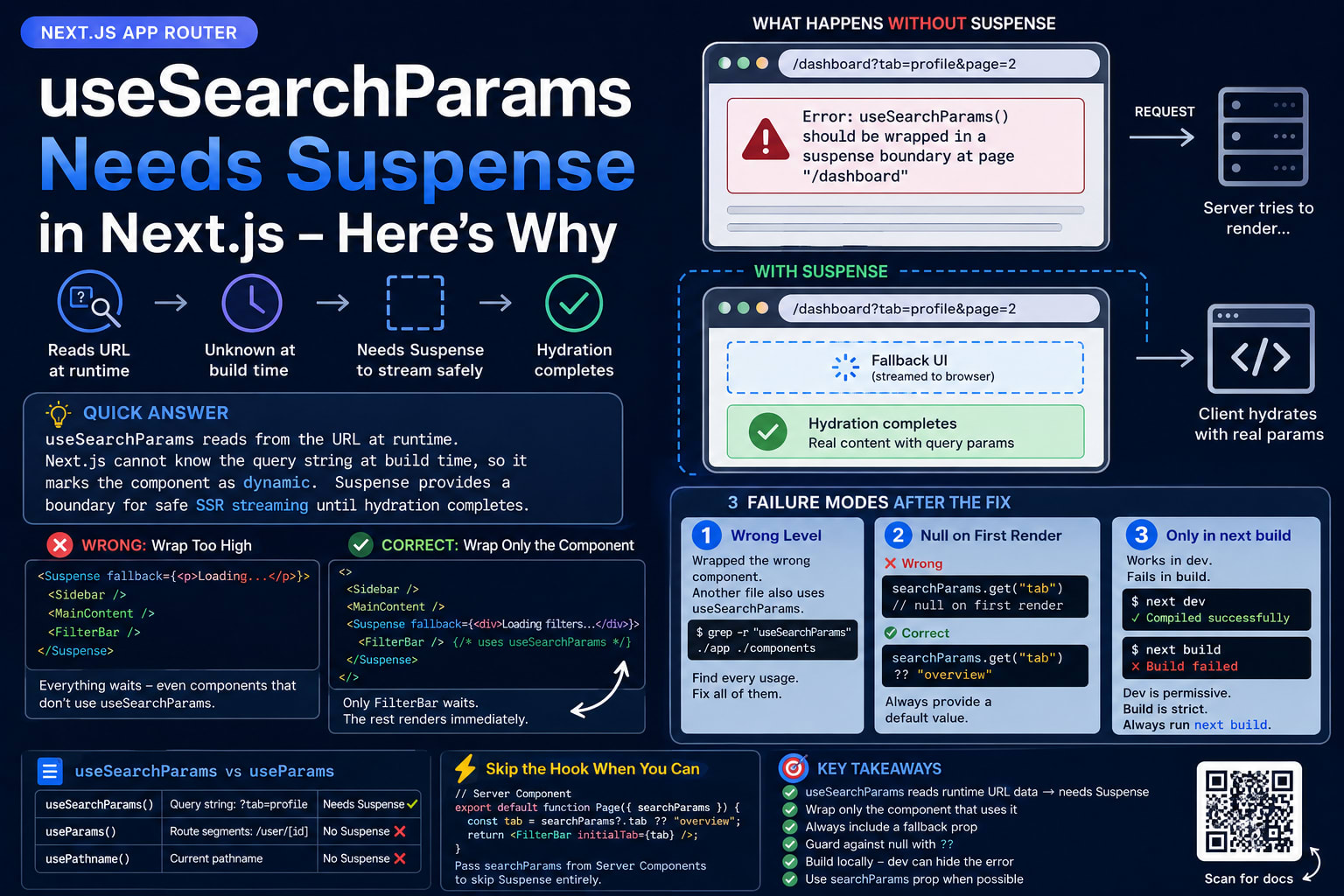
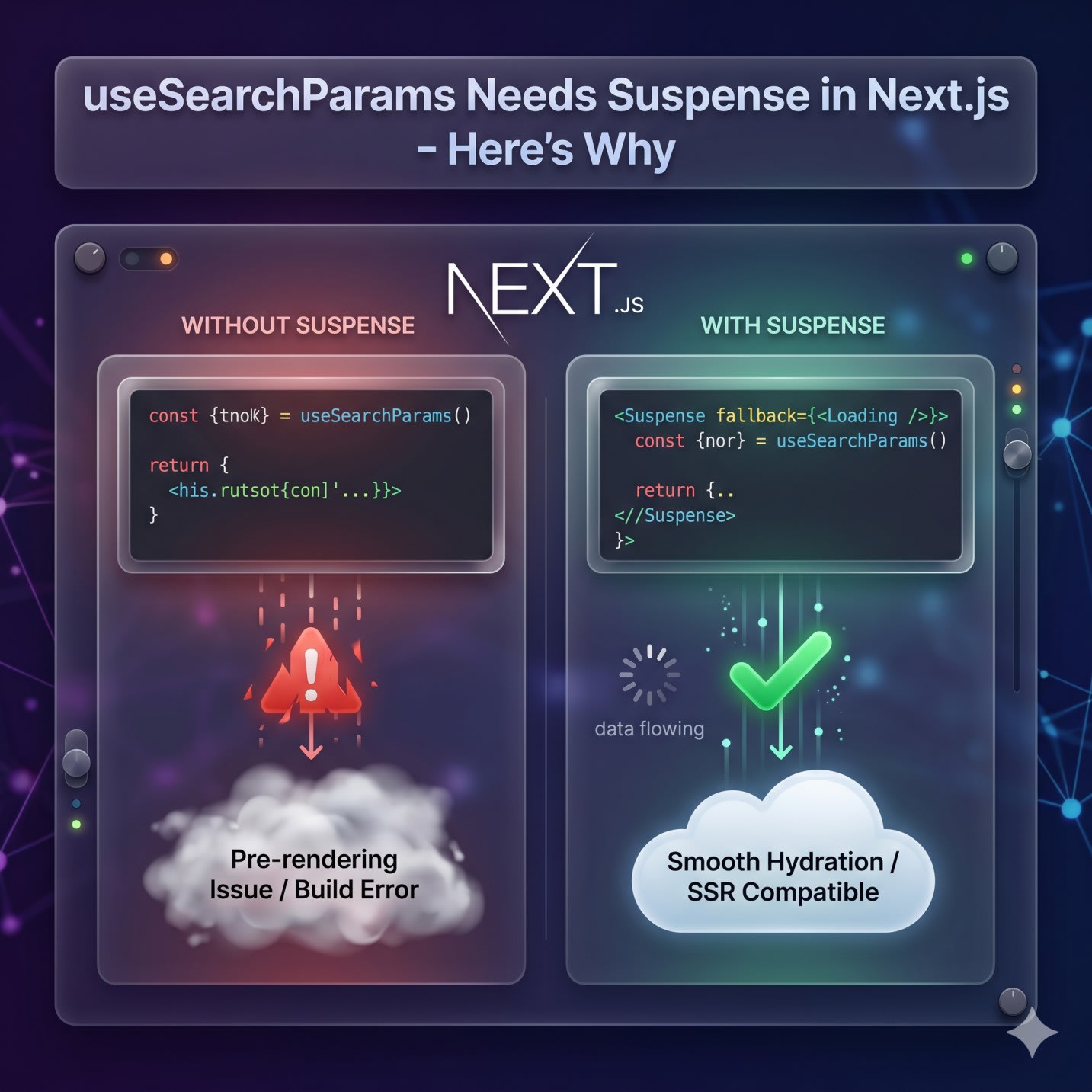
What Next.js Does During SSR Without Suspense
When a user requests the page, Next.js tries to stream HTML to the browser as fast as possible.
Server Components render first. Client Components that depend on runtime values - like URL params - render after hydration.
Without a Suspense boundary, Next.js has no way to tell the client: "wait, this part is not ready yet." It tries to render everything at once, hits useSearchParams(), finds no value on the server, and throws.
With a Suspense boundary, Next.js streams a fallback while client-side hydration catches up.
That is the entire reason for the requirement.
The Exact Error Message
The useSearchParams suspense build error appears in Next.js 13.4 and above - including Next.js 15 and Next.js 16 - and the build output reads:
Error: useSearchParams() should be wrapped in a suspense boundary at page "/dashboard".
Read more: https://nextjs.org/docs/messages/missing-suspense-with-csr-bailout
In next dev, this shows as a full page error.
In next build, it fails the build entirely. That is when most developers first see it - because dev mode is more permissive about hydration timing.
The Correct Fix for useSearchParams Suspense in Next.js
Wrap the component that calls useSearchParams() in a <Suspense> boundary. Not the page. The component.
Wrong: Wrapping Too High
jsx
// Wrong: Suspense around the entire page - now everything waits
export default function DashboardPage() {
  return (
    <Suspense fallback={<p>Loading...</p>}>
      <Sidebar />
      <MainContent />
      <FilterBar /> {/* FilterBar is the only thing using useSearchParams */}
    </Suspense>
  );
}
This removes the build error. But Sidebar and MainContent now show a loading state while FilterBar waits for query params - even though they have nothing to do with the URL.
Correct: Wrap Only the Component Using useSearchParams
jsx
// Correct: Suspense wraps only the component that calls useSearchParams
import { Suspense } from "react";
import FilterBar from "./FilterBar";
import Sidebar from "./Sidebar";
import MainContent from "./MainContent";

export default function DashboardPage() {
  return (
    <>
      <Sidebar />
      <MainContent />
      <Suspense fallback={<div>Loading filters...</div>}>
        <FilterBar />
      </Suspense>
    </>
  );
}
Sidebar and MainContent render immediately. Only FilterBar waits.
The fallback Prop Is Required
Without fallback, React renders nothing until hydration completes. You get a blank section.
jsx
// Wrong: blank section until hydration
<Suspense>
  <FilterBar />
</Suspense>

// Correct: shows skeleton while hydration runs
<Suspense fallback={<FilterBarSkeleton />}>
  <FilterBar />
</Suspense>
Use a skeleton that matches the real component size. This avoids layout shift.
Failure Mode 1 - Wrapping Suspense at the Wrong Level
This is the most common mistake after developers learn the fix.
You have a layout file. You wrap a section in Suspense. The error persists.
The reason: the component tree has another file - maybe in a ui folder or components/shared - that also calls useSearchParams. You fixed one instance and missed another.
I hit this building a production dashboard. Local dev was clean. next build failed on a component I was certain I had fixed. It was importing from a copied ui folder I had forgotten about.
Find every usage before you wrap anything:
bash
grep -r "useSearchParams" ./app ./components --include="*.tsx" --include="*.ts" --include="*.jsx" --include="*.js"Every file in that list needs a Suspense boundary somewhere in its parent tree. Fix all of them, not just the one throwing the error.
How to Confirm the Boundary Is Working
After wrapping, run next build and check for the ○ static or λ dynamic symbol next to your route in the build output.
A route with useSearchParams will show λ (dynamic). That is expected. If the build completes without the Suspense error, the boundary is in the right place.
Failure Mode 2 - useSearchParams Returns null After You Add Suspense
After adding Suspense, some developers see null or an empty object on the first render - even after hydration.
This happens when you read params without a fallback value.
jsx
// Wrong: reads tab without guarding for null
"use client";
import { useSearchParams } from "next/navigation";

export function FilterBar() {
  const searchParams = useSearchParams();
  const tab = searchParams.get("tab"); // null on first render

  return <div>Current tab: {tab}</div>; // renders "Current tab: "
}
jsx
// Correct: guard with a default value
"use client";
import { useSearchParams } from "next/navigation";

export function FilterBar() {
  const searchParams = useSearchParams();
  const tab = searchParams.get("tab") ?? "overview"; // safe default

  return <div>Current tab: {tab}</div>;
}
useSearchParams() can return null before hydration completes. The Suspense boundary manages the render timing - it does not guarantee a non-null value. Always use ?? when reading.
Failure Mode 3 - The Error Only Appears in next build, Not Dev
next dev is more permissive. It recovers from hydration mismatches silently. You can run the entire app locally and never see the error.
next build does a full static analysis of the component tree. It walks every route and flags every useSearchParams call missing a parent Suspense. There is no recovery - it fails the build.
This is why teams get surprised when CI breaks on a PR that "worked fine locally." The component worked in dev. The build-time check is stricter.
The rule: always run next build locally before pushing. Do not rely on dev mode to catch this.
For a full list of why Next.js builds fail on Vercel but pass locally, the Next.js Build Fails on Vercel post covers the full set of patterns - the Suspense check is one of them.
The next.config.js Fix That Breaks Your Build
Some older Stack Overflow answers suggest adding this to next.config.js to suppress the error:
// next.config.js — DO NOT DO THIS
const nextConfig = { experimental: { missingSuspenseWithCSRBailout: false, }, };
Do not do this.
This flag was removed in Next.js 15. If you add it now, your build fails with a different error saying the experimental flag does not exist. There is no config escape hatch. The only fix is the Suspense boundary.
useSearchParams vs useParams - They Are Not the Same
A lot of developers apply Suspense to the wrong hook after seeing this error.
HookWhat it readsNeeds Suspense?useSearchParams()Query string: ?tab=profileYesuseParams()Route segments: /user/[id]NousePathname()Current pathnameNo
useParams() reads values that are part of the route. Those are known at build time. No Suspense needed.
useSearchParams() reads the query string. Runtime-only. Always needs Suspense.
If you're getting the Suspense error and you think you're using useParams - check again. There is a good chance a different component in the tree is using useSearchParams.
When to Skip useSearchParams Entirely
Sometimes the right move is not to use the hook at all.
If a parent Server Component can read searchParams as a prop and pass it down, the child Client Component never needs useSearchParams. No hook, no Suspense requirement.
jsx
// Server Component - searchParams is a prop in App Router page components
export default function DashboardPage({ searchParams }) {
  const tab = searchParams?.tab ?? "overview";

  return (
    <div>
      <FilterBar initialTab={tab} />
    </div>
  );
}
jsx
// Client Component - receives tab as a prop, useSearchParams not needed
"use client";
export function FilterBar({ initialTab }) {
  return <div>Current tab: {initialTab}</div>;
}
This approach is simpler, no Suspense needed, and the Client Component stays lighter.
Use this pattern when the component only needs the param value on load.
Use useSearchParams when the component needs to react to URL changes in real time - like live filtering that updates without a full page reload.
For caching strategies that interact with dynamic rendering in Next.js 15 and 16, the Next.js Use Cache Not Working post covers how static and dynamic boundaries affect cache behavior.
If you're working with URL params tied to email verification flows or dynamic routing in Next.js, the React Hydration Error in Next.js post explains the exact SSR/client mismatch model that connects to this - the same hydration timing issue drives both problems.
Key Takeaways
The useSearchParams suspense build error happens because it reads from the URL at runtime - Next.js cannot resolve this at build time, so a Suspense boundary is required for safe SSR streaming
Wrap only the component that calls useSearchParams, not the entire page - wrapping too high degrades components that have nothing to do with the URL
Always include a fallback prop - without it, React renders nothing during hydration
useSearchParams can return null before hydration - always guard with ?? when reading values
The error appears in next build even when next dev is clean - always build locally before pushing
Use grep to find every file calling useSearchParams - fix all of them, not just the one in the error message
If a Server Component parent can pass searchParams as a prop, do that instead - it skips the Suspense requirement entirely
FAQs
Why does useSearchParams need Suspense in Next.js?
useSearchParams() reads URL query parameters that only exist at request time. Next.js cannot resolve them at build time. The Suspense boundary tells Next.js how to handle the component during SSR streaming - it renders the fallback while hydration completes and the real param values become available.
Does useSearchParams work without Suspense in Next.js?
It appears to work in next dev because development mode recovers from hydration errors silently. But next build performs stricter static analysis and fails the build if any component using useSearchParams is missing a parent Suspense boundary.
Can I put Suspense in a Server Component?
Yes. A Server Component can render a <Suspense> boundary that wraps a Client Component using useSearchParams. Keep the layout in the Server Component and isolate the param-reading logic in a Client Component wrapped by Suspense.
Why is useSearchParams returning null after I added Suspense?
useSearchParams() can return null on the first render before hydration completes. Always provide a fallback when reading: searchParams.get("tab") ?? "default". Suspense handles render timing but does not guarantee a non-null value.
What is the difference between useSearchParams and useParams in Next.js?
useSearchParams() reads the query string - the part after ? in the URL. It needs Suspense. useParams() reads dynamic route segments like /user/[id]. Route segments are known at build time, so useParams() does not need Suspense.
Does wrapping the entire page in Suspense fix the error?
It removes the build error, yes. But every component on the page now waits behind the same loading fallback - including ones that have nothing to do with the URL. Wrap only the component that calls useSearchParams.
When should I use the searchParams prop instead of useSearchParams?
When the parent is a Server Component, use the searchParams prop. It is passed automatically to page-level Server Components in App Router. Only use useSearchParams in a Client Component when you need real-time reactivity to URL changes without a full page reload.
Why does Next.js require Suspense for useSearchParams but not usePathname?
usePathname() reads the current route path, which is resolved during rendering and does not vary based on user input. useSearchParams() reads the query string, which is runtime-only and user-provided. Next.js can statically analyze one but not the other.
Does this error still happen in Next.js 15 and Next.js 16?
Yes. The Suspense requirement for useSearchParams has not changed in Next.js 15 or 16. The build error, the fix, and all three failure modes described here apply to both versions.
Can I disable the useSearchParams Suspense requirement in next.config.js?
No. The missingSuspenseWithCSRBailout experimental flag that some older guides mention was removed in Next.js 15. Adding it to next.config.js will break your build with a different error. Wrap the component in Suspense - there is no config workaround.
Wrapping Up
useSearchParams is not broken. The Suspense requirement exists because the App Router's SSR streaming model needs a defined boundary for components that depend on runtime values.
Once you understand the static vs dynamic rendering split, the requirement makes sense. The three failure modes become patterns you can spot and fix in under a minute.
For related App Router errors, Next.js App Router Not Working covers the most common routing misconfigurations. Next.js Async Params Not Working covers a similar class of build-time errors introduced in Next.js 15. For metadata issues in the same App Router setup, Next.js Metadata Not Working covers the server component rules that apply to both metadata and search params.