

PrismaPg idleTimeoutMillis Pool: Why Connections Won't Close
Skilldham
Engineering deep-dives for developers who want real understanding.
Last updated: August 2026
TL;DR
Setting idleTimeoutMillis and connectionTimeoutMillis on your PrismaPg pool does not reliably close idle connections. This is true in serverless environments. The pool config is real. But node-postgres has open, unresolved bugs around idle timers. These show up on Vercel, Lambda, and some managed Postgres providers. The real fix is a mix of settings. Use min: 0. Use allowExitOnIdle. Check pg_stat_activity directly. It also depends on whether a pooler sits in front of your database. PgBouncer and Neon's pooler both count.
You configure your PrismaPg idleTimeoutMillis pool exactly like the docs say. idleTimeoutMillis: 10000. connectionTimeoutMillis: 5000. You redeploy.
Your connection count on Neon's dashboard does not move.
You check the docs again. You copy the exact same config from three blog posts. Same result.
You open pg_stat_activity on your database. A dozen connections are sitting idle. Some are twenty minutes old. Your pool was set to close idle connections after ten seconds.
You are not wrong about the config. The config is the textbook answer. It is also incomplete. Here's what's actually happening under the hood. Here's how to diagnose it instead of guessing.
What idleTimeoutMillis and connectionTimeoutMillis Actually Control
How the Pool Reads These Options
PrismaPg wraps node-postgres. When you set idleTimeoutMillis, you are not talking to Prisma. You are talking to the pg-pool module underneath it.
idleTimeoutMillis sets a timer. It tells the pool how long a client can sit unused. After that, the pool closes it.
connectionTimeoutMillis is different. It sets a limit on opening a brand new connection. If the pool can't connect in time, it gives up.
These two settings do two different jobs. One closes connections you already have. The other limits how long you wait for a new one.
What "Idle" Means Inside node-postgres
A connection only counts as idle once it goes back to the pool. If your code never releases the client, the idle timer never starts.
This matters more than it sounds. Say you have a dangling await prisma.$transaction(). Or a query that never resolves. Either one keeps a client checked out. The pool has no timeout for that state. It just waits.
The Standard Fix (And Why It Looks Like It Works)
The Config Everyone Copies
Every blog post shows the same block. Two posts on this site do too.
javascript
// Wrong: assumes this alone solves idle connection buildup
import { PrismaPg } from '@prisma/adapter-pg';

const adapter = new PrismaPg({
  connectionString: process.env.DATABASE_URL,
  max: 10,
  idleTimeoutMillis: 10000,
  connectionTimeoutMillis: 5000,
});
This config is not wrong. It's the correct starting point. It's just not the whole answer once you leave a long-running server.
Why It Passes Locally
Picture a normal Node process. Or a long-running server. This config works exactly as documented there. The process stays alive. The pool's internal timer runs on schedule. Idle clients get closed on time.
That's the trap. It passes on your machine. It passes in a Docker container running as a persistent service. It ships. Then it fails somewhere you can't easily watch.
Where It Breaks: Serverless and Managed Postgres
This is the exact point where a PrismaPg idleTimeoutMillis pool setup stops matching the docs. The config is identical. The environment is not.
Vercel and Lambda Freeze the Event Loop
A serverless function does not run all the time. Once the response goes out, the runtime can freeze the process. It can also kill it. This can happen at any point.
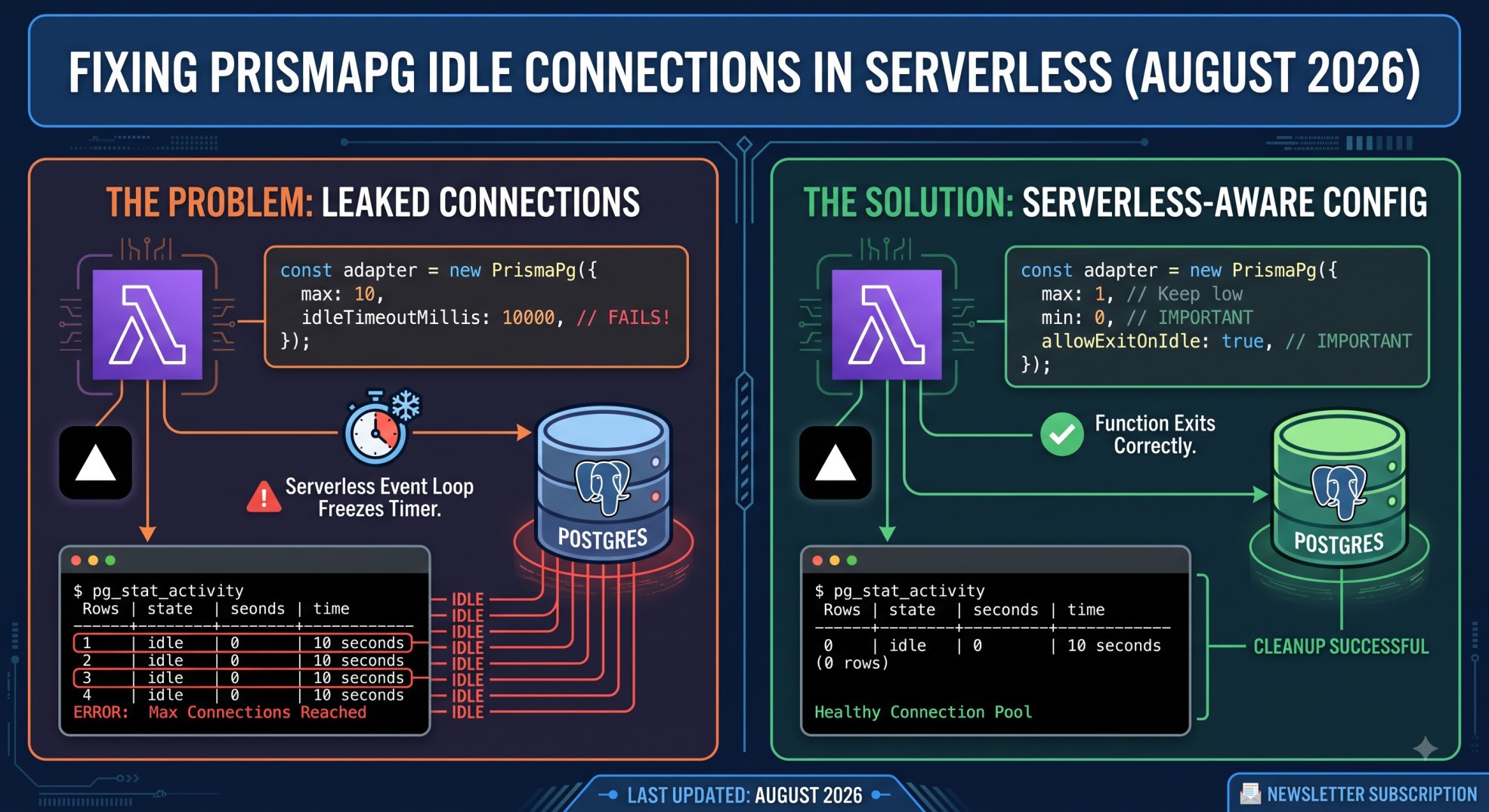
Say that freeze lands between the idle timer starting and firing. The timer never completes. The connection stays open on the database side. The client never got the CPU time to close it.
An open node-postgres issue documents this exact problem. idleTimeoutMillis works fine in a normal Node process. On Vercel or Lambda-style runtimes, it silently fails to fire. Idle connections stack up on the database as a result.
Managed Postgres Providers Add Their Own Timers
A separate issue points at a race condition. connectionTimeoutMillis can fire mid-handshake. When that happens, the half-open connection can leak. It stays idle. Nothing ever cleans it up.
Managed providers add another layer. DigitalOcean, Neon, and Supabase each run their own server-side timers. These sit on top of yours. Your client-side settings and the provider's settings do not always agree. Neither side reliably tells the other what "idle" means right now.
There's an open GitHub discussion on the Prisma repo about this. A developer shows idle connections not closing on DigitalOcean managed Postgres. idleTimeoutMillis was set correctly the whole time. Even Prisma's own team responded with a question, not a fix. This is genuinely unresolved. It is not a gap in your setup.
How to Actually Diagnose a Leaked Connection
Stop guessing from the app side. Go straight to the database.
Query pg_stat_activity for Real Numbers
sql
-- Correct: shows every connection your app has open right now
SELECT
  pid,
  state,
  now() - state_change AS idle_duration,
  query
FROM pg_stat_activity
WHERE datname = current_database()
  AND state = 'idle'
ORDER BY idle_duration DESC;
This query shows the truth. It tells you how many connections are idle. It tells you for how long. No app-side log can fake this out.
Reading the Idle Column Correctly
state = 'idle' means the connection is open. It's just not running a query right now. idle in transaction is worse. It means a transaction opened and never closed. That open transaction can block other queries.
Watch the rows that outlive your idleTimeoutMillis setting. If that count keeps growing, your pool's timer is not doing its job. Something else needs to close them.
min: 0 and allowExitOnIdle - What Changes on Serverless
Why min Should Not Be a Fixed Number in Lambda
A long-running server likes warm connections. Setting min above zero keeps a few ready for the next request. A serverless function gets no benefit from this. Each invocation may run in a brand new container anyway.
javascript
// Correct: serverless-aware pool config
const adapter = new PrismaPg({
  connectionString: process.env.DATABASE_URL,
  max: 1,
  min: 0,
  idleTimeoutMillis: 10000,
  connectionTimeoutMillis: 5000,
  allowExitOnIdle: true,
});
Setting min: 0 stops the pool from a losing game. It stops trying to keep connections warm. That's a losing game inside a function that can freeze or die at any moment.
allowExitOnIdle and Process Exit Behavior
allowExitOnIdle changes one thing. It tells node-postgres it is safe to let the Node process exit. This holds even if the pool still technically has an idle client. Without it, a serverless function can hang. It waits on a pool it was never going to reuse.
I hit this shipping a Vercel API on Munshi. It talked to Neon Postgres through PrismaPg. Function duration crept up for no visible reason. I added allowExitOnIdle: true. I paired it with max: 1 and min: 0. Cold start time and function duration both dropped. The runtime stopped waiting on a pool it did not need.
PgBouncer, Neon Pooler, and Supabase Pooler Interaction
Transaction Mode Pooling Changes the Rules
Say you connect through a pooler in transaction mode. The pooler owns the real connection to Postgres now, not node-postgres. Your app's pool just manages connections to the pooler instead. That's a cheaper, different resource.
In this setup, idleTimeoutMillis on your app-side pool matters less. The pooler enforces its own idle limits. It also enforces its own transaction limits. Both apply to the real database connections behind it.
What Settings to Drop When a Pooler Sits in Front
Neon's pooled connection string changes session behavior. So does Supabase's pooler. Prepared statements stop working the normal way. Long-lived session state does too. Set max low on the app side. The pooler is already doing the expensive part.
Don't stack a long connectionTimeoutMillis on top of the pooler's own timeout. Two timers competing against each other causes bugs. This is exactly what the open GitHub issues describe.
Check the Prisma 7 NeonDB Next.js driver adapter setup post first if that part isn't in place. It covers the connection string. It also covers the adapter wiring this article assumes.
Key Takeaways
idleTimeoutMillis and connectionTimeoutMillis are real settings. They are not a complete fix for idle connection buildup in serverless.
The PrismaPg idleTimeoutMillis pool issue is documented in the Prisma and node-postgres GitHub repos. It is not unique to your setup.
Serverless runtimes can freeze mid-timer. That's why the idle timeout sometimes just does not fire.
Query pg_stat_activity directly. Don't trust app-side logs to know what's actually open.
Use min: 0 and allowExitOnIdle: true together on serverless. Don't rely on idleTimeoutMillis alone.
A pooler like PgBouncer or Neon's pooler changes which settings matter most. Your app-side pool stops talking directly to Postgres.
If you moved to driver adapters in Prisma 7, pool tuning is now your job. It used to be hidden behind a connection string.
Frequently Asked Questions
Does this still happen in the latest Prisma 7 releases?
Yes. The root issue lives in node-postgres, not in Prisma's adapter code. Upgrading Prisma 7 patch versions does not change this on its own.
Is this only a problem with PrismaPg, or does it affect Prisma's older connection method too?
It affects any setup using node-postgres pooling underneath. Prisma 7's driver adapters just made the pool config visible. Before, it was hidden inside a connection string.
Can I fix this by just increasing max connections instead?
No. Raising max just hides the symptom. You get more headroom before you hit your connection limit. The leaked idle connections are still there. They're just less painful for now.
Does adding a ?connection_limit=1 parameter to the connection string solve this?
That parameter is for Prisma's older query engine. It does not apply to PrismaPg driver adapter pools. With the driver adapter, max in your PrismaPg config controls pool size instead.
Should I set idleTimeoutMillis lower, like 1000ms, to force connections closed faster?
A very low value does not fix a timer that isn't firing. It just narrows the window. Pair a reasonable value with allowExitOnIdle and min: 0. That matters more than the exact number.
Will using PgBouncer or Neon's pooler fully solve this?
It solves the part that matters most. A pooler sits between your app and Postgres. It controls the real connection count. Your app-side pool settings become less critical. Still, verify with pg_stat_activity on the database itself.
Is this a Vercel-specific problem, or does it happen on other serverless platforms too?
The open node-postgres issue reports it on Vercel and Lambda-style runtimes. Any platform that freezes or kills a process between calls carries the same risk.
How do I know if idle connections are actually causing my errors, versus something else?
Run the pg_stat_activity query during a traffic spike. Watch the idle connection count. If it climbs steadily, and your database starts rejecting new connections, this is your problem.
Idle connections that won't close are not a sign you set up PrismaPg wrong. It's a sign the standard config was only ever half the story. Query pg_stat_activity before you trust any pool setting. Treat min: 0 plus allowExitOnIdle as your serverless baseline, not an edge case. Check the Prisma 7 migration errors driver adapter fix post too. It covers the P1012 and SSL errors. Those usually show up first.
Get the next PrismaPg and serverless Postgres breakdown before it hits your production logs. Subscribe to the SkillDham newsletter.