
AI Agents for Developers - How They Actually Work
Skilldham
Engineering deep-dives for developers who want real understanding.
You have been hearing about AI agents everywhere. Every framework, every demo, every conference talk is about agentic AI. But most explanations either stay too abstract - "the agent reasons and uses tools" - or jump straight to framework documentation without explaining what is actually happening under the hood.
This guide explains how AI agents for developers actually work internally, what MCP does and why it matters, and how to build a working agent from scratch - not just configure one from a template.
What an AI Agent Actually Is
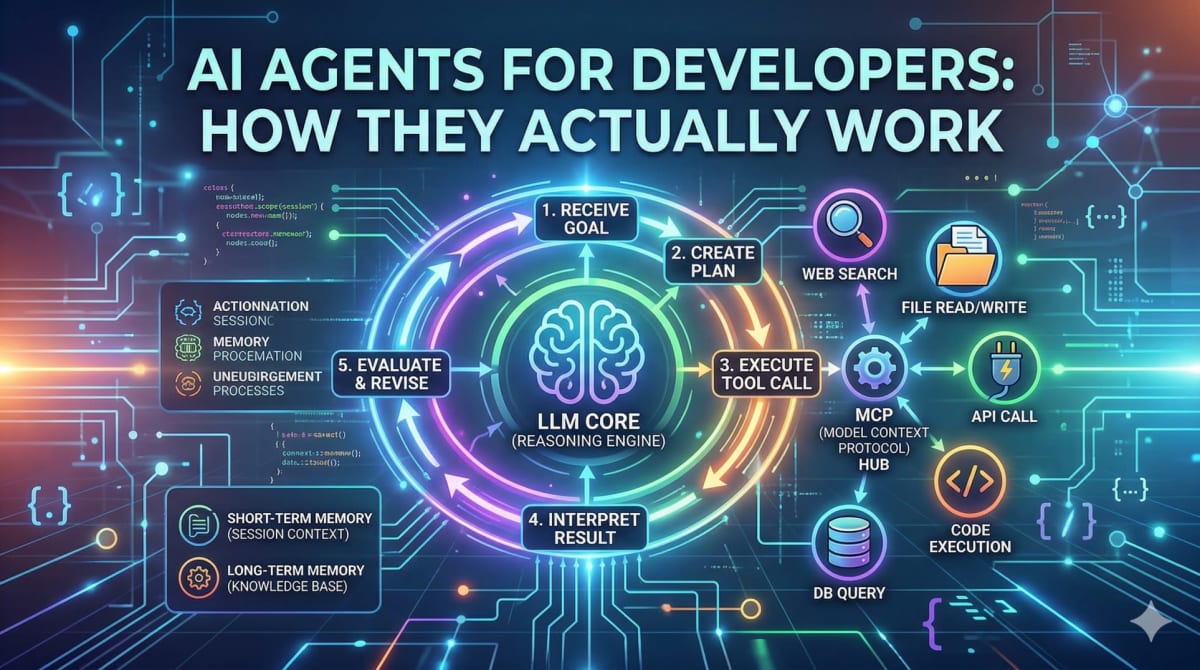
The simplest accurate definition: an AI agent is a language model that has been given tools and a loop.
The "tools" part means it can take actions - search the web, read a file, call an API, write code, query a database. The "loop" part means it keeps going until the task is done, not just until it produces one response.
A regular LLM call looks like this:
User prompt → LLM → Single response → DoneAn AI agent loop looks like this:
Goal → LLM → Plan → Tool call → Result → LLM evaluates →
Another tool call → Result → LLM evaluates → ... → Final output
The key difference is that the agent decides what to do next based on the result of what it just did. This is what makes it "agentic" - it is not following a fixed script, it is reasoning about the current state and deciding the next action.
Here is what that loop looks like in actual code:
python
import anthropic

client = anthropic.Anthropic()

tools = [
    {
        "name": "search_web",
        "description": "Search the web for current information",
        "input_schema": {
            "type": "object",
            "properties": {
                "query": {"type": "string", "description": "Search query"}
            },
            "required": ["query"]
        }
    },
    {
        "name": "read_file",
        "description": "Read contents of a file",
        "input_schema": {
            "type": "object",
            "properties": {
                "path": {"type": "string", "description": "File path"}
            },
            "required": ["path"]
        }
    }
]

def run_agent(goal: str):
    messages = [{"role": "user", "content": goal}]

    while True:
        response = client.messages.create(
            model="claude-opus-4-6",
            max_tokens=4096,
            tools=tools,
            messages=messages
        )

        # If no tool use - agent is done
        if response.stop_reason == "end_turn":
            return response.content[0].text

        # Agent wants to use a tool
        tool_use = next(b for b in response.content if b.type == "tool_use")
        tool_result = execute_tool(tool_use.name, tool_use.input)

        # Add result back to conversation so agent can continue reasoning
        messages.append({"role": "assistant", "content": response.content})
        messages.append({
            "role": "user",
            "content": [{
                "type": "tool_result",
                "tool_use_id": tool_use.id,
                "content": tool_result
            }]
        })
        # Loop continues - agent decides what to do next
```

This is the core of every AI agent - a loop where the model decides what tool to call, gets the result, and decides what to do next. Frameworks like LangChain and CrewAI are abstractions on top of exactly this pattern.

---

## What MCP Is and Why It Actually Matters

MCP stands for Model Context Protocol. It was introduced by Anthropic and has become a standard way for AI agents to connect to external tools and data sources.

Before MCP, if you wanted your agent to access a database, you would write a custom function, hardcode it into your agent setup, and that tool would only work with that specific agent. Every integration was custom - a Notion integration for one project, a GitHub integration for another, none of them reusable.

MCP solves this by standardizing how tools are exposed to AI models. An MCP server exposes tools in a standard format. Any MCP-compatible client - Claude, Cursor, your custom agent - can connect to it and use those tools without any custom integration code.
```
Without MCP:
Agent A → custom GitHub integration (only works with Agent A)
Agent B → custom GitHub integration (rewritten from scratch)

With MCP:
GitHub MCP Server → exposes tools in standard format
Agent A → connects to GitHub MCP Server → uses tools
Agent B → connects to same GitHub MCP Server → uses same tools
Here is what a minimal MCP server looks like:
typescript
import { Server } from "@modelcontextprotocol/sdk/server/index.js";
import { StdioServerTransport } from "@modelcontextprotocol/sdk/server/stdio.js";

const server = new Server(
  { name: "my-tools", version: "1.0.0" },
  { capabilities: { tools: {} } }
);

// Define what tools this server exposes
server.setRequestHandler("tools/list", async () => ({
  tools: [
    {
      name: "get_project_files",
      description: "List all files in the project",
      inputSchema: {
        type: "object",
        properties: {
          directory: { type: "string", description: "Directory path" }
        }
      }
    },
    {
      name: "run_tests",
      description: "Run the test suite and return results",
      inputSchema: { type: "object", properties: {} }
    }
  ]
}));

// Handle tool execution
server.setRequestHandler("tools/call", async (request) => {
  if (request.params.name === "get_project_files") {
    const files = await listFiles(request.params.arguments.directory);
    return { content: [{ type: "text", text: JSON.stringify(files) }] };
  }
  if (request.params.name === "run_tests") {
    const results = await runTests();
    return { content: [{ type: "text", text: results }] };
  }
});

const transport = new StdioServerTransport();
await server.connect(transport);
Once this server is running, any MCP-compatible client can connect to it and your agent immediately has access to get_project_files and run_tests without any additional integration work. That is the core value of MCP - reusable, composable tools that work across different agents and clients.
For a broader look at how AI is changing what developers build, our guide on AI impact on developer jobs covers what skills are becoming more valuable as agentic systems get more common.
Multi-Agent Systems - When One Agent Is Not Enough
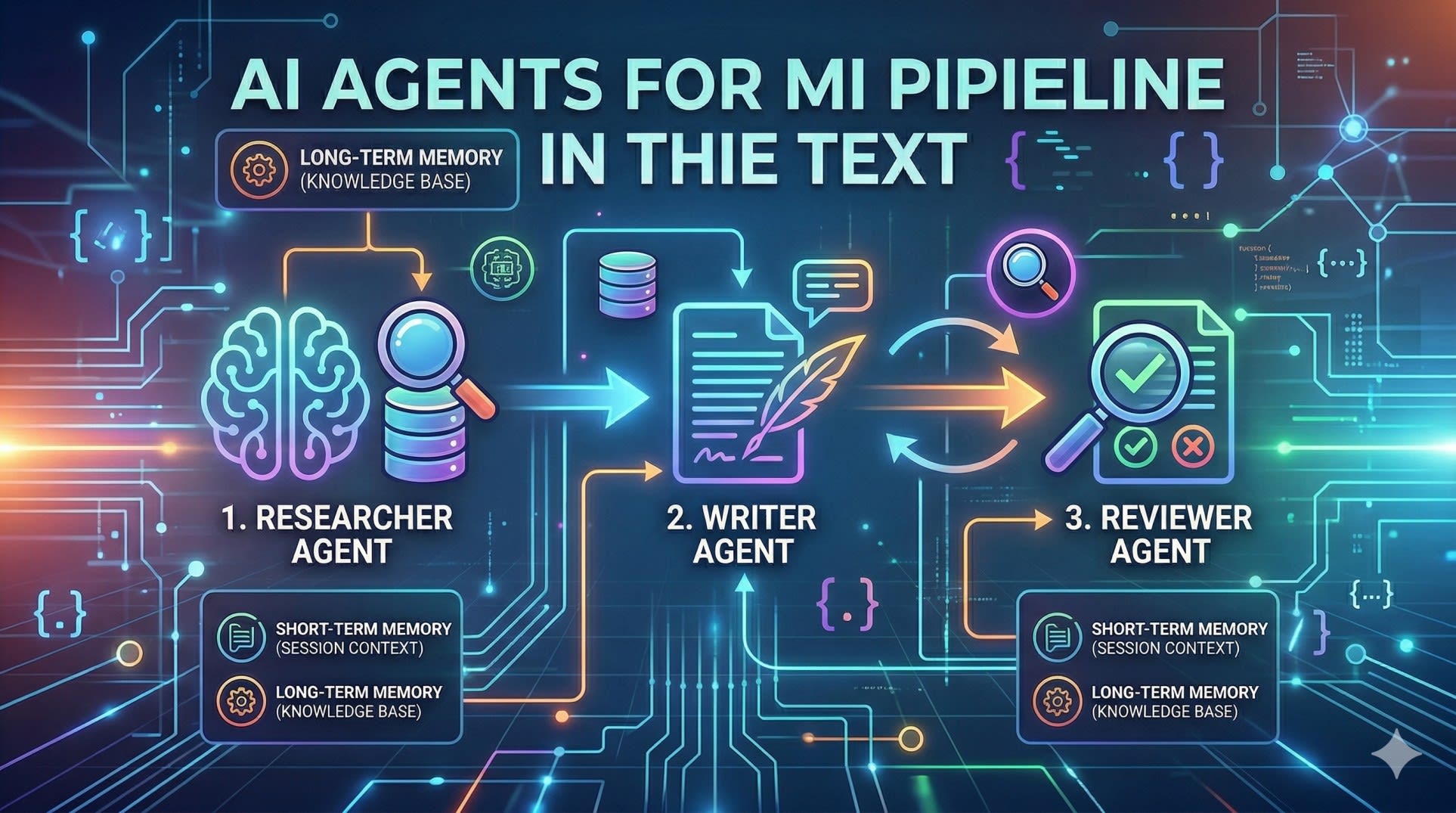
A single agent works well for contained tasks. But complex workflows - ones that require different types of expertise, or where quality checking needs to be independent from generation - benefit from multiple specialized agents working together.
The pattern is straightforward: each agent has a specific role, uses specific tools, and passes its output to the next agent in the pipeline.
python
import anthropic

client = anthropic.Anthropic()

def researcher_agent(topic: str) -> str:
    """Agent specialized in research - has web search tools"""
    response = client.messages.create(
        model="claude-opus-4-6",
        max_tokens=2048,
        system="You are a research specialist. Search thoroughly and return structured findings.",
        tools=[web_search_tool, extract_content_tool],
        messages=[{"role": "user", "content": f"Research this topic thoroughly: {topic}"}]
    )
    return extract_final_response(response)

def writer_agent(research: str, format: str) -> str:
    """Agent specialized in writing - takes research as input"""
    response = client.messages.create(
        model="claude-opus-4-6",
        max_tokens=4096,
        system="You are a technical writer. Transform research into clear, structured content.",
        messages=[{
            "role": "user",
            "content": f"Write a {format} based on this research:\n\n{research}"
        }]
    )
    return response.content[0].text

def reviewer_agent(content: str) -> dict:
    """Agent specialized in quality review"""
    response = client.messages.create(
        model="claude-opus-4-6",
        max_tokens=1024,
        system="You are a quality reviewer. Check for accuracy, clarity, and completeness.",
        messages=[{
            "role": "user",
            "content": f"Review this content and return JSON with 'approved' (bool) and 'feedback' (str):\n\n{content}"
        }]
    )
    return json.loads(response.content[0].text)

def run_pipeline(topic: str, format: str):
    # Stage 1: Research
    research = researcher_agent(topic)

    # Stage 2: Write
    content = writer_agent(research, format)

    # Stage 3: Review - loop until approved
    while True:
        review = reviewer_agent(content)
        if review["approved"]:
            return content
        # Revise based on feedback
        content = writer_agent(
            research,
            format + f"\n\nRevision needed: {review['feedback']}"
        )
This pipeline pattern - researcher feeds writer, reviewer checks output and loops back if needed - is the foundation of most production multi-agent systems. The key design principle is that each agent does one thing well and has only the tools it needs for that role.
Memory in AI Agents - Short-Term vs Long-Term
Memory is one of the most important architectural decisions when building AI agents for developers to use in production. Without memory, every agent run starts from scratch. With the right memory architecture, agents can maintain context across sessions, learn from past runs, and get more useful over time.
There are two types: short-term memory (within a single run) and long-term memory (across runs).
Short-term memory is just the conversation history - the messages array you pass to each API call. The agent's "working memory" is what fits in the context window.
Long-term memory requires an external store:
python
import json
from datetime import datetime

class AgentMemory:
    def __init__(self, storage_path: str):
        self.storage_path = storage_path
        self.memories = self._load()

    def _load(self):
        try:
            with open(self.storage_path, 'r') as f:
                return json.load(f)
        except FileNotFoundError:
            return {"sessions": [], "facts": {}}

    def save_session(self, goal: str, outcome: str, tools_used: list):
        """Save what happened in this session"""
        self.memories["sessions"].append({
            "timestamp": datetime.now().isoformat(),
            "goal": goal,
            "outcome": outcome,
            "tools_used": tools_used
        })
        self._persist()

    def remember_fact(self, key: str, value: str):
        """Store a fact for future sessions"""
        self.memories["facts"][key] = value
        self._persist()

    def get_context_for_goal(self, goal: str) -> str:
        """Get relevant past context for a new goal"""
        relevant = [
            s for s in self.memories["sessions"][-10:]  # last 10 sessions
            if any(word in s["goal"].lower() for word in goal.lower().split())
        ]
        if not relevant:
            return ""
        return f"Previous relevant sessions:\n" + \
               "\n".join([f"- Goal: {s['goal']}, Outcome: {s['outcome']}"
                         for s in relevant])

    def _persist(self):
        with open(self.storage_path, 'w') as f:
            json.dump(self.memories, f, indent=2)
For production systems with larger memory needs, vector databases like pgvector or Pinecone enable semantic search over past memories - finding relevant context based on meaning rather than keyword matching. This is the same RAG pattern used in document Q&A systems, applied to agent memory.
Frameworks Worth Knowing
The raw API approach above gives you full control but requires more setup. For production use, several frameworks handle the boilerplate:
LangChain is the most widely used. It has abstractions for agents, tools, chains, and memory. It is well-documented and has a large ecosystem, but can feel over-abstracted for simple use cases.
LangGraph is better for complex multi-agent workflows where you need precise control over the flow between agents. It models the pipeline as a graph, which makes branching and conditional logic cleaner.
CrewAI is purpose-built for multi-agent systems with a focus on role-based agents. If you are building a system where different agents have distinct personas and responsibilities, CrewAI's abstractions map well to that mental model.
For most developers getting started building AI agents, the recommendation is to start with the raw API - understand what is actually happening - then adopt a framework when the boilerplate becomes genuinely burdensome.
Our guide on how React developers can stay relevant in the AI era covers how frontend skills apply to building AI-powered products specifically.
The Anthropic documentation on tool use is the authoritative reference for the patterns covered in this guide.
Key Takeaway
AI agents for developers come down to three building blocks that everything else is built on:
The agent loop - a language model that calls tools, gets results, and decides what to do next until the goal is complete
MCP - a standardized protocol that makes tools reusable across agents and clients, eliminating custom integration work for every new connection
Multi-agent pipelines - specialized agents with distinct roles passing outputs to each other, with quality checking built into the pipeline as a separate agent
Start by implementing the raw loop yourself - understanding what happens at each step makes everything else clearer. Then add MCP for tool reusability, and introduce multiple agents when a single agent is doing too many different things and quality is suffering.
The underlying pattern is simple. The complexity comes from production concerns - error handling, memory, cost management, and reliability at scale - which are best learned by building something real.
FAQs
What is the difference between an AI agent and a regular LLM API call? A regular LLM call takes a prompt and returns a single response - it is stateless and one-directional. An AI agent runs in a loop: it receives a goal, plans steps, calls tools, evaluates results, and decides what to do next - repeating until the task is complete. The key addition is tools and the loop that lets the model act on results.
What is MCP and do I need it to build AI agents? MCP (Model Context Protocol) is a standard for connecting AI models to external tools and data sources. You do not need it to build agents - you can define custom tools directly in your API calls. MCP becomes valuable when you want tools to be reusable across multiple agents or clients, or when you want to use the growing ecosystem of pre-built MCP servers for common integrations like GitHub, databases, and file systems.
What programming language should I use to build AI agents? Python is the most common choice because most AI frameworks and SDKs have mature Python support. TypeScript is a strong second choice, particularly for developers building agents that integrate with web applications or use the MCP TypeScript SDK. The underlying API calls work the same regardless of language.
How do I handle errors in AI agent loops? The most important patterns are: set a maximum iteration limit so agents cannot loop forever, handle tool execution errors gracefully and pass error information back to the agent so it can try a different approach, use try/catch around tool calls, and log every tool call and result for debugging. Production agents need explicit error handling at every step.
What is the best framework for building AI agents as a developer new to the space? Start with the raw API - Anthropic or OpenAI's tool use API directly. Understanding what happens at each step in the loop is more valuable than learning a framework's abstractions first. Once you have built a simple agent from scratch, LangChain is the most widely documented framework for learning the patterns, and LangGraph is better for complex multi-agent workflows.