
npm Keyv Cacheable Attack: Is Your Node App Infected?
Skilldham
Engineering deep-dives for developers who want real understanding.
Last updated: August 2026
TL;DR
The npm keyv cacheable attack started on August 4, 2026. An attacker took over the GitHub account behind keyv and cacheable. They shipped a credential-stealing worm through a preinstall hook.
Run npm ls keyv cacheable cache-manager cacheable-request flat-cache file-entry-cache against your project now. If you see keyv@6.0.0, cacheable@2.5.1, cacheable-request@13.0.20, flat-cache@6.1.24, file-entry-cache@11.1.7, or cache-manager@7.2.10 in the tree, you are exposed. Rotate your tokens before you do anything else.
You update a lockfile on a random Tuesday. Nothing about it feels different.
Then a Slack message lands. "Check if you're running keyv."
You open the project. npm ls keyv comes back with a version number you don't recognize. Your stomach drops.
You start Googling "npm keyv cacheable attack." You land on five vendor blogs. Each one is written for a security researcher with an EDR dashboard open, not for you.
Here's what actually happened. Here's the exact command to run against your lockfile. Here's the order to fix it in - no IOC spreadsheets required.
What Happened in the npm Keyv Cacheable Attack
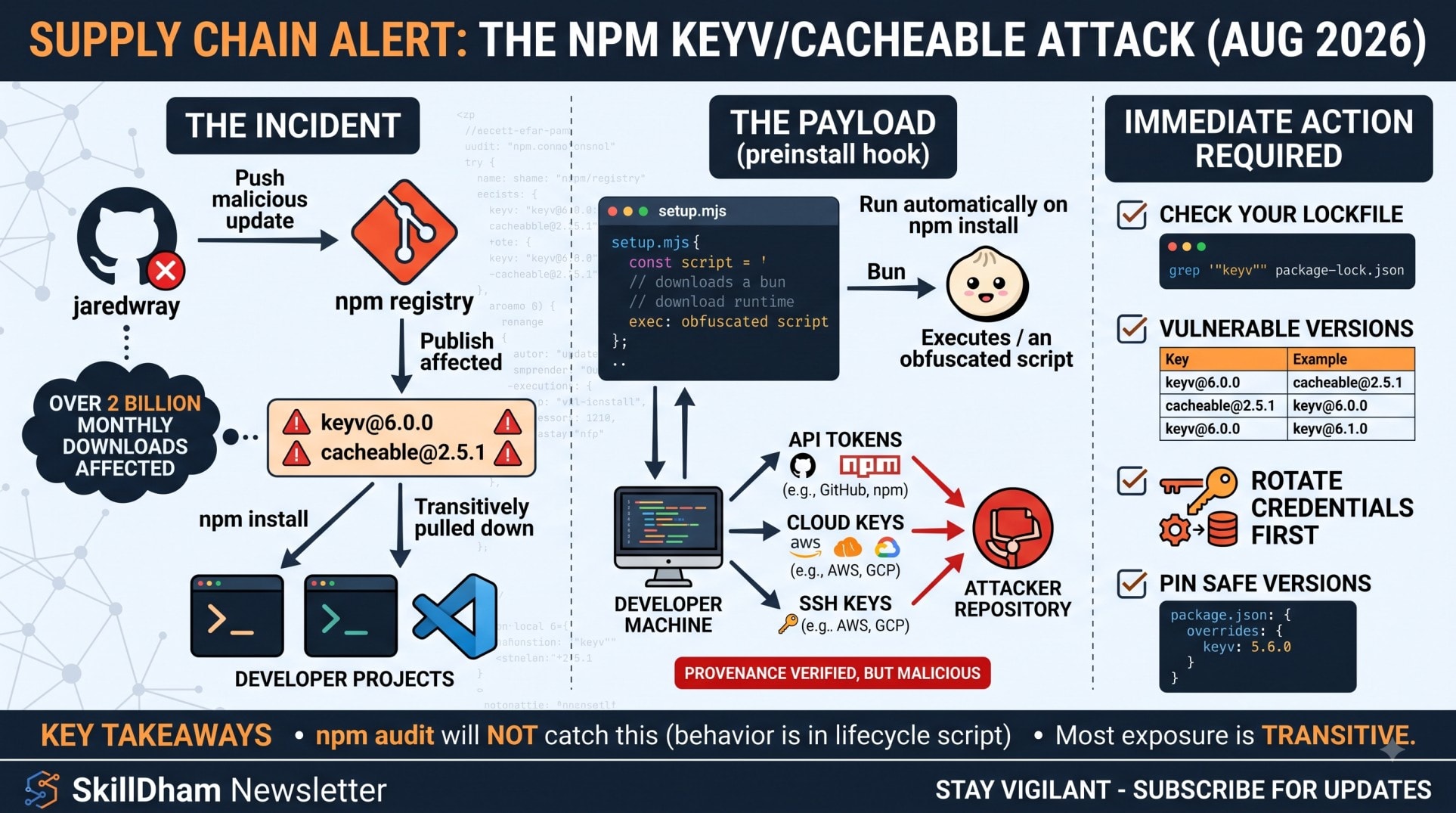
On August 4, 2026, around 09:00 UTC, an attacker compromised a GitHub account. It belonged to jaredwray, maintainer of keyv and cacheable. They pushed a malicious commit straight to main.
Minutes later, they cut a new release. It shipped with a preinstall hook. That hook runs automatically on npm install, before your application code ever starts.
I ran npm ls keyv against three of our own repos the morning this broke. Two came back clean. One flagged a transitive keyv version. It was already below the compromised range. That distinction is what this post is built around.
The compromised account and the timeline
The keyv package alone has roughly 127 million weekly downloads. cacheable, flat-cache, and file-entry-cache sit deep in dependency trees used by tools like ESLint. Combined, the affected package family accounts for over 2 billion downloads a month.
The attacker didn't stop at nine packages. They used stolen npm tokens to publish trojanized versions of unrelated packages too. Trackers report anywhere from about 400 to over 2,200 affected versions. The count is still moving.
What the malicious payload actually does
The preinstall hook is a file called setup.mjs. It downloads a standalone Bun runtime, then runs an obfuscated second-stage script.
That second stage harvests secrets from the machine running the install. Targets include npm and GitHub tokens, AWS and GCP keys, Vault tokens, and SSH keys. Database connection strings get swept up too. It exfiltrates what it finds by committing to attacker-controlled GitHub repositories.
Some malicious commits also added VS Code and Claude Code hook files directly to source repos. On some setups, just opening a checkout could trigger the payload. You wouldn't even need to run npm install.
Are You Affected - Run This Command First
Before reading anything else, run this against your project root:
bash
# Check if any compromised package or version is anywhere in your tree
npm ls keyv cacheable cache-manager cacheable-request flat-cache file-entry-cache @cacheable/utils
If that command errors out, that's a good sign. It means the package isn't in your tree as a named dependency. But most people are exposed transitively, not directly.
Check your lockfile directly
npm ls only shows what's resolved right now. Grep the lockfile itself instead. That shows every version npm has ever pinned, including nested copies:
bash
# Search package-lock.json for every occurrence, across nested dependencies too
grep -n '"keyv"\|"cacheable"\|"cache-manager"\|"cacheable-request"\|"flat-cache"\|
"file-entry-cache"\|"@cacheable/utils"' package-lock.json
For yarn.lock or pnpm-lock.yaml, swap the filename. Keep the same package names. Each match shows a version string right next to it. Compare that against the table below.
Most developers never install keyv directly. A common chain looks like this: eslint pulls in file-entry-cache. That pulls in flat-cache. That pulls in keyv. You inherit the risk three layers deep without ever typing npm install keyv.
The general grep-your-lockfile pattern here isn't new. See the walkthrough in our previous npm supply chain incident post from July 2026. The detection method is the same - only the package list changed.
Confirmed Affected Packages and Versions
These are the versions with confirmed malicious payloads as of this writing. Treat any release from this family published on August 4, 2026 as suspect until proven otherwise.
PackageMalicious versionSafe version to pinkeyv6.0.05.6.0 or earliercacheable2.5.12.5.0 or earliercacheable-request13.0.2013.0.19 or earlierflat-cache6.1.24earlier 6.x, verify hashfile-entry-cache11.1.7earlier 11.x, verify hashcache-manager7.2.107.2.9 or earlier@cacheable/utils2.5.12.5.0 or earlier
Beyond these seven, the worm reached hundreds of unrelated packages through stolen tokens. The exact list keeps growing. Check the Socket.dev live tracker for the current count before you finish remediation, not just once.
Who is NOT affected
Say your lockfile pins keyv below 6.0.0, cacheable below 2.5.1, or cache-manager below 7.2.10. You are not running the malicious code. A caret range like ^5.6.0 cannot resolve up to 6.0.0. Semver major bumps block that automatically.
The scoped @keyv/* adapter packages, like @keyv/redis and @keyv/sqlite, published a 6.0.0 tarball too. Socket's research found those specific tarballs don't carry the preinstall hook. Don't panic-remove every package with "keyv" in the name. Check the actual version first.
If your project uses npm v12 or later, install scripts are disabled by default. That alone would have blocked the preinstall hook, even with a vulnerable version in your tree. Our npm v12 install-scripts post covers how that default trips up other tools too.
Why npm audit Won't Catch This
Here's the part that surprises most developers. The malicious tarballs shipped with valid npm provenance, cryptographically signed through GitHub Actions. Every signature check passes.
npm audit cross-references known CVEs in a database. A brand-new compromise, published hours ago, often isn't indexed yet when you run the scan. A clean npm audit result on August 4 or 5 told you nothing.
The malicious behavior lives in a lifecycle script. It's not in application code a static scanner would flag. npm audit was never built to catch a hook that downloads a runtime and steals credentials. That's a build-time execution problem, not a known-vulnerability problem.
This is the same blind spot behind CVE-2026-64642 in Next.js middleware. The danger sits in what runs, not in what's listed as vulnerable.
Remediation Order - What to Do Right Now
Work through this in order. Skipping ahead to "just update the package" without rotating tokens first leaves stolen credentials live.
1. Rotate every credential that touched an affected machine. That means npm tokens, GitHub personal access tokens, and AWS or GCP keys. Also rotate Vault tokens and SSH keys. Include any database connection strings in .env files on that machine. Assume all of them are compromised, not just the ones you can prove were read.
2. Pin to the safe versions in the table above. Don't use a caret or tilde range for these packages right now. Pin exact versions until the incident is fully resolved and vendors confirm a clean release line.
json
{
  "overrides": {
    "keyv": "5.6.0",
    "cacheable": "2.5.0",
    "cache-manager": "7.2.9"
  }
}
3. Audit your CI logs for the preinstall hook signature. Search build logs for setup.mjs, a Bun runtime download, or unexpected outbound calls during npm install. Check any CI run since August 4. If one resolved a vulnerable version, treat that pipeline's secrets as burned.
4. Check for the IDE hook persistence. Some malicious commits added VS Code and Claude Code hook files to source repos. Search recent commits for unfamiliar .vscode or agent config changes you didn't make.
Why the rotate-first order matters
Pinning a clean version stops future installs from running the payload. It does nothing about credentials the worm already stole during a past install. Rotating first closes the door the attacker is already walking through.
Preventing the Next One
This is the second npm compromise in three months to ship malware with legitimate provenance signatures. Provenance proves who published a package. It says nothing about whether that publisher's account was compromised at the time.
Set ignore-scripts in your npm config. Lifecycle scripts then never run silently during install. You can allowlist specific trusted packages back in, instead of trusting every dependency by default. See npm's own documentation on the config option for the exact syntax.
If you run CI on Node images, check your container build process too. Our Node 24 native module Docker build post covers a related class of build-time surprises. Worth locking down while you're already in there.
Key Takeaways
The npm keyv cacheable attack began August 4, 2026. An attacker compromised the maintainer's GitHub account and shipped a credential-stealing worm.
Run npm ls keyv cacheable cache-manager cacheable-request flat-cache file-entry-cache first. Most exposure is transitive, not direct.
Confirmed malicious versions: keyv@6.0.0, cacheable@2.5.1, cacheable-request@13.0.20, flat-cache@6.1.24, file-entry-cache@11.1.7, cache-manager@7.2.10, @cacheable/utils@2.5.1.
Valid npm provenance does not mean a package is safe. The attacker published through a legitimately compromised, verified account.
npm audit will not catch this. The payload runs as a lifecycle script, not a known CVE in a database.
Rotate credentials before you pin versions. Pinning stops future installs, but it doesn't undo a past theft.
npm v12+ disables install scripts by default. That alone would have blocked the preinstall hook.
Frequently Asked Questions
Is keyv still safe to use at all?
Yes, once pinned to 5.6.0 or an earlier safe version. The package itself isn't broken - a specific compromised release is. Watch for an official all-clear from the maintainer before moving back to caret ranges.
Does npm audit show this attack?
Not reliably in the first hours or days. The malicious behavior is a lifecycle script. CVE databases take time to index a fast-moving incident like this one.
I don't have keyv in my package.json - am I still at risk?
Possibly. Check your lockfile directly with the grep command above. Tools like ESLint pull in file-entry-cache and flat-cache transitively, which pull in keyv.
What if I already ran npm install with a malicious version resolved?
Treat every credential on that machine as compromised. Rotate npm, GitHub, and cloud tokens immediately. Then pin the safe version and reinstall from a clean lockfile.
Are the @keyv/* adapter packages like @keyv/redis affected?
They published a 6.0.0 tarball on the same day. Current research found those specific packages don't carry the preinstall hook. Still worth pinning below the affected range until vendors confirm final scope.
Will npm audit fix handle this for me automatically?
No. npm audit fix resolves known vulnerabilities in the audit database. This incident is too recent and too script-based for that command to work here. Pin versions manually using the table above.
Does this affect Yarn and pnpm users the same way?
Yes. The compromise lives in the published npm packages themselves, not in a specific package manager. Grep your yarn.lock or pnpm-lock.yaml the same way you'd grep package-lock.json.
How long will the affected-package list keep growing?
Vendors including Socket, Snyk, Wiz, and Datadog are actively updating their trackers as of this writing. Check the Socket.dev tracker linked above for the current count before considering remediation finished.
The Bottom Line
The npm keyv cacheable attack proves something uncomfortable. A signed, provenance-verified package can still be malicious if the account behind it gets compromised. Trusting a green checkmark isn't enough anymore.
Run the lockfile check today, not after every vendor writeup. Rotate first, pin second, audit your CI logs third. Follow that order every time an incident like this breaks.
Subscribe to the SkillDham newsletter for the next update the moment this list changes.