
npm v12 Install Scripts Blocked: Fix Prisma & Next.js Now
Skilldham
Engineering deep-dives for developers who want real understanding.
Last updated: July 2026
TL;DR
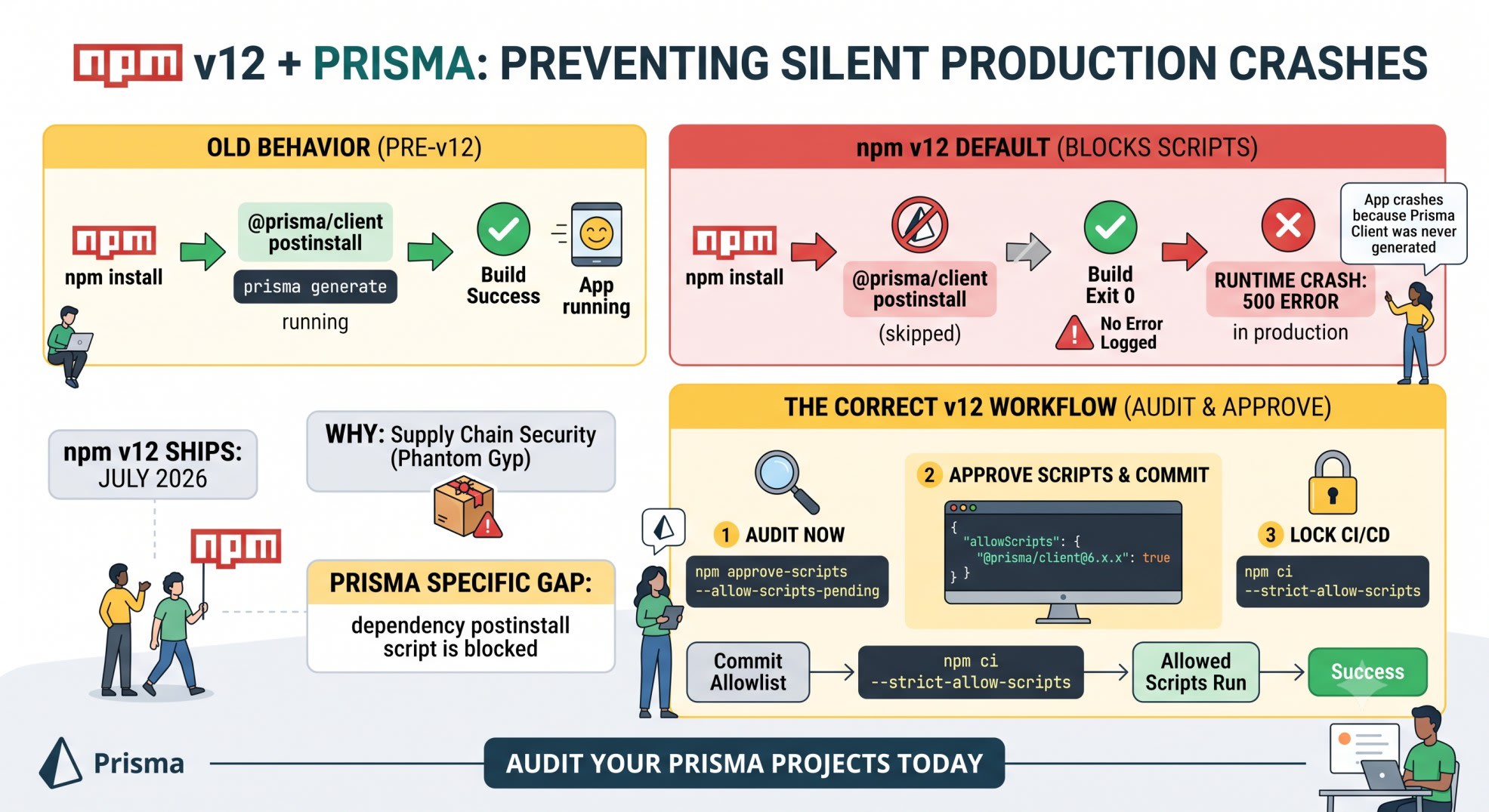
npm v12 ships in July 2026 and blocks install scripts from every dependency by default - including the postinstall script inside @prisma/client that runs prisma generate. Your build will not error. It will exit 0, then crash later when your code tries to import a client that was never generated. Run npm approve-scripts --allow-scripts-pending today on npm 11.16.0+ to see what breaks, commit the allowlist, and add --strict-allow-scripts to CI so the failure shows up in your pipeline instead of production.
You write the migration in your Slack channel: "upgraded npm, build passed, deploy looks green."
Then the app 500s on the first request that touches the database.
No error in the build log. No red X in the pipeline. Just a PrismaClientInitializationError in production, twenty minutes after you told everyone it shipped clean.
You check the Vercel logs. You check the schema. You check the connection string. Everything looks right - because the problem isn't your code. It's that npm quietly skipped a script it used to run automatically.
Here's exactly what changed, why Prisma is the one that bites first, and the commands that fix it before it reaches your build.
What Changes in npm v12
GitHub published the breaking-change notice for npm v12 on June 9, 2026. The release is estimated for July 2026, and it flips three install-time behaviors from automatic to opt-in.
The Three Defaults That Flip
allowScripts defaults to off. npm install will no longer run preinstall, install, or postinstall scripts from your dependencies unless you explicitly allow them. This includes the implicit node-gyp rebuild that npm fires for any package shipping a binding.gyp file, even one with no declared script at all.
--allow-git defaults to none. Git-based dependencies stop resolving unless you say so. This has been live since npm 11.10.0.
--allow-remote defaults to none. Dependencies pulled from raw HTTPS tarball URLs stop resolving too. Live since npm 11.15.0.
The scripts change is the one that hits full-stack projects hardest, because it is not limited to obscure native packages. It hits Prisma.
Why This Is Happening Now
The timing is not arbitrary. In June 2026, a supply chain campaign tracked as Miasma compromised 32 packages under a major cloud provider's official npm namespace, then returned two days later using a technique called Phantom Gyp to compromise 57 more packages in under two hours. The trick: a 157-byte binding.gyp file with no install script at all. npm still ran node-gyp rebuild automatically, and that rebuild step executed the attacker's payload.
npm v12 closes exactly that gap. Install-time script execution becomes something you approve, not something that happens by default.
Why Prisma Breaks Silently
This is the part most npm v12 explainers skip, because they are written for a general audience, not for a Prisma stack.
The postinstall Script Inside @prisma/client
When you run npm install @prisma/client, the package itself ships a postinstall script. That script does two things: it runs prisma generate, and on first install it can also pull the platform-specific query engine binary your client needs at runtime.
That script belongs to the @prisma/client package - a dependency, not your own project. Under npm v12, dependency scripts are exactly what gets blocked by default.
I checked this against Paisa's Vercel preview build this week, running plain npm install with 11.16.0 already active. The warning showed up immediately: a pending script for @prisma/client, skipped, no error.
The Silent Failure Mode
Here is the trap. npm ci in your Vercel build step exits 0. The build looks successful. Nothing in the log says "Prisma client was not generated."
Then your first API route imports PrismaClient, and you get a runtime error because the generated client code was never written to node_modules/.prisma/client. If you have your own explicit "postinstall": "prisma generate" line already committed in your root package.json, you're partially protected - that script belongs to your project, not a dependency, so v12 does not touch it directly. But if you're relying on Prisma's bundled script running automatically, as most quick-start setups do, you will not find out until something tries to query the database.
How to Check If Your Project Is Affected
You do not need to wait for July. npm 11.16.0 already shows you what v12 will block.
Running the Dry-Run Audit
bash
# Upgrade first
npm install -g npm@11.16.0

# Dry-run: lists what would be blocked, changes nothing
npm approve-scripts --allow-scripts-pending
Run this inside any of your Prisma projects - Munshi, Paisa, or SkillDham itself. If @prisma/client shows up in the output, its postinstall script is currently pending approval.
Reading the Output
The command lists every dependency with a pending script or an implicit native build, pinned to the exact installed version. An empty list means you are safe today. A non-empty list means you have work to do before the upgrade lands.
Do this audit per project, not once for your whole machine. Munshi, Paisa, and SkillDham each have their own package.json and their own pending-script list.
The Fix: Approving Scripts and Committing the Allowlist
Once you know what's pending, the fix is two commands and one commit.
Approving Everything, Then Reviewing
bash
# Approve every currently pending script - a reasonable starting point
npm approve-scripts --all

# Or approve just Prisma
npm approve-scripts @prisma/client prisma
Review the list before you approve everything blindly. For a Prisma + NeonDB + Next.js stack, you are typically approving @prisma/client, prisma, and any native driver adapter package you use.
The package.json Block You Commit
npm approve-scripts writes the allowlist straight into package.json. Commit it.
json
{
  "name": "paisa",
  "allowScripts": {
    "@prisma/client@6.x.x": true,
    "prisma@6.x.x": true
  }
}
Approvals are pinned to the exact version you approved. Bump Prisma later, and you re-approve the new version - npm approve-scripts prisma again after the upgrade. That is intentional. A compromised new version of a package you already trust does not inherit your old approval automatically.
The Monorepo and Workspace Trap
If any of your projects use npm workspaces, this is the part that will bite you even after you think you have fixed it.
Why the Allowlist Doesn't Propagate
The allowScripts block you commit at the root does not automatically cover a package's own workspace. A Prisma dependency declared inside a nested workspace package needs its own approval - the root allowlist does not walk down the tree. This exact gap showed up as a live pain point in the GitHub discussion thread tracking npm v12 migration questions, two days after the changelog post went out.
Fixing It Per-Workspace
bash
# Run the audit inside each workspace, not just the root
npm approve-scripts --allow-scripts-pending --workspace=apps/api
npm approve-scripts --allow-scripts-pending --workspace=packages/db
Walk every workspace folder individually. A clean root package.json can still hide a blocked Prisma postinstall three folders down.
Locking This Down in CI Before Vercel Builds Break
The permissive default matters on your laptop. It does not belong in your build pipeline.
Adding --strict-allow-scripts
bash
# In CI, once your allowScripts block is committed:
npm ci --strict-allow-scripts
With this flag, any script that is not already in your committed allowlist fails the build immediately and loudly - instead of silently skipping and letting the failure surface later as a runtime crash in production.
What Happens If You Skip This
Without --strict-allow-scripts, a new transitive dependency that suddenly grows an install script - whether from a legitimate upgrade or a compromised package - gets silently skipped in CI too. You lose the one place where you would actually notice a new script showing up: the build log. Add the flag once your allowlist is committed, and every new pending script becomes a loud CI failure you can review, not a quiet skip you find out about later.
Key Takeaways
npm v12 is estimated for July 2026 and blocks install scripts, Git dependencies, and remote tarball URLs by default
The npm v12 install scripts blocked change hits Prisma directly, because @prisma/client's own postinstall script is a dependency script, not your project's script
The failure is silent: npm ci exits 0, then your app crashes at runtime with a missing Prisma client
Run npm approve-scripts --allow-scripts-pending today on npm 11.16.0+ to audit any project before the upgrade lands
Commit the allowScripts block in package.json so your team and CI share the same approved list
Approvals are pinned to exact versions - re-approve after every Prisma upgrade
Workspaces need their own audit - the root allowlist does not propagate down automatically
Add --strict-allow-scripts in CI once your allowlist is committed, so a new pending script fails loudly instead of skipping quietly
FAQ
Does npm v12 block my own postinstall script, like "postinstall": "prisma generate" in my root package.json?
No. The block applies to scripts declared inside your dependencies' package.json files, not scripts you write yourself in your project's root package.json. If you already added an explicit postinstall line running prisma generate, that keeps running.
What if I don't have my own postinstall script for Prisma?
Then you are relying on the script bundled inside @prisma/client, and that is exactly what npm v12 blocks by default. Run the audit now to confirm.
Will npm v12 actually error out my build, or just skip the script?
In npm v12 itself, a missing approval is skipped with a warning, not an error - unless you add --strict-allow-scripts. Without that flag, the build looks successful and the failure only appears later at runtime.
Does this affect Next.js image handling through sharp?
Native modules that run an install-time build script or ship a binding.gyp file are affected in general. Some packages, including recent versions of sharp, ship prebuilt binaries as regular optional dependencies instead of running a build script, which sidesteps the issue. Check your specific version with the audit command rather than assuming either way.
Can I just disable this in npm config and go back to the old behavior?
You can pass flags like --allow-scripts per install, but that reintroduces the exact code-execution surface npm v12 is designed to close. The recommended path is approving the specific packages you trust, not disabling the check globally.
Do I need to do this on every project, or just production ones?
Every project that runs npm install in CI or on a teammate's machine. A side project you only run locally is lower risk, but any project deploying through a pipeline needs the audit before npm v12 lands.
Does this apply if I use pnpm or Yarn instead of npm?
pnpm shipped the equivalent change - blocking lifecycle scripts by default with an explicit allowlist - in pnpm v10, about 18 months before npm. Yarn 4.14 ships the same behavior. If you already migrated for this reason, you have likely already done this audit.
What's the single command I should run right now?
npm approve-scripts --allow-scripts-pending on npm 11.16.0 or later. It changes nothing - it only shows you what npm v12 will block in your specific project.
Conclusion
npm v12 install scripts blocked by default is the right security move, but it turns a script that has quietly run for years into one your build now has to ask permission for - and Prisma's own postinstall is one of the first things that trips over that change. The fix is small: audit today with npm approve-scripts --allow-scripts-pending, commit the allowlist, and add --strict-allow-scripts to CI so any future gap fails loudly instead of showing up as a production crash. Run the audit on Munshi, Paisa, or whatever Prisma project you have open right now - it takes two minutes and tells you exactly where you stand before July.
For builds failing on Vercel for unrelated reasons, the Next.js Build Fails on Vercel post covers the other common causes worth ruling out first. If you're setting up Prisma with NeonDB from scratch, the Prisma 7 NeonDB Next.js driver adapter setup post walks through the full config. And if native modules are breaking inside a Docker build specifically, the Node 24 native module Docker build fails post covers that adjacent failure mode.
For the official list of every npm v12 change, see GitHub's changelog post.