
Vercel AI SDK v5 useChat Not Streaming? 5 Exact Fixes
Skilldham
Engineering deep-dives for developers who want real understanding.
You migrate from Vercel AI SDK v4 to v5.
The server logs show stream chunks. The network tab shows data flowing. But the UI dumps the full response all at once.
No streaming. No token-by-token output.
You revert. Streaming works. You migrate again. Broken again.
You search "vercel ai sdk v5 usechat not streaming." You find a GitHub issue with 40 replies and no fix.
Here is what is happening - five causes, five fixes.
Quick Answer
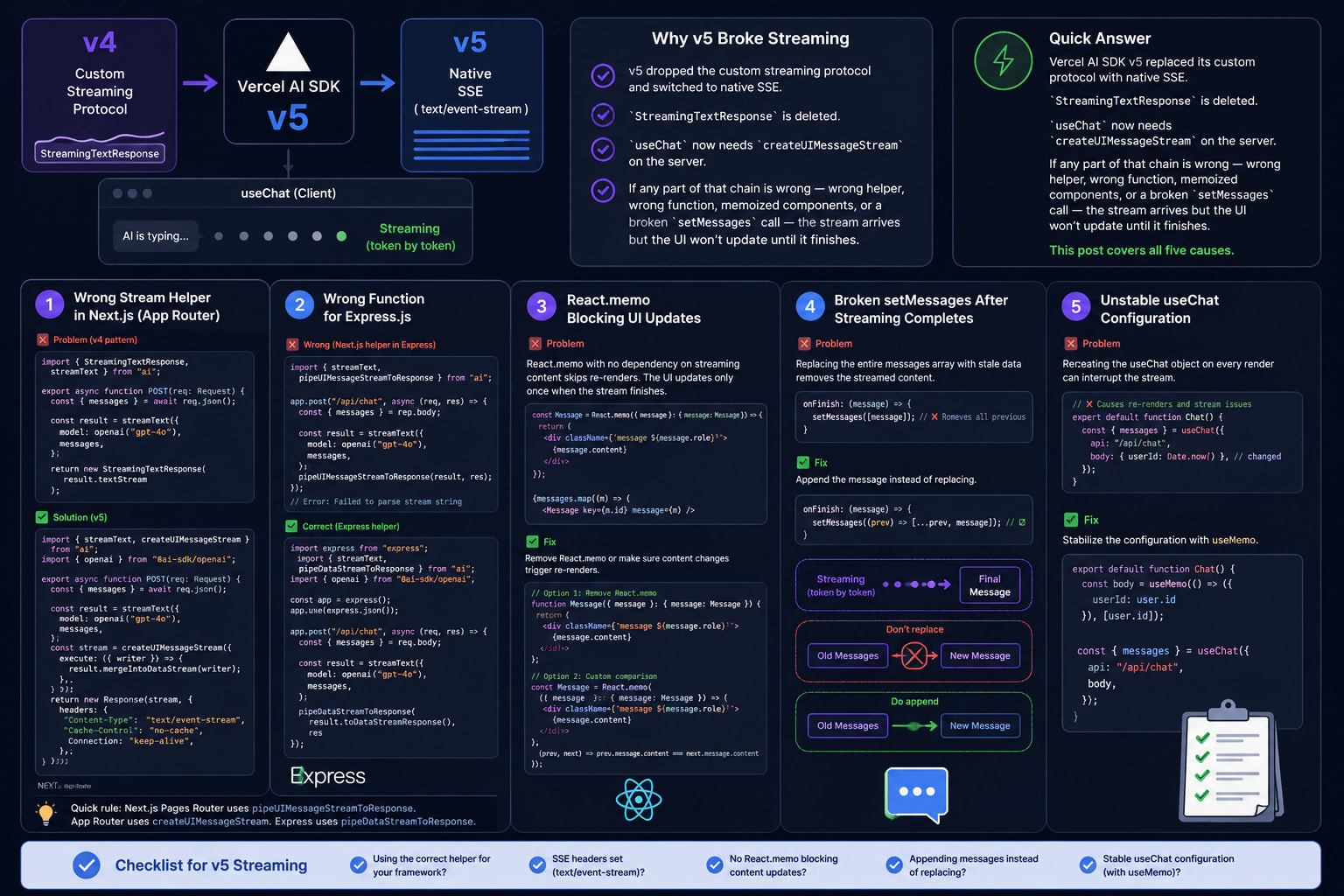
Vercel AI SDK v5 replaced its custom protocol with native SSE. StreamingTextResponse is deleted. useChat now needs createUIMessageStream on the server. If any part of that chain is wrong - wrong helper, wrong function, memoized components, or a broken setMessages call - the stream arrives but the UI won't update until it finishes. This post covers all five causes.
Why Vercel AI SDK v5 Broke Streaming
v5 shipped in late July 2025 with one big change. It dropped the custom streaming protocol and switched to native SSE.
In v4, StreamingTextResponse wrapped a ReadableStream in a custom format. useChat had a parser for it. That parser is gone in v5.
v5 also splits messages into two types. UIMessage is what useChat holds in client state. ModelMessage is what the AI model sees. The server must convert between them using createUIMessageStream.
If you migrated by renaming imports only, your server still sends v4-format data. The v5 useChat client cannot read it. It buffers the whole response, then shows it at once.
That is the root cause. Now the five ways it breaks.
Fix 1: Wrong Stream Helper in Next.js
This is what most migrating developers hit first.
What the v4 code looked like
typescript
// Wrong: v4 pattern - StreamingTextResponse is deleted in v5
import { StreamingTextResponse, streamText } from "ai";

export async function POST(req: Request) {
  const { messages } = await req.json();

  const result = streamText({
    model: openai("gpt-4o"),
    messages,
  });

  return new StreamingTextResponse(result.textStream);
}
The UI shows the full response after a delay. No streaming.
The v5 fix for Next.js App Router
typescript
// Correct: v5 Next.js App Router pattern
import { streamText, createUIMessageStream } from "ai";
import { openai } from "@ai-sdk/openai";

export async function POST(req: Request) {
  const { messages } = await req.json();

  const result = streamText({
    model: openai("gpt-4o"),
    messages,
  });

  const stream = createUIMessageStream({
    execute: ({ writer }) => {
      result.mergeIntoDataStream(writer);
    },
  });

  return new Response(stream, {
    headers: {
      "Content-Type": "text/event-stream",
      "Cache-Control": "no-cache",
      Connection: "keep-alive",
    },
  });
}
Your client code stays the same. useChat reads the SSE stream natively:
typescript
// Client - useChat in v5 (no changes needed here)
"use client";
import { useChat } from "@ai-sdk/react";

export default function Chat() {
  const { messages, input, handleInputChange, handleSubmit } = useChat({
    api: "/api/chat",
  });

  return (
    <div>
      {messages.map((m) => (
        <div key={m.id}>
          <strong>{m.role}:</strong> {m.content}
        </div>
      ))}
      <form onSubmit={handleSubmit}>
        <input value={input} onChange={handleInputChange} />
        <button type="submit">Send</button>
      </form>
    </div>
  );
}
The one change: StreamingTextResponse is out. createUIMessageStream plus a plain Response with SSE headers is in.
Fix 2: Wrong Function for Express.js
The Express fix looks different from the Next.js fix. Using the Next.js helper in Express throws this error:
Error: Failed to parse stream stringHere is why. pipeUIMessageStreamToResponse works with Next.js Response objects. pipeDataStreamToResponse works with Express res objects. They are not the same thing.
Wrong Express pattern
typescript
// Wrong: pipeUIMessageStreamToResponse is for Next.js, not Express
import { streamText, pipeUIMessageStreamToResponse } from "ai";

app.post("/api/chat", async (req, res) => {
  const { messages } = req.body;

  const result = streamText({
    model: openai("gpt-4o"),
    messages,
  });

  pipeUIMessageStreamToResponse(result, res);
});
Correct Express pattern
typescript
// Correct: Express uses pipeDataStreamToResponse
import express from "express";
import { streamText, pipeDataStreamToResponse } from "ai";
import { openai } from "@ai-sdk/openai";

const app = express();
app.use(express.json());

app.post("/api/chat", async (req, res) => {
  const { messages } = req.body;

  const result = streamText({
    model: openai("gpt-4o"),
    messages,
  });

  pipeDataStreamToResponse(result.toDataStreamResponse(), res);
});
One function for Express. A different one for Next.js. Using either in the wrong place breaks streaming or throws the parse error.
Quick rule: Next.js Pages Router uses pipeUIMessageStreamToResponse. App Router uses createUIMessageStream. Express uses pipeDataStreamToResponse.
Fix 3: React.memo Blocking UI Updates
This one is invisible at the network level.
Your server streams fine. Your client gets the data. But the UI still renders the full response at once.
The cause is a memoized message component that skips re-renders during the stream.
What this looks like
typescript
// Wrong: React.memo with no dependency on streaming content
const Message = React.memo(({ message }: { message: Message }) => {
  return (
    <div className={`message ${message.role}`}>
      {message.content}
    </div>
  );
});

{messages.map((m) => (
  <Message key={m.id} message={m} />
))}
React.memo does a shallow comparison. During streaming, message.id and message.role stay the same. Only message.content grows. If memo does not catch that change, the component skips every re-render. The stream finishes, message.content gets its final value, and then memo re-renders once.
The fix
Option 1 - remove React.memo from the message component. Most chat UIs are not large enough to need it.
typescript
// Correct: no memo on the message component
const Message = ({ message }: { message: Message }) => {
  return (
    <div className={`message ${message.role}`}>
      {message.content}
    </div>
  );
};
Option 2 - if you need memo, pass content as a separate prop:
typescript
// Correct: memo with explicit content dependency
const Message = React.memo(
  ({ id, role, content }: { id: string; role: string; content: string }) => {
    return (
      <div className={`message ${role}`}>
        {content}
      </div>
    );
  },
  (prev, next) => prev.content === next.content && prev.id === next.id
);

{messages.map((m) => (
  <Message key={m.id} id={m.id} role={m.role} content={m.content} />
))}
I hit this building the Paisa AI chat. The server was streaming fine. Chrome DevTools showed chunks arriving every 100ms. But the chat bubble only appeared after the stream finished. The memo comparison was the problem.
Fix 4: The setMessages Regression
Does your chat have a "New Chat" button? If yes, you may have hit this one.
After calling setMessages([]), streaming breaks for the next message. GitHub issue #10926 confirmed this as a v5 regression. It corrupts the internal stream cursor that useChat uses to track position.
The broken pattern
typescript
// Wrong: setMessages([]) corrupts streaming state in v5
const { messages, setMessages } = useChat({ api: "/api/chat" });

const handleNewChat = () => {
  setMessages([]);
};
The workaround
Change the id prop on useChat instead of clearing messages. A new id makes React remount the hook with clean state.
typescript
// Correct: change the chat ID to reset cleanly
"use client";
import { useChat } from "@ai-sdk/react";
import { useState } from "react";

export default function Chat() {
  const [chatId, setChatId] = useState("chat-1");

  const { messages, input, handleInputChange, handleSubmit } = useChat({
    api: "/api/chat",
    id: chatId,
  });

  const handleNewChat = () => {
    setChatId(`chat-${Date.now()}`);
  };

  return (
    <div>
      <button onClick={handleNewChat}>New Chat</button>
      {messages.map((m) => (
        <div key={m.id}>
          <strong>{m.role}:</strong> {m.content}
        </div>
      ))}
      <form onSubmit={handleSubmit}>
        <input value={input} onChange={handleInputChange} />
        <button type="submit">Send</button>
      </form>
    </div>
  );
}
A new chatId remounts useChat with clean internal state. Streaming works on the next message.
Fix 5: experimental_throttle for Tool-Heavy Responses
Does streaming work fine for plain text but break when your prompt triggers tool calls?
This is the fix.
When a model fires many tool calls fast, v5's state update batching falls behind. The UI freezes mid-stream and jumps to the completed output at the end.
What this looks like
Plain text streams fine. Three or more tool calls in one response - the UI freezes, then jumps.
The fix
typescript
// Correct: throttle state updates for tool-heavy responses
"use client";
import { useChat } from "@ai-sdk/react";

export default function Chat() {
  const { messages, input, handleInputChange, handleSubmit } = useChat({
    api: "/api/chat",
    experimental_throttle: 50,
  });

  return (
    <div>
      {messages.map((m) => (
        <div key={m.id}>
          <strong>{m.role}:</strong>
          {m.parts?.map((part, i) => {
            if (part.type === "text") return <span key={i}>{part.text}</span>;
            if (part.type === "tool-invocation")
              return <span key={i}>[Tool: {part.toolName}]</span>;
            return null;
          })}
        </div>
      ))}
      <form onSubmit={handleSubmit}>
        <input value={input} onChange={handleInputChange} />
        <button type="submit">Send</button>
      </form>
    </div>
  );
}
experimental_throttle: 50 tells useChat to batch state updates. It fires at most once every 50ms. The React reconciler stays ahead of the stream. The animation stays smooth.
Start at 50ms. Choppy animation - lower to 25ms. Still freezing with dense tool calls - raise to 100ms.
Which Fix Do You Need?
Check the network tab first.
Multiple text/event-stream chunks arriving - streaming works server-side. The problem is client-side. Go to Fix 3, 4, or 5.
Response arrives as one payload - the problem is server-side. Go to Fix 1 or 2.
SymptomFixImport error on StreamingTextResponseFix 1"Failed to parse stream string" in consoleFix 2Server streams, UI renders all at onceFix 3Streaming breaks after "New Chat"Fix 4Breaks only on tool-call responsesFix 5
Key Takeaways
StreamingTextResponse is deleted in v5 - renaming imports is not enough
Next.js App Router needs createUIMessageStream; Express needs pipeDataStreamToResponse - they are not the same
If the network tab shows chunks but the UI renders all at once, check for React.memo blocking re-renders
setMessages([]) breaks the stream cursor in v5 - change the id prop instead
experimental_throttle: 50 fixes streaming freezes when tool calls are rapid
Network tab first - it tells you whether the fix is server-side or client-side
FAQs
Why does Vercel AI SDK v5 useChat not stream even though the server shows chunks?
The most common cause is React.memo on your message component. During streaming, only message.content changes. If memo does not watch that, the component skips re-renders until the stream ends. Remove React.memo or pass content as a separate prop with a custom comparator.
What replaced StreamingTextResponse in Vercel AI SDK v5?
StreamingTextResponse is gone. The v5 replacement is createUIMessageStream with a plain Response and SSE headers for Next.js App Router. For Express, use pipeDataStreamToResponse. The v4 custom parser no longer exists.
What is the difference between pipeUIMessageStreamToResponse and pipeDataStreamToResponse?
pipeUIMessageStreamToResponse is for Next.js Pages Router. pipeDataStreamToResponse is for Express. Using either in the wrong framework causes "Failed to parse stream string." Next.js App Router uses neither - it uses createUIMessageStream with a plain Response.
Why does streaming break after clicking "New Chat" in Vercel AI SDK v5?
setMessages([]) corrupts useChat's internal stream cursor. This is a known v5 regression (GitHub issue #10926). Change the id prop instead. A new ID remounts the hook with clean state.
What is experimental_throttle in useChat and when should I use it?
It controls how often useChat fires React state updates during streaming. Rapid tool calls can overwhelm the reconciler and freeze the UI mid-stream. Set experimental_throttle: 50 to batch updates to once every 50ms. This keeps the animation smooth.
Does Vercel AI SDK v5 streaming work differently in development vs production?
The behavior is the same in both. But React Strict Mode in development mounts components twice. This can trigger two competing requests. If streaming breaks only in dev, check whether the first request gets canceled before the second fires.
Can I still use Vercel AI SDK v4 after v5 is released?
Yes. Install it with npm install ai@4. But v5 and v6 are the maintained versions. Provider packages for Anthropic and OpenAI track the latest SDK. Staying on v4 means falling behind on model support.
Why does Vercel AI SDK v5 use SSE instead of the custom protocol?
The v4 custom protocol needed a client-side parser. That parser broke every time the wire format changed. Native SSE is a browser standard. useChat can use the fetch streaming API without a custom parser. It also makes Express and FastAPI integration easier - both have SSE support built in.
Conclusion
Vercel AI SDK v5 did not break streaming. It replaced the transport layer.
Once you know the SSE switch and the createUIMessageStream pattern, the migration is quick. The five causes here cover every failure mode reported on GitHub and the Vercel forum.
Start with the network tab. That one check tells you whether to look at the server or the client. Then match your symptom to the fix above.
If you are building a Next.js AI chat from scratch, read How to Add AI Chat to a React Native App for the full setup. And if you hit caching problems after fixing streaming, Next.js use cache not working fix covers the next problem you will likely hit.