

Prisma Generate Not Working? npm Now Installs Prisma 8
Skilldham
Engineering deep-dives for developers who want real understanding.
Last updated: October 2026
TL;DR
Your prisma generate not working error is a version problem, not a schema problem. Since early October 2026, npm’s latest tag for prisma points to the Prisma 8 release candidate.
That CLI has no generate, migrate dev, db push, or studio. Your @prisma/client is still on 7.10.0.
The fix:
Pin the CLI: npm i -D prisma@7
In CI and Docker, call npx -y prisma@7
Block 8.x in Dependabot or Renovate
You clone a project and run npm install. Then you run npx prisma generate, like always.
It fails.
Nothing in schema.prisma changed. The same command worked last week. Your teammate’s laptop still runs it fine.
You search “prisma generate not working” and find answers from 2023. Delete node_modules. Reinstall.
Restart the TypeScript server. None of it helps.
So you ask an AI assistant. It tells you to run npx prisma generate. That is the exact command that just failed.
Here is the truth. You did not break anything.
npm quietly handed you a new major version of Prisma. Once you see it, the fix takes one line.
What Changed: npm Now Installs Prisma 8
If prisma generate not working started for you in October 2026, start here. The prisma package on npm changed what a plain install gives you. The client package did not.
The latest tag moved to a release candidate
Every npm package has tags. latest is the one you get when you skip the version. Check both Prisma packages yourself:
bash
# Check what a plain install of each package resolves to
npm view prisma dist-tags.latest
npm view @prisma/client dist-tags.latest
text
# Output in October 2026
8.0.0-rc.22
7.10.0
So npm install prisma now gives you 8.0.0-rc.22. The client still resolves to 7.10.0. Prisma 7 now lives under the prev tag.
This is on purpose, not a bad publish
Most developers assume Prisma made a mistake. A GitHub issue, prisma/orm#30322, asks them to point latest back at 7.10.0. But Prisma’s release tooling publishes RC builds to latest by design.
Their October 2 changelog says it plainly. latest is Prisma 8, and prev is Prisma 7. The stable Prisma 8 release is expected in October 2026.
So do not wait for a revert. Fix your project instead.
Why the CLI and the client split apart
Prisma 8 is not a normal upgrade. It ships a new runtime package called @prisma/orm-postgres. The old @prisma/client belongs to Prisma 7, so it stays on 7.10.0.
A fresh install now gives you a Prisma 8 CLI. It sits next to a Prisma 7 client. They do not work together.
Who gets hit by this
You are exposed if any of these touch your project:
Running npm install prisma with no version
Running npx prisma init or npx prisma generate with no local install
CI jobs that install without a lockfile
Dependabot or Renovate PRs that bump prisma
Scripts that call prisma@latest
Tutorials and AI-written setup steps from before October
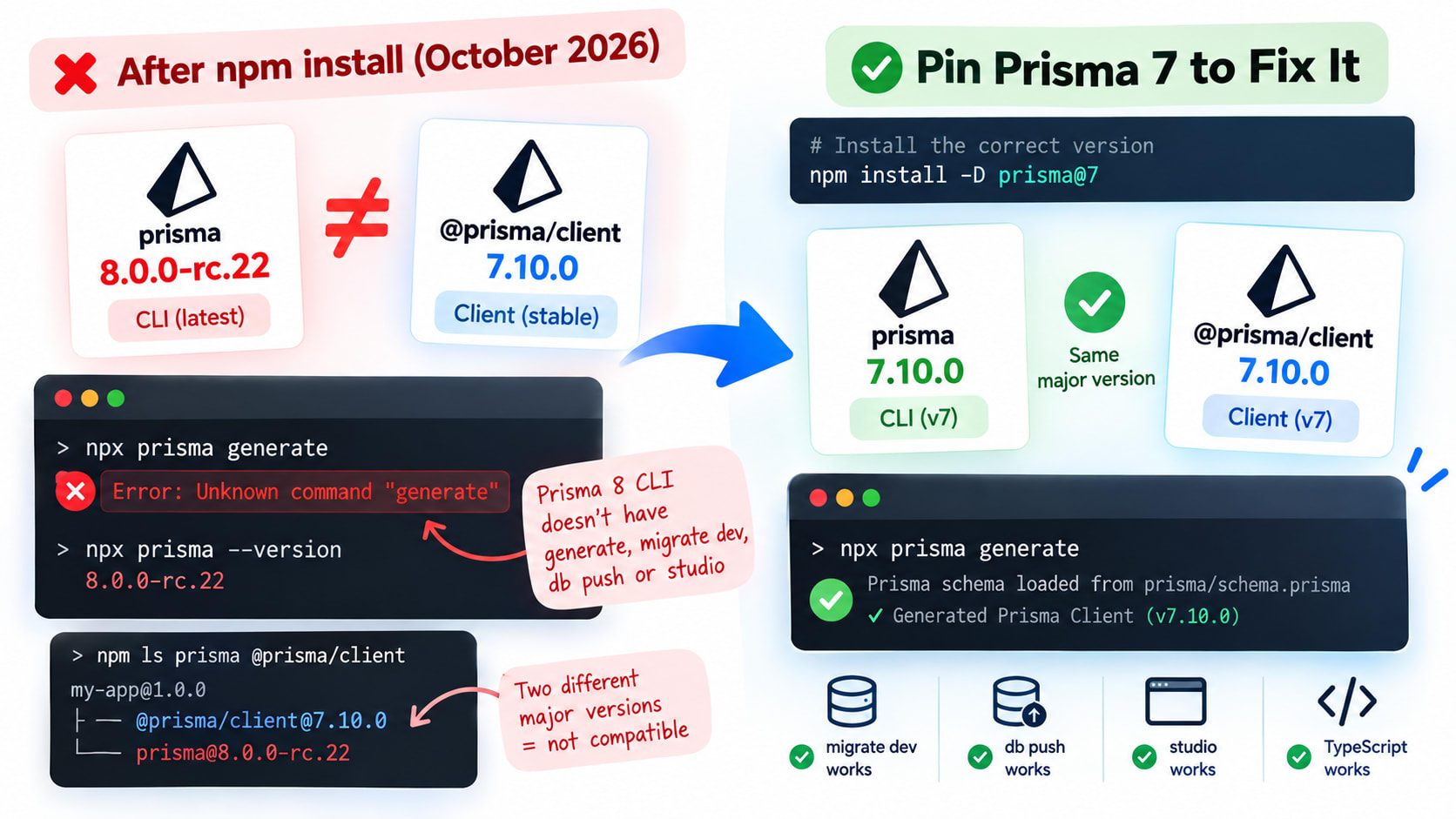
Confirm the Version Mismatch in 30 Seconds
Do not guess. Two commands tell you if this is your bug. I reproduced it in an empty folder with no lockfile.
Check what npm actually installed
npm ls prints the installed version of each package. Run it from your project root:
bash
# Show the CLI and the client side by side
npm ls prisma @prisma/client
text
# Wrong: the CLI and the client are on different major versions
my-app@1.0.0 /home/dev/my-app
├── @prisma/client@7.10.0
└── prisma@8.0.0-rc.22
Two major versions in one tree. That is the whole bug.
You can also ask the CLI directly. Run npx prisma --version. If it starts with 8, you have the new CLI.
The errors you will see
The Prisma 8 CLI does not read schema.prisma. It also dropped every Prisma 7 command name. Each of these fails on 8.0.0-rc.22:
bash
# Wrong: Prisma 7 commands sent to the Prisma 8 CLI
npx prisma generate
npx prisma migrate dev
npx prisma db push
npx prisma studio
text
# Output on prisma@8.0.0-rc.22
$ npx prisma generate
[PASTE EXACT OUTPUT FROM TERMINAL SESSION]

$ npx prisma migrate dev
[PASTE EXACT OUTPUT FROM TERMINAL SESSION]

$ npx prisma db push
[PASTE EXACT OUTPUT FROM TERMINAL SESSION]

$ npx prisma studio
[PASTE EXACT OUTPUT FROM TERMINAL SESSION]
The new CLI uses structured error codes. An unknown command reports CLI.UNKNOWN_COMMAND.
Why the error is so misleading
The error never says “wrong version.” It only says the command does not exist. So you blame your setup, your path, or your cache. The real cause is one line in package.json.
Fix Prisma Generate Locally: Pin Prisma 7
The local fix is small. You put the CLI back on the same major version as the client.
The install that caused it
This is the command most tutorials tell you to run:
bash
# Wrong: no version, so npm uses the latest tag (Prisma 8 RC)
npm install -D prisma
It writes "prisma": "^8.0.0-rc.22" into package.json. The caret lets newer 8.x builds in too. Then your lockfile saves the mismatch for everyone.
The one-line fix
Name the major version when you install:
bash
# Correct: pin the CLI back to the Prisma 7 line
npm install -D prisma@7

# Also works today: the tag Prisma set aside for Prisma 7
npm install -D prisma@prev
prisma@7 resolves to the newest 7.x release. Today that is 7.10.0. prisma@prev points to the same version right now.
Prefer @7. A tag can move again. A major version range cannot.
Now check that it worked:
bash
# Correct: confirm both packages match, then generate
npm ls prisma @prisma/client
npx prisma generate
text
# Output after the fix
my-app@1.0.0 /home/dev/my-app
├── @prisma/client@7.10.0
└── prisma@7.10.0
Same major version on both lines. generate runs again.
Pin both packages to exact versions
A caret range is what let this happen. Remove it for Prisma. Your package.json should look like this:
json
{
  "dependencies": {
    "@prisma/client": "7.10.0"
  },
  "devDependencies": {
    "prisma": "7.10.0"
  }
}
Exact versions cannot drift. The CLI and the client must move together, by hand.
Is that safe long term? Yes. Prisma 7 gets bug and security fixes for 18 months after Prisma 8 goes stable.
What to check after pinning
Munshi, my production finance app, runs on the Prisma 7 line with Neon. That is exactly the setup a stray Prisma 8 install breaks. The full setup is in the Prisma 7 NeonDB Next.js driver adapter guide.
Pinning gets generate running again. But you may now hit normal Prisma 7 errors you skipped before. For adapter, P1012, and SSL errors, see the Prisma 7 migration errors fix.
Fix CI and Docker Builds
CI is where this bug hides longest. Your laptop has a lockfile and a warm cache. A fresh runner has neither.
npx with no local install grabs latest
Many pipelines call npx before anything is installed:
bash
# Wrong: with no local prisma, npx downloads the latest tag
npx prisma generate
On a fresh runner or a slim Docker stage, there may be no local prisma. npx then fetches latest. That is now Prisma 8.
bash
# Correct: name the major version so npx cannot drift
npx -y prisma@7 generate
-y skips the install prompt, so CI does not hang. @7 locks the major version.
Install from the lockfile, every time
npm install can resolve fresh versions. npm ci installs exactly what the lockfile says. It also fails if package.json and the lockfile disagree.
That failure is good. It catches drift before it reaches production.
yaml
# Correct: GitHub Actions job that keeps Prisma on 7
name: build
on: [push]

jobs:
  build:
    runs-on: ubuntu-latest
    steps:
      - uses: actions/checkout@v4
      - uses: actions/setup-node@v4
        with:
          node-version: 22
          cache: npm
      - run: npm ci
      - run: npx prisma generate
      - run: npm run build
Here npx prisma finds the local 7.10.0 binary. So no version suffix is needed.
A Dockerfile that cannot pull Prisma 8
Copy the lockfile before you install. Prisma 7 also needs its config file and schema folder:
dockerfile
# Correct: install from the lockfile, then generate with the local CLI
FROM node:22-alpine AS build
WORKDIR /app

COPY package.json package-lock.json ./
COPY prisma.config.ts ./
COPY prisma ./prisma
RUN npm ci
RUN npx prisma generate

COPY . .
RUN npm run build
Find every prisma@latest in your repo
Prisma’s own changelog warns about this. Any script that installs prisma@latest now gets version 8. Find them all:
bash
# Find scripts and configs that will now pull Prisma 8
grep -rn "prisma@latest" --include="*.json" --include="*.yml" --include="*.yaml" --include="Dockerfile" .
Change each match to prisma@7.
Fix Vercel Builds That Suddenly Fail
Vercel did not change. Your install did.
Why a Vercel build breaks
Vercel installs from your lockfile when one exists. So an untouched repo usually keeps building.
It breaks when a bot PR lands Prisma 8 in the lockfile. It also breaks when a build script calls npx with a floating version.
Use the local binary in scripts
This is a common pattern that now breaks:
json
{
  "scripts": {
    "build": "npx prisma@latest generate && next build"
  }
}
Replace it with the local binary. A bare prisma in a script runs whatever is installed:
json
{
  "scripts": {
    "postinstall": "prisma generate",
    "build": "prisma generate && next build"
  },
  "devDependencies": {
    "prisma": "7.10.0"
  }
}
With prisma pinned to 7.10.0, both scripts run the Prisma 7 CLI. Vercel installs devDependencies during the build by default.
What if postinstall never runs at all? That is a different bug.
npm v12 can block install scripts. The npm v12 install scripts fix for Prisma walks through it.
Redeploy without the build cache
After you pin, redeploy once with a clean cache. In the Vercel dashboard, open the failed deployment and click Redeploy. Untick the option to use the existing build cache.
This clears any cached Prisma 8 files from the earlier build.
Stop Dependabot and Renovate From Bringing It Back
You pinned Prisma 7. Next week a bot opens a PR to undo it. Block that now.
Dependabot: ignore major updates only
Some teams ignore every @prisma package. That works, but it has a cost. Ignored packages also stop getting Dependabot security PRs.
Ignore only the major jump instead:
yaml
# Correct: .github/dependabot.yml - block Prisma 8, keep 7.x patches
version: 2
updates:
  - package-ecosystem: "npm"
    directory: "/"
    schedule:
      interval: "weekly"
    groups:
      prisma:
        patterns:
          - "prisma"
          - "@prisma/*"
    ignore:
      - dependency-name: "prisma"
        update-types: ["version-update:semver-major"]
      - dependency-name: "@prisma/*"
        update-types: ["version-update:semver-major"]
The groups block keeps the CLI and the client in one PR. So they never land on different versions.
Renovate: cap the allowed range
Renovate users hit a second problem. The 8.0.0-rc builds report a different repository in their npm metadata. Issue #30322 notes this breaks Renovate’s monorepo grouping for prisma and @prisma/client.
So group them by hand, and cap the range:
json
{
  "packageRules": [
    {
      "matchPackageNames": ["prisma", "@prisma/client"],
      "groupName": "prisma",
      "allowedVersions": "<8.0.0-0"
    }
  ]
}
<8.0.0-0 excludes every 8.x build, including release candidates. Remove the cap when you are ready to migrate.
If You Actually Want Prisma 8
Maybe you want the new version. That is fine. Just know it is a migration, not a version bump.
Every command has a new name
Prisma 8 groups commands by what they touch. contract is your schema file.
db is your database. migration is your migration files.
Prisma 7Prisma 8prisma generateprisma contract emitprisma migrate devprisma db update, or prisma migration plan then prisma db migrateprisma migrate deployprisma db migrateprisma db pushprisma db init on an empty database, then prisma db updateprisma db pullprisma contract inferprisma formatprisma contract formatprisma studioNo command in the Prisma 8 CLI
Try Prisma 8 next to your Prisma 7 app
Prisma 8 can now read a Prisma 7 PostgreSQL schema as it is. One command sets up both versions side by side:
bash
# Correct: set up Prisma 8 beside Prisma 7 (PostgreSQL only)
npx prisma@latest orm init --from-prisma7-schema prisma/schema.prisma
First, it checks that Prisma 8 can read your schema. If that check fails, it stops. If it passes, your Prisma 7 CLI becomes prisma7.
Your Prisma 7 config moves to prisma7.config.ts. A new prisma.config.ts is written for Prisma 8. Your prisma/ folder and your database stay untouched.
The config file changes shape
A Prisma 7 config looks like this. Pointing the Prisma 8 CLI at it fails:
ts
// Wrong: Prisma 7 config read by the Prisma 8 CLI
import { defineConfig, env } from "prisma/config";

export default defineConfig({
  schema: "prisma/schema.prisma",
  migrations: {
    path: "prisma/migrations",
  },
  datasource: {
    url: env("DATABASE_URL"),
  },
});
Recent RCs removed defineConfig from prisma/config. Prisma 8 wraps everything in definePrismaConfig:
ts
// Correct: Prisma 8 config with definePrismaConfig
import "dotenv/config";
import { definePrismaConfig } from "prisma/config";
import { defineConfig as ormConfig } from "@prisma/orm-postgres/config";

export default definePrismaConfig({
  orm: ormConfig({
    contract: "./src/prisma/contract.prisma",
    db: {
      connection: process.env.DATABASE_URL!,
    },
  }),
});
The defineConfig inside @prisma/orm-postgres/config keeps its old name. Only the outer wrapper changed.
Queries change too
There is no generated PrismaClient in Prisma 8. You create a db client in src/prisma/db.ts. Then every query reads differently:
ts
// Prisma 7
const admins = await prisma.user.findMany({ where: { role: "admin" } });

// Prisma 8
const admins = await db.orm.public.User.where({ role: "admin" }).all();
public is the PostgreSQL schema your table lives in. Every query in your app needs this rewrite. Plan it like a real project.
Prisma Studio on a Prisma 8 project
The Prisma 8 CLI has no studio command. Prisma’s docs say to run Studio from the Prisma 7 CLI instead. Run it from a folder outside your project:
bash
# Correct: open Studio with the Prisma 7 CLI from a neutral folder
cd /tmp && npx prisma@7 studio --url "postgresql://user:password@localhost:5432/mydb"
Studio may crash with a pipe error on Prisma 7. If so, see the Prisma Studio pipe error fix for v7.
For the full path, follow the official Prisma 7 to Prisma 8 migration guide. Each phase keeps your app shippable.
Key Takeaways
If prisma generate not working started in October 2026, run npm ls prisma @prisma/client first.
npm’s latest tag for prisma now installs the Prisma 8 RC. @prisma/client stays on 7.10.0.
The Prisma 8 CLI has no generate, migrate dev, db push, or studio.
npm i -D prisma@7 fixes local installs. Pin both packages to exact versions.
In CI and Docker, use npm ci. Call npx -y prisma@7 when nothing is installed yet.
Block only major updates in Dependabot or Renovate. That way 7.x security patches still arrive.
Prisma 8 is a real migration. Start with orm init --from-prisma7-schema when you are ready.
Frequently Asked Questions
Why is prisma generate not working after a fresh npm install?
Since early October 2026, npm’s latest tag for prisma points to the Prisma 8 release candidate. That CLI has no generate command. Run npm install -D prisma@7 to get the Prisma 7 CLI back.
Will Prisma move the latest tag back to Prisma 7?
No. Prisma’s release tooling publishes RC builds to latest by design, as its October 2 changelog confirms. Prisma 8 stable is expected in October 2026, so latest will stay on the 8 line.
Is Prisma 7 still supported?
Yes. Prisma 7 gets bug fixes and security updates for 18 months after Prisma 8 goes stable. Your project stays on 7 as long as package.json asks for 7.
What replaced prisma generate in Prisma 8?
The new command is prisma contract emit. It writes contract.json and contract.d.ts next to your contract file. There is no generated PrismaClient anymore, so you create the client yourself in src/prisma/db.ts.
Should I use prisma@7 or prisma@prev?
Both give you 7.10.0 today. Use prisma@7 in package.json and in scripts. A tag like prev can move later, but a major version range cannot.
Why does npx prisma init set up a different project than my tutorial?
Without a local install, npx downloads the latest tag, which is now Prisma 8. Its setup does not create the layout Prisma 7 tutorials expect. Run npx prisma@7 init to follow a Prisma 7 tutorial.
Does blocking Prisma 8 in Dependabot stop security updates?
Only if you ignore the whole package. Ignore only semver-major updates for prisma and the @prisma packages. Dependabot still opens patch and minor PRs inside the 7.x line.
How do I open Prisma Studio on a Prisma 8 project?
The Prisma 8 CLI has no studio command. Prisma’s docs say to run npx prisma@7 studio from a folder outside your project. Pass your connection string with the --url flag.
Conclusion
Your schema was never the problem. The prisma package moved its latest tag to Prisma 8. And Prisma 8 renamed every command you use.
Pin the CLI to 7, install from your lockfile, and cap the version in your bots. That keeps your builds boring while Prisma 8 finishes its RC cycle. When you do move, treat it as a planned migration with the official guide.
Want more fixes like this, pulled from real production bugs? Subscribe to the SkillDham newsletter. One practical fix in your inbox, no fluff.